In short
OpenAI is rolling out Intelligent UI, a new ChatGPT interface that adds interactive visuals, tools and diagrams alongside GPT-6. The company says the update is meant to make complex topics easier to learn and everyday tasks easier to complete.
- OpenAI is launching Intelligent UI with GPT-6.
- The new interface adds interactive visuals like charts, diagrams and calculators.
- Rollout starts with paid users and expands to free and Go tiers the next day.
- OpenAI says the goal is to improve learning and task completion.
- Users will be able to dial back the amount of visual content.
OpenAI is giving ChatGPT a much more visual interface with the rollout of Intelligent UI, a new feature launching alongside GPT-6 that adds interactive charts, diagrams, buttons, calculators and other on-screen elements to conversations. The update matters because it moves ChatGPT beyond plain text and into a more task-focused assistant that can explain, calculate and help users act on information more directly.
The feature begins rolling out globally on Wednesday for Pro, Plus, Business and Enterprise users, with access for free and lower-cost Go users arriving on Thursday. OpenAI says the aim is to make complex topics easier to understand, while also making the chatbot more useful for everyday planning, learning and decision-making.
In a briefing for journalists, OpenAI showed how the system can generate visuals on the fly, from instructional diagrams to interactive tools. The company is framing the change as part of a broader effort to make ChatGPT less like a static text box and more like a flexible workspace.
What is Intelligent UI?
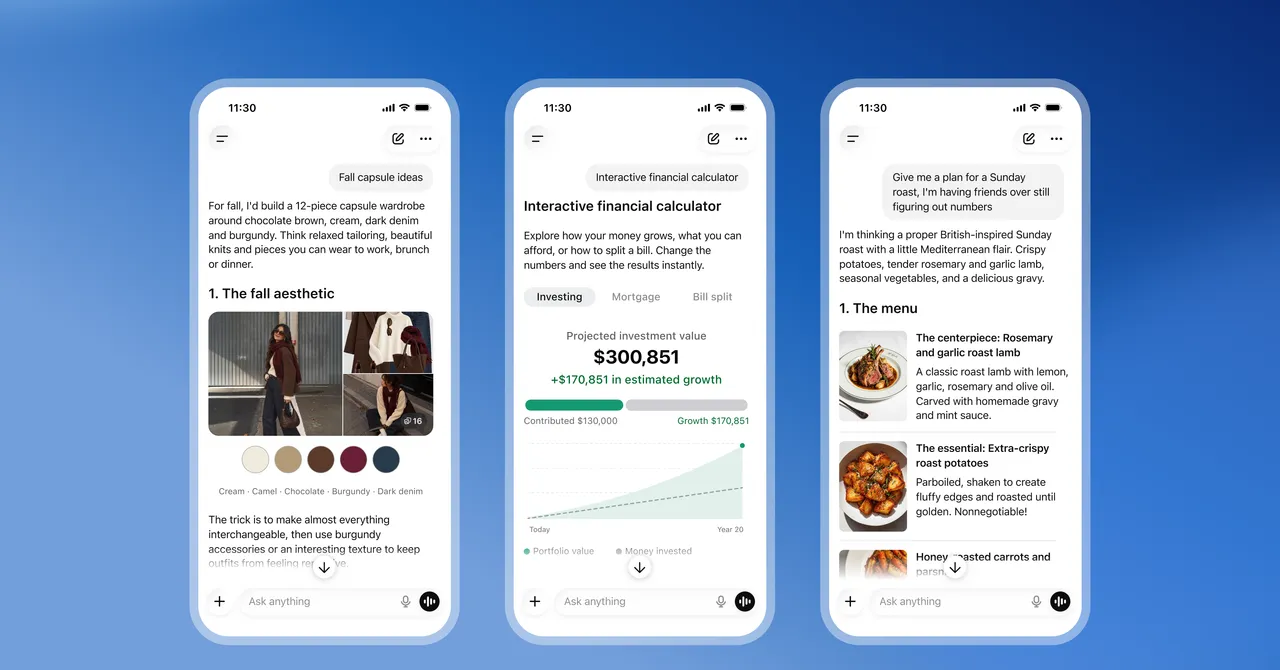
Intelligent UI is OpenAI’s new interface layer for ChatGPT that inserts interactive visuals into responses instead of relying mainly on text. Rather than showing users a simple paragraph explanation or a generic illustration, the assistant can now produce elements such as tappable controls, editable graphs, tailored calculators and other dynamic components.
That is a significant shift for a product that has, until now, been known primarily as a text-first chatbot. OpenAI is essentially turning many prompts into mini-app experiences that are generated in real time based on what the user asks.
How does the new interface work?
How the new interface works is straightforward: GPT-6 can decide when a response would benefit from a richer layout and then assemble the visual elements automatically. In practice, that could mean a recipe presented with interactive steps, a trip plan displayed on a map, or a financial calculation embedded directly in the answer.
Instead of asking users to mentally translate text into a chart or sketch, ChatGPT can now present the information in a form that is meant to be explored, adjusted and used immediately.
OpenAI product manager Aarush Selvan said the company wants ChatGPT to help people “get things done,” adding that for everyday planning, learning and other practical tasks, the most useful replies are often not just paragraphs of text.
Why OpenAI is betting on visuals
OpenAI says the main reason for the update is educational: the company wants to make difficult subjects easier to grasp. That explanation fits with the demonstrations it showed, which focused on concepts that are often hard to visualize, such as aerodynamics, mechanics and multistep planning.
There is also a clear product strategy behind the change. A more visual interface can make ChatGPT feel friendlier, faster and more approachable for people who may not want to read dense text responses. While OpenAI did not explicitly pitch the feature as a growth strategy, the effect could be to broaden the service’s appeal.
For a company competing to make its assistant central to daily work and learning, a richer interface is a natural next step. If text is good for explanation, visuals are often better for comprehension, especially in areas like budgeting, trip planning, science and technical education.
What problems is OpenAI trying to solve?
What OpenAI is trying to solve is the gap between understanding and action. Text can explain a topic, but many users still need a chart to compare options, a calculator to test a budget or a diagram to see how a machine works. Intelligent UI is designed to bridge that gap inside the chat window.
That approach could also reduce friction. Instead of copying numbers into a spreadsheet or searching elsewhere for a visual explainer, users can stay inside ChatGPT and interact with the output immediately.
Examples from OpenAI’s demo
During the demonstration, OpenAI showed several ways the interface could be used in everyday life and learning. One example involved a college student asking how an airplane wing creates lift. ChatGPT responded by generating diagrams that broke down the concept visually rather than relying on a long technical explanation alone.
Other examples included a recipe display, a bicycle mechanics diagram, a hiking map for a multi-day trip and a personal savings calculator. Those use cases suggest OpenAI is targeting both educational and practical scenarios, from school assignments to trip planning and household finance.
| Example use case | Visual element shown | Why it matters |
|---|---|---|
| Airplane lift explanation | Diagrams | Makes an abstract science concept easier to understand |
| Recipe planning | Interactive recipe layout | Helps users follow steps and adjust inputs |
| Bicycle mechanics | Annotated visual diagram | Shows how moving parts connect and function |
| Hiking excursion | Map | Supports route planning across multiple days |
| Savings planning | Calculator | Lets users test financial scenarios instantly |
Who gets access first?
The first wave of access starts with paying customers. Intelligent UI is rolling out Wednesday to ChatGPT Pro, Plus, Business and Enterprise users, then expanding Thursday to the free and lower-cost Go tiers. The staged release suggests OpenAI wants to test the new experience with its most active users before pushing it to a wider audience.
That sequence also reflects a common pattern in AI product launches. Companies often debut major interface changes with premium plans first, where usage tends to be heavier and feedback can arrive faster.
What does the rollout mean for free users?
What the rollout means for free users is that they will not have to wait long to see the new interface. OpenAI says the feature will reach those accounts the following day, which is unusually fast compared with many product rollouts that take weeks or months to reach the broader public.
Still, the earliest and most feature-rich access will likely remain concentrated among paid subscribers, especially if OpenAI adjusts the interface based on real-world usage.
How customizable is the new experience?
How customizable is the new experience? OpenAI says users will be able to reduce the amount of visual content if they prefer a simpler interface. That matters because not every conversation benefits from graphics, and some users may still want a clean, text-heavy chat environment.
The company is treating visuals as a setting rather than a mandate. That flexibility could be important for professionals, researchers and power users who want utility without clutter.
In effect, the design philosophy appears to be: add visual help when it improves comprehension, but let users turn it down when it gets in the way.
What this says about ChatGPT’s future
OpenAI’s latest move suggests ChatGPT is evolving into something closer to an interactive productivity layer than a conventional chatbot. The addition of Intelligent UI places more emphasis on direct manipulation, visual learning and embedded tools than on simple question-and-answer exchanges.
That evolution has broad implications. For education, it could make ChatGPT a stronger study companion. For consumers, it could make the product easier to navigate. For enterprise users, it could turn routine workflows into richer in-chat experiences that save time.
It also points to a deeper trend in AI product design: the race is no longer just about which model writes the best response, but which interface helps people use the response most effectively.
Why this matters beyond a feature update
Why this matters beyond a feature update is that the interface itself is becoming part of the AI competition. As models improve, the advantage increasingly belongs to the products that can present answers in the most useful form. In that sense, Intelligent UI is not just a visual refresh; it is a statement about where OpenAI thinks the market is headed.
If ChatGPT can reliably turn complex prompts into interactive, understandable and actionable screens, it may become more valuable for everyday users than a chatbot that only speaks in text.
How Intelligent UI compares with the old ChatGPT
The difference between the previous version of ChatGPT and the new Intelligent UI setup is less about intelligence than presentation. The core model still responds to prompts, but the output format is now more adaptive and more capable of showing information instead of merely describing it.
That may sound subtle, but for users it can be the difference between reading an explanation and actually using one.
| Feature | Earlier ChatGPT experience | Intelligent UI experience |
|---|---|---|
| Primary format | Mostly text | Text plus interactive visuals |
| Typical output | Paragraph explanations | Charts, diagrams, buttons and tools |
| User interaction | Read and respond | Read, click, edit and adjust |
| Best suited for | Conversation and drafting | Learning, planning and task completion |
What comes next for OpenAI?
What comes next for OpenAI will likely depend on how people actually use the feature. If Intelligent UI proves useful in education, planning and practical problem-solving, it may become a defining part of the ChatGPT experience and shape future interface design across the AI industry.
For now, the launch marks an important step in how OpenAI is trying to position its flagship product. ChatGPT is no longer just a place to ask questions and get answers. It is becoming a place where answers can be built, displayed and interacted with in real time.
That shift is small in one sense and enormous in another. The words are still there. But increasingly, they are no longer the whole product.
Key details at a glance
- OpenAI is launching Intelligent UI with GPT-6.
- The feature adds interactive visuals such as charts, diagrams, calculators and buttons.
- It begins Wednesday for paid ChatGPT tiers and Thursday for free and Go users.
- OpenAI says the goal is to make complex topics easier to learn and act on.
- Users will be able to reduce the amount of visual content if they want a simpler experience.
Frequently asked questions
What is Intelligent UI in ChatGPT?
Intelligent UI is OpenAI’s new interface for ChatGPT that adds interactive visual elements to responses. Instead of relying mainly on text, the chatbot can now generate charts, diagrams, calculators, buttons and other tools that users can engage with directly.
When is Intelligent UI rolling out?
Intelligent UI starts rolling out Wednesday for ChatGPT Pro, Plus, Business and Enterprise users, with access for free and lower-cost Go users arriving Thursday. OpenAI is staging the launch in phases, beginning with paying customers.
Why is OpenAI adding more visuals to ChatGPT?
OpenAI says the main goal is to make complex topics easier to learn and understand. The company also wants ChatGPT to be more useful for practical tasks such as planning trips, following recipes, managing finances and exploring technical concepts.
Can users turn down the visual elements?
Yes. OpenAI says users will be able to reduce the amount of visual content if they prefer a simpler, more text-focused interface. That customization is meant to keep the experience flexible for different types of users and workflows.