In short
OpenAI is rolling out a new ChatGPT UI that can generate custom visuals and interactive tools inside answers, powered by GPT-6. The update could make chatbot responses more useful while signaling a broader shift toward generative interfaces.
- OpenAI is introducing an Intelligent UI for ChatGPT that can build charts, diagrams and other interactive elements.
- The rollout is powered by GPT-6 and begins with paid users before expanding to free users.
- Early examples included a slug diagram, a rent calculator and an airplane seat explorer.
- The move puts OpenAI in closer competition with Google’s generative UI ideas in Search.
- The change may reshape software design by letting AI generate the interface itself.
OpenAI has started rolling out a new ChatGPT interface that can generate custom visuals, charts and interactive elements inside answers, signaling a shift away from the standard wall of text that has defined chatbots since launch. The update, powered by the company’s GPT-6 model, matters because it could change not just how people use ChatGPT, but what everyday software looks like in the age of AI.
Instead of replying only with paragraphs, ChatGPT can now create diagrams, calculators, maps and other task-specific interfaces when those formats are useful. OpenAI says the change is designed to make answers easier to scan, more useful for complex tasks and less cluttered when visuals do not add value.
The update arrives first for paid users and will reach free users shortly after, making it one of OpenAI’s most visible product changes since ChatGPT became a mass-market consumer app. It also places the company in closer competition with Google’s own generative interface features in Search, while raising bigger questions about the future of design in AI-powered products.
What OpenAI launched and why it matters
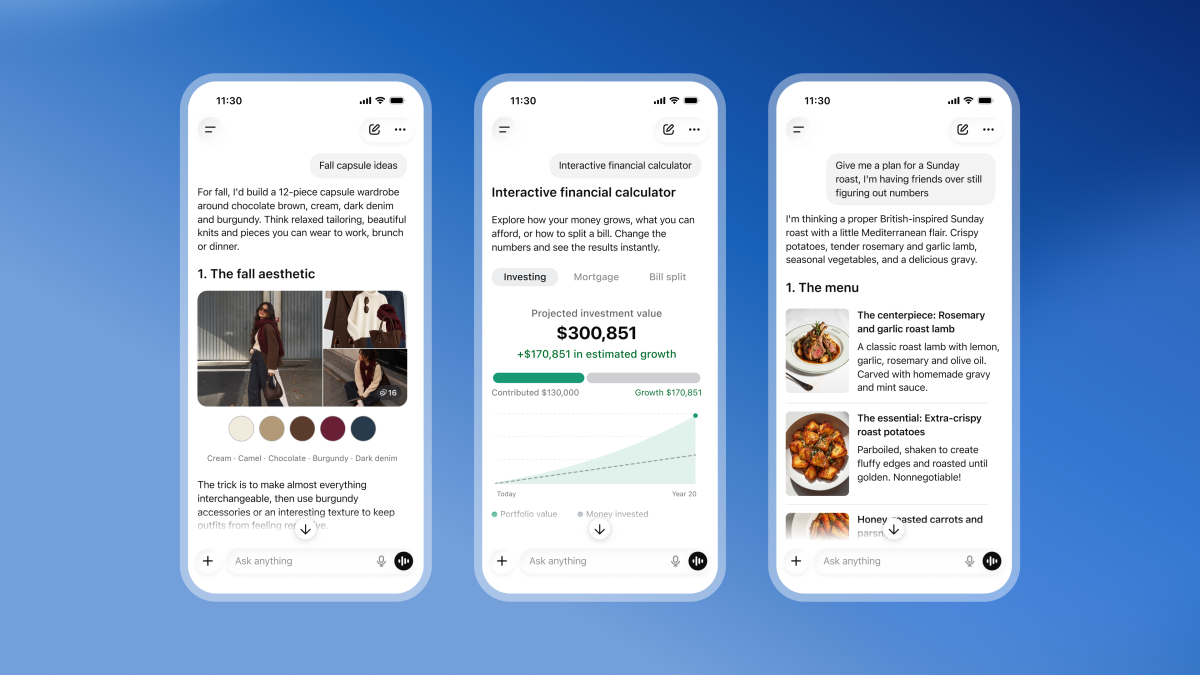
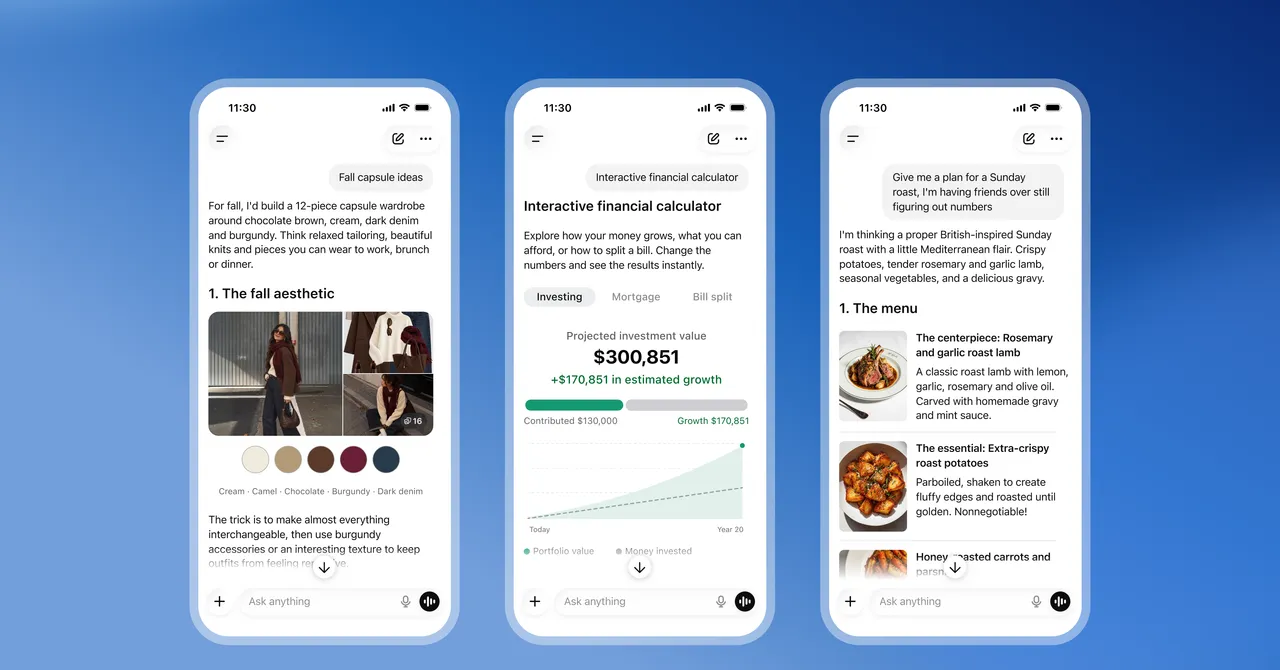
OpenAI’s new “Intelligent UI” is an effort to make ChatGPT answer questions with custom-built visual components instead of relying almost entirely on plain text. The company says the system decides dynamically whether a chart, buttons, sliders or another interactive element will help users understand the answer.
That makes the chatbot feel less like a conversation window and more like a lightweight app generator. For OpenAI, the upgrade is both a usability improvement and a statement about the direction of consumer AI: users increasingly expect software to adapt to the task, not the other way around.
The company says the interface is being powered by GPT-6, its newest model in this rollout. Paid users are receiving access first, with free users scheduled to get the feature the following day.
How the new interface works
The new system creates visual tools on the fly when OpenAI thinks they will add clarity. If the user asks about a concept that benefits from a diagram, the chatbot can build one. If the question calls for comparison or calculation, it can create a more interactive layout with controls the user can manipulate.
OpenAI says it is intentionally selective. Not every prompt will produce a graphic, and the company does not want to overwhelm users with unnecessary visual noise.
A product manager at OpenAI said the company’s design team spent significant time deciding when a diagram, chart or button set improves understanding and when it starts to crowd the screen. Users who prefer fewer visuals can ask for a more minimal response.
That balancing act is important. In AI products, more interactivity is not always better. A cleaner answer can be faster, but a well-designed visual can reveal patterns or relationships that would take many paragraphs to explain.
What the new ChatGPT can do in practice
The clearest sign that OpenAI is moving beyond text-first chat came in early tests of the product. Some prompts produced visuals that were not just decorative, but genuinely functional.
Slug anatomy turned into an interactive diagram
When asked to produce a diagram of a slug, ChatGPT generated a labeled visual focused on anatomy. The result included clickable buttons for different body parts, allowing the user to explore sections such as the upper tentacles and the muscular foot.
That kind of output illustrates the central promise of the new interface: the model can adapt the format to the subject matter. Educational questions, especially those involving biology or systems thinking, are natural candidates for richer visual explanation.
A housing affordability calculator
Another example was a custom San Francisco apartment affordability tool. The interface used sliders so the user could adjust variables such as income and living costs, then see how much of take-home pay different apartments would consume.
For practical decision-making, this is where generative UI may prove most compelling. Instead of forcing users to translate a long explanation into a spreadsheet or calculator elsewhere, the chatbot can build the utility right inside the conversation.
An airplane seat explorer
The most striking example from the hands-on test was a seat-selection tool built to compare airplane cabins. The user asked ChatGPT to compare layouts across four Alaska and Delta aircraft and received an interactive map where individual seats could be tapped for more detail.
Exit rows were highlighted in green, reflecting the user’s preference not to sit there. It was a simple but revealing example of how AI-generated interfaces can translate a user’s personal priorities into a tailored tool faster than a traditional software workflow.
| Example | What ChatGPT Generated | Why It Helped | User Value |
|---|---|---|---|
| Slug anatomy | Interactive labeled diagram | Made body parts easier to identify | Educational exploration |
| San Francisco rent | Affordability calculator with sliders | Let users test changing income and expenses | Practical budgeting |
| Airplane cabins | Seat map explorer | Compared layouts across multiple aircraft | Travel planning |
Why this looks like a bigger shift than a simple redesign
OpenAI’s update is about more than visual polish. It points to a new model for software where the interface itself can be generated on demand, shaped by the question and the context rather than by fixed product templates.
That is a major departure from the typical app experience. In standard software, the designer and engineering team decide what a screen should look like long before a user arrives. In generative UI, the screen can be assembled in response to the user’s goal.
This creates opportunities for personalization, but it also challenges long-held assumptions about product design. If every answer can look different, designers may need to think less about one universal interface and more about the rules that govern when and how AI should invent one.
What makes generative UI different from ordinary multimodal AI?
Generative UI is different because it does not merely add images or voice to a chatbot. It creates task-specific controls and layouts that function like miniature applications within the conversation.
That distinction matters. Multimodal systems can understand and produce text, images, audio and video. Generative user interfaces go a step further by generating the interaction layer itself, including the widgets, charts and buttons a person uses to work with the answer.
How does OpenAI compare with Google?
OpenAI’s move closely resembles a feature Google introduced in Search earlier this year. Google called its version “generative UI,” and it also uses AI to build bespoke visuals for specific queries rather than showing only links and static summaries.
One example cited by Google showed Search producing an adjustable visual explanation of black holes for users trying to understand deep space. The similarity suggests that major AI companies are converging on the same conclusion: people often learn and decide faster when information is embedded in an interactive format.
The competition may not be about who can write the best paragraph anymore. It may increasingly be about who can build the most useful interface around the answer.
Why the comparison to Search matters
The comparison matters because Search and chat are becoming less distinct. Traditional search engines have already started summarizing results, while chatbots are adding more structured outputs. In both cases, the goal is to reduce friction and get users to the answer faster.
If AI systems can generate a unique interface for each query, the line between browsing, searching and using an app becomes much thinner. That could reshape how consumers discover information, compare options and make decisions online.
What the rollout says about ChatGPT’s direction
ChatGPT began as a text-based assistant, but the product has steadily moved toward a richer, more visual experience. The new interface suggests that OpenAI sees the future of chat as a flexible workspace rather than a narrow question-and-answer box.
This direction fits with broader trends in AI product development. As models become more capable, the value shifts from simply generating words to packaging those words into the right format for the user’s task.
- Simple factual questions may still receive plain text.
- Explanations of complex systems may produce diagrams.
- Decision-making prompts may create sliders, tables or calculators.
- Comparative shopping or travel planning may generate interactive maps and visual selectors.
In theory, that should make the product feel smarter. In practice, it will depend on how well the system predicts what a user actually needs—and whether users trust the model to make those design choices correctly.
What users can expect next
For now, the biggest change is that answers may feel more tailored and less repetitive. Instead of forcing users to read through a long explanation and then mentally translate it into action, ChatGPT can increasingly present information in a format that matches the task.
That could be especially helpful in education, planning, product comparison, travel research and budgeting. These are the kinds of situations where a static answer is often not enough, but a simple interactive tool can make a meaningful difference.
There are still limitations. A tool that feels elegant for one user may seem unnecessary for another. Visual clutter, inconsistent design language and over-automation could all become problems if the system gets too eager to generate interfaces.
Still, the direction is clear. OpenAI wants ChatGPT to do more than talk. It wants it to show, compare, calculate and let users manipulate the answer in real time.
Why designers may need to rethink the interface layer
The rise of generative UI could force a broader reckoning in software design. If AI systems are deciding what the screen should look like at the moment of use, human designers may need to shift from drawing fixed interfaces to defining constraints, standards and fallback behaviors.
That change could be liberating. It may also be unsettling.
Design teams have traditionally controlled the structure of a product experience. With AI increasingly generating that structure, the designer’s role may move closer to editor, curator and systems architect. The question becomes less “what should this screen look like?” and more “when should the system create a screen at all?”
There is also a user-trust issue. If an AI-generated interface is wrong, confusing or incomplete, the mistake is more than cosmetic. It can distort how users interpret the answer itself.
Timeline of the rollout
Here is a simplified look at how the launch was described in the announcement and early testing.
| Time | Event | Significance |
|---|---|---|
| Wednesday | OpenAI announced “Intelligent UI” for ChatGPT | Marked the shift toward custom visual responses |
| Launch day | GPT-6 powered rollout began for paid users | Early access for subscribers |
| Following day | Free users were scheduled to receive access | Expanded the feature to a much wider audience |
How should users think about the change?
Users should think of the update as a smarter presentation layer, not just a new coat of paint. The underlying promise is that ChatGPT can now choose a better medium for the answer, whether that means text, diagram or interactive widget.
That may sound incremental, but it has big implications. A chatbot that can build the right tool for the question becomes more than a conversational assistant. It starts to resemble a personalized application platform.
For now, OpenAI’s own example responses suggest the company is trying to keep the feature grounded in utility. The goal is not to add animation for its own sake, but to make answers easier to understand and act on.
That restraint will matter. If OpenAI gets the balance right, the new ChatGPT could make AI conversations more useful, more intuitive and more human-centered. If it gets the balance wrong, it risks turning every answer into a flashy interface no one asked for.
Either way, the launch is a strong sign that the next wave of AI products will be judged not only by what they know, but by how they choose to show it.
Bottom line
OpenAI is redesigning ChatGPT so it can answer with custom visuals and interactive controls, powered by GPT-6 and rolling out first to paid users. The change could make chatbot responses more practical and personalized, while also pushing the tech industry toward a future where AI generates the software interface itself.
Frequently asked questions
What is the new ChatGPT UI from OpenAI?
It is a redesigned ChatGPT interface that can generate custom visuals and interactive tools inside answers. Instead of only returning text, the system may create diagrams, charts, buttons or sliders when those formats make the response clearer or more useful.
When is the ChatGPT UI update rolling out?
It is rolling out first to paid users immediately, with free users scheduled to get access the following day. OpenAI said the feature is powered by GPT-6 as part of the launch.
How is this different from normal ChatGPT answers?
It is different because the interface itself can be generated dynamically. Rather than just summarizing information in paragraphs, ChatGPT can build a task-specific visual tool, such as a calculator, seat map or labeled diagram, directly within the conversation.
Is this similar to Google’s AI Search features?
Yes, it is similar in concept to Google’s generative UI in Search. Both systems aim to produce custom visual answers for certain queries, helping users understand complex topics faster and interact with information more directly.
Why does ChatGPT’s new UI matter?
It matters because it could change how people use AI and how software is designed. If chatbots can generate useful interfaces on demand, AI products may move beyond text boxes and become personalized tools that adapt to each question.