Updated July 14, 2026 1:19 am
In short
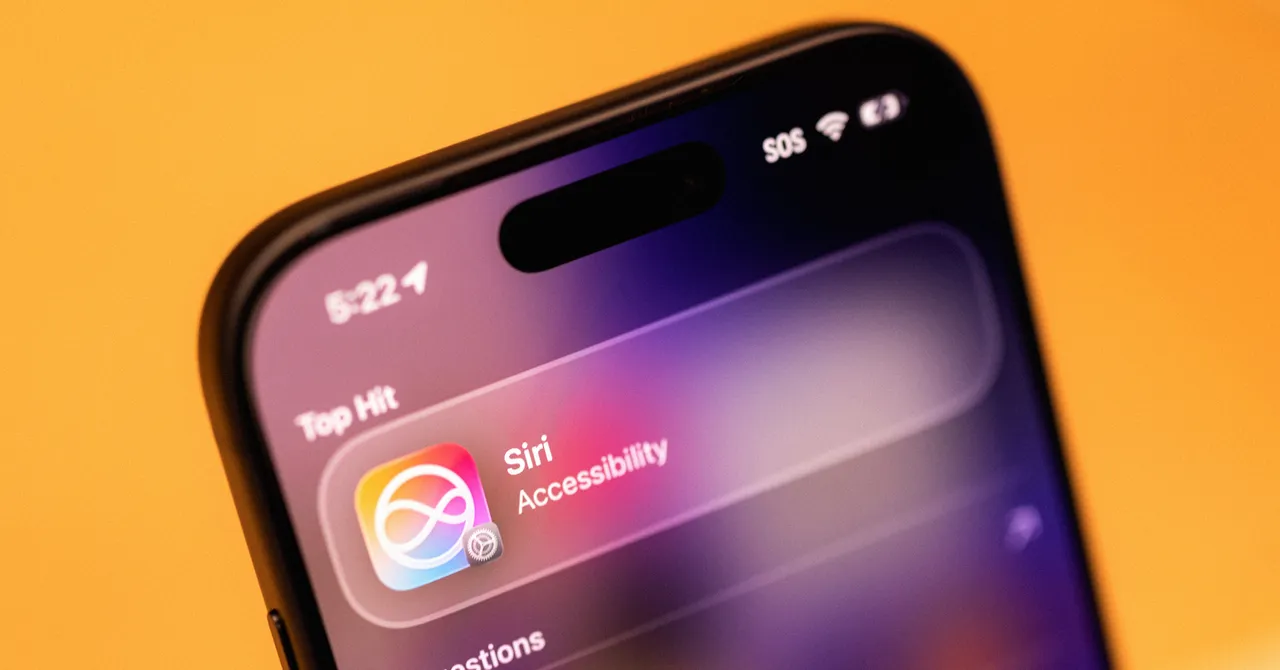
Apple’s Siri AI public beta adds deeper phone-wide context, on-screen awareness, and app-level learning controls as the assistant begins rolling out to early iPhone testers.
- iOS 27 public beta is the first public release of Apple’s revamped Siri AI.
- The assistant now uses on-device indexing, screen awareness, and app integration to provide contextual help.
- Siri AI is limited to iPhone 15 Pro and newer models at launch.
- A new Siri app stores conversations, but it does not yet include long-term memory.
- Apple’s strategy is to make AI feel native across iPhone, iPad, Mac, and Vision Pro.
Update — July 14, 2026 1:19 am
Apple’s public beta of Siri AI now appears to be rolling out with a few newly described details for testers. The assistant is said to take some time to fully index a device, with newer beta builds showing a visible “Optimizing Search and Siri” progress bar.
The updated source also adds that users can fine-tune app-by-app behavior by turning off “Learn from this App” under Siri AI’s App Access settings. That setting is enabled by default when Siri AI is on.
Another new wrinkle is that Siri AI can use what is currently on the screen to answer questions, not just data stored on the phone. In one example, it identified a reference from a social post and supplied background links without needing much extra context.
Apple’s long-awaited Siri overhaul is now in public beta with iOS 27, giving iPhone owners their first chance to test a far more capable assistant that can search across apps, read what is on screen, and act like a built-in chatbot. The update matters because it could change how millions of people use their iPhones every day, shifting Siri from a basic voice tool into a device-wide intelligence layer.
The new version, dubbed Siri AI, was introduced at Apple’s June WWDC event and is now rolling out to early adopters through the Apple Beta Software Program. Unlike the old Siri, which often struggled with simple requests, the redesigned assistant is woven into search, messaging, notes, photos, and other parts of the operating system, making it one of the company’s most consequential software changes in years.
What Apple is changing with Siri AI
Apple is not simply adding a few chatbot features to Siri. It is rebuilding the assistant around device context, system-level access, and more flexible ways to interact, including text, voice, and visual inputs. That combination is what makes the update feel closer to a personal operating system companion than a standalone voice assistant.
In testing, Siri AI was able to handle tasks that would previously have required several separate steps. It found old vacation photos, drafted text messages, suggested food spots, and pulled relevant details from calendar events and conversations. The assistant is still imperfect, but it appears dramatically more useful than the version iPhone users have known for years.
For Apple, this is also a strategic move. Rivals such as Google have already spent years adding AI features to Android phones, so the new Siri is as much a catch-up effort as it is an innovation push. The difference is that Apple is betting on deeper integration rather than a standalone AI app.
Why Siri AI feels different from the old Siri
Siri AI feels different because it is now embedded across the iPhone experience instead of sitting on the sidelines as a limited voice assistant. The system can be summoned from search, used in a dedicated app, and accessed in ways that make it feel present throughout the operating system rather than isolated inside a single interface.
That matters for usability. Many users stopped relying on Siri because it often required precise phrasing, understood too little context, and failed at tasks that felt obvious. Apple’s redesign aims to make the assistant more forgiving and more aware of what the user is doing at a given moment.
“They’ve integrated it across the entire ecosystem, so you can access Siri AI no matter where you are on the device,” said Nabila Popal, a senior research director at IDC who studies consumer devices. She added that the assistant’s accessibility and system-wide placement are among its strongest design decisions.
In practical terms, that means Siri is no longer just a voice you call up occasionally. It is becoming an interface layer that can help people navigate apps, retrieve information, and complete tasks without bouncing between screens.
How do you get Siri AI on an iPhone?
You get Siri AI by installing the iOS 27 public beta, enrolling in Apple’s Beta Software Program, and then joining Siri’s waitlist inside Settings. Once Apple clears your device, you receive a notification that the assistant is ready to use.
Because the software is still in beta, Apple strongly expects users to back up their phones before installing it. That warning is standard for pre-release software, but it is especially relevant here because Siri AI is tied deeply into indexing and system-wide search.
Apple is also limiting access by hardware. Even if an iPhone can install iOS 27, the new Siri AI is only available on the iPhone 15 Pro and newer models. The assistant is also coming to iPad and Mac, with Vision Pro support included as part of Apple’s broader ecosystem strategy.
Setup steps at a glance
- Join the Apple Beta Software Program.
- Install iOS 27 public beta on a supported device.
- Open Settings and sign up for the Siri waitlist.
- Wait for Apple’s notification that access has been granted.
- Let the phone finish indexing for the best results.
What is inside the new Siri app?
The new Siri app is designed less like a fresh destination and more like a record of prior conversations. It stores previous exchanges, lets users revisit older threads, and supports new chats, although Apple’s own system integration means many users may interact with Siri outside the app itself.
That app interface will look familiar to anyone who has used ChatGPT, Claude, or similar assistants. But at launch it lacks some of the most common features users may expect from modern AI tools, including a memory function that remembers stable preferences over time.
That absence is notable because it means Siri still behaves like a very smart but relatively short-term helper. If a user wants recipe suggestions, for example, they may still need to remind Siri about dietary needs each time rather than expecting the assistant to retain that preference automatically.
Conversation retention and privacy controls
Apple gives users some control over how long Siri conversations remain stored. In the settings menu, users can choose to keep chats forever, for one year, or for 30 days. Shorter retention periods cause older conversations to be deleted from the app.
Apple also allows users to turn off Siri if they do not want the assistant to remain active. That option will likely matter to privacy-conscious customers who are wary of a system that learns from their activity across the phone.
| Feature | What it does | Why it matters |
|---|---|---|
| Public beta access | Lets early adopters test Siri AI in iOS 27 | First public look at Apple’s redesigned assistant |
| Dedicated Siri app | Stores and resumes chat threads | Makes Siri feel more like a chatbot |
| System-wide search | Lets users ask Siri from Search or Ask | Places Siri in the core iPhone workflow |
| On-device indexing | Builds a searchable database of device data | Enables context-aware answers |
| App Access controls | Lets users disable learning from specific apps | Provides a layer of user control |
How does Siri AI understand personal context?
Siri AI understands personal context by indexing data on the device and drawing on information from messages, calendars, photos, and other apps. Apple’s system builds an on-device searchable layer that helps the assistant connect a user’s questions to what is actually happening in their digital life.
That process is central to the new experience. Instead of treating each request as isolated, Siri can use the phone’s internal context to produce more relevant answers and actions. In effect, the assistant is attempting to make sense of the clutter that defines modern smartphone use.
Josh Clark, principal at design agency Big Medium and co-author of Sentient Design: Crafting Intelligent Interfaces with AI, said Siri’s strength comes from the fact that it is built into the operating system rather than sitting outside it. That gives it access to forms of context more deeply tied to the device than web-based chatbots can usually reach.
In the beta, the indexing process appears under the label “Optimizing Search and Siri,” complete with a progress bar. On one test device, full indexing took a little more than a week, though Apple says the timing can vary depending on storage, device model, and software version.
Examples of contextual help
Once the indexing process is underway, Siri can surface details from multiple apps in a single answer. In one example, it pulled a weekly overview from recent messages, surfaced an incoming TikTok Shop order, identified movie plans discussed in a group chat, and flagged calendar events such as a birthday party and a live performance.
That kind of response is the main promise of the upgrade. Siri is no longer being positioned as a tool that merely sets timers or answers trivia. It is being marketed as a phone-native guide to the user’s life.
What can Siri AI do on-screen and with the camera?
Siri AI can read what is visible on the screen and use that information to answer follow-up questions. Apple previously offered some of this capability through Visual Intelligence, but the new system makes it feel more continuous and useful inside everyday phone use.
In practice, this means Siri can respond to vague prompts by using screen content as context. If a user is looking at a social post, a message thread, or a webpage, Siri can infer what is being discussed and fill in missing details.
That feature can be especially useful for quickly checking claims that appear in social feeds. In one instance, Siri identified a reference to a singer’s criticism of Meta’s smart glasses and tracked the information to a festival appearance in Madrid, along with links to additional coverage.
Camera app integration
Apple has also added a Siri tab inside the camera app. Users can point the camera at an object or scene and ask for help, upload an image for more detail, or search the web for related information. The app can return a short explanation and then expand it into a longer response with source links.
This camera integration makes Siri feel closer to a live research assistant. Rather than waiting for the user to describe a photo or object manually, the assistant can interpret the image directly and offer context in real time.
Why this matters for iPhone users
This matters because Apple is trying to make the iPhone feel smarter without forcing users to leave the ecosystem they already use. If the new Siri works as intended, the assistant could reduce friction across messaging, search, photos, planning, and content discovery.
That is a major shift for a product line that has long depended on simple utility rather than advanced automation. The redesign may especially matter for people who never got much value from the old Siri and rarely used it beyond alarms, timers, and basic questions.
For Apple, the broader message is equally important: the company wants artificial intelligence to feel native, not bolted on. By embedding the assistant into the operating system, Apple is making a claim that the future of AI on phones will be about context, trust, and ease of use rather than just raw model capability.
Benefits at a glance
- More natural interaction through voice, text, and search.
- Better use of messages, calendar entries, and photos as context.
- Reduced need to switch between apps.
- Improved navigation for people who use Siri casually or rarely.
- Potentially stronger utility than older Siri commands.
How does Siri AI compare with Android’s Gemini?
Siri AI is catching up to tools Android users may already recognize, especially Google’s Gemini-powered features on Pixel and Samsung devices. Apple’s main advantage is not that it invented the category, but that it is bringing a similar style of AI assistance to a much larger iPhone base with deep system integration.
That distinction is important. Android users may already be accustomed to AI-assisted screenshots, drafting tools, and contextual searches, but many iPhone owners have not had access to the same level of built-in help. Apple’s release may therefore feel transformative even if the underlying idea is no longer new in the broader market.
Popal argued that many Apple customers are still unaware of the AI features already available on Android phones, underscoring how much of the current race is about consumer perception as much as technical capability.
Apple’s challenge is to prove that integration matters more than novelty. If users experience Siri as genuinely useful in daily life, the company could close the gap quickly in public opinion even if rivals arrived first.
What are the main limitations right now?
The main limitations right now are hardware access, indexing time, missing memory features, and the uncertainty that comes with beta software. Siri AI is limited to newer iPhone models, and some of its best capabilities depend on the phone having finished its indexing process.
Because the software is still under development, users should expect uneven performance. That includes delays in availability, incomplete features, and the possibility that Apple will change behavior before the final release.
There are also clear product gaps. The assistant still does not retain long-term user preferences in the way some dedicated chatbots do, and some interactions may require more setup than a polished mainstream feature would normally demand.
Known constraints
- Only iPhone 15 Pro and newer devices can use the new Siri.
- Indexing may take days before the assistant feels fully helpful.
- Conversation memory is not yet a core feature.
- Beta software may contain bugs or inconsistent behavior.
- Some users may prefer tighter privacy controls before enabling app learning.
Timeline of Siri AI’s rollout
Apple’s assistant revamp has moved from announcement to public testing in a matter of weeks, but the rollout has been structured and cautious. The company is clearly using the beta process to gather feedback before a wider release.
| Date | Milestone | Significance |
|---|---|---|
| June 2026 | WWDC reveal of Siri AI | Apple previews the redesigned assistant |
| July 2026 | iOS 27 public beta launches | General public can test the software |
| July 2026 onward | Siri waitlist opens in Settings | Apple controls access as rollout expands |
| Weeks after install | Device indexing completes | Context-aware features become more useful |
What happens next for Apple’s AI strategy?
Apple is likely to keep iterating quickly, especially because the current release still lacks several features users now associate with advanced AI assistants. The company will probably refine memory, expand context handling, and improve reliability as the software matures.
More broadly, Siri AI suggests Apple sees artificial intelligence less as a product and more as an interface redesign. That is a subtle but important distinction. Instead of asking users to open a separate AI app, Apple is trying to make intelligence invisible, omnipresent, and useful wherever the user already is.
If that strategy succeeds, Siri could finally become the assistant Apple promised years ago: not a novelty, but a practical layer across the phone. If it falls short, it may join a long list of ambitious Apple software ideas that took longer than expected to deliver on their promise.
For now, the public beta gives Apple its first real test. Millions of iPhone owners will soon decide whether Siri AI is a meaningful reinvention or simply the latest upgrade in a long, uneven history of voice assistants. The answer will depend less on marketing than on whether the assistant can consistently save time, reduce taps, and understand what users need before they spell it out.
Frequently asked questions
What is Siri AI in iOS 27?
Siri AI is Apple’s redesigned assistant in iOS 27, built to function more like a context-aware chatbot and less like the older voice-only Siri. It can search across the phone, use what is on screen, and help with tasks inside Apple’s ecosystem.
How do you get access to Siri AI?
You get access by installing the iOS 27 public beta, joining Apple’s Beta Software Program, and then signing up for the Siri waitlist in Settings. Apple notifies eligible users when the assistant is ready on their device.
Which iPhones support Siri AI?
Siri AI is limited to the iPhone 15 Pro and newer models. Even if an older iPhone can install iOS 27, Apple’s revamped assistant will not automatically be available unless the device meets the hardware requirement.
Does Siri AI remember user preferences?
Not yet. Siri AI can store conversation history and revisit prior chats, but it does not currently include the kind of long-term memory feature common in some other chatbots, so users may still need to repeat preferences like diet or tone.
Why does Siri AI matter for Apple?
Siri AI matters because it could make the iPhone feel significantly more useful in daily life and help Apple catch up with AI features already seen on some Android devices. The bigger goal is to make intelligence part of the operating system, not a separate app.