In short
Google is rolling out Gemini-powered voice modes in Gmail, Docs and Keep, letting users search inboxes, draft documents and transcribe notes by speaking. The features are launching on mobile first in English and are tied to Google’s paid AI plans.
- Google is adding live voice assistant modes to Gmail, Docs and Keep.
- Gmail Live can summarize inbox information and answer follow-up questions verbally.
- Docs Live helps turn spoken ideas into structured writing and summaries.
- Keep Live lets users capture notes and shopping lists by voice, with Android-only availability at launch.
- The features are rolling out globally in English on mobile and are tied to paid AI subscriptions.
Google is rolling out new Gemini-powered voice modes for Gmail, Docs and Keep that let users search, summarize, draft and transcribe by speaking naturally instead of typing. The update matters because it turns three of Google’s most widely used productivity apps into hands-free assistants, and it is beginning to reach mobile users globally in English starting today.
The new experiences — Gmail Live, Docs Live and Keep Live — are designed to help people find information faster, capture ideas on the go and work through longer tasks without constantly switching between keyboard, screen and search box. Google first showed the features at I/O in May, but they are now moving from preview to real-world availability across phones.
What Google is launching
Google is introducing three live conversational modes built on Gemini for core productivity apps: one for email, one for documents and one for notes. Each mode is meant to reduce friction when users need to retrieve information, organize content or create something new while multitasking.
The company is framing the rollout as a practical extension of its Gemini Live voice experience inside the wider Google ecosystem. Instead of treating the assistant as a separate destination, Google is embedding it directly into apps people already rely on every day.
| Feature | App | Main job | Availability | Plan access |
|---|---|---|---|---|
| Gmail Live | Gmail | Find and summarize email details through voice | iOS and Android | Google AI Plus, Pro, Ultra |
| Docs Live | Google Docs | Summarize documents and help turn ideas into structured writing | iOS and Android | AI Pro and Ultra |
| Keep Live | Google Keep | Transcribe and organize notes and shopping lists by voice | Android only | AI Pro and Ultra |
How Gmail Live works
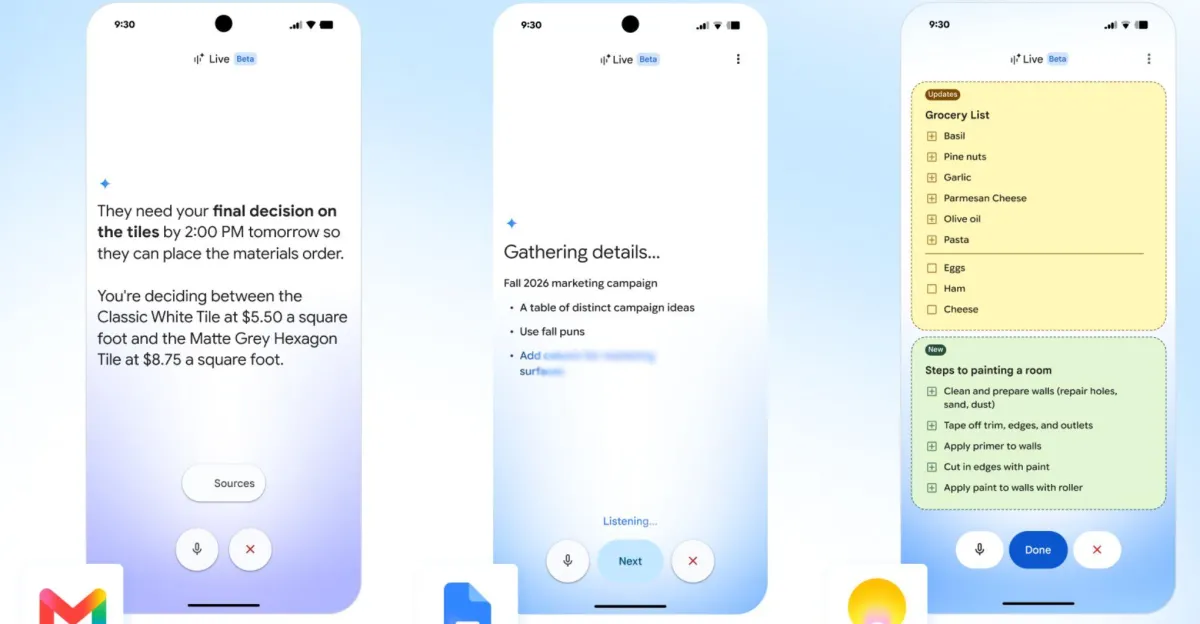
Gmail Live is built to help people pull useful information out of crowded inboxes without searching manually through long message chains. Users can ask a spoken question, and Gemini will scan connected email content, then provide a verbal summary of the answer.
Google says the experience can handle questions that would normally require opening several messages and tracing a conversation thread. A person might ask when a child’s next school event is, for example, and Gmail Live is intended to gather the relevant detail from the email trail and read back a concise response.
Why this matters for email-heavy users
Email remains one of the most time-consuming digital tasks for professionals, parents and students alike. A voice-first assistant inside Gmail may be especially useful when users are commuting, cooking, walking between meetings or simply trying to reduce the number of taps needed to find one detail buried in a thread.
Google is also trying to improve trust in the answer by showing source links in the transcript view. That means users can verify where the assistant found the information instead of relying only on a spoken summary.
Google says Gmail Live can keep a conversation going, allowing people to ask follow-up questions without restarting the exchange and to interrupt the assistant mid-response if they need to change direction.
What Docs Live adds to Google Docs
Docs Live gives Google Docs a conversational workflow for drafting and structuring written work. Users can describe what they need in plain language, and Gemini can help shape that input into a more organized document.
The feature is aimed at everyday writing tasks such as turning notes into a proposal, summarizing a longer document or reshaping rough ideas into a more formal format. Rather than replacing the editing process, Docs Live is designed to accelerate the first draft and make it easier to get from scattered thoughts to a usable structure.
How Docs Live could change drafting
Docs Live is most useful when the hard part is not writing every sentence, but getting started or reorganizing a pile of information. For many users, that could mean less time staring at a blank page and more time refining a machine-assisted draft that already has headings, summaries or a business-friendly outline.
Google says the assistant can also draw on connected services, if users allow it, to improve personalization. That includes Gmail, Drive, Chat and the web, which could help the system tailor its output to a user’s prior work and current context.
How Keep Live turns notes into conversations
Keep Live is the most casual of the three tools, but it may be the one that feels most natural for everyday life. Instead of requiring structured commands, it lets users speak as they would normally and have Gemini turn that speech into a note or list entry.
That means a shopping list can be built by voice with a simple request such as adding ingredients for pesto, without needing to specify formatting or formatting rules. Gemini is supposed to interpret the context and store the note in a useful way automatically.
Why Keep Live is limited to Android for now
Google says Keep Live is rolling out on Android only at launch, even though Docs Live is arriving on both iOS and Android. The company has not offered a detailed public explanation for the platform split, but the rollout suggests Google is moving feature by feature rather than releasing identical support across every device at once.
That distinction matters for users who split time between phones and tablets or who depend on Keep as a lightweight capture tool. For now, Android users are getting the first taste of the full voice-note workflow.
Who can use the new Gemini voice modes?
The answer depends on the app and the subscription tier. Gmail Live is available to users on Google AI Plus, Pro and Ultra plans, while Docs Live and Keep Live are limited to AI Pro and Ultra subscribers at launch.
Google says the features are now rolling out globally in English on mobile. Gmail Live works on both iOS and Android, Docs Live is available on iOS and Android, and Keep Live is limited to Android.
Workspace support is still on the way
Google also says all three tools are coming soon to Workspace business customers. That is significant because many of the company’s most intensive Gmail and Docs users live inside enterprise and team environments rather than consumer accounts.
A wider Workspace rollout would give the new voice modes a far larger potential audience, especially among workers who already use Gmail and Docs as their default communication and document tools.
Why Google is putting voice inside productivity apps
Google’s move reflects a broader shift in AI product design: the most valuable assistants are increasingly those that live inside existing workflows. Rather than asking people to open a separate chatbot window, the company is weaving Gemini into the places where work already happens.
That approach gives Google several advantages. It makes the technology feel more useful and less novelty-driven, it helps the company compete more directly with other AI assistants, and it increases the odds that users will rely on Gemini repeatedly throughout the day.
It also aligns with a practical reality of mobile computing. Speaking to an app can be faster than typing, especially when a user is walking, driving, carrying groceries or trying to keep their attention on something else. Voice input remains one of the simplest ways to lower the friction of information retrieval and task capture.
How this fits into Google’s Gemini strategy
Google has been pushing Gemini across consumer and enterprise products as a way to make its AI system feel less like a standalone chatbot and more like an operating layer. Voice modes inside Gmail, Docs and Keep extend that strategy into daily productivity routines.
By tying the experience to paid AI plans, Google is also signaling that these features are part of its premium AI bundle rather than basic utility software. That could help the company justify subscription pricing, while giving users a clearer reason to upgrade.
What users should expect from the rollout
The initial release is useful, but it is not the same as a fully open public launch. The features are arriving in English first, on mobile first, and with some app and subscription restrictions that narrow the audience.
That means the rollout is best understood as the start of a broader deployment rather than a finished end state. Google often uses staged launches to gather feedback, monitor quality and expand support carefully after initial release.
- Language: English at launch
- Platform: Mobile first
- Delivery: Real-time voice interaction
- Core use cases: Search, summarize, draft and transcribe
- Business availability: Coming soon for Workspace customers
Timeline of Google’s live voice push
The new launch follows a phased approach that began months ago in public demonstrations and is now reaching everyday users.
| Date | Milestone | What happened |
|---|---|---|
| May 2026 | Google I/O preview | Google showed Gmail Live, Docs Live and Keep Live for the first time |
| September 3, 2026 | Initial rollout begins | The features start reaching mobile users globally in English |
| Upcoming | Workspace expansion | Google says the tools will arrive for business customers later |
What the feature set says about the future of AI assistants
The launch suggests that the next phase of consumer AI will be defined less by headline-grabbing demos and more by mundane utility. Email summaries, document drafting and note capture are not flashy tasks, but they are the kinds of activities people repeat constantly.
That is why the update may prove more important than it first appears. If Google can make Gemini feel dependable in these everyday settings, it strengthens the case for AI as a default interface for work and personal organization.
It also raises expectations. Once people become used to asking a phone to locate information or prepare content on command, they may expect other apps to offer the same level of conversational control.
What users will still need to watch for
As with any AI tool that summarizes or generates content, accuracy will remain the key concern. Google is positioning the features as assistants, not replacements for human review, and users will still need to verify important details before acting on them.
That is especially true in Gmail, where a summary is only as reliable as the messages it pulls from, and in Docs, where a draft can be structured well while still requiring substantial editing. The transcript links should help, but they do not remove the need for oversight.
Privacy will also remain a practical consideration. Google says Docs Live can use information from Gmail, Drive, Chat and the web when permission is granted, which suggests users will need to think carefully about what data they are comfortable connecting to a voice-based assistant.
The bottom line
Google is turning Gmail, Docs and Keep into hands-free, voice-controlled AI tools powered by Gemini, starting with a global English rollout on mobile devices. The change may seem incremental, but it gives the company a more deeply integrated AI experience that could reshape how users search email, draft documents and capture notes.
For Google, the launch is another step toward making Gemini part of daily digital work. For users, it is a sign that conversational AI is moving out of standalone chat windows and into the apps where information is actually managed.
Frequently asked questions
What are Google’s new Gemini voice modes?
Google’s new Gemini voice modes are live conversational features for Gmail, Docs and Keep. They let users speak naturally to search email, summarize documents, draft writing and transcribe notes instead of relying only on typing and manual navigation.
Who can use Gmail Live, Docs Live and Keep Live?
Access depends on the app and subscription tier. Gmail Live is available to Google AI Plus, Pro and Ultra users, while Docs Live and Keep Live are available to AI Pro and Ultra subscribers at launch.
Which devices support Google’s new voice features?
Gmail Live works on iOS and Android, Docs Live works on iOS and Android, and Keep Live is Android only at launch. Google says the rollout is beginning globally in English on mobile devices.
How does Gmail Live help users find information?
Gmail Live helps users ask spoken questions about their inbox and get a summarized verbal answer. Google says it can locate details buried in long email threads and show linked sources in the on-screen transcript for verification.
Will these features come to Google Workspace accounts?
Yes. Google says Gmail Live, Docs Live and Keep Live are coming soon for Workspace business customers. The company has not given a specific date, but the business rollout is part of its broader expansion plan.