In short
Apple has explained how its new Audio Intelligence features can listen for speech, music and ambient sounds while keeping raw audio inaccessible to Apple. The system relies on on-device processing, Secure Exclave hardware and user-controlled activation to preserve privacy.
- Apple says raw audio from Audio Intelligence is never saved as a file or exposed to the operating system.
- The features rely on the Secure Exclave in the S11 chip on Apple Watch Series 12 and Apple Watch Ultra 4.
- Users must actively enable some functions, and Live Rewind requires a double-tap of the Digital Crown.
- Apple says any transfer to iPhone is encrypted, and synced text can use end-to-end encryption with the right account protections.
Apple says its new Siri Audio Intelligence tools are designed to analyze sound without giving the company access to users’ raw microphone audio. The privacy approach matters because the features, unveiled at Wednesday’s iPhone Duo launch event, expand Siri’s ability to listen for speech, music and ambient sounds while trying to avoid the kind of cloud-based audio collection that has long raised privacy concerns.
In a document released alongside the announcement, Apple said the audio used by features such as Siri Recap, Live Rewind, Sound Recognition and Music Recognition is processed inside dedicated hardware on the device and is not stored as a file. According to Apple, the raw sound is also inaccessible to the operating system, third-party apps, users and Apple itself.
The company’s explanation is the clearest public window yet into how it plans to combine always-available AI features with its long-running privacy branding. It also arrives at a moment when consumer trust around voice assistants, ambient sensing and wearable intelligence is under renewed scrutiny.
What Apple announced at the event
Apple introduced a set of Audio Intelligence capabilities during Wednesday’s iPhone Duo event, adding new ways for Siri to understand what is happening around the user. The company framed the tools as practical, on-device helpers that can identify sounds, summarize what was heard and let users revisit portions of audio.
The new features include:
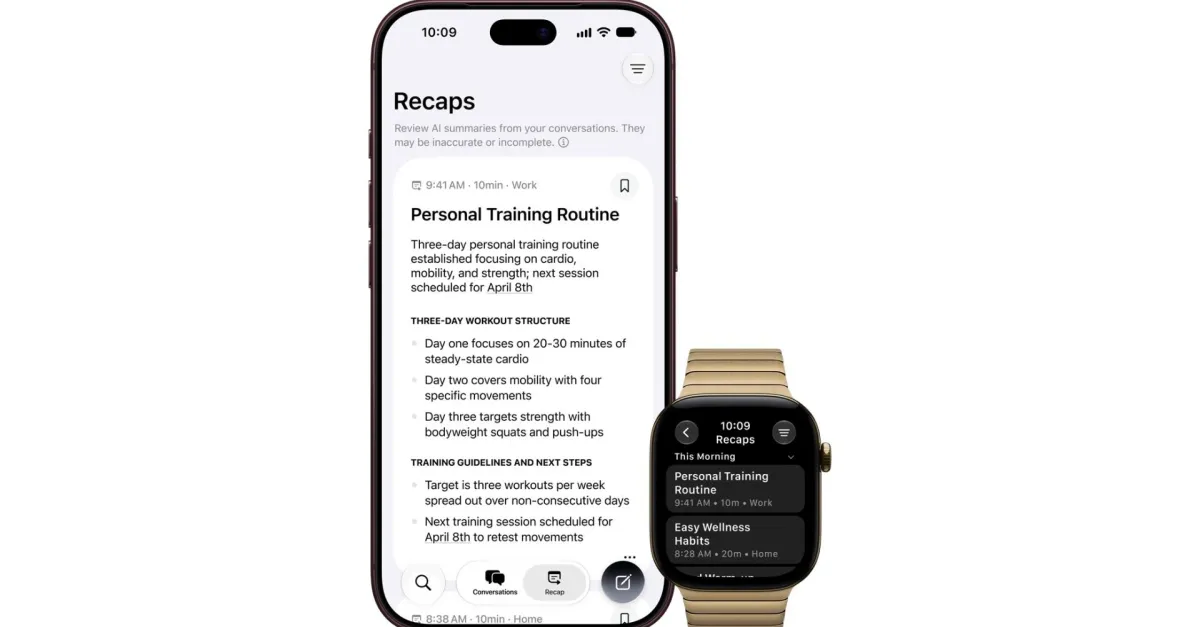
- Siri Recap, which generates a text summary from captured audio moments.
- Live Rewind, which lets users jump back through recently captured audio.
- Sound Recognition, which identifies non-speech sounds.
- Music Recognition, which helps detect songs playing nearby.
Apple is pitching these capabilities as part of a broader move toward more context-aware Siri behavior. Instead of relying solely on explicit voice commands, the assistant can interpret nearby audio in real time and use that information to help the user.
How Apple says Audio Intelligence protects privacy
Apple says the key privacy safeguard is that raw audio never leaves protected hardware in a form that can be saved or accessed later. The company says processing happens inside a dedicated hardware zone, where the audio is analyzed as a temporary stream rather than turned into a stored recording.
What is the Secure Exclave?
It is a hardware-isolated area built into the chip that handles sensitive sensor data separately from the main operating system. Apple says the system is meant to prevent the rest of the device, including watchOS, apps, the user and even Apple, from reading what is processed there.
Apple ties this architecture to the new S11 chip in the Apple Watch Series 12 and Apple Watch Ultra 4. In its description, the microphone feed enters the Secure Exclave, where it is examined for speech, music or other sounds without being transcribed into a permanent audio file.
Apple says microphone audio is processed inside dedicated hardware, never stored as a recording, and cannot be accessed by the operating system, apps, users or the company itself.
That distinction is central. Traditional voice assistants often depend on transmitting audio to cloud servers for interpretation. Apple is instead emphasizing local processing, protected memory and short-lived buffers that are continuously overwritten.
Why does this matter?
It matters because “ambient listening” features create privacy anxiety by design: they are always close to the user’s conversations, background sounds and personal routines. Apple’s challenge is to make the technology useful enough to justify itself without making users feel surveilled.
By claiming the audio never becomes a file and is never accessible outside the secure hardware layer, Apple is drawing a sharp line between its approach and the more controversial forms of data collection associated with always-on digital assistants.
Which devices use the new system?
Apple says the Secure Exclave architecture in the S11 chip powers the new wearable hardware, specifically the Apple Watch Series 12 and Apple Watch Ultra 4. That means the most privacy-sensitive audio processing is taking place directly on the device rather than in a general-purpose app layer.
The implication is that Apple is increasingly treating the watch as a standalone intelligence endpoint, not just a companion accessory. With microphones, secure silicon and AI-driven listening features, the device is being positioned as a more capable sensor hub for the wrist.
| Feature | What it does | Privacy approach | User control |
|---|---|---|---|
| Siri Recap | Creates text summaries from captured audio | Processed in dedicated hardware, not saved as raw audio | User chooses what text to keep |
| Live Rewind | Lets users revisit recent audio | Audio buffer exists only in protected hardware | Requires double-tap of the Digital Crown to activate |
| Sound Recognition | Detects speech, sounds or environmental cues | Analyzed locally in the Secure Exclave | Activation is user-controlled |
| Music Recognition | Identifies music playing nearby | Uses on-device processing before any transfer | Can be turned on or off by the user |
How much control do users have?
Apple says users decide when the Audio Intelligence features are active and how much of the output they want to retain. That control is an important part of the company’s privacy message, especially for features that could otherwise feel intrusive.
Live Rewind, for example, is not fully automatic in Apple’s description. Users must double-tap the Digital Crown each time they want to enable it. That requirement suggests Apple is trying to avoid a permanently listening interface and instead frame the function as an intentional action.
Apple also says users can choose what text to keep from Siri Recap and Live Rewind. That means the AI may generate or capture an audio-derived summary, but the final decision about what remains on the device appears to stay with the owner.
What happens if audio has to move between devices?
Apple says any transfer to iPhone is encrypted using both devices’ Secure Exclaves. In other words, the company is not presenting this as an open data handoff between systems. Instead, it is describing a protected exchange between two trusted hardware environments.
For users who keep a device passcode and enable iCloud two-factor authentication, text created from Audio Intelligence features can sync with end-to-end encryption. That arrangement extends Apple’s privacy model beyond a single device and into its cloud-connected ecosystem.
The company is making a familiar argument with new technical details: privacy does not have to mean sacrificing smart features, so long as the intelligence happens close to the hardware and the data remains tightly controlled.
Why Apple’s privacy pitch is strategically important
Apple has spent years using privacy as a competitive differentiator, especially against rivals whose business models depend more directly on user data and ad targeting. Audio Intelligence extends that strategy into a category that is especially sensitive because it can capture conversations and environmental context.
The tension is obvious. The more useful Siri becomes, the more it needs to understand what is being said nearby. But the more it understands, the more users may worry about whether their private moments are being recorded, transmitted or analyzed elsewhere.
Apple’s answer is to move the intelligence into the chip itself. That architecture is intended to reassure users that the company can offer contextual features without building a database of their raw sounds.
How does this compare with older voice-assistant models?
It differs mainly in where the analysis happens. Older models often depended more heavily on cloud processing, which meant audio could be transmitted off-device for transcription or interpretation. Apple says its new approach keeps the raw microphone stream inside the secure hardware boundary and avoids saving a usable copy of the audio.
That doesn’t eliminate every privacy question. Users still have to trust the company’s hardware design, implementation and policy claims. But it does reduce the exposure associated with persistent audio uploads and server-side retention.
What the release signals about Apple’s AI direction
Apple appears to be shifting from a narrow assistant model to a broader ambient-intelligence approach. Rather than asking the user for every command, the company is building features that can detect, summarize and react to what is happening around them.
That makes the privacy architecture more important than ever. Features that work in the background need stronger safeguards than features that only activate after a clear wake phrase or button press.
The Secure Exclave model gives Apple a technical story to match its product story. It lets the company claim that intelligence can be embedded in the device without turning the device into a recorder that lives in the cloud.
What remains unknown
Apple’s document offers a general description of the privacy architecture, but it does not answer every technical or policy question. The company has not publicly detailed, in this material, exactly how much processing is done locally versus on the iPhone, how long any intermediate data survives, or how external audits of the system will work.
It is also not yet clear how widely the features will roll out beyond the newest watch models, or how they will behave in edge cases involving noisy environments, multiple speakers or mixed audio sources.
Those details may become more important as users begin testing the features in everyday settings. For now, Apple is relying on a familiar formula: announce a new intelligence capability, then immediately explain the privacy architecture intended to make it acceptable.
Timeline: Apple’s Audio Intelligence rollout
Here is the sequence of events Apple outlined or implied in its release:
| Date / Moment | Event | Why it matters |
|---|---|---|
| Wednesday | Apple unveils iPhone Duo and new Siri Audio Intelligence features | Introduces ambient-listening tools to users |
| Same day | Apple publishes privacy explanation document | Details how audio is processed and protected |
| Launch period | Features begin relying on S11 chip Secure Exclave | Moves core processing into isolated hardware |
| After activation | Users choose when to enable features and what to keep | Preserves user control over captured text |
The bigger picture for Siri and wearables
Apple’s latest move suggests that wearables are becoming a major frontier for AI. A wrist-worn device with microphones, secure hardware and quick-access controls can act as a highly personal sensing platform, especially for short summaries, reminders and recognition tools.
At the same time, wearables are also among the most privacy-sensitive consumer devices because they are physically close to the body and often present in intimate spaces. That makes Apple’s claim that the raw audio never leaves secure silicon more than a technical footnote; it is the foundation of the product’s credibility.
If Apple can convince users that the features are genuinely local, selective and encrypted, it could normalize a new generation of ambient AI tools. If not, the company may find that even strong privacy branding is not enough to overcome the creep factor of always-nearby listening.
For now, Apple is betting that the combination of on-device processing, user-triggered activation and encrypted sync will be enough to win trust. The new Audio Intelligence features are not just about making Siri smarter; they are also a test of whether consumers will accept more sensing from their devices as long as the company promises they remain in control.
That is the real significance of the document Apple released with its launch: it is both a privacy statement and a product strategy. The company is telling users that the future of AI can be ambient without being openly invasive — and that the silicon, not the cloud, is where that promise will be enforced.
Frequently asked questions
What is Apple’s Audio Intelligence?
Apple’s Audio Intelligence is a set of new Siri-related listening features that can recap audio, rewind recent sound, recognize noises and identify music. Apple says the system is designed to work on-device rather than by sending raw microphone audio to the cloud.
Does Apple store the raw audio from Audio Intelligence?
No. Apple says the raw audio is processed inside dedicated hardware, is not saved as a file and cannot be accessed by the operating system, apps, users or Apple itself. The company says the data exists only as a temporary, continuously overwritten buffer.
How does the Secure Exclave protect privacy?
The Secure Exclave is a hardware-isolated compartment inside the chip that handles sensitive sensor data separately from the rest of the system. Apple says audio processed there cannot be read by watchOS, apps, the user or Apple, which helps prevent raw sound from leaking out.
Which Apple devices use the new listening features?
Apple says the S11 chip with Secure Exclave powers the system in the Apple Watch Series 12 and Apple Watch Ultra 4. Those devices handle the sensitive audio processing locally, while encrypted transfers can send selected data to iPhone when needed.
Can users turn Audio Intelligence off?
Yes. Apple says users control when the features are active and what text they keep. Live Rewind, for example, requires a fresh double-tap of the Digital Crown each time, which indicates the feature is meant to be intentionally enabled rather than always running.