Updated September 21, 2026 4:53 pm
In short
Google’s first Googlebook laptops are now available for preorder, and Google has added new details about pricing, gaming support, desktop-optimized apps and AI features including a Gemini key and voice dictation.
- Googlebook is a new laptop category aimed at making Android phones and laptops work together more seamlessly.
- Five launch models from HP, Dell, Lenovo, Acer and Asus go on preorder now and ship October 4.
- The platform emphasizes AI features such as Magic Pointer and Rambler, plus 10 years of software updates.
- Googlebook hardware must meet strict standards, including 16 GB RAM, 45+ TOPS performance and the Glowbar light strip.
Update — September 21, 2026 4:53 pm
Google says the first Googlebook laptops now go on preorder and will reach stores on October 4, with the Dell model starting at $999 rather than the $1,199 figure previously cited.
The company also says the platform will support more than 20,000 Play Store games, with roughly half of the top 100 titles optimized for keyboard, trackpad and touch. Because these laptops do not include discrete graphics, Google is bundling a year of Nvidia’s GeForce Now streaming service.
On the software side, Google says around 20 apps are already either made for desktop or optimized for desktop, including CapCut, Adobe Photoshop, Notability and Fantastical. It also unveiled two keyboard-specific features: a Gemini key and Rambler, an AI dictation tool that works in any text field.
Google has launched a new class of laptops called Googlebooks, a move designed to bring the kind of phone-to-computer continuity long associated with Apple’s ecosystem to Android users. The first five Googlebook models go on preorder today and reach stores on October 4, with prices starting at $899 and a strong emphasis on AI, app continuity and premium hardware.
The debut matters because Google is no longer treating laptops as simply larger web browsers. Instead, it is trying to make the laptop a natural extension of an Android phone, with shared setup data, smarter app handoffs, AI tools baked into the interface and a new hardware identity built around the Glowbar light strip.
At a media event in New York City, Google detailed the platform after first teasing it in May. The company says Googlebooks will be built by multiple manufacturers under Google-set standards, much like Android phones. The initial lineup comes from HP, Dell, Lenovo, Acer and Asus, all using either Qualcomm’s Snapdragon X Elite or Intel’s Core Ultra 3, while MediaTek has also joined the platform with a chip that is not yet in a shipping laptop.
What Googlebook is trying to solve
Googlebook is Google’s answer to a simple complaint: Android phones have become central to daily life, but laptops still do not feel like a natural companion device in the way Macs do for iPhone owners. Google’s goal is to make the Android ecosystem feel more unified across screens, so users can move from phone to laptop with less friction.
Sameer Samat, president of the Android ecosystem, argued at the launch event that laptop design has not evolved as quickly as the devices people use every day. He said the company sees the project as a multi-year effort and framed the Android community as the starting point for a broader reset in personal computing.
Google’s message is that the modern laptop should be rethought around mobile devices rather than isolated from them, according to Samat’s remarks at the event.
That approach helps explain why Google is not positioning Googlebook as a simple Android laptop. Instead, it is a distinct operating system that blends elements of Android and ChromeOS while remaining tuned for both x86 and ARM hardware.
How Googlebook differs from Chromebooks
Googlebook is not a replacement for Chromebooks, and Google stressed that point repeatedly. Chromebooks will remain available, especially for schools and budget-conscious buyers, while Googlebook is meant to occupy a more premium lane with higher-end features, deeper AI integration and a stronger focus on smartphone continuity.
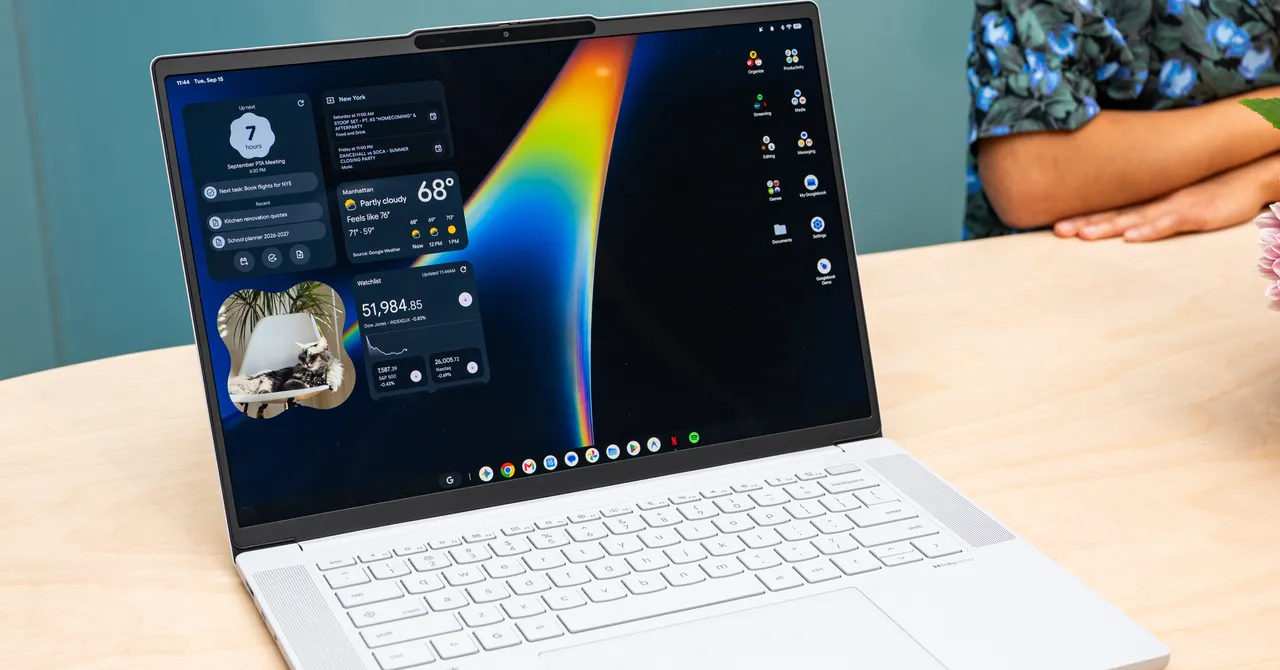
In visual terms, the interface resembles an enlarged Android environment, but Google says the software foundation is more than a scaled-up phone operating system. The platform is designed specifically for modern laptop hardware and for the kinds of workflows people increasingly expect from both mobile and desktop devices.
What comes preloaded and what carries over from your phone?
Googlebook is built to pull key information from an Android phone during setup, including Wi-Fi networks, passwords, settings, messages, contacts and photos. That means users should be able to move into a new laptop with less manual configuration than is typically required on a traditional Windows or macOS machine.
Not every app on a phone will automatically appear on the laptop, however. Google is dividing apps into categories and steering users toward versions that make better sense on a larger screen.
- Made for Desktop apps are designed to feel native on a laptop.
- Optimized for Desktop apps are adapted for larger screens and improved layouts.
- Better on the Website apps are nudged toward the web instead of a mobile-style install.
Google says some apps, including Facebook, will land in the web-first category because they are generally better suited to browser use on the laptop. Users can still install the app if they prefer the phone-like version.
Which laptops are launching first?
The first Googlebook wave includes five models from five manufacturers, all of them premium-minded devices. Four are traditional clamshell laptops, while Acer’s model is a 2-in-1 convertible.
| Model | Manufacturer | Form factor | Starting price | Processor |
|---|---|---|---|---|
| Acer Googlebook 14 | Acer | 2-in-1 | $899 | Snapdragon X Elite or Intel Core Ultra 3 |
| Dell XPS Googlebook | Dell | Clamshell | $1,199 | Snapdragon X Elite or Intel Core Ultra 3 |
| HP Googlebook 14 | HP | Clamshell | $1,299 | Snapdragon X Elite or Intel Core Ultra 3 |
| Lenovo Googlebook 15 | Lenovo | Clamshell | $1,299 | Snapdragon X Elite or Intel Core Ultra 3 |
| Asus Googlebook 14 | Asus | Clamshell | $1,299 | Snapdragon X Elite or Intel Core Ultra 3 |
Every Googlebook purchase includes one year of Google AI Pro with 5 terabytes of storage, a bundle that underscores how central AI and cloud services are to the platform’s pitch.
Why Google is making laptop hardware stricter
Google says Googlebooks must meet a set of standards so that the experience feels consistent regardless of manufacturer. That decision mirrors the way Android phones vary widely in design but still need to meet compatibility rules to carry Google services.
The requirements are meant to push the category toward a clear premium identity. Googlebook machines need lightweight materials such as aluminum, magnesium or carbon fiber, at least 16 GB of RAM, more than 45 TOPS of compute performance, touchscreen displays, backlit keyboards, haptic trackpads, Dolby Atmos speakers, studio-quality microphones with noise cancellation and at least 14 hours of battery life.
Google also says the platform will receive 10 years of software updates, an unusually long support window that could appeal to buyers concerned about longevity and security.
What is the Glowbar and why does it matter?
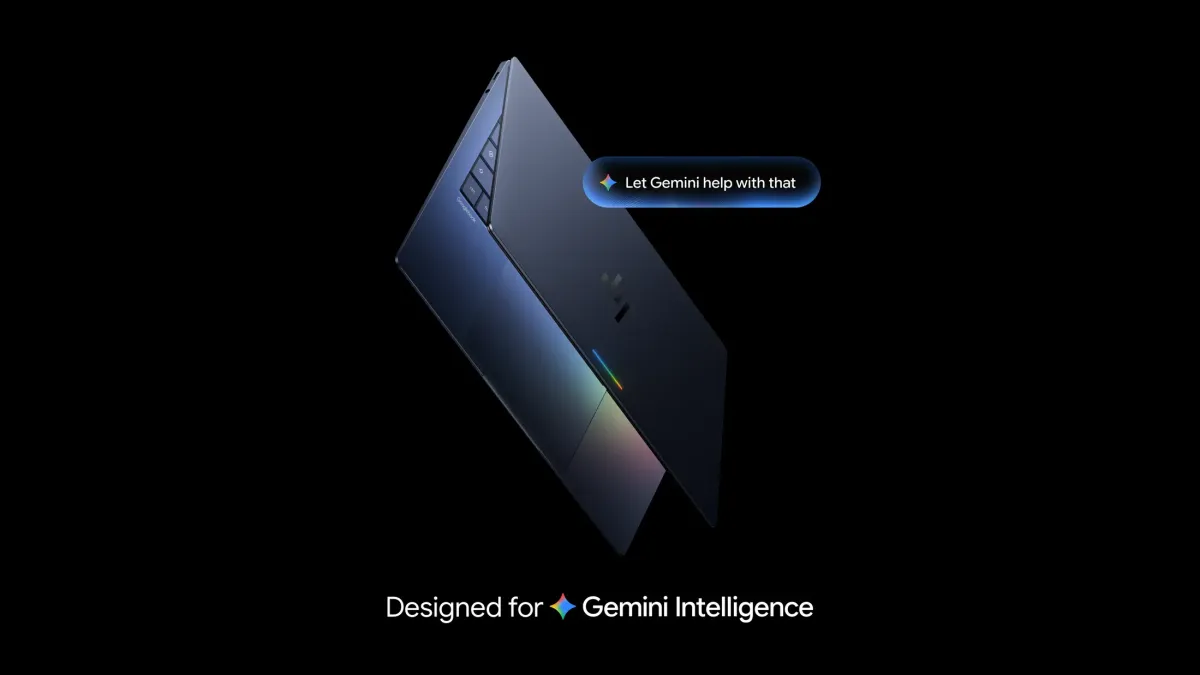
The Glowbar is the signature visual cue that identifies a machine as a Googlebook. The illuminated strip sits on the exterior of the laptop and echoes the glowing accent used on Google’s original Chromebook Pixel.
Beyond branding, the light strip has functional ambitions. Developers can tap into it to trigger custom light behaviors tied to actions inside their apps, and Google is also offering a consumer-facing Easter egg app that lets users change colors and animations themselves. The bar will also light up when Gemini is active, mirroring the visual language Google has been using on its newest Pixel phones.
How AI changes the laptop experience
Googlebook is not simply a laptop with AI features tacked on. The company is putting Gemini at the center of the experience, using it to interpret context, simplify actions and make voice input feel more natural.
One of the headline tools is Magic Pointer. When a user hovers the cursor over something on screen, Gemini can surface context-aware actions. That could mean creating a calendar event from an invitation, identifying a dog breed from an image or warning that an email may be a phishing attempt.
The idea is to make the pointer an entry point into AI assistance rather than a passive cursor. Google says the feature works by understanding the context of whatever the user selects or hovers over.
How does Rambler work?
Rambler is Google’s new voice-to-text feature, and it is built to live across the system rather than inside a single app. Users can call it up with the Quick Insert key and use it in any text field, whether they are composing an email, writing a document or filling out a form.
Google says Rambler does more than simple transcription. It removes filler words, recognizes corrections, supports formatting requests such as bullets or emoji, and can handle mixed-language speech. In effect, it aims to make voice dictation feel like an editing assistant rather than a basic speech engine.
According to Google’s presentation, Rambler is designed to understand not only what users say but what they mean to keep, cut or rephrase.
That emphasis on cleanup and rewriting reflects a broader trend in AI software: the value is shifting from raw transcription toward polished, ready-to-use output.
What Googlebook does for Android app continuity
Googlebook’s strongest consumer pitch may be the way it extends an Android phone onto a bigger screen. That includes direct support for app casting, phone-to-laptop task handoff and broader file search that spans both local storage and the connected phone.
For example, the Files app can search by context instead of exact file name, so typing “dog” could surface matching photos even if the user cannot remember where they were stored. Meanwhile, “Continue on” lets a task started on a phone reappear on the laptop at the same point, reducing the need to start over.
Google is also introducing app-casting for phone-only software, including services like DoorDash, so users can stream those apps to the desktop when there is no native laptop version available.
What about iPhone users?
iPhone owners are not the primary audience for Googlebook, and Google’s cross-platform support reflects that reality. The company is offering a Link to iOS app that can surface messages and some notifications on the desktop, but the experience is far more limited than the integrated Android workflow.
That asymmetry is intentional. Google is trying to create a compelling reason for Android users to stay inside Google’s ecosystem rather than gradually drifting toward the seamlessness Apple customers already enjoy across iPhone and Mac.
Gaming, productivity and the limits of the first wave
Google says Googlebooks will support more than 20,000 games available through the Play Store, with many optimized for cross-device play across phones, tablets and laptops. Roughly half of the top 100 titles are tuned for keyboard, trackpad and touchscreen input, which should give casual gamers a broad catalog to choose from.
Still, Googlebooks are not gaming rigs. They do not include discrete graphics cards, and users will not be able to download the latest AAA titles locally in the way they might on a high-end Windows machine.
To fill that gap, Google is bundling one year of Nvidia’s GeForce Now streaming service, which is optimized for the platform. That gives the company a way to offer gaming access without requiring the laptop hardware to carry the load on its own.
Why the launch matters for Google’s hardware strategy
The arrival of Googlebook is significant because it suggests Google wants a more cohesive hardware story across phones, tablets and laptops. For years, its computing strategy has relied on Android on one side and Chromebooks on the other, with limited overlap in how those products felt or functioned.
Now Google is trying to move from parallel product lines to a more unified ecosystem. If it works, the company could make Android feel less like a phone-only platform and more like a true computing environment spanning multiple device categories.
The launch also puts pressure on competitors by redefining what a modern laptop should do out of the box. Instead of focusing solely on hardware benchmarks or traditional desktop software, Google is betting that buyers will value continuity, AI assistance and long-term platform support as much as raw specs.
Timeline: How Googlebook came together
The company’s rollout has been unfolding in stages for months, and the launch this week is the most concrete sign yet that Google intends to push the category into the market.
| Milestone | What happened | Why it matters |
|---|---|---|
| May 2026 | Google first teased Googlebook | Signaled a new laptop strategy beyond Chromebooks |
| September 2026 | Google outlined the platform at a New York media event | Revealed hardware partners, features and standards |
| September 2026 | Preorders opened for the first five models | Marked the first commercial availability |
| October 4, 2026 | Retail availability begins | Consumers can buy the first Googlebook laptops |
What happens next?
Googlebook’s success will depend on whether users see enough value in the promise of seamless Android continuity to choose it over established Windows laptops or MacBooks. It will also depend on developers embracing the new app tiers and building software that takes advantage of the larger screen and AI tools.
Google is clearly aiming high. By combining premium hardware standards, a stricter software model, AI-driven productivity tools and deep Android integration, the company is making its strongest argument yet that the laptop market has room for a new category.
For Android users who have long watched Apple’s ecosystem deliver that coveted handoff between phone and computer, Googlebook is the closest thing yet to a native equivalent. Whether it becomes a real competitor or another ambitious platform experiment will likely depend on how quickly Google can turn the concept into everyday habit.
Frequently asked questions
What is Googlebook?
Googlebook is Google’s new laptop platform designed to bring Android-style continuity, AI tools and premium hardware to personal computers. It is not just a Chromebook rename; Google says it is a distinct operating system optimized for modern laptop chips and deeper phone integration.
When will Googlebook laptops be available?
Googlebook laptops are available for preorder now and will go on sale on October 4. The first wave includes models from Acer, Dell, HP, Lenovo and Asus, with prices starting at $899.
How is Googlebook different from Chromebooks?
Googlebook is different from Chromebooks because it targets a more premium segment and adds stronger Android continuity, AI features and stricter hardware requirements. Google says Chromebooks will still exist, especially for education and budget buyers, but Googlebook is a separate class of device.
Does Googlebook work with iPhones?
Googlebook has limited support for iPhones through a Link to iOS app that can surface messages and some notifications. However, the full seamless experience is designed for Android phones, so iPhone users will not get the same level of integration.
What AI features are built into Googlebook?
Googlebook includes features such as Magic Pointer, which suggests contextual actions when you hover over items on screen, and Rambler, a voice-to-text tool that removes filler words, supports formatting and works in any text field.