
In short
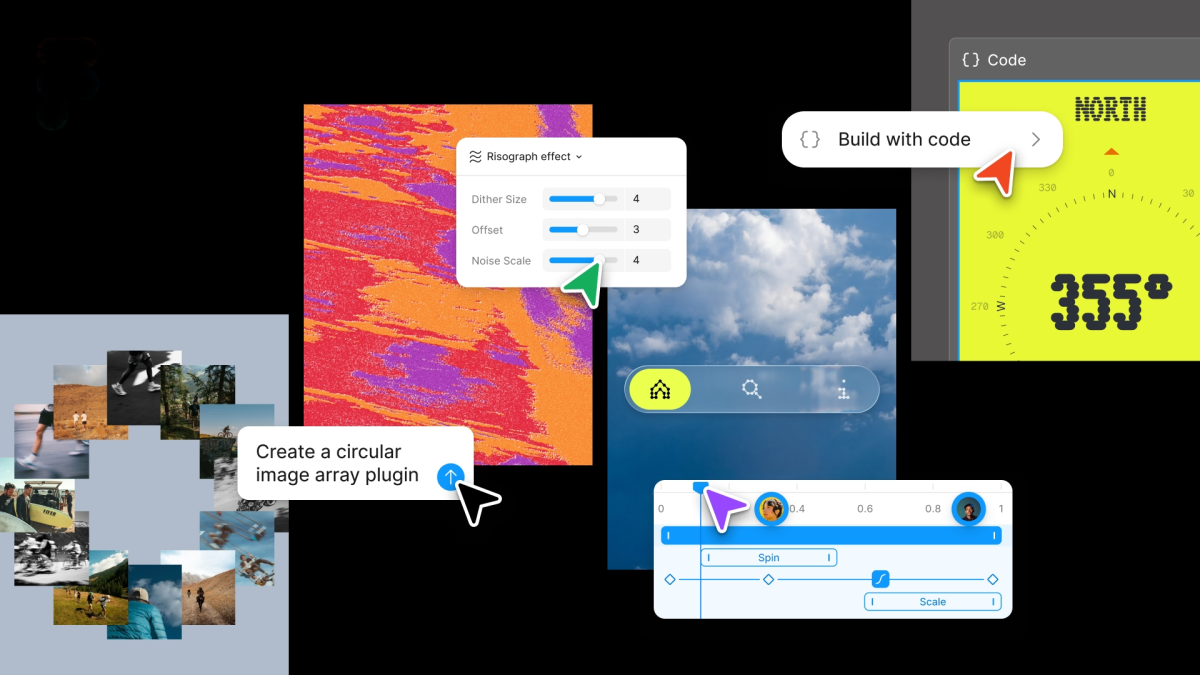
Figma has rolled out a major update that brings code layers, motion support, shader effects and custom AI workflows into its collaborative design canvas. The changes are aimed at making the platform more useful for designers, engineers and product teams working together earlier in the product process.
- Figma is adding code layers directly to its collaborative canvas.
- The platform now supports animations, transitions, 3D transforms and AI-generated shader effects.
- Users can create reusable AI skills, connect external tools and build custom plugins with prompts.
- Figma plans to generate Weavy workflows inside the app later this year.
Figma is broadening the scope of what its design platform can do, unveiling a major update that brings code layers directly into the collaborative canvas, adds support for motion and shader effects, and expands the ways teams can build custom AI-powered workflows inside the product.
The latest release is part of a wider effort by Figma to make design, prototyping, and engineering feel less like separate handoffs and more like a shared workspace. The company has spent the past year tightening its ties to code, including integrations with coding tools and an earlier AI-driven prototyping feature. Now it is moving further in that direction by embedding more of the logic and iteration process inside Figma itself.
For designers, product managers, and engineers, the update points to a future where early product exploration happens inside a single environment rather than across a chain of disconnected tools. That shift could make Figma more useful not just for mockups, but for the messy, collaborative process of figuring out what should be built in the first place.
Code layers move closer to the design surface
The most notable addition is the new code layer feature, which places code more directly into Figma’s multiplayer canvas. Instead of treating code as something that only appears after a design has been approved, teams can now bring repositories and code structures into the design space and work from there.
According to the company, the goal is to help teams clone repositories and pull product flows from code into design layers for experimentation and testing. In practical terms, that means teams can inspect how something is implemented, shape new ideas around it, and rapidly explore alternatives without having to worry about producing production-ready code during the early stages of work.
Figma’s product leadership said the collaborative canvas is most valuable when teams are exploring ideas quickly, because the priority in that setting is iteration rather than polished output. The company’s view is that this approach should change how designers, engineers and product managers all work together.
That philosophy reflects one of the main tensions in modern product development: design tools are increasingly expected to do more than produce visuals, while engineering tools are being asked to support more early-stage thinking. Figma’s new code layers sit right in the middle of that overlap.
Why this matters for teams
Figma has long positioned itself as a collaborative platform, but the move to include code more directly in the canvas gives that collaboration a stronger technical foundation. It may be especially useful for companies where designers and engineers frequently revisit the same idea from different angles and need a shared reference point.
Rather than forcing teams to move immediately from static mockup to implementation, code layers can help bridge the gap between concept and build. That can reduce context switching, which is often one of the biggest sources of friction in product development.
- Designers can work closer to the technical reality of a feature.
- Engineers can inspect and iterate on flows earlier in the process.
- Product managers can compare directions without waiting on separate prototypes.
Motion, transitions and shader effects arrive in Figma
Figma is also adding support for motion, including animations, transitions and 3D transforms. This is a meaningful expansion because interactive behavior has traditionally been handled outside the design file, either in separate tools or through code-heavy workflows.
Until now, teams that wanted motion-rich prototypes often had to design the animation elsewhere and then translate that work into a format Figma could understand. The new update brings those capabilities into the product itself, allowing animation and transition work to live inside the same collaborative environment as the rest of the design.
That change matters because modern interfaces are increasingly defined not just by layout and color, but by movement. Subtle transitions, loading states and animated responses are often part of the product experience, especially in mobile and consumer-facing software. Bringing those tools into Figma gives teams a more direct way to think about interaction design.
Direct support for richer UI experimentation
The update also adds shader effects and fills, with AI support helping users generate some of these assets. This means Figma is not only expanding what can be represented in the canvas, but also using AI to help create more visually sophisticated components faster.
Shader effects can be important for teams working on polished product branding, immersive interface treatments, or more experimental visual styles. By pairing those features with AI generation, Figma is trying to lower the barrier to trying out advanced effects that may previously have required specialized design or development work.
| Feature | What it does | Why it matters |
|---|---|---|
| Code layers | Brings code into the collaborative canvas | Helps teams explore ideas and flows without leaving Figma |
| Motion support | Adds animations, transitions and 3D transforms | Makes interactive prototyping more native and less fragmented |
| AI shader tools | Generates shader effects and fills with AI | Speeds up experimentation with richer visual treatments |
| Custom skills | Creates repeatable AI agent instructions | Lets teams automate recurring tasks in their own way |
| Prompt-built plugins | Generates custom plugins from text prompts | Extends Figma for specific workflows without deep coding |
Figma is turning its AI assistant into a workflow engine
Beyond visual and code features, the update includes a broader push to make Figma’s AI assistant more useful for repeatable work. Users can now write text prompts that define “skills” the AI can reuse, turning one-off instructions into reusable tasks that agents can follow inside the canvas.
The company is also adding the ability to connect outside tools such as Notion, Granola, Excel and GitHub, or attach files so the assistant has more context. That makes the system more capable of handling real work rather than only responding to isolated prompts.
In effect, Figma appears to be evolving its AI assistant from a helper that answers questions into something closer to a workflow layer. If the assistant can remember instructions, pull in context from other tools and repeat tasks reliably, it becomes much more valuable for product teams with recurring design chores or cross-functional tasks.
What custom skills could enable
Custom skills are especially interesting because they suggest a move toward agent-like behavior inside a design environment. Teams could create internal routines for things such as naming assets, comparing variations, generating summaries, or preparing files for review.
That kind of automation can save time, but it also raises the bar for how clearly teams define their workflows. A skill is only useful if it reflects the way people already work, so the success of this feature may depend on whether it is easy to create, refine and share inside larger organizations.
- Repeatable design operations can be standardized.
- Cross-tool context can reduce manual copying and pasting.
- Teams may be able to offload routine steps to AI agents.
Weavy and Figma’s push toward multi-model workflows
The update also reflects Figma’s recent acquisition of Weavy, a node-based tool that lets designers route workflows through multiple models and compare outputs. The company acquired the product last year and is now working to bring the two experiences closer together.
Later this year, Figma says users will be able to generate Weavy workflows directly from inside Figma. That would create a more seamless path from a design task to a more complex AI workflow, which could matter for teams testing different models or comparing how various systems handle a creative or production request.
Weavy’s role is important because it signals that Figma does not want to limit AI to a single helper function. Instead, it appears to be building toward a layered system where users can create, compare and refine outputs in ways that are more flexible than a single chat interface.
From design software to orchestration layer
If the integration works as planned, Figma could become more than a design tool with AI features bolted on. It would start to look like an orchestration layer for creative and product work, where teams can move from concept to automation without leaving the platform.
That would place Figma in a broader industry trend: software vendors are racing to turn AI from a standalone novelty into something embedded in core workflows. In design software, that means going beyond generation and into actual process management.
A broader strategy to reduce friction between design and engineering
The latest update builds on a clear pattern. Figma has been working for some time to reduce the handoff gap between people who design products and the people who build them. Last year, it introduced Figma Make, a prompt-based prototyping tool, and it has since added support for coding tools including Claude Code and Codex to strengthen the path from concept to implementation.
That direction is no surprise. As product development cycles get shorter and AI tools make it easier to generate interfaces quickly, the value increasingly lies in coordination, review and iteration. Figma’s advantage has always been collaboration, and these updates extend that strength into more technical parts of the workflow.
Rather than serving only as a place where finished designs are handed over, Figma wants to be where ideas are tested, code is referenced, motion is explored, and AI helps fill in the repetitive work.
How this fits the market
Competition in creative software has shifted rapidly as AI changes user expectations. Customers now want tools that do more of the mundane work, integrate with other systems and adapt to different stages of product development. Figma’s response is to lean into flexibility and collaboration rather than isolate AI in a separate tool.
That strategy may also help the company defend its position against products that focus narrowly on generation, since Figma is not simply offering asset creation. It is trying to embed creation inside a broader collaborative system.
What users can expect next
Some parts of the update are available now, while others will arrive later in the year. The company’s staggered rollout suggests it is still refining how these features fit together, especially as it merges the Weavy experience and deepens the connection between code, design and AI agents.
For users, the practical effect will likely be gradual at first. Teams may begin by testing code layers for exploration, then move into motion tools for richer prototypes, and later incorporate AI skills and custom plugin generation as those features mature.
The real test will be whether these additions feel like natural extensions of the core Figma experience or like separate tools living under the same brand. If Figma gets the integration right, the update could make the platform a more central hub for product teams than ever before.
Key dates and product milestones
| Timing | Milestone | Significance |
|---|---|---|
| Last year | Figma launches Figma Make | Introduced prompt-based prototyping |
| Last year | Acquires Weavy | Expanded multi-model workflow capabilities |
| Earlier this year | Adds Claude Code and Codex integrations | Strengthened design-to-code handoff |
| Wednesday update | Announces code layers, motion support and AI tools | Deepens collaboration between design, engineering and automation |
| Later this year | Weavy workflows inside Figma | Brings advanced AI workflows into the canvas |
The bigger picture: Figma wants to be where products are built
This release shows Figma pressing toward a larger ambition: becoming the place where product ideas are not just visualized, but actively developed. By adding code layers, motion, AI-generated effects and custom agent workflows, the company is trying to make the design canvas more useful at every step of the product lifecycle.
That ambition is especially important in an era when teams are under pressure to ship faster with fewer people. Tools that reduce friction between departments and automate routine steps can have an outsized impact. Figma is betting that the best way to serve that demand is to make the collaborative canvas smart enough to handle more of the work itself.
The update does not turn Figma into a coding environment or a full automation platform on its own. But it does make the product feel more integrated, more technically aware and more aligned with the realities of modern product development. For a company built on collaboration, that may be exactly the point.
As AI continues to reshape creative software, the companies that win may be the ones that can combine generation, iteration and teamwork inside one coherent experience. Figma’s latest move suggests it intends to be in that group.