In short
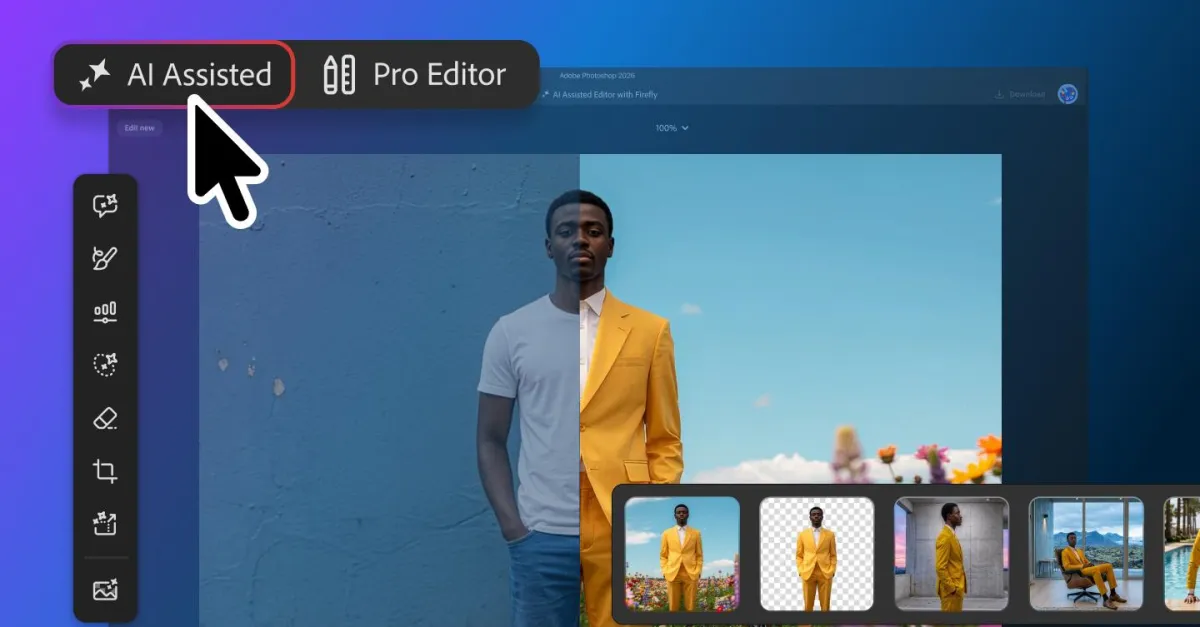
Adobe is launching a beta AI Assisted Editor for Photoshop that consolidates its AI tools into a simplified interface. The update also adds markup-based editing and smarter mask refinement powered by Firefly Image 5.
- Adobe is adding an optional AI Assisted Editor to Photoshop in beta.
- The new interface groups AI tools into a single toolbar for easier access.
- Users can now guide edits by drawing directly on images instead of only typing prompts.
- Firefly Image 5 improves Photoshop’s understanding of full-image context for mask edits.
Adobe is expanding Photoshop with a new beta interface called AI Assisted Editor, a simplified workspace that gathers the app’s AI tools into one toolbar and adds new ways to edit images without relying only on text prompts. The update matters because it pushes Photoshop further toward faster, more intuitive AI-assisted creation for professionals and casual users alike.
The company says the new view is optional and is designed to make its AI features easier to find and use. Alongside the new interface, Adobe is also improving mask-based editing and adding a markup system that lets users point, sketch, or highlight directly on an image to describe what should change.
What Adobe is changing in Photoshop
Adobe’s latest Photoshop update is centered on accessibility and speed. Rather than forcing users to hunt through menus or type detailed instructions every time, the company is introducing a dedicated workspace that surfaces its AI tools in one place.
The new AI Assisted Editor is launching in beta and is designed as an optional mode. In practical terms, that means users who want a traditional Photoshop layout can keep using it, while others can switch to an interface built around generative and assisted editing.
Inside that view, Adobe is grouping several of its AI-powered tools together, including prompt-based image editing, background removal, image expansion, and related features that automate common production tasks. The goal is to make AI editing feel less like a separate add-on and more like a core part of the workflow.
How the new AI Assisted Editor works
The new interface is meant to reduce friction. Instead of jumping between panels, users will see a single toolbar that concentrates Photoshop’s AI capabilities in one location.
That matters because AI features in creative software are often powerful but hard to discover. By placing them together, Adobe is effectively creating an entry point for users who want quick edits, faster retouching, or image manipulation without needing deep technical knowledge.
What tools are included?
Adobe says the new editor brings together a number of its existing AI features. These include the prompt-driven editor, background removal, and image extension tools that can expand or reframe a photo beyond its original boundaries.
The company is also adding new editing options built around direct interaction with the image itself. Rather than asking users to type out every change, Adobe wants them to be able to indicate intent visually.
- Prompt-based image editing
- Background removal
- AI image extension
- Direct markup editing
- Natural-language mask refinement
Why Adobe is adding markup-based editing
Adobe is adding markup because not every editing task is easy to describe in words. Many users know what they want to change, but not always how to phrase it well enough for a prompt interface to interpret accurately.
With the new markup feature, users can draw directly on an image to guide the assistant. Adobe says people will be able to mark areas for recoloring, sketch arrows to show where something should move, or draw rough outlines to suggest new objects or shapes.
This approach blends the familiarity of manual editing with the convenience of AI. It may be especially useful for designers, marketers, and content creators who work quickly and need a more visual way to communicate with the software.
Adobe says the markup system allows people to select regions for recoloring, indicate placement with arrows, or sketch rough forms to hint at new elements, all without relying on a text prompt alone.
How does mask editing change with Firefly Image 5?
Adobe is also updating its Instruct Edit with Masks feature, which lets users modify selected areas of an image using natural language. The company says its Firefly Image 5 model now has a better grasp of the full image context, reducing the need to manually outline every section that needs changing.
That improvement could make a big difference in workflows where precision matters. In the past, mask-based editing often required careful selection work before a prompt could be applied. Adobe now says users can describe the change they want more naturally, and the model should understand the broader scene well enough to act on it.
Examples Adobe highlighted include opening a person’s closed eyes or adding a hat to someone in a photo. Those are the kinds of edits that can be awkward in traditional software but are increasingly becoming routine targets for generative image models.
Why this matters for creative professionals
The shift is important because Photoshop remains a standard tool in professional imaging, and small changes to its workflow can influence how millions of people work. Adobe is not only adding features; it is also reshaping the interaction model around AI assistance.
For editors, photographers, and designers, the appeal is obvious:
- less manual selection work
- fewer steps to complete common edits
- more intuitive communication with AI tools
- faster experimentation during early design stages
At the same time, Adobe is being careful to keep the changes optional. That is a notable signal that the company understands some professionals may want to explore AI tools without abandoning the classic Photoshop environment.
Adobe’s broader AI strategy in creative software
This Photoshop update fits into Adobe’s larger push to make generative AI central to its product lineup. Over the past year, the company has increasingly framed AI not as a novelty but as a fundamental shift in how creative work gets done.
That strategy has centered on Firefly, Adobe’s family of AI models and features, which are being integrated across its design and media products. In Photoshop, that means the company is moving beyond isolated AI experiments and toward a more integrated editing system.
Adobe appears to be making a calculated bet: if AI tools are easier to use and easier to find, more creators will incorporate them into everyday work. The new editor is part of that effort to lower the barrier between traditional editing and AI-assisted production.
What Adobe is trying to solve
The core problem Adobe is addressing is usability. Generative tools are often impressive, but users can struggle with scattered interfaces, complex prompts, or awkward selection steps.
By adding an AI-focused workspace, Adobe is trying to make the process feel more natural. Instead of asking users to adapt themselves to the software, the software is adapting to the way people already think about images.
That is where the markup feature becomes especially interesting. It moves Photoshop closer to a visual conversation: point here, remove that, move this object over there, enlarge that area, or change this color. In other words, the software becomes less about tool mastery and more about communicating intent.
Comparison of the new Photoshop AI tools
The table below summarizes the main additions and how they differ from older editing habits.
| Feature | What it does | Why it matters |
|---|---|---|
| AI Assisted Editor | Collects AI tools into a single optional interface | Makes Photoshop’s AI features easier to find and use |
| Markup editing | Lets users draw on an image to direct changes | Reduces dependence on text prompts |
| Instruct Edit with Masks | Edits selected areas using natural language | Simplifies targeted changes |
| Firefly Image 5 context awareness | Understands more of the full image scene | Less manual masking and more accurate edits |
What this means for Photoshop users
For existing Photoshop users, the update is likely to be welcome because it offers flexibility rather than forcing a redesign. The optional nature of the new interface means people can try the AI-assisted workflow without giving up the familiar version of the app.
For newer users, the update may make Photoshop less intimidating. A simplified AI toolbar could provide a clearer starting point for background removal, object replacement, and other tasks that once required more advanced know-how.
It is also a sign that Adobe is increasingly treating AI as a user-interface challenge as much as a model capability challenge. Better models matter, but the way people reach those models may matter just as much.
Why this update arrives now
Adobe’s move comes amid a wider industry race to make AI more embedded, more conversational, and more visual. Creative software makers are competing not only on the quality of their models but on how seamlessly those models fit into everyday tools.
Photoshop has long been a benchmark for digital image editing, and Adobe is under pressure to keep evolving the product without alienating power users. An optional AI workspace is a practical compromise: ambitious enough to show progress, but not so disruptive that it replaces the interface professionals already know.
That balance may be critical as users become more selective about which AI tools they trust. Many creators want faster results, but they also want control, predictability, and a way to override automation when necessary.
The bigger picture for Adobe and creative AI
Adobe’s latest Photoshop release shows that the company is still leaning hard into AI-assisted creation, but with a more polished and user-friendly pitch. The focus is no longer just on what the model can generate; it is also on how easily users can instruct it.
If the beta performs well, the AI Assisted Editor could become a template for future Adobe products. The company has already been expanding AI assistance across its ecosystem, and Photoshop remains the most visible place to demonstrate how those tools can be folded into mainstream creative work.
For now, the update represents another step in Photoshop’s gradual transformation from a manual editing suite into a hybrid workspace where human judgment and machine assistance increasingly work side by side.
Key facts at a glance
Here is a quick summary of the update and what Adobe is changing.
| Item | Details |
|---|---|
| Product | Adobe Photoshop |
| New feature | AI Assisted Editor |
| Status | Beta launch |
| Interface | Optional AI-focused toolbar and workspace |
| Notable additions | Markup editing, improved masks, Firefly Image 5 enhancements |
| Main benefit | Faster, more intuitive AI-assisted image editing |
What happens next?
Adobe has not said when the beta will become widely available or whether the AI Assisted Editor will eventually become part of the default Photoshop experience. For now, the company is positioning it as a testbed for a more streamlined approach to image editing.
What is clear is that Adobe sees AI not as a side feature, but as a central part of Photoshop’s future. The company’s latest update suggests it wants users to edit images in a way that feels more direct, more visual, and less dependent on technical commands.
That could reshape how people interact with the world’s best-known image editor over time, especially if the new tools prove useful enough to become a regular part of the creative process.
FAQ
What is Adobe’s AI Assisted Editor in Photoshop?
Adobe’s AI Assisted Editor is an optional beta interface that brings Photoshop’s AI tools into one simplified toolbar. It is designed to make prompt-based editing, background removal, image expansion, and related AI features easier to access and use.
How is the new markup feature different from text prompts?
The markup feature lets users draw directly on an image to show Photoshop what they want changed. Instead of typing instructions alone, users can sketch, circle, or point to areas, which can make editing more intuitive and precise.
What does Firefly Image 5 improve?
Firefly Image 5 improves Photoshop’s understanding of image context, especially in the Instruct Edit with Masks feature. Adobe says this means users will not need to manually mark as much of the image before asking the AI to make a change.
Is the new AI interface replacing the standard Photoshop layout?
No, the new interface is optional. Adobe is launching it as a beta workspace, which means users can try the AI-focused version while still keeping the traditional Photoshop layout if they prefer.
Why does this Photoshop update matter?
This update matters because it shows Adobe is pushing AI deeper into the everyday editing workflow. By making the tools easier to find and easier to direct, Adobe is trying to make image editing faster, simpler, and more accessible for a wider range of users.
Reporting based on Adobe’s Photoshop update announced August 27, 2026.
Frequently asked questions
What is Adobe’s AI Assisted Editor in Photoshop?
Adobe’s AI Assisted Editor is an optional beta workspace that puts Photoshop’s AI tools into one simplified toolbar. It is intended to make prompt-based editing, background removal, image extension, and other AI features easier to find and use.
How does Adobe’s new markup feature work?
Adobe’s new markup feature works by letting users draw directly on an image to communicate changes visually. People can circle areas, sketch arrows, or roughly outline shapes to tell Photoshop what to recolor, move, or add.
What does Firefly Image 5 improve in Photoshop?
Firefly Image 5 improves Photoshop’s ability to understand the broader context of an image. That makes mask-based editing easier because users do not need to manually define every area before asking the AI to make a change.
Is the AI Assisted Editor replacing the normal Photoshop layout?
No, the AI Assisted Editor is optional. Adobe is launching it as a beta interface, so users can try the AI-focused layout without abandoning the standard Photoshop workspace.