In short
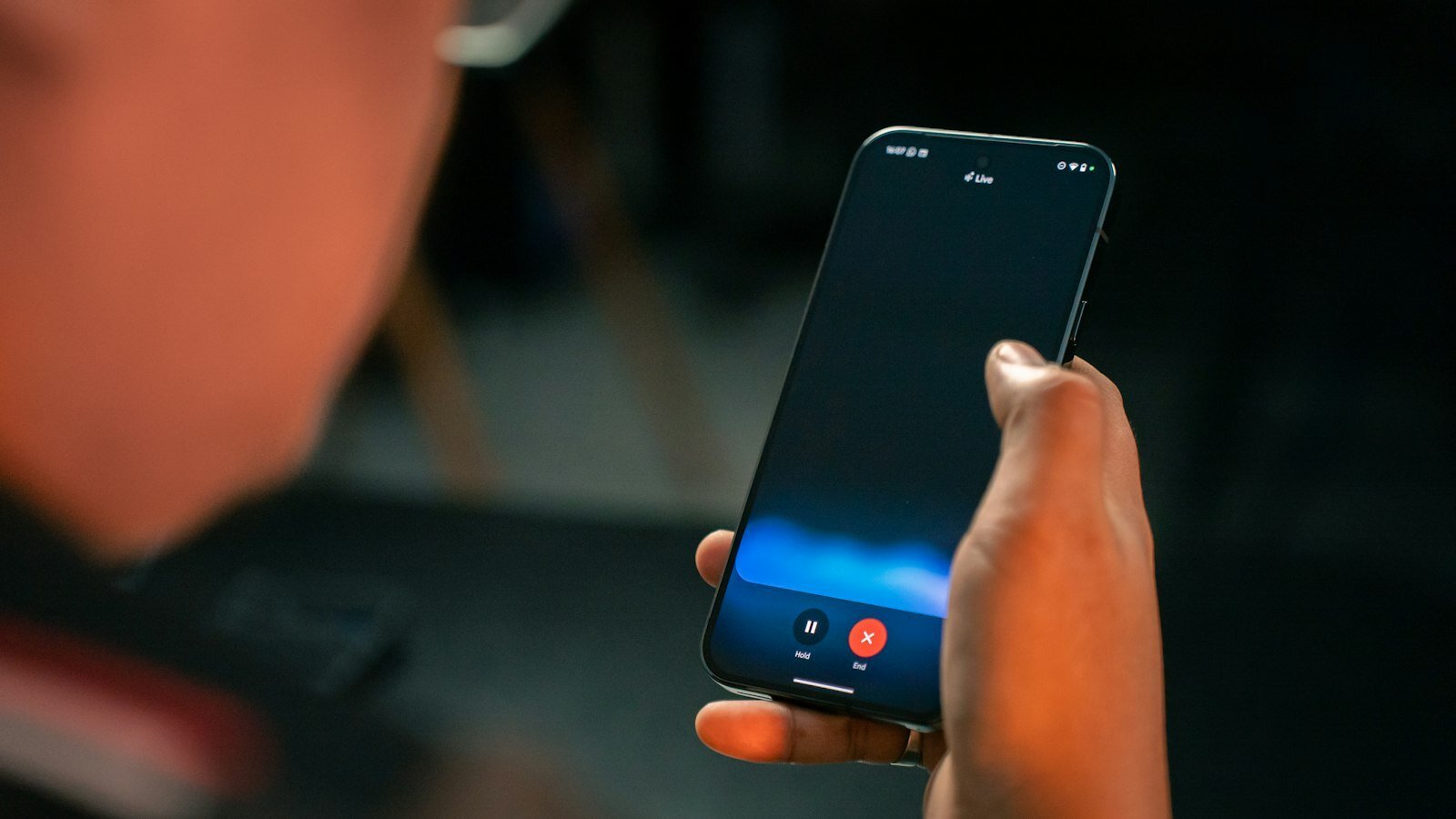
Google is testing a Pixel 11 feature that lets Gemini make business phone calls for users, from reservations to appointment changes. The AI can wait on hold and handle menus, while the user watches a live transcript and can take over at any time.
- Google is launching an early Pixel 11 preview that lets Gemini place business calls for users.
- The AI can navigate phone menus, wait on hold and speak with business staff directly.
- Users keep control through a live transcript and can take over the call whenever they want.
- The feature starts in the US for Gemini paid subscribers in the Phone by Google Public Beta.
- The launch highlights the shift from chatbots to agentic AI that completes real tasks.
Google is rolling out a new Pixel 11 feature that lets Gemini make business phone calls on a user’s behalf, handling tasks such as booking reservations, checking product availability and rescheduling appointments. The move matters because it pushes consumer AI beyond chat and into a real-world workflow that many people still find frustrating: waiting on hold and navigating phone trees.
The feature is being introduced as an early experiment in the United States for eligible Pixel 11 owners, and Google says users can monitor the conversation in real time, jump in whenever they want, and fully take over the call if needed. That combination of delegation and oversight is the key selling point: the AI does the waiting, but the human stays in control.
What Google is launching on Pixel 11
Google’s latest Pixel 11 addition gives Gemini the ability to place calls to local businesses and manage the exchange from start to finish. Rather than forcing users to dial, wait for a representative or work through automated menus themselves, the assistant can call a business, introduce itself and carry the conversation forward.
According to Google’s description, the feature is designed to make common errands less time-consuming. The company says it can be used for practical tasks including asking about inventory, making reservations and changing existing appointments.
The feature is not a broad rollout to every phone or every Gemini user. Google is framing it as an “early preview,” and the initial availability is narrow: Gemini paid subscribers in the Phone by Google Public Beta on Pixel 11 devices in the US.
How does Gemini’s call feature work?
Gemini’s calling tool works by acting as a proxy for the user during a phone call with a business. Once a user asks Gemini to place the call, the assistant handles the opening exchange, gets through the business’s automated prompts and can wait until a person picks up.
Google says the user can watch the conversation unfold through a live transcript and can step in at any moment. That distinction is important. The company is not presenting the feature as a fully autonomous replacement for the user, but as a supervised assistant that can do the tedious parts while leaving the final say to the human.
Google says Gemini will “call the business, introduce itself, navigate automated phone menus, wait on hold, and handle the conversation with the person on the other end,” while the user can monitor the interaction in a live transcript and take over whenever desired.
Why the control layer matters
The ability to take over is likely central to how Google expects people to trust the tool. Phone calls are unpredictable, and even a simple request can turn awkward if a business asks for details Gemini does not have, or if the user decides to clarify something mid-call.
That is why the transcript view matters as much as the calling itself. It turns a black-box action into something more like a shared workspace, where the user can check what the AI said, confirm details and intervene before a misunderstanding becomes a bad reservation or a missed appointment.
Why this feature could matter for everyday users
This is one of the clearest examples yet of AI moving from a novelty into a utility. Many consumer AI tools still focus on generating text, summarizing content or helping with brainstorming. By contrast, Gemini’s business-calling feature addresses a universal annoyance that has changed little in decades.
For users, the appeal is immediate. Calling a store to ask whether a product is in stock, phoning a salon to move an appointment or checking if a restaurant can fit in an extra guest are all small tasks, but they add friction to daily life. If Gemini can complete even part of that workload, it makes the phone less of a chore.
It also plays directly into the broader market race around agentic AI, where assistants do not just answer questions but complete tasks. The more an AI can act on behalf of a user, the more valuable it becomes, especially when the task involves an old-fashioned medium like voice calls.
What kinds of calls can Gemini handle?
Google says the feature is built for local business interactions, not for every type of call. The examples it gave include reservations, product-stock checks and appointment changes, all of which are common, bounded and relatively predictable.
That scope suggests Google is starting with simpler, lower-risk scenarios rather than trying to automate more sensitive calls. In practice, that may make the feature more reliable and reduce the chances of awkward errors.
- Making a reservation
- Checking product availability
- Rescheduling an appointment
- Working through automated phone menus
- Waiting on hold until a person answers
How is this different from Google’s earlier call tools?
This is an evolution of a similar idea Google introduced last year. The earlier “Call for me” feature also let AI contact local businesses, but it was narrower and did not give users the same live takeover option.
In other words, Google has moved from AI making a call on the user’s behalf to AI making the call while the user remains actively present. That may sound subtle, but it changes the product from a hands-off convenience into a more transparent collaboration between person and machine.
The newer version also appears more tightly tied to Gemini and the Pixel ecosystem, reinforcing Google’s strategy of using its own hardware to showcase features that might not be available everywhere else.
Who gets access first?
Google is limiting the initial release to a specific group: Gemini paid subscribers enrolled in the Phone by Google Public Beta on Pixel 11 phones in the United States. That is a relatively small audience, which is typical for an early experiment that may still need refinement before it is expanded.
The restricted launch also gives Google room to collect feedback on how well the AI handles real calls, how often users intervene and whether businesses respond smoothly to an AI caller. Those details will likely shape whether the company broadens access later.
| Feature | Details |
|---|---|
| Device | Pixel 11 |
| Assistant | Gemini |
| Availability | Early preview / public beta |
| Eligible users | Gemini paid subscribers in the US |
| Business tasks | Reservations, stock checks, appointment changes |
| User control | Live transcript and manual takeover |
What does this say about Google’s AI strategy?
The new feature shows Google trying to make Gemini useful in ways that feel tangible rather than experimental. Voice calls are not glamorous, but they are still one of the most common ways people interact with businesses, especially local ones.
That makes the Pixel 11 feature strategically valuable. If Google can prove that Gemini reliably handles calls, it strengthens the company’s argument that its AI is not just a chatbot but an operational assistant built into daily life.
It also gives Google another way to differentiate Pixel phones from other Android devices. Hardware features that blend on-device software with cloud-powered AI are increasingly important in the smartphone market, where many specs are similar and software experiences can be the real differentiator.
Why business calling is a smart AI test case
Business calling is a smart test case because the setting is constrained but still meaningful. The assistant only needs to manage a limited set of goals, but the user experience still feels practical and valuable.
It is also one of the few areas where people may happily let AI do the waiting. Few consumers enjoy being stuck on hold, and even fewer mind handing that task over to a machine as long as the machine reports back accurately.
That makes this feature a useful barometer for consumer appetite for AI delegation. If users embrace it, other supervised agent features could follow across messaging, scheduling and customer service.
How does it compare with competitors?
Google is not the only company exploring automated calling. Meta is reportedly working on a similar capability for its Muse AI agent, although those calls may involve human operators behind the scenes. That suggests the industry is converging on the same idea from different angles: AI as the front end for repetitive communication tasks.
The competitive difference matters. Google is emphasizing a live transcript and user takeover, which makes the process look more transparent and more clearly AI-driven. If competitors rely on hidden human labor or less visible delegation, Google may be trying to position Gemini as the more authentic automation story.
That said, the practical winner will likely be the product that works most reliably rather than the one with the most elegant branding. Phone-based AI is only useful if it can survive real-world hold times, voice menus, interruptions and the variability of human conversation.
What are the risks and limitations?
Like any early AI feature, this one carries obvious limitations. Businesses may not respond smoothly to an AI caller, automated menus can be inconsistent, and the assistant may struggle with unusual requests or unexpected questions.
There are also trust questions. Even with user oversight, some people may hesitate to let AI speak for them on the phone, especially when money, reservations or personal details are involved. The live transcript helps, but it does not eliminate the possibility of misunderstandings.
Another limitation is access. Because the feature is initially tied to Pixel 11 in beta and limited to paid Gemini subscribers in the US, most users will not be able to try it right away. That may be frustrating, but it also signals that Google is treating the release as a controlled test rather than a finished consumer product.
Timeline of Google’s AI calling push
Google’s latest move did not appear out of nowhere. It is part of a broader progression toward more task-oriented assistants.
| When | Milestone | Why it mattered |
|---|---|---|
| Last year | Google introduced “Call for me” | Showed interest in AI making business calls for users |
| Now | Gemini calling arrives on Pixel 11 | Adds live transcript and takeover controls |
| Today | Early preview begins in the US | Starts real-world testing with a limited user group |
What happens next?
The most important question is whether users actually adopt the feature once they try it. If the experience saves time and feels trustworthy, Google could expand it beyond this initial preview. If the calls are awkward, slow or inaccurate, the company may need to adjust before making it more widely available.
For now, the Pixel 11 feature is best understood as a practical experiment in agentic AI. It is not trying to replace human judgment; it is trying to remove one of the most tedious parts of routine communication. That may be exactly where consumer AI finds its strongest use case.
In a market crowded with assistants that can talk about tasks, Google is betting that people will value one that can actually do them.
Bottom line: Gemini’s new phone-calling feature is a small but telling step in the evolution of consumer AI, turning a chatbot into a delegated helper that can wait on hold, navigate menus and speak for the user — all while leaving the final control in human hands.
Frequently asked questions
What can Gemini do with business phone calls on Pixel 11?
Gemini can make calls to local businesses on a user’s behalf, including tasks such as making reservations, checking product availability and rescheduling appointments. Google says it can also handle automated menus and wait on hold until a person answers.
Who can use Google’s new Gemini calling feature first?
The feature is initially available to Gemini paid subscribers who are enrolled in the Phone by Google Public Beta on Pixel 11 devices in the United States. Google is treating it as an early preview, so access is limited at launch.
Can users take over a Gemini phone call?
Yes. Google says users can follow the call through a live transcript and step in at any point. That lets people correct details, answer questions or fully take control if the conversation becomes complicated.
How is this different from Google’s earlier Call for me feature?
This version is more interactive and transparent. Google’s earlier Call for me tool could contact businesses, but the new Pixel 11 feature adds live monitoring and the ability for users to take over the call in real time.
Why is this feature important for Google?
This feature matters because it moves Gemini from answering questions to completing practical tasks. By handling phone calls, Google is showing how AI can take over a frustrating daily chore and making Pixel phones more distinctive.