Updated July 21, 2026 7:56 pm
In short
Adobe is testing AI photo critique, guided edits, object removal, depth-of-field and style tools in Project Indigo, with the features still limited to testers and apparently powered in part by Google’s Gemini-based Nano Banana model.
- Project Indigo is adding AI critique, capture advice and Lightroom-style edit guidance.
- Adobe is testing more automatic object removal with presets for common distractions.
- The company is favoring guided AI tools over open-ended prompting.
- Features are in limited testing and may never reach a wide release.
- The update reflects Adobe’s broader push to make AI more useful for photographers.
Update — July 21, 2026 7:56 pm
Adobe’s test build also appears to be using Google’s Gemini-based Nano Banana model for the new AI features, although the company says it can swap in other models, including its own Firefly system.
In addition, users can still type out custom edit requests for actions that are not covered by the preset buttons, even as Adobe tries to steer the experience toward more guided controls.
As before, the tools remain inside the AI playground, are only available to a limited group of testers and may never be released more broadly.
Update — July 20, 2026 10:53 pm
Adobe’s testing also now appears to rely on Google’s Gemini-based Nano Banana model for the new AI tools, though the company says it can swap in other models, including its own Firefly system.
The updated source also adds that users can still describe an edit in text for actions beyond the preset buttons, even though Adobe is trying to steer people toward more guided workflows.
As before, the features remain inside the AI playground area, are available only to a limited set of testers, and may never reach a wider release.
Adobe is testing a new wave of AI features in its experimental iPhone camera app, Project Indigo, including photo critiques, editing suggestions and more automated object removal. The update matters because it pushes camera software beyond simple capture tools and into AI-assisted photography coaching and cleanup.
The features are part of Adobe’s broader effort to make Project Indigo a more capable camera app for enthusiasts and professionals, while also experimenting with large language models and generative image tools that could shape future Adobe products.
What Adobe is adding to Project Indigo
Project Indigo, the experimental iOS camera app Adobe introduced last year, is getting a new set of AI-powered tools aimed at helping users improve images after they are taken and, in some cases, before they press the shutter.
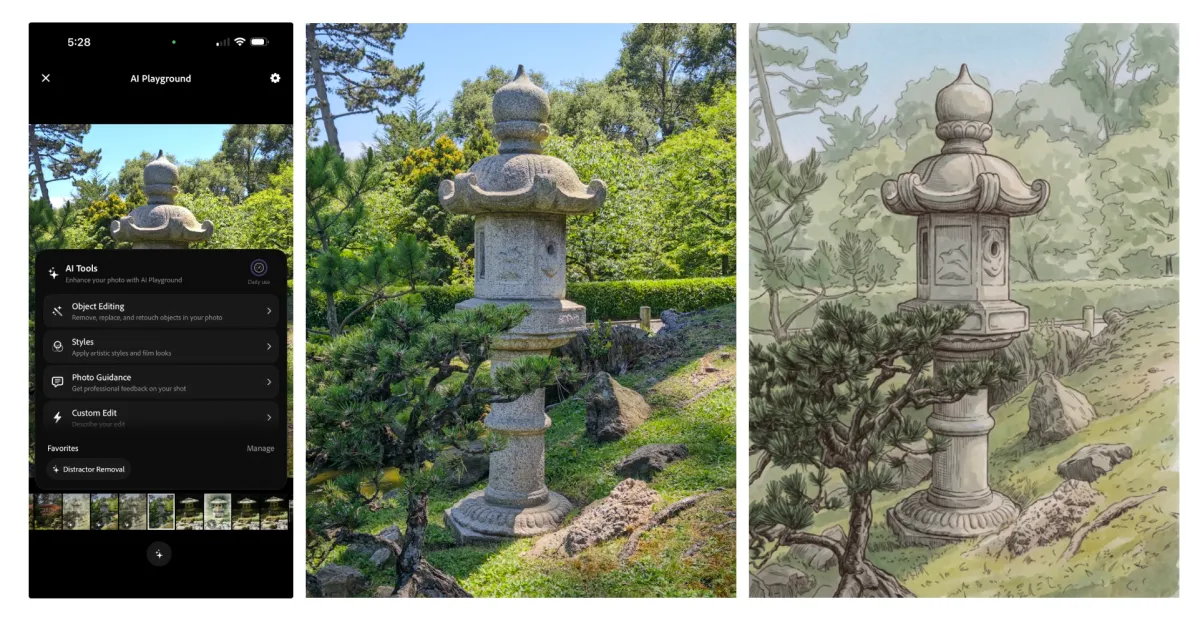
The app already offered manual controls, multi-frame super-resolution and different shooting modes. The newest update layers in AI assistance that can comment on a photo’s composition, suggest retakes and recommend edits using more guided, button-based workflows rather than relying entirely on free-form text prompts.
Why Adobe is moving away from prompt-first editing
Adobe’s camera lead, Marc Levoy, has argued that prompt-driven image editing can be awkward because the user often has to guess the right wording to get the desired result. He said the company is trying to make the most experimental features more deterministic, so users can trigger clearer outcomes with fewer prompt-writing headaches.
That approach reflects a broader industry debate. Generative tools can do impressive work, but they also introduce uncertainty when the result depends too heavily on how a person phrases a request. Adobe’s answer in Project Indigo is to offer more structured controls where possible, while still leaving room for text-based edits when users need them.
Adobe’s camera team is trying to make AI editing feel more like a set of guided tools than a guessing game, with outputs that are easier to reproduce and understand than open-ended prompting alone.
How the new AI critique feature works
The new critique feature is designed to read a photo and offer a professional-style assessment of the image. According to Adobe’s testing, the app can comment on framing, lighting, color and emotional effect, giving users a readout that resembles feedback from an experienced photographer.
The idea is not just to rank a picture, but to explain why it works or falls short. That could be useful for people learning photography, especially when the AI’s opinion highlights details the user may not have noticed.
What kind of advice does Project Indigo give?
Project Indigo’s capture-and-edit suggestions aim to be practical rather than abstract. The app can recommend reshooting with a different frame, exposure or composition, and it can point out specific distractions in the viewfinder.
In one example from testing, the app suggested removing a white hexagonal object that appeared in the frame. That kind of instruction is more concrete than broad guidance like “improve composition,” and it may help users understand how to make the shot cleaner before and after capture.
A second part of the feature set explains how a user could improve an existing photo with Adobe Lightroom tools. That makes the app part camera coach and part editing assistant, which is a notable expansion for a product that started as an experimental capture app.
Object removal is getting more automatic
Adobe is also using the update to improve one of the most familiar AI photography tasks: object removal. Similar tools already exist in Apple Photos, Google Photos and Adobe Photoshop, but Project Indigo is taking a more automated approach by offering preset toggles for common clutter.
Instead of requiring users to draw around an object every time, the app can target things such as people in the background, trash cans, wires, poles, fences, vehicles and other visual distractions. Users can also type in a custom item they want removed.
Adobe says the results are strong, and early testing suggests the tool can eliminate a person from the background without introducing obvious image artifacts. That matters because object removal is often judged not just by what disappears, but by how naturally the rest of the scene is reconstructed.
How does this compare with older removal tools?
Traditional removal tools have usually depended on manual selection, which can work well but is not always precise. A stray edge or incomplete outline can leave halos, smudges or other visual errors behind.
Project Indigo’s approach is more guided. By surfacing categories of common distractions, Adobe is trying to reduce friction and make object removal usable for people who do not want to spend time masking every detail by hand.
That could make the feature especially appealing in mobile photography, where speed and convenience often matter more than full desktop-grade editing control.
What else is Adobe experimenting with?
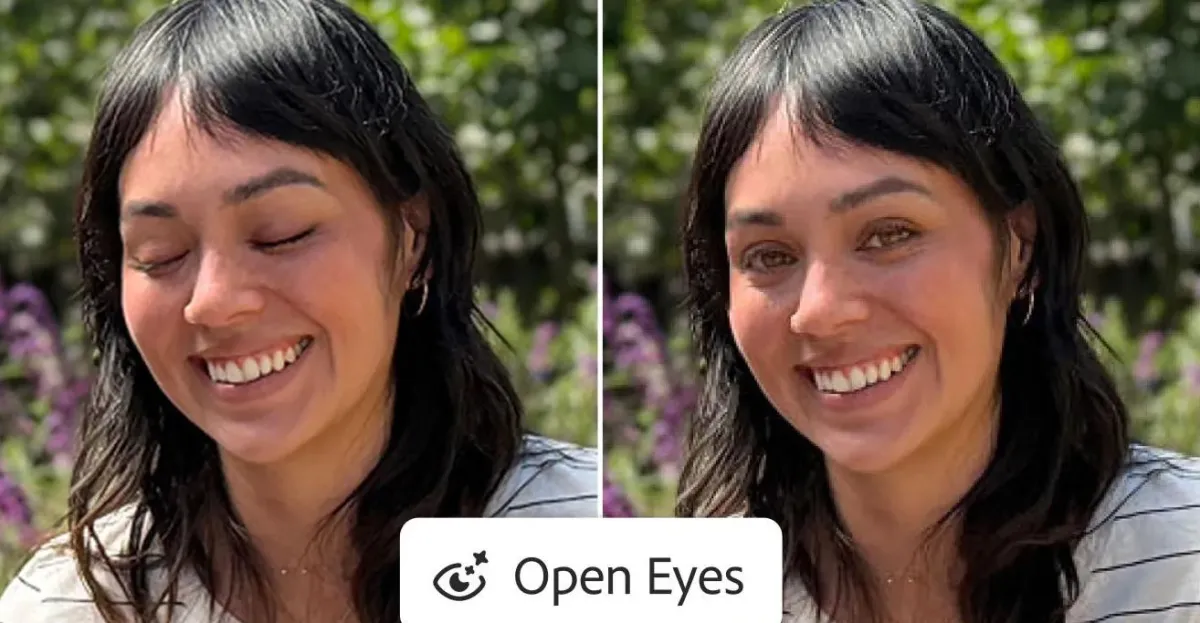
Alongside critique and cleanup tools, Adobe is testing AI features that can simulate depth of field and apply stylized looks to photos. The depth-of-field option can create a blurred-background effect, making a picture resemble one shot with a wider aperture or a larger sensor.
The style-transfer feature lets users transform an image into looks such as watercolor, pen-and-ink, ink line with color wash, monochrome and backlit subject treatments. Some of these effects echo the early wave of artistic mobile filters, though Adobe is now applying newer models and more advanced rendering.
Even so, style transfer remains one of the more familiar and less surprising uses of generative imaging. It is visually interesting, but it does not solve the same practical problem as object cleanup or photo coaching.
Why the new tools matter even if they are experimental
Project Indigo’s AI features are still tucked inside an AI playground section and are only being opened to a limited group of users. Adobe has not committed to a broad release, and some of the tools may never ship at all.
Still, the direction is revealing. Adobe appears to be testing which kinds of AI assistance feel useful to photographers and which ones risk becoming novelty features. The distinction matters because the consumer AI market is crowded with apps that generate flashy results but do not necessarily help users learn or improve.
In that sense, Project Indigo is trying to do something more ambitious than just add another filter set. It is exploring whether AI can act as a photography teacher, a retouching assistant and a creative tool without turning the experience into a prompt-writing contest.
How Project Indigo fits into Adobe’s broader AI strategy
Adobe has spent the past few years positioning Firefly and its related products as safer, more commercially oriented creative AI tools. Project Indigo offers a smaller, mobile-first proving ground for that strategy, one where the company can test how users respond to AI assistance in a real camera workflow.
The app also reflects a practical reality: many people now expect their phones to help them capture and improve images with minimal effort. That expectation has already pushed Apple, Google and other photo-platform vendors to build smarter editing tools into their ecosystems.
Adobe’s challenge is to differentiate itself not only by quality, but by philosophy. Rather than making the app feel like a pure generative toy, Project Indigo is trying to preserve the logic of photography: framing, timing, exposure and careful editing.
Who is Marc Levoy and why does his role matter?
Marc Levoy is the engineer and researcher leading the project, and his background helps explain its emphasis on computational photography. He previously played a major role in advancing Google Pixel camera technology, where software-based processing became a defining strength of the phones’ imaging systems.
That history gives Adobe credibility in camera software, especially on a platform like iPhone where software decisions can have as much impact as the hardware itself. Levoy’s influence also helps explain why the app’s AI additions seem aimed at thoughtful assistance rather than pure visual gimmickry.
His philosophy appears to be that AI should make good photography easier to understand, not just easier to fake.
Timeline: how Project Indigo is evolving
Adobe has been building Project Indigo in stages, starting with camera controls and computational photography features before layering in AI experimentation. The following table summarizes the app’s evolution and the latest additions.
| Stage | Feature set | What it does | Why it matters |
|---|---|---|---|
| Launch phase | Manual controls, multi-frame super-resolution, capture modes | Gives users more control over how photos are taken and combined | Positions the app as a serious camera tool, not just a filter app |
| New AI testing phase | Photo critique, capture suggestions | Analyzes composition, lighting, color and emotional feel; recommends retakes | Turns the app into a learning aid and shooting coach |
| Editing expansion | Object removal, Lightroom guidance | Removes common distractions and suggests follow-up edits | Makes cleanup faster and more accessible on mobile |
| Creative experiments | Depth-of-field generation, style transfer | Simulates blur and applies artistic looks | Explores how far AI can go beyond correction into creative transformation |
What the update says about the future of mobile photography
Project Indigo’s direction suggests that the next phase of mobile photography may be less about adding more capture modes and more about adding smarter interpretation. Cameras are increasingly being asked to understand scenes, assess quality and recommend changes in plain language.
That evolution could benefit beginners who want guidance, but it could also appeal to advanced shooters looking for a quicker way to evaluate a frame. A good AI critique may not replace a human eye, but it can still surface things that are easy to miss in the moment.
At the same time, Adobe’s decision to keep these features experimental is important. It signals caution around reliability, user trust and the risk of overpromising what AI can do in a photography workflow.
What are the risks?
The biggest risk is that AI features can drift from useful assistance into aesthetic overreach. If tools become too eager to “improve” an image, they can flatten the photographer’s intent or create results that look polished but feel generic.
There is also the broader concern that prompt-based or generative editing can encourage a flood of low-effort synthetic imagery. Adobe seems aware of that tension, which is why the company is leaning into guided controls and task-specific buttons instead of opening the door too widely.
That balance between creativity and restraint may end up defining whether Project Indigo feels like a credible photography platform or just another AI showcase.
Why this update stands out from ordinary AI photo tools
Many AI photo apps can erase objects, apply filters or generate stylized results. What distinguishes Project Indigo is the attempt to make AI explain itself, suggest improvements and teach users something about photography along the way.
That educational layer could prove valuable if the app’s assessments are accurate enough to build trust. Even when users disagree with the AI, the feedback can still prompt them to think more deliberately about composition and lighting.
In that respect, Adobe is betting that the best AI photography tools are not those that hide the craft, but those that make the craft more visible.
The company’s latest experiment is still limited, and many of its features remain in testing. But if Adobe eventually decides to expand them, Project Indigo could become one of the clearest examples yet of how generative AI and computational photography are merging inside a consumer camera app.
For now, the message is simple: Adobe is using Project Indigo to see whether AI can improve photos without stripping away the discipline of taking them well.
- Project Indigo is adding AI photo critique, capture advice and editing suggestions.
- The app is testing more automatic object removal, depth-of-field generation and style transfer.
- Adobe is favoring guided AI tools over prompt-heavy workflows.
- The features are in limited testing and may not roll out widely.
- Marc Levoy’s team is trying to make AI feel more useful to photographers, not just more flashy.
How Project Indigo’s AI tools work in practice
The most compelling part of the update is how directly the features map onto real photography problems. Framing, distraction removal and background blur are all issues photographers deal with constantly, especially on phones.
By focusing on those tasks, Adobe is making the AI feel more grounded in actual shooting and editing habits. A tool that removes a stray person from the background or tells you to shift composition by a few steps is easier to understand than a generic “enhance” button.
That practical focus may be Adobe’s best bet for standing out in a crowded mobile AI market. Users are more likely to trust tools that help them see what changed and why.
Adobe’s update suggests that the company sees the future of camera AI as a mix of coaching, correction and controlled generation rather than fully automated image rewriting.
Whether that vision reaches a mainstream audience remains uncertain. But even as a testbed, Project Indigo offers a clear look at where photography software is headed: toward apps that do not just take pictures, but evaluate them.
What users should expect next
For now, access is limited and the features remain experimental. Adobe has not said when or whether they will expand beyond the AI playground area or appear in a future public release.
That uncertainty is typical for this stage of product development. Companies often use limited rollouts to learn what people actually use, what they ignore and what they do not trust.
If the response is positive, Adobe could bring some of these functions into more polished parts of the app or into related Lightroom and Photoshop mobile workflows. If not, Project Indigo may still serve as a useful preview of the company’s thinking about AI-assisted photography.
Either way, the update makes one thing clear: Adobe is no longer treating mobile camera software as a simple capture layer. It is treating it as a place where AI can influence how people learn, edit and judge a photograph.
Frequently asked questions
What is Adobe adding to Project Indigo?
Adobe is adding AI photo critique, capture suggestions, object removal, depth-of-field generation and style-transfer tools to Project Indigo. The features are being tested in an AI playground area and are designed to help users assess and improve photos more directly.
How does the photo critique feature work?
The photo critique feature gives a professional-style readout on a picture’s framing, lighting, color and emotional impact. It is meant to help users understand what works in a shot and what could be improved, rather than just applying a generic enhancement.
Is Project Indigo’s new AI available to everyone?
No, Project Indigo’s new AI tools are only available to selected users during testing. Adobe says the features are experimental, so they may change significantly or never be released more broadly.
What makes Adobe’s approach different from other AI photo tools?
Adobe is leaning toward guided, button-based AI actions instead of relying only on free-form text prompts. That makes the tools more deterministic and may help users get clearer results without having to guess the right prompt.
Who is leading the Project Indigo effort?
Marc Levoy is leading Project Indigo. He is known for his work on Google Pixel camera technology, and his background in computational photography helps explain the app’s focus on practical camera improvements and structured AI assistance.