In short
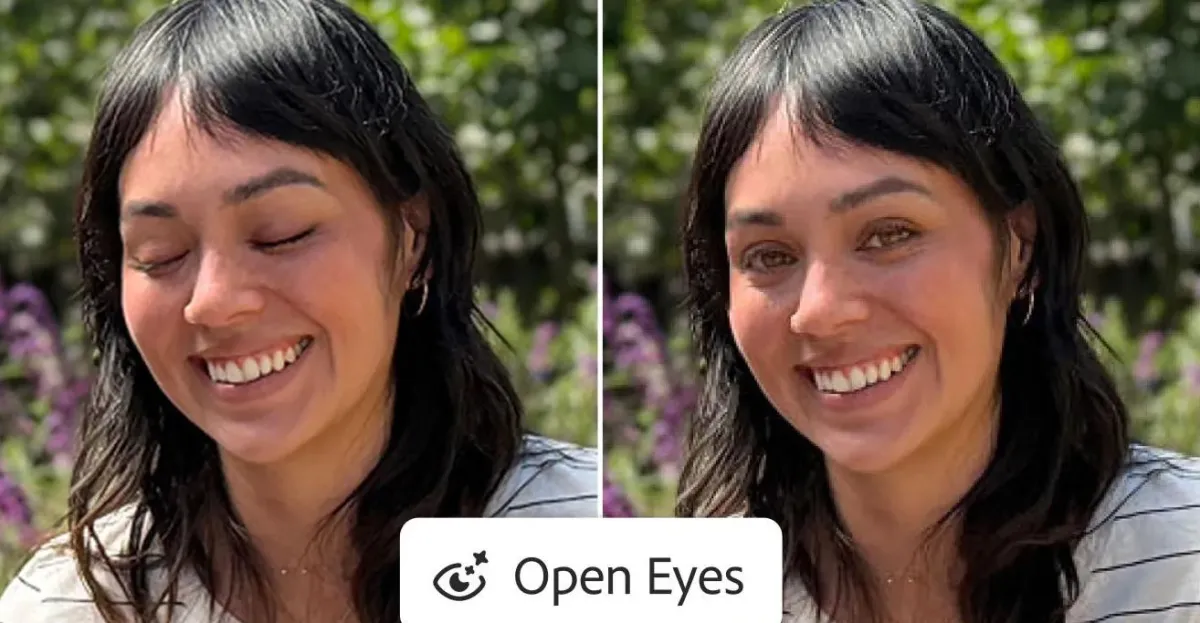
Adobe has added a one-tap generative AI tool to Lightroom mobile that can open closed eyes in photos. The feature is available on iOS, iPadOS and Android and is aimed at making a common photo fix faster and easier.
- Lightroom mobile now includes an Open Eyes Quick Action powered by generative AI.
- The app automatically detects closed eyes and surfaces the tool in the image view.
- Adobe says the feature can use other photos of the same person as reference.
- Free users can try the tool twice before being prompted to subscribe.
- The update brings a common photo repair task into a faster mobile workflow.
Adobe has added a new generative AI feature to Lightroom mobile that can open closed eyes in photos with a single tap, giving iPhone, iPad, and Android users a faster way to rescue group shots and portraits that would otherwise be unusable. The tool matters because it turns a common, frustrating editing chore into a near-instant fix inside Adobe’s mobile workflow.
The feature appears when Lightroom detects that one or more people in an image have their eyes shut. In those cases, the app surfaces a new Open Eyes Quick Action directly on top of the photo, allowing users to launch the edit without hunting through menus or manual retouching tools.
Adobe’s move brings a familiar photo-repair task into a more automated, AI-driven format, and it does so at a moment when mobile editing is becoming a more important part of everyday photography. For casual users, it promises easier saves for otherwise strong pictures. For Adobe, it is another sign that the company is pushing generative AI deeper into its creative software stack.
What Adobe changed in Lightroom mobile
Adobe has added an Open Eyes Quick Action to Lightroom mobile that uses generative AI to replace closed eyes in photos. The feature is now available in the mobile app for iOS, iPadOS and Android, where Lightroom can automatically detect a face with shut eyes and offer an edit shortcut immediately after the image is opened.
That detection step is important. Instead of making users manually locate a subject’s face or dig through edit panels, Lightroom flags the issue on its own and presents the fix as a one-tap action. The result is designed to be quick enough for casual users while still staying inside Adobe’s broader editing environment.
Adobe has been steadily adding AI-assisted tools across its products, but this addition is notable because it targets a very common real-world problem. People blinking at the wrong moment has ruined countless vacation photos, wedding shots and candid portraits. A feature built specifically for that use case gives Lightroom mobile a practical appeal beyond technical novelty.
Why closed-eye repairs are such a useful feature
Closed-eye fixes are useful because they solve one of the most common photo mistakes without requiring advanced editing skills. Many users do not want to spend time cloning, compositing or swapping parts from another picture. They just want a photo to look natural and usable.
Adobe’s new approach is intended to reduce the distance between problem and solution. Rather than asking users to understand layers, masks or manual retouching, the app identifies the issue and offers a guided fix. That aligns with a broader trend in creative software: less technical input from the user, more AI-driven correction behind the scenes.
The feature is also a reminder that mobile editing has matured. Smartphones have become the primary camera for many people, so the tools that repair or improve photos need to work quickly and from the device people already use most often.
How does Open Eyes work?
Open Eyes uses generative AI to create a natural-looking replacement for closed eyes based on the photo and other images in the user’s Lightroom library. Adobe’s goal is not simply to paste in a generic eye shape, but to produce a result that fits the lighting, face angle, and overall look of the original image.
That is a major difference from older photo-fix methods that borrow eyes from another frame with mixed results. Traditional swapping can work when the two photos are similar, but it often struggles if the subject turns slightly, changes expression, or is lit differently. Adobe’s generative method aims to synthesize a more coherent result instead of making a literal cut-and-paste replacement.
According to Adobe’s description of the feature, Lightroom can use other photos of the same person stored in the library as reference material. That helps the app match details such as eye color, size and shape so the edited image still resembles the subject accurately.
| Feature | What it does | How it works | Where it’s available |
|---|---|---|---|
| Open Eyes Quick Action | Opens closed eyes in a photo | Uses generative AI and reference images from the library | Lightroom mobile on iOS, iPadOS and Android |
| Auto-detection | Flags photos where eyes are closed | Detects faces and presents the tool automatically | Inside the mobile app interface |
| Reference matching | Helps preserve realism | Matches eye color, shape and size to the subject | Uses the user’s Lightroom photo library |
Why this matters for everyday photographers
This matters because it lowers the effort required to salvage a good photo. For most users, the question is not whether an edit is technically possible. The question is whether it is easy enough to do before they move on to something else.
That is especially true on mobile, where people often browse, share and edit in short bursts. If a photo has one blinking subject in an otherwise strong frame, a tool like this can make the difference between deleting the image and sharing it.
Adobe is also tapping into a broader expectation that AI tools should save time rather than simply add flashy effects. In that sense, Open Eyes fits neatly into the practical side of generative AI: fixing imperfections, streamlining repetitive tasks and making results look polished with minimal effort.
How Adobe’s approach differs from older tools
Adobe’s approach differs because it uses AI to recreate the eyes instead of simply borrowing them from another shot. That distinction matters for realism.
Older software methods often depend on finding another image with the subject’s eyes open and then fitting those eyes into the current photo. Even when that works, the mismatch in pose or lighting can make the result look odd. Generative AI can instead produce a version that is tailored to the exact frame being edited.
Adobe is not alone in experimenting with this kind of repair, but Lightroom’s one-tap design is likely to make the process feel far less intimidating for non-professionals. Users who might never open Photoshop can still benefit from AI-powered correction in a simpler interface.
Adobe’s Lightroom mobile update is aimed at making a common image fix almost effortless, with the app automatically surfacing a tool when it notices closed eyes and using generative AI to produce a more natural-looking result.
How many times can free users try it?
Free users can test the feature twice before Lightroom prompts them to subscribe. After those two uses, Adobe will direct users toward a Creative Cloud plan that includes additional credits for its AI-powered tools, according to reporting from DPReview.
That limit positions Open Eyes as both a demo and an incentive. People can experience the convenience of the tool before deciding whether it is worth paying for more frequent access. It also reflects Adobe’s broader strategy of tying newer AI functions to subscription-based credit systems.
For Adobe, this is a familiar model. The company has increasingly reserved certain advanced or high-volume AI features for subscribers, while allowing limited experimentation for free-tier users. That may frustrate casual users, but it also gives Adobe a way to monetize compute-intensive features that would otherwise be costly to provide broadly.
What does this say about Adobe’s AI strategy?
It shows Adobe is pushing generative AI deeper into mainstream consumer editing tasks, not just professional workflows. The company has repeatedly added AI-powered features across its creative products, and Lightroom mobile is becoming an important testing ground for fast, user-friendly automation.
This matters because Adobe’s audience is broad. It includes professional photographers, content creators, social media users and casual editors who simply want better pictures. By bringing generative AI into a feature as ordinary as eye repair, Adobe is normalizing the idea that AI should be part of routine image cleanup.
There is also a product-design lesson here. The success of an AI feature is not only about how sophisticated it is, but also how naturally it fits into the workflow. Lightroom’s version appears to work best because it is contextual, visible and immediate. Users do not need to know what AI model is behind it; they just need the image to look right.
Why mobile is the right place for this feature
Mobile is the right place because that is where many photos are taken, reviewed and shared first. A quick repair tool is more valuable when it is available at the moment a user notices the problem.
In desktop software, users often expect more complex controls and are willing to spend more time editing. On a phone or tablet, convenience wins. Adobe’s choice to launch the feature in Lightroom mobile suggests the company sees a strong opportunity in making AI corrections feel instantaneous on the devices people use most often.
The same logic applies to social sharing. A user who wants to post a group photo immediately may not want to export it to another app or wait until they reach a desktop computer. A one-tap fix can remove that friction entirely.
Timeline of Adobe’s eye-fixing tools
Adobe has been refining eye-repair tools for years, but the latest mobile update takes the concept further by making it faster and more automated.
| Period | Development | Significance |
|---|---|---|
| Nearly a decade ago | Photoshop Elements offered eye-opening tools | Provided an early consumer-friendly way to repair blinking subjects |
| Recent years | Adobe expanded generative AI tools across its apps | Made more advanced image reconstruction possible |
| Now | Lightroom mobile gains Open Eyes Quick Action | Brings a one-tap AI repair to phones and tablets |
What users should know before they try it
Users should know that the feature is designed for convenience, but results will still depend on the photo. AI tools can make impressive repairs, yet they are not magic. The quality of the final image may vary depending on the subject’s angle, lighting and the availability of reference photos in the library.
That means the tool is best viewed as a fast solution for common mistakes, not a replacement for careful photography. In a well-shot portrait or group image, it may produce an excellent result. In a more difficult frame, it may still need a human eye to decide whether the edit looks believable.
- It is available in Lightroom mobile for iOS, iPadOS and Android.
- The app automatically detects closed eyes and presents the feature.
- The edit uses generative AI, not a simple copy-and-paste repair.
- Lightroom can reference other photos of the same person for better matching.
- Free users can try the feature twice before a subscription prompt appears.
Why Adobe’s update stands out in a crowded AI market
Adobe’s update stands out because it solves a real, everyday problem instead of offering an abstract AI novelty. In a market full of chatbots, image generators and experimental assistants, practical editing features often resonate the most with ordinary users.
That practicality may help Adobe defend its place in a rapidly changing software landscape. As generative AI becomes easier to integrate, users will increasingly expect their creative apps to remove friction, not just add new kinds of content. A feature like Open Eyes is small in scope, but it sends a larger message: AI should make editing less tedious and more accessible.
For Lightroom users, the change is simple. A photo that once might have been left behind can now be fixed with a tap. For Adobe, it is another step toward an editing future where the software notices the problem first and proposes the solution immediately.
That may not sound dramatic, but for anyone who has ever taken a great photo ruined by one bad blink, it is exactly the sort of update that feels worth having.
Frequently asked questions
What is Lightroom mobile’s Open Eyes feature?
It is a generative AI editing tool in Adobe Lightroom mobile that can open closed eyes in photos with one tap. The app detects when someone’s eyes are shut and offers a Quick Action to repair the image automatically.
Which devices support Adobe’s closed-eye fix?
The feature is available in Lightroom mobile on iOS, iPadOS and Android. Adobe built it for the app’s mobile workflow, where users are often editing and sharing photos directly from a phone or tablet.
Does Lightroom use AI or a manual swap to fix eyes?
It uses generative AI, not a simple manual copy from another photo. Adobe says the tool can also use reference images of the same person from the user’s Lightroom library to help match the eye color, size and shape more naturally.
Is the Open Eyes feature free to use?
It is limited for free users. According to reporting cited by DPReview, people on the free version can try it twice before Lightroom prompts them to subscribe to a Creative Cloud plan with more AI credits.