Updated September 25, 2026 4:24 pm
In short
Apple’s HomeKit Secure Video now has AI summaries and smarter alerts, but the feature is capped at five cameras, costs far more than Ring or Nest, and still trails rivals on usefulness in testing.
- Apple Intelligence for Home adds AI summaries, search and notification reduction to HomeKit Secure Video.
- Ring and Google Nest still deliver more detailed alerts and better value for most users.
- Apple’s pricing is higher for multi-camera homes and is capped at five cameras for the AI features.
- Ring’s unusual-event filtering stands out as the best solution for cutting notification noise.
- The next stage for smart home cameras is automation based on what the camera understands.
Update — September 25, 2026 4:24 pm
Since we published, the original report has filled in the pricing details for Apple Intelligence for Home: the 2TB iCloud+ tier includes support for one camera, the 6TB tier covers two, and the 12TB tier covers up to five. Apple still does not support more than five cameras for the AI features.
The update also clarifies setup requirements. Apple Intelligence for Home needs a HomePod or Apple TV running tvOS 27, an iPhone on iOS 27, and compatible HomeKit Secure Video hardware. Apple says Reduce Notifications is enabled by default, while Summarize Videos must be turned on manually.
The source now also says standard HomeKit Secure Video storage remains available on lower iCloud+ tiers, even though Apple Intelligence itself is limited to the higher-priced plans.
Apple has finally added AI-powered camera summaries and smarter alerts to HomeKit Secure Video, but early testing suggests Amazon Ring and Google Nest still deliver more useful notifications for less money. The feature arrives as part of iOS 27 and Apple’s broader Home Intelligence push, raising a bigger question about whether Apple is building a genuinely better smart-home security experience or simply arriving late to a market already defined by its rivals.
For homeowners, the update matters because security cameras are no longer just motion detectors. They are becoming AI interpreters that can explain what happened, decide what deserves attention, and eventually trigger actions around the home.
That shift is more than cosmetic. A camera that says “a delivery person is walking on the lawn” is far more useful than one that only reports “motion detected,” especially when the notification arrives before a video clip finishes loading. Apple, Google, and Ring all now promise some version of that convenience — but they do not deliver it equally.
Apple Intelligence comes to HomeKit Secure Video
Apple’s new home-camera features extend HomeKit Secure Video with AI-generated descriptions, natural-language search, clip stitching across cameras, and a notification-slimming tool that groups related events. The company is positioning the package as part of Apple Intelligence for Home, available through iCloud+ subscriptions and tied to compatible hardware running the latest software.
In practical terms, the system is designed to tell users not only that something moved, but what the camera believes it saw. That could be a person, a package delivery, a pet, a vehicle, or a more specific activity that helps the homeowner decide whether to act immediately.
Apple’s rollout also marks a notable change in emphasis for the company’s smart-home strategy. Rather than merely storing footage securely, the service now tries to interpret scenes, surface important clips, and reduce the noise that makes camera alerts easy to ignore.
How do you use Apple Intelligence for Home?
You need an iCloud+ plan, a HomeKit Secure Video-compatible camera, an Apple home hub running the latest software, and an AI-capable iPhone. Apple’s AI features are enabled through the Home app and can be switched on camera by camera.
Apple says the feature set includes text summaries of camera activity, “noteworthy” event surfacing, smart search, and a Reduce Notifications option that collapses several related alerts into one.
| Service | AI features | Monthly price | Camera limit |
|---|---|---|---|
| Apple Home / iCloud+ | Text summaries, search, clip stitching, reduced notifications | $9.99 to $59.99 | Up to 5 cameras for AI features |
| Google Home | Gemini summaries, search, face recognition, Home Brief | $20 | Unlimited cameras |
| Amazon Ring | Text summaries, search, face recognition, unusual events, reduced notifications | $20 | Unlimited cameras |
Why pricing is Apple’s biggest problem
Apple’s AI home-camera bundle is expensive relative to the competition, particularly for households with more than one or two cameras. The company folds the feature into iCloud+ tiers, meaning the cost rises quickly if users want support for multiple cameras.
Apple’s pricing structure stands in sharp contrast to Google and Ring, both of which offer AI camera features for a flat $20 a month and support unlimited cameras. Apple’s plan tops out at five cameras for its AI features, which makes it a less attractive option for larger homes or users with several indoor and outdoor devices.
That gap matters because camera subscriptions are not just about storage anymore. They are now about the quality of the alert, the speed of the summary, and the usefulness of the search tools behind it. If the software is meant to cut down on tedious notifications, pricing becomes part of the user experience.
- Apple: Lowest starting price for one camera, but the most expensive at scale.
- Google: Flat $20 pricing, unlimited cameras, and strong search.
- Ring: Flat $20 pricing with broad AI coverage and fewer unnecessary alerts.
How well do the descriptions work?
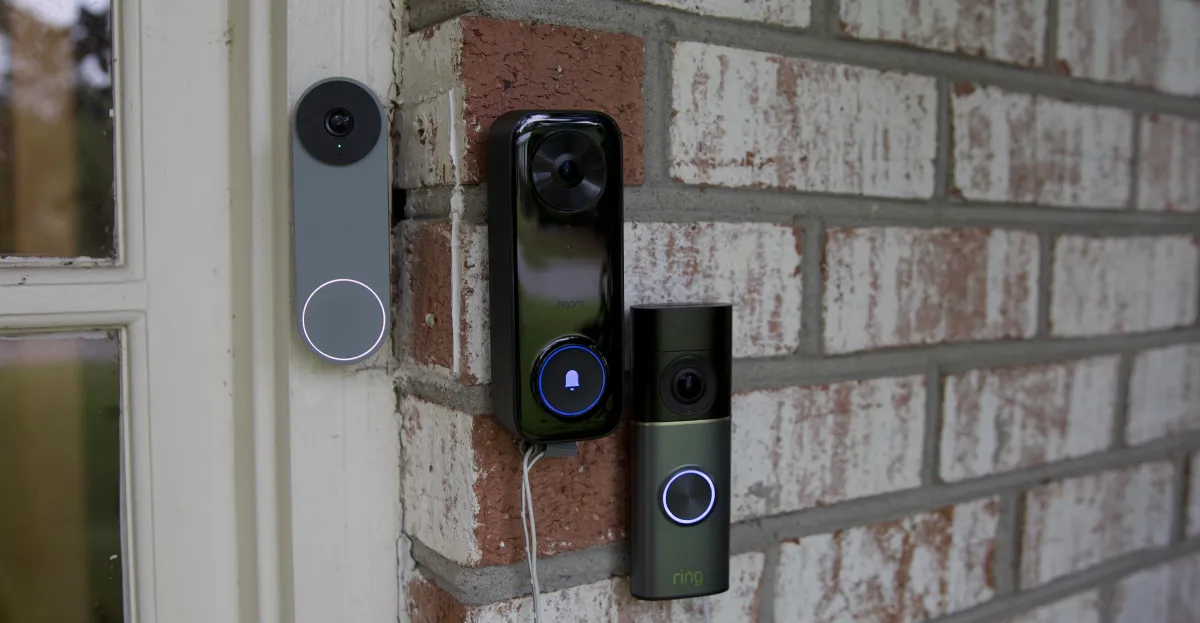
Apple, Google, and Ring all promise to do more than motion detection, but the quality of their descriptions varies significantly. In testing, Google and Ring generally produced more specific and more readable alerts than Apple, which often defaulted to vague wording such as “someone” or “vehicle.”
That difference matters in everyday life. A notification that identifies a delivery driver or a pet on the porch can save time; one that only says “someone is walking in the yard” is less actionable, especially when users are trying to decide whether a package has arrived, whether a stranger is present, or whether the family cat is outside again.
Apple’s summaries were also often shorter and more cautious than those from its rivals. In some cases that restraint makes the system feel cleaner and more privacy-conscious, but it can also make the alert less useful at a glance.
In testing, the most useful camera alerts were the ones that turned vague motion notices into specific, readable explanations of what was happening.
What did the cameras get right — and wrong?
All three systems recognized some of the same basic events, such as delivery trucks and people approaching the front door. But they diverged in how much detail they provided. Google often named more context, Ring was generally strong at identifying people and familiar activity, and Apple was sometimes the least descriptive.
There were also misfires. AI camera tools can be surprisingly confident while still being wrong, especially when identifying unusual objects or moving yard equipment. Those errors are a reminder that these systems are not seeing the world the way people do; they are pattern-matching based on training and probability.
That limitation becomes obvious when a mower is mistaken for a toy vehicle or when a familiar person is identified inconsistently. The value of AI in cameras depends not just on intelligence, but on consistency.
Who is best at recognizing people?
Ring was the most dependable at facial recognition in testing, consistently identifying the same person at the door. Google had mixed results, sometimes getting the right match and sometimes confusing one family member or visitor for another. Apple also identified familiar faces, but often with more hesitation and less certainty than its competitors.
For doorbell cameras, this is one of the most important AI features. If the camera can tell you who is at the door quickly and accurately, you can decide whether to answer, ignore, or investigate without opening an app or waiting for a video clip to load.
But recognition only helps if the notification arrives on time. In the tests, Google was generally the fastest to deliver alerts, with Ring close behind. Apple’s alerts were less consistent on the doorbell camera used in testing, even though it continued recording clips.
Reliability remains Apple’s biggest challenge
Apple’s smart-home camera system has historically been held back by inconsistent recording and spotty notifications, and the latest update appears aimed at fixing that problem. Apple says it reworked the underlying HomeKit Secure Video architecture, and the changes appear to have improved loading speed, stability, and clip capture across several devices.
That said, the results were uneven. Most compatible cameras tested with the system behaved better after the update, but one wired Aqara doorbell remained problematic when it came to sending notifications through Apple Home, even though it continued to record events reliably and still surfaced information in other ways.
In contrast, Google’s Nest system was the most complete and dependable in the test, capturing events quickly and surfacing more descriptive search results. Ring was also fast and solid overall, though it had occasional playback issues.
Why does Apple’s third-party approach matter?
Because Apple does not make its own security cameras, HomeKit Secure Video depends on third-party hardware, and that introduces another layer of variability. The software may be Apple’s, but the camera, wireless connection, sensor quality, and firmware all belong to different companies.
That means the user experience can be excellent on one supported camera and frustrating on another. Apple can improve the software, but it cannot fully control the hardware the way Amazon and Google can with their own ecosystems.
| Platform | Strength | Main weakness |
|---|---|---|
| Apple Home | Better search, stitching, privacy-first positioning | Higher cost and less detailed alerts |
| Google Nest | Best overall detail and search performance | Occasional identity confusion |
| Ring | Fast alerts and strong unusual-event filtering | Cloud-heavy design and occasional playback problems |
What does Ring do better than everyone else?
Ring’s standout feature is its ability to learn what normal activity looks like and then suppress the flood of routine notifications. Instead of alerting users every time a pet, neighbor, or family member appears, the system can focus on events that seem out of the ordinary.
That approach is particularly valuable for users who are tired of being interrupted by dozens of low-priority alerts each day. In practice, it can turn a noisy camera feed into something much closer to a security assistant that understands context.
For households with pets, frequent visitors, or predictable routines, this may be more useful than simply having the longest description. Ring’s advantage is not only that it describes events, but that it tries to decide which ones deserve attention.
Ring’s unusual-event system is designed to separate everyday activity from the moments that actually look different from the norm.
How are smart cameras evolving beyond alerts?
The next step for camera AI is not just better descriptions. It is action. Once a camera can reliably recognize a person, vehicle, or animal, it can trigger automations that change what happens elsewhere in the home.
That could mean turning on sprinklers when an animal enters a yard, broadcasting a speaker alert when a cat wants to come inside, or reminding someone to set out the bins when the trash truck passes. These are small examples, but they show how camera intelligence is moving from observation to response.
Google has already started experimenting with camera-based automations, although early results remain inconsistent. Apple does not yet offer a comparable system, but if it moves into first-party camera hardware, that capability would be a logical next step.
What is holding automations back?
Accuracy is the biggest obstacle. If a camera cannot reliably tell a raccoon from a dog, or a delivery person from a passerby, then any automation based on that recognition becomes untrustworthy. A smart-home system can only act intelligently if the identification layer is dependable.
That is why notification quality, recognition accuracy, and alert timing all matter so much. The future of home cameras is not simply about seeing more — it is about understanding enough to do the right thing.
The privacy tradeoff is getting bigger
The more capable these systems become, the more personal knowledge they require. A camera that knows who belongs at home, which vehicles are regulars, and which pets roam the property can make far better decisions than a basic motion detector. But that same familiarity can feel intrusive if the data is stored or processed in ways the user does not fully trust.
Apple and Google both lean heavily on the idea of privacy-conscious processing and user control, even if their systems still rely on cloud infrastructure for key AI features. Ring, by comparison, has long faced more scrutiny because of its cloud-first model and its history of law-enforcement partnerships.
There is a tradeoff here that consumers cannot ignore. The smarter the camera gets, the more it knows about daily life — routines, habits, visitors, pets, deliveries, and absences. That can be helpful, but it can also feel like a surveillance engine inside the home.
The real promise of AI in home security is that the system notices what matters; the real concern is how much it has to learn to get there.
Apple’s strategy: promising, but incomplete
Apple’s new camera intelligence features point in the right direction, and the company’s security-focused approach may appeal to users who prefer a tighter ecosystem. The search tools are useful, clip stitching is clever, and the improved HomeKit Secure Video infrastructure seems to have fixed some long-standing reliability issues.
Still, Apple has work to do. Its alerts are often less detailed than those from Google and Ring, its pricing is less competitive for multi-camera households, and its ecosystem still depends on third-party hardware. Those factors make it harder to argue that Apple offers the best overall package today.
At the same time, this is still early. Apple Intelligence for Home only recently rolled out, and some rough edges may disappear as the software matures. If Apple eventually ships its own camera hardware, the equation could change again.
For now, though, the smart-home camera market is showing a clear pattern: AI has made cameras better, but not equally better. Google leads on description quality and search, Ring leads on filtering noise, and Apple is promising a privacy-forward alternative that is not yet the most useful or the most affordable.
Timeline: how AI camera alerts reached this point
The progression from simple motion alerts to contextual camera summaries has happened quickly, but each step has added a little more intelligence to the smart-home stack.
| Period | What changed | Why it matters |
|---|---|---|
| Basic motion era | Cameras sent only generic movement alerts | Users still had to open clips to understand what happened |
| AI summary rollout | Systems began describing people, pets, vehicles, and deliveries | Notifications became readable at a glance |
| Current phase | Search, event stitching, unusual-event filtering, automations | Cameras are becoming decision-making sensors, not just recorders |
Bottom line
Apple has made its home-security cameras smarter, but not yet smarter than the market leaders. The company’s new AI features are real, useful, and long overdue, yet Ring and Google still provide better context, faster alerts, and stronger value for most households.
The deeper story is that the smart-home camera race is no longer about who can record the most footage. It is about who can interpret events most accurately, reduce notification overload, and eventually act on what the camera sees. Apple is now in the race — but it is still chasing the pack.
Frequently asked questions
What is Apple Intelligence for Home?
Apple Intelligence for Home is Apple’s new AI layer for HomeKit Secure Video. It adds text descriptions, smarter search, clip stitching, and notification reduction so a camera can explain what it sees instead of only sending generic motion alerts.
Are Apple’s smart home cameras better than Ring and Nest?
No, not overall. Apple’s system is useful and privacy-friendly, but Ring and Google Nest still tend to provide more detailed alerts, faster notifications, and better value, especially for homes with multiple cameras.
How much does Apple’s camera AI cost?
Apple bundles the AI features into iCloud+ plans that range from $9.99 to $59.99 a month, depending on how many cameras you want to cover. The top tier supports up to five cameras, while Ring and Google charge $20 a month for unlimited cameras.
What is the best AI feature on Ring cameras?
Ring’s strongest feature is its unusual-event detection, which learns normal patterns at a home and sends alerts only when something seems different. That can dramatically cut down on notification noise from pets, family routines, and everyday activity.
Why do AI camera alerts matter so much?
AI camera alerts matter because they save time and make security footage easier to understand instantly. Instead of opening a clip to figure out whether it is a package, a person, or a pet, users can decide what to do from the notification itself.