In short
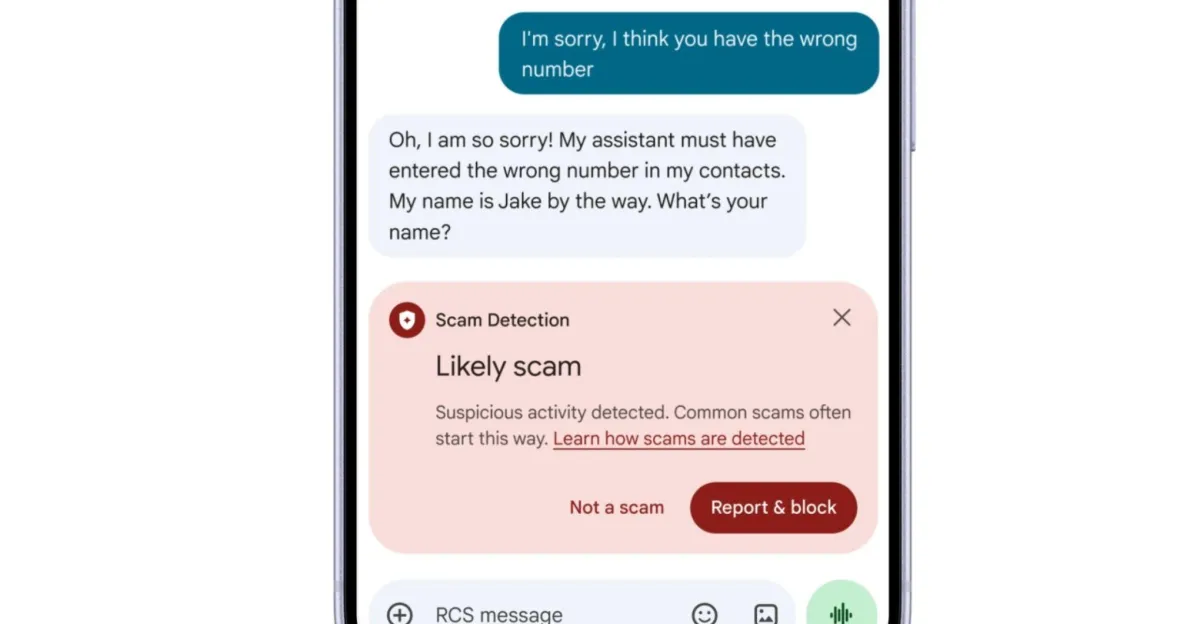
Google is adding Gemini-powered scam protection to Android Messages, using AI to assess unknown senders and suspicious links. The update also brings new safeguards for call forwarding, screen sharing, and broader Scam Detection coverage.
- Google is launching an opt-in enhanced protection mode in Google Messages that uses Gemini to evaluate unknown senders for scam behavior.
- The system pairs cloud-based analysis with on-device Gemini Nano checks for suspicious links before users open them.
- Android is also getting alerts for call forwarding changes and automatic privacy masking during screen sharing.
- Google is expanding Scam Detection from Pixel phones to more brands and aims to reach hundreds of millions of users later this year.
Google is rolling out a new Android anti-scam feature that uses Gemini to judge whether unknown senders in Google Messages may be trying to defraud users, a move that could give millions of people a stronger line of defense against increasingly polished mobile fraud. The company is also expanding scam detection, adding call-forwarding warnings, and hiding sensitive details during screen sharing.
The biggest change is an optional “enhanced protection” mode for Google Messages. When enabled, it uses cloud-based Gemini models to analyze conversations with unfamiliar contacts and flag patterns that may indicate a scam, including the kind of gradual, manipulative exchanges fraudsters often use to build trust before striking.
Google says the feature is designed to catch threats that can slip past simpler filters, especially attacks that unfold slowly over text and avoid the obvious warning signs people expect from spam. The company is pairing that cloud review with on-device Gemini Nano checks for suspicious links shared in conversation, giving Android users two layers of AI-assisted screening before they tap.
That rollout arrives as text-message fraud continues to evolve beyond the crude phishing blasts many users can now spot instantly. Modern scams increasingly look like ordinary conversations, often starting with a harmless-sounding message, a mistaken identity claim, a shipping problem, or a job-related request. By the time the victim realizes something is wrong, the attacker may already have extracted money, login credentials, or other sensitive information.
What Google is changing in Android security
Google’s update centers on Google Messages, but it also extends to other parts of Android and Chrome. The company is combining AI-based checks with new guardrails intended to stop scammers from manipulating call settings, exposing private data, or luring people to dangerous websites.
How the new Google Messages protection works
The new enhanced protection mode is opt-in and applies to chats with unrecognized senders. Google says its cloud-based Gemini analysis can interpret the intent behind a conversation, rather than simply looking for obvious spam keywords or suspicious phone numbers.
According to the company, the system is meant to detect “slow-burn” scams, where a fraudster spends time building rapport before steering the conversation toward a harmful goal. That may include requests to move the chat off-platform, verify an account, pay a fee, or open a malicious link.
Google says the secure cloud analysis is meant to augment its existing on-device detection so the company can spot new and more sophisticated attacks that try to disguise themselves as ordinary conversation.
Google also says user data is encrypted during the AI review and handled in a dedicated secure environment that the company says it cannot access. The approach is clearly designed to address a common concern around cloud-based safety systems: if an AI is analyzing private messages, users want to know the content is not freely visible to the provider.
Why Gemini Nano matters for links
Alongside the cloud review, Google is using Gemini Nano on the device to inspect web signals tied to unfamiliar URLs shared in messages. If the link appears malicious, Android can warn the user before the page is opened.
That matters because scam campaigns often rely on speed and momentum. A text message with a convincing link can push someone from suspicion to action in seconds. By checking the destination before launch, Android gets a chance to interrupt the attack at the most vulnerable moment.
Why Google is leaning harder on AI for scam detection
Google’s broader bet is that traditional spam filters alone are no longer enough. As scammers adapt to platform defenses, their messages can resemble legitimate exchanges closely enough that simple pattern matching misses them. AI models, especially large ones trained to interpret context, can look for behavioral cues rather than just suspicious phrasing.
That shift also reflects a wider trend in consumer security: companies are increasingly turning to generative AI not just for productivity features, but for threat detection. In theory, models like Gemini can read intent, track dialogue patterns, and identify inconsistencies over time. In practice, the challenge is balancing stronger protection with false positives, privacy concerns, and the risk of overblocking harmless conversations.
Google appears to be framing the new mode as an additional layer rather than a replacement. Existing on-device Scam Detection in Messages stays in place, while enhanced protection adds cloud-based reasoning on top. This layered approach suggests Google wants to preserve speed and privacy where possible, while escalating to deeper analysis when risk appears higher.
| Feature | Where it runs | What it checks | User control |
|---|---|---|---|
| Messages enhanced protection | Cloud-based Gemini | Intent of unknown senders and scam-like conversation patterns | Opt-in |
| Link safety checks | On-device Gemini Nano | Potentially malicious signals in unfamiliar URLs | Automatic when enabled |
| Call forwarding alerts | Android system level | Attempts to enable call forwarding | User is notified |
| Screen-sharing privacy shield | Chrome and Android WebView | Sensitive data visible while sharing a screen | Automatic masking |
What else is coming to Android users?
Google’s announcement includes several additional protections beyond message scanning. These updates are meant to make it harder for scammers to quietly reroute calls, gather information during screen sharing, or exploit older detection gaps across Android apps.
Call forwarding is getting more control
One new safeguard blocks apps from turning on call forwarding without the user’s awareness. If someone attempts to enable the feature, Android will notify the device owner.
That matters because call forwarding can be abused to intercept incoming calls, especially those containing verification calls or voice-based account recovery codes. A scammer with access to forwarding settings may be able to reroute calls to a device they control, increasing the odds of taking over accounts or impersonating the user.
Screen sharing in Chrome and WebView will hide sensitive data
Google is also introducing automatic protection for screen-sharing sessions in Chrome and Android WebView. When people share their screens, the system will conceal sensitive information to reduce the chance that private data is exposed to another person or app.
This feature is particularly relevant because screen-sharing scams have become a common social-engineering tactic. Fraudsters may convince victims to broadcast their screen while logging into a bank account, approving a transaction, or entering a one-time password. Masking sensitive content could limit how much damage those tactics can do.
Who gets Google’s existing Scam Detection feature now?
Google is expanding its current Scam Detection tool in Messages beyond Pixel phones. The feature is now reaching devices from Honor, Motorola, Oppo, OnePlus, Realme, Tecno, Vivo, Xiaomi, and additional Android brands.
The company says it plans to bring the feature to hundreds of millions of more users later this year. That is a significant distribution push, and it suggests Google sees scam protection as a mainstream Android safety baseline rather than a niche Pixel-only perk.
For years, Google has used its own hardware line to debut software capabilities before broadening them to the rest of Android. This update follows that familiar path, but the scale is notably larger because scam detection has become a universal problem rather than a premium feature category.
How the rollout changes the Android security landscape
Android has long been a more open platform than its chief rival, and that openness creates both flexibility and risk. Users benefit from a wide device ecosystem and broader app choice, but they also face a more fragmented security environment, where the quality of protections can vary by brand, model, and update cadence.
Google’s latest push tries to close some of those gaps by putting AI defenses directly into core communication and browsing paths. Instead of depending only on carrier tools, third-party security apps, or user vigilance, Google is baking scam screening into the software many people already use every day.
That approach could be especially important in markets where mobile fraud is often delivered through SMS or chat apps rather than email. A single convincing message can be enough to trigger a transfer, reveal a password, or steer a user to a fake login page. The more the protection lives inside the messaging layer itself, the better the odds of stopping abuse early.
What users should still watch for
Even with AI protection, Google is not suggesting Android can fully eliminate scam risk. Users will still need to be cautious about urgent requests, links from strangers, impersonation attempts, and messages that pressure them to act immediately.
- Do not trust a message just because it sounds personal or polite.
- Be wary of links from unknown contacts, especially shortened URLs.
- Verify requests for money, credentials, or codes through another channel.
- Never enable call forwarding unless you understand why it is needed.
- Avoid screen sharing when banking, shopping, or reviewing sensitive accounts.
Google’s tools can help catch some attacks, but they work best when paired with user judgment. The best scam defense is still a combination of machine detection, system warnings, and human skepticism.
How Google’s AI security approach compares with older defenses
Traditional spam systems tend to look for known bad phone numbers, patterns of mass messaging, or fixed phrases associated with fraud. That model can be effective against large-scale spam but struggles against personalized scams, where the wording changes constantly and the attacker mimics human conversation.
Google’s use of Gemini suggests the company wants security systems that can understand context and progression. A message by itself might seem harmless, but a string of messages may reveal intent. That is where a model designed for language understanding may offer an advantage over rules-based filters.
At the same time, AI-based moderation and protection tools carry their own limitations. False alarms can frustrate users, while overly conservative systems risk blocking legitimate contact. Google’s choice to make enhanced protection opt-in may reflect those trade-offs, letting more cautious users choose a higher-security mode without forcing it on everyone.
Why this update matters beyond Messages
This is not just a feature drop for one app. It is part of a broader strategy to make Android feel safer in the face of a scam economy that now spans texts, calls, links, and live screen manipulation. The additions point to a security model that tries to anticipate the entire chain of fraud, not merely the final message.
If Google can reduce scam success rates even modestly, the effect could be meaningful across Android’s huge user base. Small improvements in detection can prevent large numbers of losses when scaled to hundreds of millions of devices.
It is also a sign of how central Gemini has become to Google’s product strategy. The company is increasingly positioning the AI model family not only as a consumer assistant, but as an infrastructure layer for Android safety, browser protection, and communication screening.
Rollout timeline and key details
Google says the enhanced protection mode will begin rolling out in the coming weeks. Its expanded Scam Detection coverage is also slated to reach many more Android users later this year, including owners of devices from multiple major handset brands.
| Update | Status | Primary purpose | Who it affects |
|---|---|---|---|
| Enhanced protection in Google Messages | Rolling out in coming weeks | Analyze unknown senders for scam intent | Opt-in Android users |
| Expanded Scam Detection support | Expanding now and later this year | Detect fraudulent chat behavior | More device brands and hundreds of millions of users |
| Call forwarding alerts | Announced | Stop unauthorized forwarding changes | Android users |
| Screen-sharing privacy masking | Announced | Hide sensitive info during sharing | Chrome and Android WebView users |
Bottom line
Google is making Android’s scam defenses more aggressive, more AI-driven, and more widely available. By combining cloud-based Gemini analysis, on-device link screening, call-forwarding alerts, and screen-sharing privacy tools, the company is trying to tackle fraud at multiple stages before users lose money or data.
For Android users, the update is a reminder that mobile security is no longer just about antivirus or app permissions. It is increasingly about understanding intent, spotting manipulation, and stopping scams while they are still just messages on a screen.
Frequently asked questions
What is Android scam protection in Google Messages?
Android scam protection in Google Messages is a set of safety tools that use AI to identify suspicious conversations, warn about dangerous links, and help users avoid mobile fraud. Google’s new enhanced protection mode adds Gemini-based analysis for messages from unknown senders.
How does Google’s Gemini scam detection work?
Google’s Gemini scam detection works by analyzing the context and intent of a conversation, not just keywords or phone numbers. In Google Messages, cloud-based Gemini checks suspicious chats with unrecognized senders, while Gemini Nano on the device can inspect unfamiliar links before they are opened.
Is Google Messages scam protection optional?
Yes, Google’s new enhanced protection mode is opt-in, meaning users must turn it on themselves. Google says the feature is designed for people who want stronger safeguards against scams and are comfortable with cloud-based AI analysis of message content.
Which Android phones are getting the expanded scam detection feature?
The expanded scam detection feature is rolling out beyond Pixel phones to devices from Honor, Motorola, Oppo, OnePlus, Realme, Tecno, Vivo, Xiaomi, and other Android brands. Google says it plans to reach hundreds of millions of additional users later this year.
Why is Google adding more AI to Android security?
Google is adding more AI to Android security because modern scams often look like real conversations and can evade older rules-based filters. AI systems like Gemini can analyze patterns, intent, and context across a chat, which may help catch sophisticated fraud earlier.