In short
OpenAI is shutting down Atlas, its standalone AI browser, but it is not dropping browser-based AI. The company is moving Atlas-like tools into ChatGPT’s desktop app and a new Chrome extension, making ChatGPT a more integrated web assistant.
- Atlas is being retired as a standalone product.
- OpenAI is moving browser features into ChatGPT desktop and Chrome.
- The company is betting on embedded AI rather than a separate browser.
- The update puts OpenAI in direct competition with Google’s Gemini Side Panel.
- OpenAI’s strategy suggests the browser is becoming a feature, not the destination.
OpenAI is shutting down Atlas, its standalone AI browser launched in October, but the company is not backing away from browser-based AI. Instead, it is moving Atlas-style agent features into ChatGPT’s desktop app and a new Google Chrome extension, signaling that OpenAI sees the browser less as a product to own and more as a capability to embed wherever users already work.
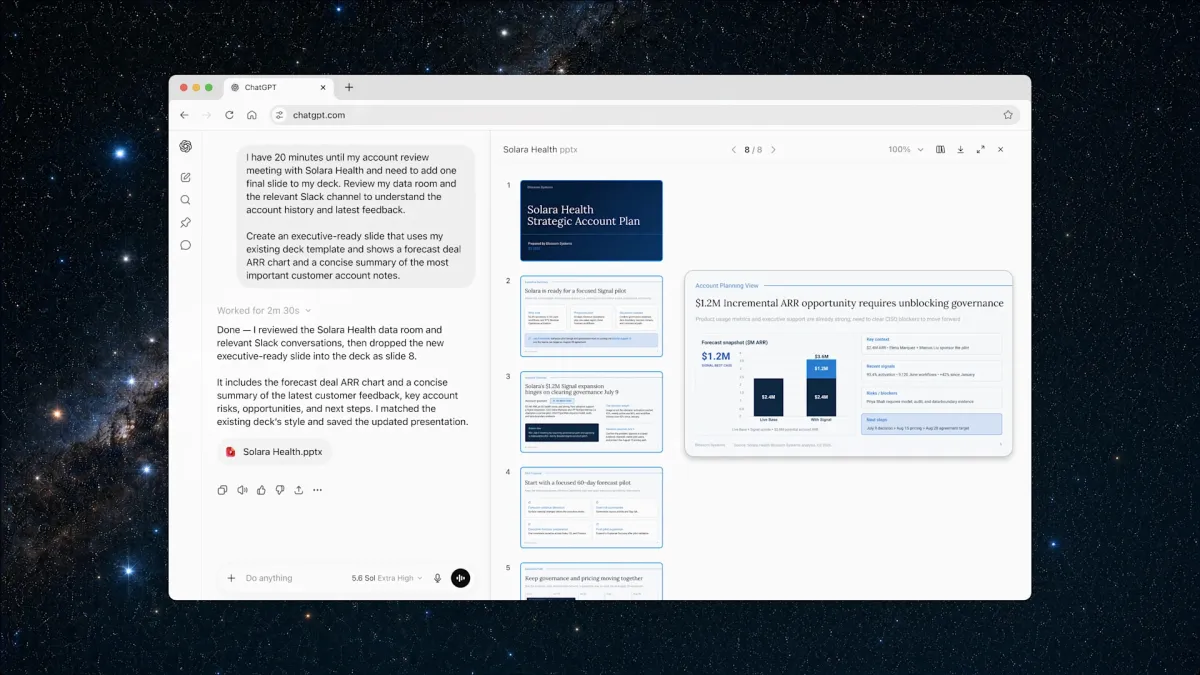
The shift matters because it shows how quickly the AI browser race is evolving: after months of experimentation, OpenAI appears to be folding its web-browsing ambitions into ChatGPT itself, aiming to turn the chatbot into a continuous workspace that can read pages, summarize content, and carry out tasks across browser windows and desktop environments.
OpenAI’s decision comes amid a broader industry push to reimagine the browser as an AI front end. Rival products from Perplexity and The Browser Company, along with AI upgrades from Google and Microsoft, have all tried to pull user attention away from the traditional browser experience and toward AI-native interfaces. OpenAI’s latest move suggests the company is now favoring distribution over destination.
What OpenAI is changing and why it matters
OpenAI is ending Atlas as a separate product, but it is keeping the underlying idea alive in a more practical form. The company is transferring the most useful browser-like functions from Atlas into ChatGPT’s desktop software and a Chrome extension, giving users access to AI help inside the tools they already use every day.
That change is significant because browser behavior has become one of the most contested battlegrounds in consumer AI. Whoever controls the interface where people search, read, compare, and complete tasks has a better shot at owning the next generation of digital work.
Atlas was OpenAI’s attempt to create a browser built around ChatGPT rather than add AI to an existing browser. The company now seems to have decided that approach was too ambitious for the moment, or at least less effective than embedding those capabilities into established products with existing user habits.
Why is OpenAI shutting down Atlas?
OpenAI is closing Atlas because the company is redirecting its attention away from experimental side products and toward more broadly useful features inside ChatGPT. In recent months, leadership pushed teams to reduce what it viewed as distracting “side quests,” a direction that also contributed to the winding down of OpenAI’s Sora video tool.
The underlying message is clear: rather than spreading engineering and product efforts across multiple ambitious standalone apps, OpenAI is prioritizing the places where its core product already has scale and user engagement.
OpenAI’s internal shift reflects a belief that the browser should be a layer of assistance, not a separate destination people must learn to use.
That strategic rethink is also consistent with the broader competitive reality. Browser adoption is hard to dislodge, especially when Chrome remains dominant. OpenAI may have concluded that it can reach more users by making ChatGPT compatible with the browser market than by trying to replace the browser market outright.
How ChatGPT is becoming a browser assistant
OpenAI is adding a Chrome extension that gives ChatGPT awareness of the page a user is viewing. That means people can ask questions about a site, request summaries, or begin longer tasks without copying and pasting content into a separate chat window.
The extension is meant to make ChatGPT feel more present during everyday browsing. Instead of switching contexts, a user can keep reading and let the AI respond inside the flow of work.
OpenAI is also expanding its ChatGPT desktop application with a more capable browser experience. Users will be able to visit websites, sign into accounts, download files, and interact with webpages without leaving the ChatGPT environment.
In addition, OpenAI is running a separate cloud browser on its servers. That remote browser allows agents to perform tasks on a user’s behalf, which is a step beyond answering questions and closer to actually completing work.
What can the Chrome extension do?
The Chrome extension can read the context of the open page, answer questions about it, summarize information, and help initiate more complex tasks. In practical terms, that puts ChatGPT in direct competition with Google’s Gemini Side Panel, which already offers several similar browser-adjacent functions.
For users, the appeal is straightforward: instead of treating the browser and AI as separate destinations, OpenAI wants the assistant to be available directly where articles, documents, and web apps are already open.
What can the desktop app do now?
The desktop app is becoming the center of OpenAI’s browser strategy. It now includes a fuller browser capable of logging into accounts, downloading files, and moving through websites in a more hands-on way.
That means ChatGPT is no longer just a conversational layer. It is evolving into an operating environment where the assistant can read, click, navigate, and, in some cases, act across the web.
Why the browser wars are intensifying
OpenAI’s move lands in the middle of a broader race among AI companies to reinvent web browsing. Over the past year, several firms have tried to create browser experiences that center AI rather than traditional tabs and search.
Perplexity launched Comet. The Browser Company introduced Dia. Google and Microsoft have both added or upgraded AI features in Chrome and Edge. Each of these efforts reflects the same strategic insight: the browser is one of the most valuable real estate locations in consumer software.
That competition has become especially fierce because the browser is where search, productivity, and commerce overlap. If an AI assistant can mediate those interactions, it may become a user’s default starting point for daily work.
OpenAI’s current strategy suggests a subtle but important shift in thinking. Instead of trying to win by making a new browser the center of the experience, it is trying to make ChatGPT the center of the experience no matter which browser the user chooses.
How does this compare with Google and Microsoft?
This approach puts OpenAI squarely against Google’s Gemini Side Panel and, more broadly, against the idea that browser vendors should own the AI layer themselves. Google and Microsoft have both tried to keep users inside their ecosystems by attaching AI features to Chrome and Edge, while OpenAI is now trying to meet users inside Chrome through its own extension.
That creates a direct contest over the same behavior: reading a page and asking an assistant to explain, summarize, or act on it.
| Product | Company | Current role in browsing | What it is trying to do |
|---|---|---|---|
| Atlas | OpenAI | Standalone AI browser | Being retired in favor of embedded features |
| ChatGPT Chrome extension | OpenAI | Browser companion | Summarize, answer questions, and start tasks from web pages |
| Gemini Side Panel | Built-in browser assistant | Keep AI inside Chrome and Google services | |
| Comet | Perplexity | AI-first browser | Reinvent browsing around search and answer generation |
| Dia | The Browser Company | AI-native browser | Turn the browser into a smarter interface for web tasks |
What Atlas taught OpenAI
Atlas appears to have functioned as a test bed for OpenAI’s browser ambitions. The company used it to explore how ChatGPT could behave when it was not just answering prompts but interacting with the open web in a more persistent, agent-like way.
That experimentation seems to have clarified something important: people may not need a completely new browser to benefit from AI browsing features. They may simply need those features inserted into the browser and desktop tools they already trust.
In that sense, Atlas may be less a failed product than an intermediate step. It gave OpenAI a chance to observe how users respond to agentic browsing before deciding where the features belong long term.
Why a standalone browser is harder than it looks
Launching a browser is not just a product challenge; it is a distribution and habit challenge. People are deeply attached to Chrome, Safari, and Edge, and changing browsers creates friction around bookmarks, extensions, passwords, and default workflows.
OpenAI likely ran into the same reality that many browser challengers face: even if the product is impressive, it is difficult to persuade users to make it their primary gateway to the internet.
By contrast, a Chrome extension or desktop app enhancement lowers the barrier to adoption. Users can try OpenAI’s browsing features without abandoning the browser they already use.
What agentic browsing means for ChatGPT
Agentic browsing refers to AI systems that do more than retrieve information. They can navigate websites, complete forms, manage accounts, and carry out tasks with limited human intervention.
OpenAI’s updated desktop app and cloud browser are designed to move ChatGPT deeper into that territory. The assistant is no longer just responding to what users ask; it is beginning to execute workflows inside the browser and on remote servers.
That makes ChatGPT less like a chatbot in the traditional sense and more like a general-purpose work layer. In practical terms, it could help users research, organize, download, compare, and transact with less manual switching between tools.
- Read and interpret web pages in context
- Summarize articles or documents without leaving the page
- Initiate longer multi-step tasks from the browser
- Log into sites and download files in the desktop app
- Use a cloud browser for tasks completed remotely by agents
What users may notice first
The most immediate benefit is convenience. Users will likely encounter ChatGPT as a side-by-side helper rather than as a separate window they must open, copy into, and manage.
For knowledge workers, students, researchers, and anyone who spends much of the day in tabs, that shift could make the AI feel more integrated into routine tasks.
For OpenAI, it also creates more opportunities to keep ChatGPT present as the default assistant across multiple environments, from Chrome to desktop to remote cloud execution.
How this fits OpenAI’s broader product strategy
OpenAI’s decision reflects a more disciplined product philosophy than the company has sometimes been associated with in the past. Instead of launching many stand-alone tools and hoping the market absorbs them, it appears to be concentrating on a few core surfaces where ChatGPT can expand its reach.
The emphasis on ChatGPT desktop, Chrome integration, and remote agents suggests a strategy built around ubiquity. OpenAI wants the assistant to show up wherever users are already working, not force them into a new environment.
That kind of integration also gives the company a clearer story for enterprise adoption. Businesses are more likely to embrace a tool that works inside familiar browsers and desktops than one that requires a wholesale change in workflow.
Why this matters for competition
OpenAI’s move may make the AI browser fight harder to predict. If browsers are no longer the main product battlefield, then the winner may be the company that controls the assistant layer across all browsers.
That puts pressure on Google, Microsoft, and newer entrants alike. It also raises the stakes for future AI agent capabilities, because the most valuable assistant may be the one that can not only answer questions but also finish the job.
OpenAI seems to be betting that users care less about whether they are inside a novel AI browser and more about whether the AI can help them get things done with minimal friction.
Timeline: OpenAI’s browser shift
OpenAI’s retreat from a standalone browser and expansion into embedded browsing tools happened over a relatively short period, underscoring how rapidly the company is iterating on its interface strategy.
| Timeframe | Development | Why it mattered |
|---|---|---|
| October | Atlas launches with ChatGPT at its core | OpenAI tests a browser built around AI from the ground up |
| Following months | OpenAI experiments with agentic browsing features | The company learns how users interact with browser-based AI |
| Recent months | Leadership pushes teams to reduce “side quests” | OpenAI narrows focus to fewer, more central products |
| Now | Atlas is being shut down | Browser features are being redistributed into ChatGPT desktop and Chrome |
What happens next?
OpenAI is not abandoning the browser use case. It is refactoring it. The company will continue to push browser-aware AI, but the experience will increasingly live inside ChatGPT rather than inside a separate browser product.
That means users should expect more incremental additions to the desktop app, more web context inside the Chrome extension, and more agent functionality that runs in the background on OpenAI’s infrastructure.
It also suggests that OpenAI sees the future of browsing as a service model rather than a standalone application model. The browser becomes a surface for AI, while the AI remains the main product.
The company’s latest move implies that the most valuable browser is not necessarily the one you install, but the one your AI assistant can quietly extend across the tools you already use.
For now, Atlas is heading for the exit. But the browser ambitions behind it are not going away. They are being folded into a wider, more pragmatic version of ChatGPT — one that aims to follow users across tabs, windows, accounts, and tasks.
That may be a more realistic way to compete in the AI browser era: not by replacing the browser, but by becoming indispensable inside it.
Frequently asked questions
Why is OpenAI shutting down Atlas?
OpenAI is shutting down Atlas because it is shifting focus away from standalone experimental products and toward features that fit more naturally inside ChatGPT. The company appears to believe it can reach more users by embedding browser-like tools into existing workflows instead of asking people to adopt a new browser.
Is OpenAI giving up on AI browsing?
No. OpenAI is keeping the idea alive by moving Atlas-style browsing features into ChatGPT’s desktop app and a Chrome extension. The company is still building AI tools that can read pages, summarize content, and complete tasks, but it is packaging them differently.
What will the ChatGPT Chrome extension do?
The Chrome extension will let ChatGPT see the context of the webpage you are viewing so you can ask questions, get summaries, and start longer tasks directly from the browser. It is designed to work like an AI helper inside Chrome rather than a separate tool.
How is this different from Google’s Gemini Side Panel?
It is similar in function because both tools sit alongside the browser and help users interact with webpages. The difference is that OpenAI is adding its own extension to Chrome, while Google is building the feature directly into its browser ecosystem.
What does agentic browsing mean?
Agentic browsing means AI can do more than answer questions. It can navigate websites, log into accounts, download files, fill out tasks, and carry out multi-step actions with limited user input, turning the assistant into a more active digital worker.