In short
A hands-on test of local AI found that private, on-device assistants can be genuinely useful for tasks like library sorting and private analysis, but they remain fiddly and unreliable. The story shows why local AI is gaining momentum as hardware vendors push more memory-rich machines.
- Local AI keeps data on your own device, which makes it attractive for privacy-sensitive work.
- A high-memory Mac Studio can run very large models, but model choice remains confusing.
- Simple tasks like scheduling and game-library sorting are where local agents are most useful today.
- Reliability is still a problem, so human oversight remains essential.
- Hardware makers are increasingly pitching premium machines as local AI platforms.
Local AI is becoming practical fast, and one Verge reporter’s hands-on test shows both why people are excited and why the experience still feels rough around the edges. By running powerful models on a high-memory Mac Studio instead of sending prompts to the cloud, he found a privacy-first path to useful automation — but also plenty of setup pain, inconsistent results and a steep learning curve.
The experiment matters because it captures a bigger shift in AI: more users want the convenience of chatbots and agents without handing sensitive data to remote servers run by OpenAI, Google, Microsoft or Anthropic. As hardware vendors push machines built for on-device AI, local models are moving from niche hobbyist territory into something closer to mainstream computing.
For now, the promise is real. So is the frustration.
Why local AI is suddenly getting so much attention
Local AI is attracting interest because it offers many of the same capabilities as cloud chatbots while keeping data on the user’s own device. That combination is appealing to people who want more privacy, lower ongoing costs and tighter control over how an assistant behaves.
The technology also lines up with a broader hardware push. Apple has been emphasizing the AI-friendly capabilities of its latest Mac desktops, while new Windows systems with high memory ceilings are being marketed specifically for local model use and agent-style workflows. In other words, the market is beginning to treat local inference not as an afterthought, but as a reason to buy more capable machines.
That appeal is especially strong for anyone working with private files, embargoed material or other data they would rather not upload to a cloud service. It’s also attractive to users who are skeptical of subscription models and want a tool that runs on their own computer, under their own control.
What makes local AI different from cloud chatbots?
Local AI runs on your computer instead of on a company’s servers, and that changes everything from privacy to cost. There are no per-query token bills, but there is a tradeoff: you need enough memory, storage and processing power to handle the models yourself.
For the reporter testing these tools, that tradeoff was worth exploring. The idea of a private “assistant” on his desk, answering only to him, was more appealing than relying on a remote system that might see personal emails, calendars or work files.
| Local AI test element | What was used | Why it mattered | Outcome |
|---|---|---|---|
| Desktop platform | M5 Ultra Mac Studio | High unified memory makes large local models feasible | Could run very large models locally |
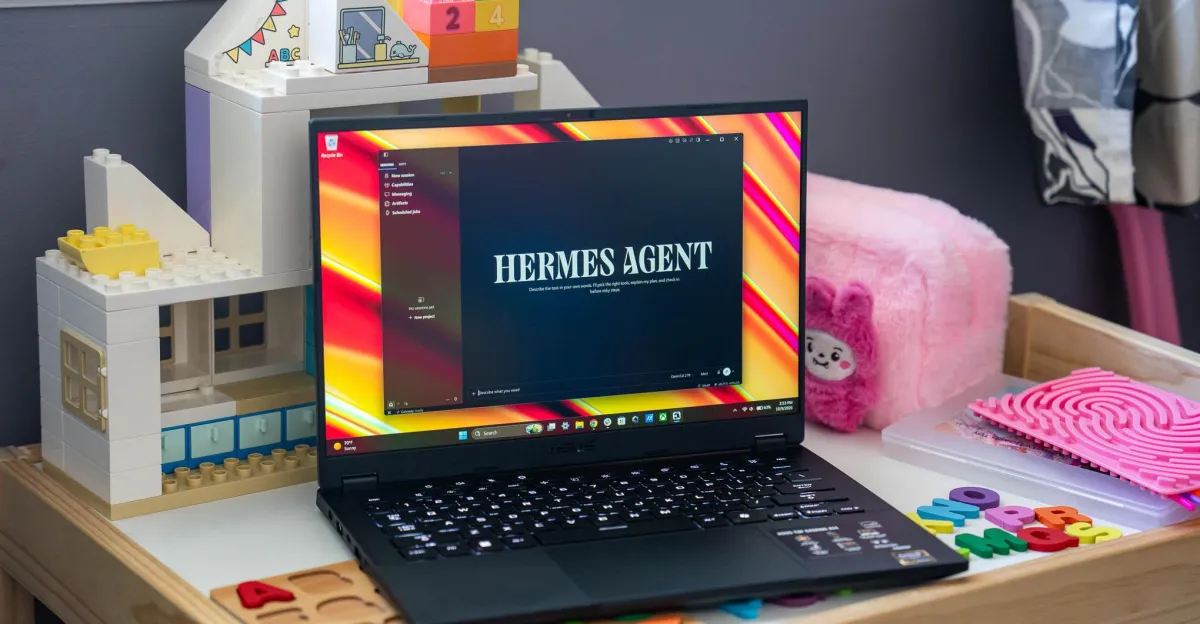
| Agent app | Hermes Agent | Open-source desktop app for self-hosted AI automation | Provided a simple interface for testing tasks |
| Model choice | Qwen 3.8 Flash Next | Large parameter count promised stronger performance | Worked, but was demanding at more than 100GB |
| Automation task | Morning briefing | Good starter test for cron-based workflows | Initially failed until sleep settings were fixed |
| Practical use case | Steam library sorting | Useful, repetitive desktop task suited to an agent | Completed successfully after permissions were granted |
How did the first local AI setup go?
The first setup was straightforward enough to get running, but it quickly exposed how overwhelming local AI can be. Once the reporter installed Hermes Agent on the Mac Studio, he had to choose from a huge range of available models, each with different strengths, sizes and hardware requirements.
Because his machine has 256GB of unified memory, he could test a very large model right away. That made the experiment more ambitious than something most users could try on an ordinary laptop, but it also showed how much hardware can matter when local AI is the goal.
The model he selected, Qwen 3.8 Flash Next, weighs in at roughly 105GB and has 125 billion parameters. The scale of that model reflects the basic rule of this space: bigger models can often do more, but they also demand more memory, more storage and more patience.
Why does the model choice matter so much?
The model choice matters because local AI does not come with the convenience of unlimited cloud infrastructure. On-device users must balance capability against hardware limits, which means model selection is part technical decision and part practical compromise.
That can be intimidating. The reporter described the number of available models as almost impossible to count, and noted that some are built for very specific purposes. For newcomers, the challenge is not just getting something to work, but figuring out what to use in the first place.
- Large models can handle more complex tasks, but require far more memory.
- Smaller models are easier to run, but may produce weaker results.
- Specialized models may perform well in narrow use cases.
- Hardware with high memory capacity widens the range of usable models.
What can a local AI agent actually do?
In practice, the reporter found that local AI can already handle some useful chores, especially repetitive ones that are annoying for humans but relatively simple for software. The key is to start with tasks that are limited in scope and can be checked easily.
That led him to try three types of work: a morning briefing, Steam library organization and some forms of private data analysis. The results ranged from barely useful to genuinely helpful.
Morning briefing: a basic but imperfect first test
The first automation was a daily summary that checked email and calendar events, then added a quick weather report. It was the kind of low-stakes routine task that could confirm whether the system was actually functioning without risking important data.
But it also revealed a common problem in local AI workflows: the tool only works as well as the surrounding setup. In this case, the briefing kept failing until the user realized the Mac could not be asleep when the scheduled job ran at 7:30 a.m. Once that was fixed, the briefing began working reliably.
The reporter’s takeaway was blunt: the system was useful, but it still broke often enough to remind him it was software, not magic.
Even after it started functioning, the briefing was not yet especially valuable. The output was too limited, and the user still needs to think of additional sources of information that would make the morning report more informative.
Steam library sorting: the clearest success
The strongest example was a task that many gamers know well: sorting a massive Steam library. With more than 400 games installed, the reporter wanted a cleaner way to organize titles by genre while preserving custom groupings like favorites, co-op games and titles meant for playing with his wife.
Instead of handling the library manually, he asked Hermes to do the categorization work. After gaining access, the system scanned the existing Steam client, suggested organization options and then sorted the games into usable groups in a matter of minutes.
That process required some trust, including giving the agent a Steam web API key. But the key could be revoked immediately afterward, which made the risk feel manageable. The result was a more navigable library and a strong demonstration of where local AI agents can shine: repetitive digital housekeeping.
- Grant the agent access to the relevant app or service.
- Define the categories or rules you want it to follow.
- Let the system process the task in bulk.
- Revoke sensitive credentials when the job is finished.
Why private data changes the calculus
Local AI becomes much more compelling when the task involves sensitive information. The reporter specifically used Hermes for financial records and for a laptop specification comparison sheet that was still under embargo, meaning cloud upload was off the table.
That is a crucial point in understanding the value of on-device AI. Many people may not care whether a chatbot knows their favorite movie franchise, but they will care very much about where their bank records, work documents or pre-release product data go.
In these situations, local processing is not just a technical preference. It becomes the difference between using AI and avoiding it entirely.
How useful is local AI for data analysis?
Local AI can be useful for simple analysis, but it is not yet a replacement for careful human review. In the reported tests, Hermes was able to help crunch numbers and produce comparison material, but the main advantage was privacy rather than deep analytical sophistication.
That distinction matters. A private model can take on the drudge work of organizing information, but it still needs oversight, especially when the output could influence financial or purchasing decisions.
The big project: benchmark automation
The most ambitious task in the experiment involved laptop benchmarking, one of the most time-consuming jobs in the reporter’s workflow. Running a full set of tests manually can require repeated passes, hardware babysitting and a lot of patience.
For someone who evaluates laptops professionally, that kind of work is ideal for automation. The reporter has been trying to build scripts that could handle parts of the process, and local AI has become a possible helper in that effort.
Even then, progress has been slow. Getting Hermes to generate usable Python scripts involved a fair amount of guidance, back-and-forth and experimentation. The project remains unfinished, which is itself an important reminder that “agentic” AI does not erase the need to understand the task.
What is holding automation back?
The biggest obstacle is reliability. Even when a model is powerful enough to reason through a request, it may still need precise instructions, stable system access and clear boundaries before it can do the job consistently.
That means local AI is still better at assisting than autonomously managing complicated workflows. It can help write code, organize files or execute routine actions, but it is not yet ready to replace the person overseeing the process.
How much hardware do you really need?
The answer is: more than most people probably expect. The test machine in this case, a Mac Studio with 256GB of unified memory, is far beyond the spec of an everyday consumer laptop and well suited to large local models.
That level of hardware helps explain why the local AI discussion is becoming intertwined with premium desktop systems and high-memory Windows workstations. These machines are not just being sold as fast computers. They are being sold as local inference platforms.
| Hardware tier | Typical local AI role | Expected experience |
|---|---|---|
| Consumer laptop | Small models, light tasks | Limited but accessible |
| High-memory desktop | Large models, complex agents | Much broader model support |
| Specialized AI PC | Agentic workflows and local automation | Optimized for on-device AI experimentation |
The bigger the memory pool, the more realistic it becomes to experiment with larger models and more capable agents. But the hardware alone does not solve the usability problem. People still need to know which model to choose, how to grant permissions safely and how to recover when something breaks.
What are the risks of giving AI control of your machine?
The main risk is permission creep. A local agent may live on your own device, but it can still do a lot if you let it, especially when you grant access to APIs, files, browsers or desktop apps.
That is why the reporter treated the setup cautiously. In the Steam test, for example, the API key was only shared long enough to finish the sorting task and then revoked. That’s a sensible model for local AI more broadly: give it narrow access for a limited purpose, then take it away again.
The other risk is trust in the output. A model can sound confident while still making mistakes, so even private assistants need checking. Local does not automatically mean correct.
- Grant only the permissions required for the specific task.
- Use temporary credentials whenever possible.
- Review outputs before relying on them.
- Start with low-stakes jobs before trying sensitive workflows.
Why the human remains in charge
One of the most interesting parts of the experiment is philosophical rather than technical. The reporter is not trying to create a digital companion or emotional assistant. He wants a tool, not a friend.
That means no ritual politeness, no pretending the system has feelings and no anthropomorphizing every prompt. The point is to use software as a labor-saving device, not to blur the line between person and program.
That stance may sound chilly, but it reflects a growing segment of AI users who want practical benefits without the emotional framing that often surrounds chatbot products. For them, the value of local AI lies in efficiency, privacy and control.
His approach to local AI is matter-of-fact: treat it like any other piece of software, keep it at arm’s length, and remain cautious as it becomes more capable.
Where local AI goes from here
The reporter’s work is still at an early stage, and he is testing the technology across several systems, including Macs, Windows PCs and future AI-focused hardware. That broader experimentation is important because the local AI market is moving quickly, and real-world use cases are still being discovered.
There is a clear tension at the center of the story. On one hand, local AI can already do meaningful work, especially in private or repetitive workflows. On the other hand, it remains brittle, difficult to configure and occasionally frustrating even for an experienced tech journalist.
That combination makes local AI exciting rather than settled. It is not yet a finished revolution. It is a promising set of tools that require patience, hardware and a willingness to tinker.
For users who care about privacy and control, that may be enough to justify the effort. For everyone else, the cloud will probably remain simpler for now.
Timeline of the local AI experiment
| Stage | What happened | Why it mattered |
|---|---|---|
| Setup | Hermes Agent was installed on the Mac Studio | Provided a local, self-hosted AI interface |
| Model selection | Qwen 3.8 Flash Next was chosen | Tested the limits of high-memory local hardware |
| First workflow | A morning briefing was automated | Confirmed basic scheduling and task execution |
| Practical win | Steam library sorting was completed | Showed real value in repetitive desktop work |
| Ongoing work | Benchmark scripting remains in progress | Demonstrates both promise and current limits |
In the end, the most important lesson may be that local AI is not one thing. It is a spectrum of models, tools and hardware choices that can be powerful in the right context and maddening in the wrong one. The excitement is justified, but so is the frustration.
The technology is already useful enough to save time and protect privacy in specific situations. Whether it becomes truly mainstream will depend on how much easier it gets for ordinary users to set up, trust and maintain.
Frequently asked questions
What is local AI?
Local AI is AI software that runs on your own computer instead of a company’s cloud servers. That means your files and prompts stay closer to home, but it also means you need enough memory, storage and processing power to handle the model yourself.
Why do people use local AI instead of cloud chatbots?
People use local AI for privacy, control and sometimes cost. Sensitive documents, financial records or embargoed material can be processed without uploading them to a third-party service, and there are no per-request token charges once the model is running locally.
Is local AI easy to set up?
No, local AI is still fairly complicated for most users. You have to choose a model, install the right software, manage permissions and troubleshoot failures. In this test, even a simple morning briefing broke until the computer’s sleep settings were fixed.
What kinds of tasks are best for local AI?
Local AI is best at repetitive, low-risk desktop tasks such as sorting files, organizing a game library, summarizing routine information or helping with private analysis. It is less reliable for open-ended, high-stakes work that demands accuracy and consistency.
Do you need expensive hardware for local AI?
Often, yes. Small models can run on ordinary machines, but larger and more capable ones need a lot of memory. In this case, a 256GB Mac Studio made it possible to test a very large 125-billion-parameter model locally.



![Three men seated on stage discussing at Human[X] event, with branded backdrop and one holding a notepad.](https://superintelligencenews.com/wp-content/uploads/2026/10/superintelligencenews.com-voice-ai-voice-ai.jpg)