Updated September 9, 2026 1:26 pm
In short
Adobe is putting generative media directly into Premiere’s timeline, adding beta AI audio cleanup tools, and bringing a plain-language AI assistant to After Effects.
- Adobe is embedding AI generation directly into Premiere’s timeline.
- Editors can create video, music, sound effects, and ambience without switching apps.
- Premiere will support multiple models, including Firefly, Veo, Runway, Luma, and Kling.
- New beta audio tools aim to clean up dialogue and balance sound automatically.
- After Effects is getting an AI Assistant for natural-language workflow help.
Update — September 9, 2026 1:26 pm
Adobe’s Premiere update also adds a clearer AI Assistant in After Effects, where editors can use plain-language prompts to reorganize projects, troubleshoot problems, and build effects without writing expressions by hand.
The company’s new timeline-based Generative Media panel and beta audio tools remain the main focus, but the After Effects assistant extends Adobe’s push to make more of its pro software work through conversational commands.
Adobe is redesigning Premiere Pro’s AI workflow so editors can generate video, audio, and sound design directly from the timeline, a move aimed at reducing the back-and-forth that often slows professional editing. The update matters because it puts generative tools where editors already work, making AI-assisted production faster, more contextual, and easier to control.
The company announced a new Generative Media interface inside Premiere that lets users create missing B-roll, sound effects, music, and ambient audio without leaving a project. Adobe is also adding AI-powered audio cleanup tools and expanding its AI Assistant into After Effects, signaling a broader push to make its creative software more conversational and less technically demanding.
What Adobe is changing in Premiere
Adobe’s biggest shift is not that it is adding new AI capabilities, but that it is moving them into the editing timeline itself. That design change is meant to cut down on interruptions and make generative tools feel like a natural part of editing rather than a separate destination.
For years, editors who needed to fill a gap in a sequence often had to export context, switch to another app or website, generate an asset, and then bring it back into the project. Adobe’s new approach tries to collapse that workflow into a single place.
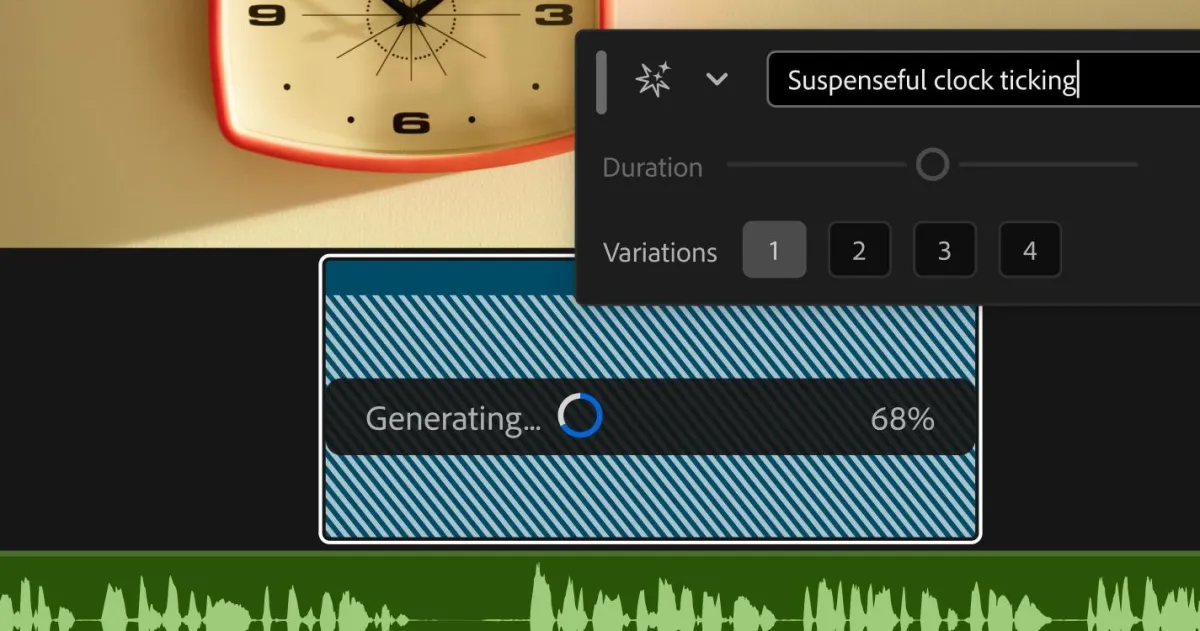
Instead of opening another interface, editors can highlight an empty section of the video or audio timeline and request a generated clip that fits the surrounding material. The result is meant to be editable and project-aware, so creators can keep refining the sequence without breaking momentum.
Why timeline integration matters
Timeline integration matters because professional editors think in sequences, not in isolated prompts. When an AI tool is embedded in the same place where cuts, audio layers, transitions, and effects are already managed, it becomes easier to judge whether the generated material truly works.
That is especially important for productions that move quickly, such as social clips, branded content, trailers, documentary rough cuts, and marketing assets. In those environments, small time savings can add up to substantial workflow gains.
Adobe is framing the update as a way to make generative features less disruptive and more usable inside the editing process, rather than forcing creators to leave the project every time they need a new asset.
How the new Generative Media tool works
The new Generative Media interface is designed to make AI generation feel like a normal edit. Users can select a gap on the timeline, choose the kind of asset they need, and generate material that can be adjusted like any other clip.
Adobe says the feature will support multiple creative outputs, including video, sound effects, music, and soundscapes. That breadth is notable because editors often need more than one type of replacement asset when a sequence has missing footage or thin audio.
Just as important, the system is built to let editors pick from several underlying models rather than being locked into one provider. Adobe says Premiere users will be able to choose among Adobe Firefly, Google Veo, Runway, Luma, and Kling, depending on the look or feel they want.
| Feature | What it does | Why it matters | Status |
|---|---|---|---|
| Generative Media in Premiere | Creates video, music, SFX, and ambient audio from the timeline | Keeps editors inside the project and speeds up asset creation | Announced |
| Multi-model support | Lets users pick from Firefly, Veo, Runway, Luma, and Kling | Offers style flexibility and more control over generated results | Announced |
| AI audio tools | Separates speakers, ducks music, and adjusts dialogue and ambience | Helps clean up complex tracks with less manual work | Beta |
| AI Assistant in After Effects | Accepts plain-language commands for project and effects tasks | Lowers the technical barrier for advanced motion graphics work | Beta |
Why Adobe is opening the door to multiple models
Adobe’s support for several model providers reflects a wider trend in creative software: users want choice, not a single one-size-fits-all generator. Different projects demand different visual styles, pacing, realism levels, and output constraints.
In practical terms, a marketing team may want polished, brand-safe results, while a music video editor may prefer something more stylized or experimental. By letting users switch models inside Premiere, Adobe is positioning the software as a control center rather than a closed AI service.
That strategy may also help Adobe compete with standalone generative platforms. If editors can access multiple systems from the same interface, they are less likely to drift into external tools for creative fills and audio generation.
What this means for creators
For creators, the advantage is not just convenience. It is also continuity. The more an AI-generated clip can be produced, reviewed, and refined in the same timeline as the rest of the project, the less likely it is to feel bolted on or out of place.
That continuity is important in editing, where timing, tone, and context are everything. A clip that looks fine in isolation may fail once it is placed next to a particular cut, voice track, or music cue.
- Editors can fill empty gaps without switching tools.
- Generated assets remain editable within the project.
- Multiple AI models provide more creative options.
- Workflow interruptions should be reduced.
What new AI audio tools are coming to Premiere?
Adobe is also adding a new set of AI audio features to Premiere, and these may be just as important as the visual generation tools for day-to-day editing. The company says the features are in beta and are aimed at solving common problems in dialogue-heavy projects.
One function separates overlapping speakers, which is useful when interview subjects talk over each other or when a recording captures multiple voices in a crowded environment. Another automatically lowers music underneath speech, a process often known as ducking, which can save editors from manually keyframing audio levels.
Adobe is also introducing independent controls for dialogue and ambience. That gives editors more room to shape the sound of a scene without having to rebuild the entire mix from scratch.
Why the audio update is significant
Audio is often the hidden bottleneck in video production. A strong picture can still feel unprofessional if the dialogue is muddy, the music overpowers the voices, or ambient sound changes abruptly from shot to shot.
By automating some of those fixes, Adobe is targeting the tedious but essential work that takes time and attention away from storytelling. For editors working on fast turnaround jobs, that can be a meaningful productivity boost.
The audio tools are designed to help editors handle cluttered tracks and balance dialogue more quickly, particularly when the original recording is messy or inconsistent.
How the AI Assistant is expanding into After Effects
Adobe is also bringing its AI Assistant to After Effects, where it will be available in beta. The assistant is meant to make the motion graphics application easier to use by accepting plain-language instructions instead of requiring users to know every technical detail.
After Effects is powerful, but it is also famously complex. Many tasks in the software traditionally require a combination of menus, expressions, and technical know-how. Adobe’s AI Assistant is aimed at reducing that friction by helping users reorganize projects, troubleshoot issues, and build effects using conversational prompts.
That could be especially helpful for users who know what they want visually but not how to build it through scripting or advanced controls. It also suggests Adobe is trying to make its software more accessible to a wider range of creators without abandoning professional users.
What kinds of tasks can it help with?
Adobe says the assistant can be used to reorganize projects, fix technical problems, and create effects without requiring editors to write expressions manually. That could shorten the path from idea to execution for motion designers and video teams.
In a tool as deep as After Effects, even minor automation can save meaningful time. A short prompt that identifies a broken setup or suggests a plausible effect could spare users from searching through layers of documentation or forum posts.
What this reveals about Adobe’s broader AI strategy
Adobe’s latest updates show a company trying to make AI feel less like a novelty and more like an embedded production layer. Rather than treating generative features as separate experiments, Adobe is folding them into the core experience of its flagship creative tools.
That is a smart position in a market where creators increasingly expect AI to be useful in the flow of work. The promise of generation alone is no longer enough. The real competition is about speed, context, reliability, and whether the tool respects the way professionals already work.
Adobe also appears to be making a subtle argument about trust. By embedding generation inside Premiere and letting users choose from several models, the company is suggesting that AI should be something editors can direct, compare, and control — not a black box that overrides their judgment.
Adobe’s advantage in the creative software market
Adobe’s strength has always been its position inside the professional workflow. If the company can keep AI generation native to Premiere, After Effects, and its broader Creative Cloud ecosystem, it gains a major advantage over external tools that sit outside the editing timeline.
That advantage is partly technical and partly behavioral. Creators are more likely to adopt tools that reduce friction without forcing them to re-learn their process from scratch.
- Editors stay inside Adobe software longer.
- Generated assets are easier to evaluate in context.
- Audio cleanup becomes less manual.
- After Effects becomes less intimidating for new users.
What does this mean for video production workflows?
It means video production is moving another step toward AI-assisted assembly. The editor’s role is not disappearing, but the balance is shifting: the software is doing more of the repetitive support work, while the human editor makes judgment calls about timing, tone, and story.
In the short term, this could help teams deliver projects faster and with fewer staffing bottlenecks. In the longer term, it may reshape expectations around what an editing suite should do by default.
Instead of being a place where editors only cut and arrange media, Premiere is increasingly becoming a place where missing media can be generated, audio can be cleaned, and technical hurdles can be translated into simple language.
Timeline of Adobe’s latest AI updates
The rollout underscores how Adobe is layering AI features across its products in stages, with some arriving as full additions and others first appearing in beta form.
| Update | Product | Purpose | Release stage |
|---|---|---|---|
| Generative Media interface | Premiere Pro | Generate clips and audio from the timeline | Announced |
| Model choice inside timeline | Premiere Pro | Allow selection among Firefly, Veo, Runway, Luma, and Kling | Announced |
| Audio separation and ducking tools | Premiere Pro | Clean up dialogue and balance sound automatically | Beta |
| AI Assistant integration | After Effects | Handle project tasks and create effects through natural language | Beta |
How is Adobe trying to make AI easier to use?
Adobe is trying to make AI easier to use by putting it in the same place editors already work and by reducing the technical steps required to get useful results. The company’s design philosophy appears to be: fewer detours, more direct control.
That means less time spent hunting for missing assets, less reliance on outside tools, and less need to understand the mechanics behind every effect or cleanup task. Instead, editors can focus on the sequence in front of them and use AI where it fits naturally.
Adobe’s bet is that generative media will become more valuable when it is treated like an editing feature rather than a separate category. If that proves true, the company’s latest Premiere and After Effects updates could become a template for how professional creative software integrates AI going forward.
Why the update matters now
This rollout arrives at a moment when creative professionals are being asked to do more with fewer resources. Video teams face tighter deadlines, smaller crews, and greater pressure to produce content for multiple platforms.
Adobe’s new tools address that reality directly. They promise faster assembly, easier cleanup, and a smoother route from rough cut to finished product. Even if some of the features remain in beta, the direction is clear: generative AI is moving deeper into the everyday mechanics of editing.
For Adobe, that is both a product strategy and a competitive statement. The company wants Premiere and After Effects to be the places where AI becomes practical, predictable, and part of the craft — not just a demo.
Frequently asked questions
What is Adobe adding to Premiere?
Adobe is adding a Generative Media interface that lets editors create video and audio assets directly from the project timeline. The tool is designed to generate missing B-roll, music, sound effects, and ambient audio without forcing users to leave the edit.
Which AI models will Premiere support?
Premiere will support multiple models, including Adobe Firefly, Google Veo, Runway, Luma, and Kling. Adobe says the choice is meant to give editors more flexibility over style and output depending on the needs of a project.
What new audio tools is Adobe bringing to Premiere?
Adobe is adding beta audio tools that can separate overlapping speakers, automatically lower music under dialogue, and independently adjust dialogue and ambience. These features are aimed at speeding up common cleanup tasks in complex audio tracks.
How is Adobe using AI in After Effects?
Adobe is expanding its AI Assistant into After Effects in beta, where it can respond to plain-language commands. The assistant is meant to help users reorganize projects, fix technical issues, and create effects without manually writing expressions.