Updated July 20, 2026 7:28 pm
In short
Adobe is testing generative AI tools in Project Indigo, with a free limited rollout for now, possible future paid access, and plans to add content credentials while relying initially on Google’s Nano Banana model rather than Firefly.
- Adobe is testing generative AI features in Project Indigo, its iPhone camera app.
- The update includes Styles, Object Editing, Photo Guidance and Custom Edit.
- The company says the experiment is optional, limited to a small user group, and may later become paid.
- Adobe is using Google’s Nano Banana model for now and is exploring content credentials for AI-edited images.
- The shift marks a major change for an app originally built around natural-looking photography and manual controls.
Update — July 20, 2026 7:28 pm
Adobe says Project Indigo’s AI Playground is still an experiment, but the company is now floating a paid version if the feature set catches on. It also says the test is being offered free to a small slice of users with no sign-in required, and that it may widen access or launch follow-up experiments depending on demand.
The update also makes clear that the app’s generative tools are not using Adobe Firefly. Adobe is leaning on Google’s Nano Banana model for now, while its team works toward adding C2PA Content Credentials to images altered inside Indigo.
Levoy also said the same prompt-driven buttons can produce slightly different results each time they are pressed, underscoring that the new editing tools are designed to be iterative rather than fixed one-click effects.
Adobe has begun testing generative AI features inside Project Indigo, its iPhone camera app originally pitched as a way to deliver a more natural, SLR-like look. The update adds AI-powered filters, object removal, photo advice, and prompt-based editing, marking a major shift for an app that launched as a photography tool first and an AI playground second.
The experiment matters because Adobe is now blending computational photography with generative editing in a mobile camera app, while also testing how much AI users actually want in a product that once appealed to purists seeking realism rather than heavy manipulation.
What changed in Project Indigo’s latest update?
Adobe’s version 1.1 update for Project Indigo introduces a new “AI Playground” that packages several generative tools into the camera app. The company says the feature set is being rolled out experimentally to a small share of users over the next few weeks, and access does not require users to sign in.
Importantly, Adobe says the AI module is optional. A toggle allows users to decline the new system and keep using Indigo in its earlier form, which focused on manual camera controls and image quality rather than AI-driven alteration.
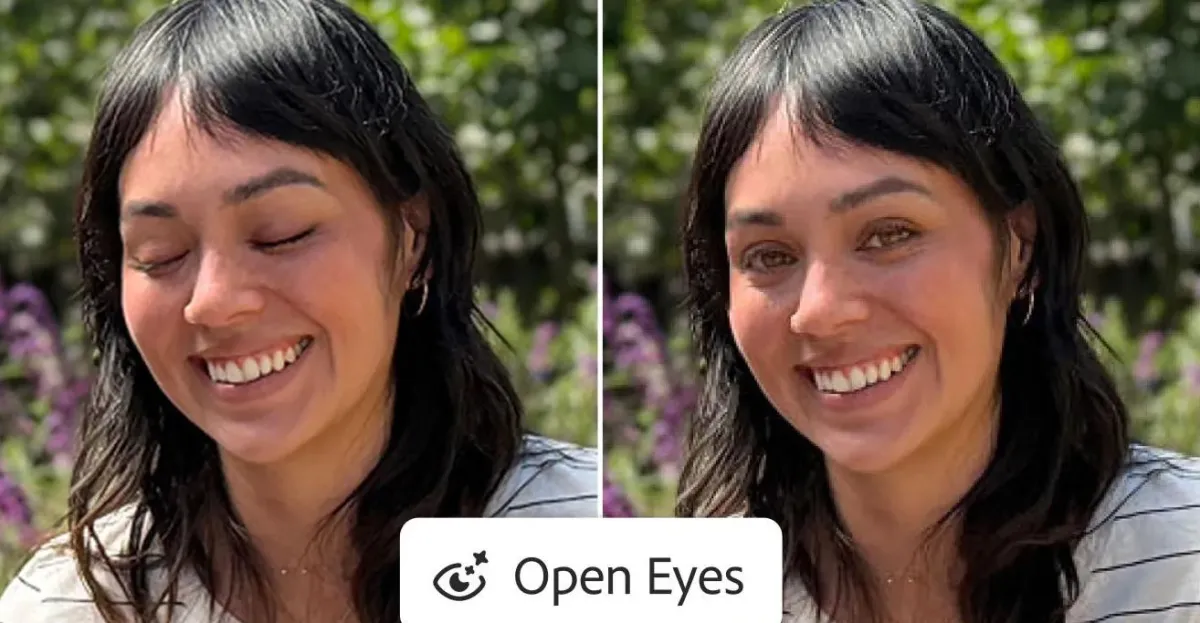
The update contains four major functions: Styles, Object Editing, Photo Guidance, and Custom Edit. Adobe fellow Marc Levoy said the tools rely on engineered prompts rather than open-ended prompting alone, and he noted that repeated uses may produce slightly different outputs.
AI Playground features at a glance
| Feature | What it does | Closest familiar comparison |
|---|---|---|
| Styles | Applies AI-generated looks and visual treatments to photos | Preset generative filters |
| Object Editing | Removes people or distractions and fills the gap with AI | Google Magic Eraser-style editing |
| Photo Guidance | Analyzes images and offers suggestions for retakes or edits | AI photo coach |
| Custom Edit | Lets users describe desired changes in more detail | Prompt-based image editing |
Why is Adobe adding generative AI to a camera app built for realism?
Adobe is doing it because the company appears to be testing a broader vision for mobile creation: taking a photo, improving it, and editing it within one app using both computational photography and generative AI. That is a meaningful departure from Indigo’s original identity, which was built around natural-looking iPhone photos and manual control.
When the app launched, it was described as a tool for camera enthusiasts who wanted a more faithful photographic experience, not a synthetic one. The new update suggests Adobe sees a future in which those two approaches can coexist inside the same workflow.
Levoy said Adobe sees this as the start of a larger effort to build an integrated mobile camera-and-editing experience that combines modern computational photography with AI.
The company has not said the current experiment is permanent. Instead, it is actively studying how people use the tools before deciding whether to extend the test, expand access, or release a paid version later.
How the new AI tools work
The AI Playground is designed to make image manipulation more accessible without requiring users to master separate editing software. Each section in the update serves a distinct role, from quick visual effects to more detailed text-based adjustments.
Styles creates instant AI looks
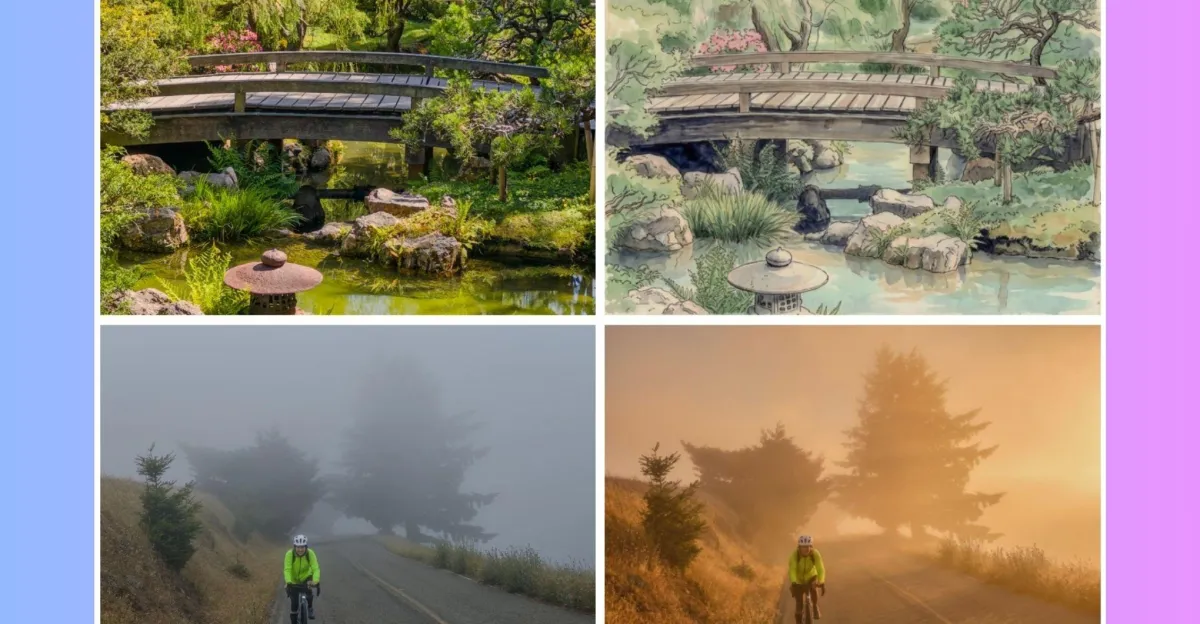
Styles applies preset generative effects to photographs taken in Indigo. Adobe says the results can alter the mood, lighting, and even the apparent medium, making a picture resemble an illustration or a heavily stylized image.
Unlike a traditional filter, these looks are not simple overlays. They are driven by generative AI and can therefore produce different outcomes when triggered again.
Object Editing removes distractions
Object Editing is intended to delete unwanted people, clutter, or background interruptions. After removal, generative AI reconstructs the missing area so the final image appears complete.
For many users, this will look familiar. The feature sits in the same product category as Google’s Magic Eraser and other AI cleanup tools now common across consumer photo apps.
Photo Guidance offers editing advice
Photo Guidance is less about direct manipulation and more about feedback. Adobe says the tool looks at an image and suggests ways to improve the shot, whether by taking another photo or adjusting the current one.
That makes the feature more like an AI-assisted photo tutor than a conventional editor. For casual users, it could reduce guesswork when deciding whether a shot is worth keeping or reshooting.
Custom Edit lets users describe what they want
Custom Edit is the most flexible part of the new suite. It allows users to describe in more detail how they want an image changed, which can be useful if a preset effect goes too far or misses the intended style.
Adobe says it is using Google’s Nano Banana model for the feature set to start, though the company has left the door open to swapping models or adding support for others later.
What makes this update different from Adobe’s usual AI strategy?
The most notable difference is that Project Indigo’s AI experiment does not yet carry the same level of transparency messaging Adobe has typically attached to its Firefly ecosystem. Adobe’s generative AI products often emphasize content authenticity and clear labeling, but the Indigo update is still evolving in that regard.
Levoy said the team is working on support for C2PA Content Credentials, a metadata standard meant to help identify AI-generated or AI-modified content. He also noted that Google’s Nano Banana model already uses SynthID, an invisible watermarking system.
That means the app is moving into a sensitive area: image generation and alteration in a camera product that originally aimed to preserve a more authentic look. The tension between convenience, creativity, and disclosure is now part of the experiment.
Levoy argued that whether an edit is acceptable or misleading depends on the context, including how the image is shared and presented, and he stressed that technology alone cannot replace responsible behavior.
How did Project Indigo start?
Project Indigo began as a niche camera app for iPhone users who wanted better-looking mobile photos without the overprocessed look that often comes from smartphone pipelines. It combined computational photography techniques with manual settings such as focus, shutter speed, ISO, and white balance.
That launch positioning gave the app a distinct identity. It was aimed at users who care about image quality, not just fast social posting, and it was widely seen as a tool for enthusiasts rather than the mainstream casual market.
The new AI layer does not erase that origin, but it does complicate it. The app is shifting from being primarily a capture tool to becoming both a capture and transformation platform.
From camera control to image generation
Adobe’s direction suggests a broader industry trend: camera apps are no longer just about recording reality more accurately. They are increasingly becoming interfaces for reshaping it immediately after capture.
That shift has obvious consumer appeal. It also raises questions about whether users still want separate stages for shooting and editing, or whether they are comfortable letting AI intervene from the moment a photo is taken.
Why this matters for mobile photography and AI editing
The move is significant because Adobe is testing the idea that generative AI can live inside a photographer-focused app without destroying its appeal to serious users. If the experiment works, it could influence how other camera and editing products are built.
There is also a commercial angle. Adobe has indicated that if the feature set proves popular, a paid version could follow. That would make Indigo not just a product experiment, but potentially a new subscription or upsell path for the company.
For Adobe, the test also helps answer a broader strategic question: can an app founded on realism attract users to AI-powered enhancement without losing the trust that made it interesting in the first place?
- It blends capture and editing into one workflow.
- It tests demand for generative tools in a photography app.
- It may become a paid feature if users respond positively.
- It raises transparency questions around AI-modified images.
What role is Google playing here?
Google is supplying the model behind at least part of the experiment. Adobe says it is starting with Nano Banana, which handles some of the generative work inside the new AI Playground.
This is notable because Adobe is not relying solely on its own Firefly stack for the update. Instead, it is using an external model to move quickly and to test which capabilities users value most.
Google’s involvement also highlights a larger trend in consumer AI products: model flexibility is becoming a competitive advantage. App makers increasingly want the option to swap providers rather than build every feature around a single in-house system.
How the rollout is being tested
Adobe says only a small percentage of Indigo users will see the feature during the current trial period. The company is using the test to study behavior before deciding whether to widen access or introduce more experiments later.
That measured approach suggests Adobe does not want to force a major identity change on the app all at once. Instead, it is probing whether users embrace AI-assisted editing as a natural extension of the camera experience or reject it as a distraction from Indigo’s original purpose.
Current test conditions
| Aspect | Details |
|---|---|
| Release stage | Experimental version 1.1 update |
| Availability | Small percentage of users over several weeks |
| Sign-in required | No |
| Opt-out option | Yes, users can keep using Indigo normally |
| Future outcome | May expand, change, or become paid |
What happens next?
The next phase will likely depend on user reaction. If people find the AI tools helpful, Adobe could expand the test and add more models or more polished versions of the features. If users prefer Indigo in its original form, the company may keep the AI layer more limited or optional.
Adobe is also likely to refine its transparency and provenance features as the experiment continues. Content credentials and invisible watermarking are becoming increasingly important as companies try to keep AI-generated and edited media distinguishable from untouched photography.
For now, the update is best understood as a live product experiment rather than a finished pivot. Adobe is watching to see whether a camera app that began with a purist philosophy can evolve into something broader without losing the audience it first attracted.
The bigger picture
Project Indigo’s new AI Playground is more than a feature update. It is a signal that the line between camera, editor, and generative AI tool is fading quickly.
That may be welcome news for people who want faster edits, smarter corrections, and more creative control on a phone. It may also unsettle users who prefer a clearer boundary between photography and synthetic image generation.
Either way, Adobe is now testing the future of mobile photography in public. The outcome could shape not only Indigo, but also how the next generation of camera apps decide whether to preserve reality, enhance it, or reinvent it on the fly.
Adobe’s position, as described by Levoy, is that the company is still learning how people want to use generative editing and will adjust the product based on the results.
That makes this less a finished product launch than a referendum on how much AI belongs inside the camera itself.
Frequently asked questions
What is Adobe Project Indigo AI Playground?
Adobe Project Indigo AI Playground is an experimental update that adds generative AI tools to the iPhone camera app. It includes stylized filters, object removal, photo advice, and prompt-based editing, while still allowing users to opt out and use the app normally.
Does Project Indigo use Adobe’s Firefly models?
No, not for this experiment. Adobe says the new AI Playground starts with Google’s Nano Banana model instead of Firefly, though the company says it may add or change model support later as the feature develops.
Can users turn off the new AI features in Project Indigo?
Yes, users can opt out of the AI Playground and continue using Project Indigo as before. Adobe says the feature is being tested with a small percentage of users and is designed to remain optional during the experiment.
Why is Adobe adding AI to a camera app focused on realism?
Adobe is adding AI to test a broader mobile photography workflow that combines capture, enhancement, and editing in one app. The company wants to learn how users respond before deciding whether to expand the feature or offer a paid version.
Will Adobe label images edited in Project Indigo?
Adobe says it is working toward adding C2PA Content Credentials to images altered by Indigo’s generative tools. The company also notes that the Google model used in the test already includes SynthID watermarking, which can help identify AI-generated content.