Updated September 24, 2026 2:55 pm
In short
YouTube is adding AI-powered Studio tools for creators, including mobile Ask Studio, draft feedback, dynamic thumbnail and title generation, automatic thumbnail monitoring, richer analytics explanations, and new editing features for Shorts and YouTube Create.
- Ask Studio is coming to iOS and Android so creators can query channel data on mobile.
- YouTube Studio will now use AI to review drafts, generate thumbnails, and suggest titles.
- The platform is expanding testing tools, including up to three opening cuts for a video.
- YouTube says creators have already run more than 40 million title and thumbnail A/B tests.
- Analytics will soon focus on explaining why videos perform well, not just showing raw metrics.
Update — September 24, 2026 2:55 pm
YouTube says Studio will soon do more than suggest better packages for videos: later this year, it will begin automatically watching thumbnail performance and swapping in a new version if the original is underperforming.
The company also says its analytics are getting a clearer explanatory layer, with guidance meant to show creators why a video worked or missed, not just the numbers behind it.
Beyond Studio, YouTube highlighted more creator tools, including conversational editing for Shorts and updates to the YouTube Create app.
Update — September 23, 2026 7:24 pm
YouTube also says its analytics tools are getting smarter, with new explanations aimed at showing not just what happened on a channel, but why certain videos performed the way they did.
In addition to the Studio changes, the company highlighted other creator-focused features, including conversational editing for Shorts and updates to the YouTube Create app.
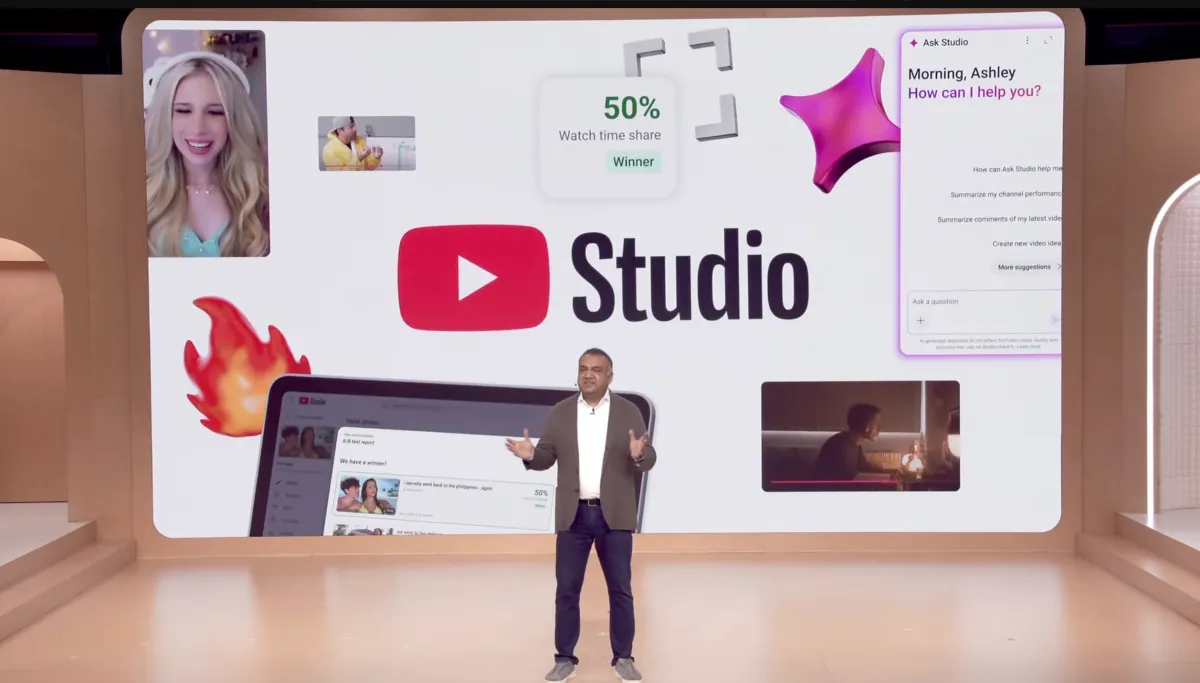
YouTube is rolling out a new set of AI features inside YouTube Studio, the dashboard creators use to manage channels, analyze performance, and plan future uploads. Announced at the company’s Made on YouTube event on September 23, 2026, the update matters because it gives creators more automated help with brainstorming, editing, thumbnail testing, and audience analysis at a time when competition for attention on the platform is intense.
The expanded tools are designed to help creators improve videos before they publish them and understand more clearly why some uploads travel farther than others. YouTube is also bringing Ask Studio, its AI question-and-answer tool, to mobile devices, while adding new experimental features that can generate thumbnail and title ideas, evaluate rough cuts, and surface content trends across the platform.
What YouTube announced at Made on YouTube
YouTube used its annual creator event to show how deeply artificial intelligence is now being woven into the Studio app. The company’s focus is not just on making individual tasks faster, but on turning YouTube Studio into a more proactive creative assistant that can suggest improvements, recommend topics, and flag weak spots before a video goes live.
That shift is significant because Studio has long served as the command center for creators. It is where they check watch time, audience retention, click-through rates, and revenue data. The new AI features push the app beyond reporting into recommendation, giving creators more direct help with content strategy.
Ask Studio is going mobile
Ask Studio, YouTube’s AI-powered Q&A tool, is expanding to both iOS and Android. That means creators will be able to ask questions about their channels while away from a desktop, using natural language to get quicker insights about performance or audience behavior.
In practice, that could help a creator ask why a video stalled, which audience segments responded best, or what patterns appear across recent uploads. By putting the feature on mobile, YouTube is making its analytics assistant more immediate and more useful for day-to-day creator work.
Draft feedback aims to improve videos before posting
One of the most notable additions is an AI feature that reviews an unpublished video draft and offers feedback on pacing, structure, and storytelling. Instead of waiting for comments or watching analytics after publication, creators can now get a pre-publish critique aimed at making the final upload stronger.
This kind of tool is especially useful for creators who publish often and work under tight deadlines. A video that drags in the middle, opens too slowly, or lacks a clear narrative could be revised before it is ever uploaded.
YouTube said the feature is meant to help creators shape stronger videos by giving them automated suggestions on how the story is flowing and where the editing may need work.
That framing suggests YouTube sees AI as a collaborator in the editing process rather than a replacement for human judgment. The creator still decides what to change, but the software adds a layer of critique that may otherwise require a second set of eyes.
How will YouTube help creators spot trends faster?
YouTube is introducing a new research feed inside Studio that shows creators what types of content are performing well on the platform. The idea is to help users identify patterns and then build their own versions with a personal twist, rather than guessing which topics might resonate.
This feature could be especially valuable for creators who rely on timely uploads, such as commentary channels, educational channels, or video makers focused on trending niches. Instead of scanning the platform manually, creators will have a more structured way to spot what is working.
At a time when recommendation systems shape nearly every audience decision, trend awareness is important for both small and large creators. Those who can move quickly often have an advantage, but only if they can identify an emerging theme before it fades.
Why a research feed matters
A research feed serves a different purpose than standard analytics. Analytics tell creators what happened on their own channel. Research tools show them what is happening more broadly across the platform, which can be useful for topic selection, format planning, and testing new ideas.
For YouTube, that kind of surface-level trend guidance can also keep creators invested in the platform instead of turning to outside tools for inspiration. The more useful Studio becomes as a planning environment, the harder it is for creators to leave the ecosystem.
Thumbnail and title generation gets more advanced
Creators have always been obsessive about thumbnails and titles, and for good reason: those two elements often determine whether a video gets clicked. YouTube is now adding AI tools that generate thumbnail and title suggestions based on the contents of a video and the creator’s own style.
The company is also debuting what it calls a dynamic thumbnail feature that can create three different thumbnail options and show each one to a separate slice of the audience. That gives creators a faster way to compare performance without manually building multiple variations.
In many ways, this is an extension of an already familiar creator habit. The difference is that YouTube is automating more of the process and building the testing framework directly into Studio.
Dynamic thumbnails could reduce guesswork
Thumbnail testing has long been one of the most important optimization tactics on YouTube, but it is usually time-consuming. Creators often design several versions, compare results, and then decide which one to keep. The new workflow reduces friction by generating test-ready options more quickly.
That matters because the thumbnail is often the first visual impression a viewer gets. A stronger thumbnail can lift click-through rates, while a weak one can bury a video even if the content itself is good.
YouTube says creators have already run more than 40 million A/B tests on titles and thumbnails using its existing testing system. That number underscores how central optimization has become to publishing on the platform.
What is changing in video testing?
YouTube is preparing a new testing option that will allow creators to compare up to three opening cuts of a video. The goal is to find out which hook performs best, since the first few seconds often determine whether viewers stay or leave.
This is a logical evolution of the company’s current experimentation tools. Instead of testing only the package around a video — the title and thumbnail — YouTube is now moving deeper into the content itself.
If a creator can determine whether a direct cold open, a fast montage, or a slower setup keeps audiences watching longer, that insight could improve both retention and discovery.
Automatic thumbnail monitoring is on the way
Later in the year, YouTube Studio is expected to automatically monitor thumbnail performance and replace a weak-performing image if necessary. That would make the system more hands-off for creators who prefer to let the platform handle optimization in the background.
This feature could be especially useful for channels that publish frequently or for creators who do not have time to revisit old videos. It also signals that YouTube wants optimization to be continuous, not just something creators do once at upload.
For creators, the upside is convenience. The trade-off is that more decision-making moves into the platform’s hands, which may raise questions about how much creative control users want to give up.
How YouTube’s AI analytics change the creator workflow
YouTube says it is also reworking analytics so Studio does more than display raw numbers. The company wants the app to explain why a video performed a certain way and offer suggestions on how creators can make future uploads more engaging.
That is an important shift in product philosophy. Traditional analytics tools often assume the user already knows how to interpret the data. YouTube’s new approach tries to close that gap by translating metrics into advice.
For newer creators, that could lower the barrier to learning what works. For experienced creators, it may speed up decision-making and reduce the time spent digging through dashboards.
| Feature | What it does | Why it matters | Availability |
|---|---|---|---|
| Ask Studio on mobile | Lets creators ask channel questions on iOS and Android | Brings analytics help to phones | Rolling out now |
| Draft feedback | Reviews unpublished videos for pacing and structure | Improves videos before posting | Announced at event |
| Research feed | Shows platform content trends | Helps creators find ideas | Inside Studio |
| AI thumbnail/title generation | Creates options aligned to a creator’s style | Saves time on packaging | Announced at event |
| Three-cut testing | Compares up to three video openings | Optimizes hooks and retention | Coming soon |
| Automatic thumbnail changes | Monitors performance and swaps poor images | Reduces underperforming packaging | Later this year |
Why YouTube is betting so heavily on AI for creators
YouTube’s creator business depends on keeping people publishing regularly and succeeding enough to stay active. AI tools that save time or improve performance can make the platform more attractive, especially for solo creators and small teams that do not have full production staffs.
The company is also responding to a broader reality across digital media: creators are under more pressure than ever to produce polished, high-performing content at scale. If YouTube can help them do that inside Studio, it strengthens the platform’s position as the default home for video creation.
There is also a competitive angle. As short-form video, livestreaming, and AI-assisted creation tools proliferate across the internet, YouTube has strong incentives to make its own ecosystem more sophisticated and sticky.
The company’s message is that creators should be able to do more inside YouTube Studio without relying as much on outside apps, separate analytics tools, or manual trial and error.
What creators may gain
- Faster feedback on video drafts before publishing
- Better title and thumbnail ideas with less manual testing
- More accessible analytics, especially on mobile
- Trend discovery tools built directly into the workflow
- More experimentation around hooks and openings
What creators may worry about
- Less control if the platform starts making too many automatic changes
- More uniform content if everyone uses the same AI suggestions
- Dependence on YouTube’s definitions of performance and quality
- Possible pressure to optimize for the algorithm instead of originality
Where the update fits in YouTube’s broader creator strategy
The new Studio features are part of a wider push to make YouTube’s tools feel more like an end-to-end creation system. The company is not just helping creators upload videos; it is building software that assists with brainstorming, editing, testing, and performance review.
YouTube also introduced conversational editing in Shorts and updates to the YouTube Create app, expanding the same AI-assisted logic across different parts of the creator workflow. That suggests a long-term strategy: keep creators inside YouTube tools from the earliest rough idea to the final published video.
That strategy makes business sense. If a creator uses YouTube for editing, research, packaging, publishing, and analytics, the platform becomes more than a host. It becomes the operating system for the channel.
What happens next?
Some of the announced features are arriving now, while others will roll out later this year. The staged release gives YouTube time to refine the tools and creators time to adapt their routines.
For creators, the biggest question is not whether AI will be part of the workflow anymore. It already is. The real question is how much of the decision-making YouTube will eventually automate, and how much room will remain for human intuition.
For viewers, the likely result is a platform filled with videos that are more carefully packaged, more tightly edited, and more aggressively tested. Whether that leads to better content overall will depend on how creators choose to use the tools.
What is clear is that YouTube is no longer treating AI as a side feature. It is now a core part of how the company expects creators to plan, publish, and grow.
Timeline of the Studio updates
The rollout is happening in phases, with some tools available immediately and others scheduled for later. Here is the sequence YouTube outlined at its event:
| Timing | Update | Purpose |
|---|---|---|
| Announced September 23, 2026 | Ask Studio expands to mobile | Brings AI help to phones |
| Announced September 23, 2026 | Draft feedback and research feed added | Assists with planning and pre-publish review |
| Announced September 23, 2026 | AI thumbnail and title generation introduced | Speeds up packaging decisions |
| Soon | Up to three-cut testing | Finds the strongest opening hook |
| Later in 2026 | Automatic thumbnail monitoring and replacement | Optimizes underperforming visuals |
As YouTube continues to automate more of the creator workflow, Studio is becoming a more intelligent assistant and a more opinionated editor. That evolution could save creators time, but it also means the platform will play a larger role in shaping what success looks like on YouTube.
Frequently asked questions
What new AI features did YouTube add to Studio?
YouTube added several AI tools to Studio, including mobile Ask Studio, draft feedback on unpublished videos, AI-generated thumbnail and title ideas, a research feed for trending content, and improved analytics that explain performance rather than only showing numbers.
How does YouTube’s draft feedback feature work?
It works by analyzing an unpublished video and suggesting improvements to pacing, structure, and storytelling. The goal is to help creators strengthen a video before it is posted, rather than waiting to learn from post-publish audience data.
Why is YouTube adding AI tools for creators now?
YouTube is adding AI tools now because creators want faster workflows and better performance insights. The company also wants to keep more of the creation process inside Studio, from idea generation and editing to testing and analytics.
Will YouTube Studio automatically change thumbnails?
Yes, YouTube said it plans to automatically monitor thumbnail performance later this year and replace a thumbnail proactively if it is underperforming. That feature is meant to reduce manual optimization and keep videos competitive after publication.
Can creators test more than one video opening?
Yes, YouTube said creators will soon be able to test up to three different video cuts to compare which opening hook works best. That extends A/B testing beyond titles and thumbnails into the early moments of the video itself.