Updated September 5, 2026 11:23 am
In short
Microsoft’s Project Zenith is a curated Windows setup for high-memory developer PCs, starting with an AMD Ryzen AI Halo mini PC and more devices coming soon.
- Project Zenith is Microsoft’s new developer-first Windows setup for high-memory AI PCs.
- The first device uses AMD Ryzen AI Halo chips and targets local model work.
- Microsoft is preinstalling coding tools and disabling consumer-style Windows distractions.
- The project reflects a broader push to make Windows better for AI development.
- More Zenith devices with different silicon are expected in the coming months.
Update — September 5, 2026 11:23 am
Microsoft says Project Zenith is now tied to new developer-focused Windows devices with 64GB or more of unified memory, and the company says those systems can run 30B-plus AI models locally without metering.
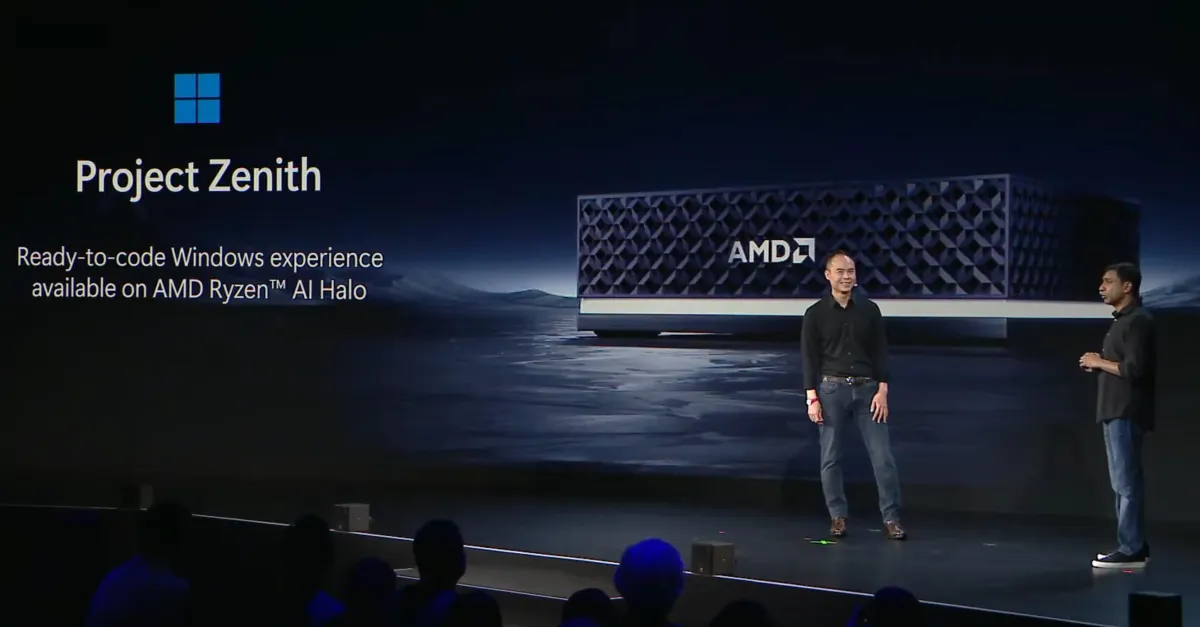
AMD has also formally introduced the first Zenith machine at IFA: a mini PC built on Ryzen AI Halo chips. Microsoft says additional Zenith devices are due in the coming months, including systems that use different silicon.
The company also says Zenith is the product of feedback from developers and part of its broader push to make Windows 11 less distracting and more useful for AI-era software work.
Microsoft has unveiled Project Zenith, a new developer-focused Windows experience built for high-memory PCs that can run large AI models locally and reduce dependence on cloud tokens. The first Zenith devices are arriving with AMD’s Ryzen AI Halo chips, signaling that Microsoft wants Windows to be a more distraction-free, AI-ready platform for software builders.
The announcement matters because it shows how Microsoft is reshaping Windows 11 for a specific kind of user: developers who want a machine that ships ready for coding, local model testing, and productivity work without the usual consumer clutter.
Project Zenith is not a separate operating system. Instead, it is a curated Windows setup that Microsoft says is designed to make development faster, cleaner, and better suited to the era of on-device AI.
What is Project Zenith?
Project Zenith is Microsoft’s name for a preconfigured Windows environment aimed at developers using new hardware with at least 64GB of unified memory. The company says the goal is to give developers a system that arrives with the right tools and fewer distractions already in place.
Logan Iyer, Microsoft’s corporate vice president for Windows platform and developer, said Zenith devices are built around a curated setup that includes the tools developers usually install first, while also making it possible to run 30-billion-parameter-plus models locally and without metering. In practical terms, that means developers can experiment with larger AI workloads on their own machines instead of paying for every cloud request.
Microsoft says Project Zenith devices are configured to give developers a ready-to-use Windows environment, with tools and settings tuned for local AI experimentation and everyday coding work.
That positioning places Zenith at the intersection of Windows, AI development, and hardware design. It is both a software strategy and a signal to PC makers: if they want to sell premium developer systems, they may need to ship machines that are configured differently from ordinary consumer PCs.
Why Microsoft is doing this now
Microsoft is responding to a shift in how software is built. Developers increasingly want local access to AI models, faster iteration cycles, and fewer OS features that interrupt workflow. At the same time, PC makers are shipping more powerful chips with AI acceleration and larger memory configurations, opening the door to a new class of workstation-style Windows devices.
The company has also spent much of this year trying to improve Windows 11 more broadly. Project Zenith extends that effort into a developer-specific lane by emphasizing setup quality, productivity defaults, and direct support for modern AI workflows.
For Microsoft, there is also a strategic angle. If more model experimentation happens locally, developers may spend less on metered cloud tokens and still remain inside the Microsoft ecosystem of Windows, GitHub, Visual Studio Code, and Copilot.
How does Project Zenith help developers?
Project Zenith helps developers by shipping a Windows environment that is already tuned for coding and local AI work. Microsoft says the first devices will include a set of preinstalled tools and a configuration that removes several common annoyances from a standard Windows setup.
The idea is simple: instead of spending the first hour cleaning up a new PC, developers can start building almost immediately.
- Visual Studio Code is installed out of the box.
- GitHub Copilot is included for AI-assisted coding.
- PowerToys is preloaded, including the Command Palette enabled by default.
- WinAppCLI and Windows Dev Skills are included for development workflows.
- File Explorer is tuned to show extensions, hidden files, and the full path.
Microsoft has also turned off several consumer-oriented Windows features that are often seen as distractions in a developer environment. That includes recently used files and folders, sync provider tips, account notifications, and Start menu tips.
What changes are included in the Zenith setup?
The Zenith configuration is notable not just for the software it adds, but for the behavior it removes. Microsoft appears to be taking a strong editorial view on what developers should see first when they open Windows.
Among the changes: long-path support is enabled, the File Explorer shows extensions and hidden files by default, and the full file path appears in the title bar. Those adjustments are small individually, but together they reduce friction for users who spend all day navigating codebases and project files.
Microsoft is also enabling PowerToys Command Palette by default, which should make it easier to launch tools and search actions quickly. That reinforces the central theme of Zenith: speed, focus, and less operating-system noise.
| Project Zenith element | What Microsoft is doing | Why it matters |
|---|---|---|
| Hardware requirement | 64GB or more of unified memory | Supports large local AI models and heavier development workloads |
| First device | Mini PC with AMD Ryzen AI Halo chips | Shows Zenith is tied to new AI-capable silicon |
| Preinstalled tools | VS Code, GitHub Copilot, PowerToys, WinAppCLI, Windows Dev Skills | Reduces setup time for developers |
| File Explorer defaults | Extensions, hidden files, full path visible | Makes file management more transparent |
| Disabled features | Recent files, sync tips, Start menu tips, account notifications | Removes distractions from the workflow |
How does the AMD partnership fit in?
AMD is the first chipmaker associated with a Project Zenith device, and it used an IFA stage appearance to announce the initial hardware. The first Zenith machine is a compact desktop powered by Ryzen AI Halo chips, a sign that Microsoft sees the high-memory mini PC as an appealing format for developers.
The device is not likely to be the last. Microsoft says more Zenith systems will arrive in the coming months, and those products may use different silicon. That leaves the door open for additional chip partners and varied device designs.
For AMD, the arrangement offers a high-profile showcase for its AI-focused hardware. For Microsoft, it provides a practical proof point: Zenith is not just a software idea, but a hardware ecosystem that can be sold as an integrated developer experience.
Who is Project Zenith for?
Project Zenith is for developers who want a high-performance Windows machine with local AI capabilities and fewer setup distractions. It is especially relevant for users building software tools, testing AI models, or working in environments where cloud usage costs can add up quickly.
It may also appeal to teams standardizing developer hardware. A preconfigured, repeatable Windows image can reduce onboarding time and make workstation behavior more consistent across a company.
That said, Zenith is not aimed at casual consumers. Microsoft’s requirements and defaults suggest a premium, purpose-built configuration for power users rather than a mass-market Windows refresh.
How Project Zenith differs from ordinary Windows 11
Project Zenith is less about changing Windows and more about trimming it. Microsoft is taking a standard Windows foundation and stripping away some of the interface behaviors that are useful for mainstream users but distracting for developers.
That distinction matters. A consumer PC might prioritize onboarding prompts, recent-file suggestions, and visibility into Microsoft services. A developer workstation, by contrast, benefits from predictable file handling, cleaner navigation, and fewer interruptions.
In that sense, Zenith reflects a broader design philosophy: the best productivity features are sometimes the ones that simply stay out of the way.
Why local AI is central to the pitch
Local AI is central because it changes the economics and speed of experimentation. Running a 30B-plus model on a local machine can give developers a much faster feedback loop while reducing reliance on cloud infrastructure.
Microsoft’s description suggests it wants developers to treat their PC as a serious AI workbench, not just a gateway to remote services. That is an important message at a time when many companies are trying to balance AI ambition with compute costs.
With 64GB or more of unified memory, Project Zenith devices are clearly targeting workloads above the mainstream laptop or desktop class. The memory threshold alone indicates that Microsoft is aiming at serious technical users, not hobbyists.
What does “distraction-free” really mean?
“Distraction-free” means Microsoft is removing common Windows prompts, tips, and consumer-facing nudges that can interrupt deep work. It also means giving developers the key utilities they need from the first boot.
That approach reflects years of developer feedback that Windows can sometimes feel optimized for general users first and technical users second. Zenith is Microsoft’s attempt to reverse that hierarchy on certain devices.
Some of the changes are subtle, but they add up. When a machine shows file extensions by default, keeps hidden files visible, and avoids pop-up reminders, it feels more like a workstation than an everyday PC.
How this fits Microsoft’s wider Windows strategy
Project Zenith is part of Microsoft’s broader effort to improve Windows 11 across several user groups. The company has been making visible changes this year to make the platform feel more responsive, more coherent, and more aligned with modern computing habits.
For developers, that means a Windows setup that anticipates their first moves. For Microsoft, it means reinforcing Windows as the best place to build, test, and deploy software in an AI-heavy era.
The challenge will be execution. A curated developer edition of Windows can be compelling, but it has to remain consistent across devices, chip vendors, and enterprise deployment scenarios. If Microsoft wants Zenith to matter beyond a launch announcement, it will need the ecosystem to keep pace.
What happens next?
Microsoft says additional Project Zenith devices are coming in the months ahead. That suggests the company is preparing a broader rollout rather than a one-off demo machine.
The next phase will likely reveal whether Zenith becomes a branded program, a reference configuration, or the foundation for a larger developer hardware category inside the Windows ecosystem. The company has not yet outlined every partner or model, but the first AMD-powered mini PC is a clear starting point.
If more OEMs join in, Zenith could become a shorthand for premium Windows developer machines that are optimized for AI, already loaded with tools, and stripped of distractions.
Key facts about Project Zenith
Here is a quick summary of the main details announced so far.
| Detail | Information |
|---|---|
| Name | Project Zenith |
| Announced by | Microsoft |
| Primary audience | Developers |
| Memory target | 64GB+ unified memory |
| First hardware partner | AMD |
| First chip platform | Ryzen AI Halo |
| Key local AI claim | Run 30B+ parameter models locally and unmetered |
| Developer tools included | Visual Studio Code, GitHub Copilot, PowerToys, WinAppCLI, Windows Dev Skills |
The bigger picture
Project Zenith may look like a niche product announcement, but it points to a larger shift in personal computing. The future of Windows is not only about consumer convenience or enterprise management. It is also about making the PC a serious AI development platform.
That vision requires hardware with substantial memory, chip-level AI acceleration, and a software stack that respects the way developers actually work. Microsoft’s latest move suggests it understands that the next wave of Windows differentiation may come from specialized experiences rather than one-size-fits-all defaults.
If Zenith succeeds, it could influence how future Windows PCs are packaged for power users. More importantly, it could help Microsoft keep developers close at a time when the economics of AI, the rise of local models, and the competition between cloud and on-device workflows are all changing quickly.
For now, Project Zenith is a clear statement of intent: Microsoft wants Windows to feel less like a general-purpose desktop and more like a focused, AI-capable workstation for the people building the next generation of software.
Frequently asked questions
What is Microsoft Project Zenith?
Project Zenith is Microsoft’s curated Windows experience for developers, designed for high-memory PCs that can run large AI models locally. It ships with preinstalled tools, developer-focused defaults, and fewer consumer distractions than a typical Windows setup.
Why is Project Zenith important?
Project Zenith matters because it shows Microsoft pushing Windows toward local AI development and more efficient software workflows. By reducing cloud dependence and setup time, the company is trying to make Windows more attractive as a serious developer workstation platform.
Which hardware is launching with Project Zenith first?
The first Project Zenith device is a compact PC powered by AMD’s Ryzen AI Halo chips. Microsoft says more Zenith devices will follow in the coming months, including systems built on different silicon platforms.
What tools come preinstalled on Project Zenith devices?
Project Zenith devices come with tools such as Visual Studio Code, GitHub Copilot, PowerToys, WinAppCLI, and Windows Dev Skills. Microsoft also changes system defaults to make file handling and navigation more useful for developers.
Can Project Zenith run AI models locally?
Yes, Microsoft says Project Zenith devices are designed to run 30B-plus parameter models locally and unmetered. That gives developers a way to test and iterate on AI workloads without depending as heavily on cloud services.