In short
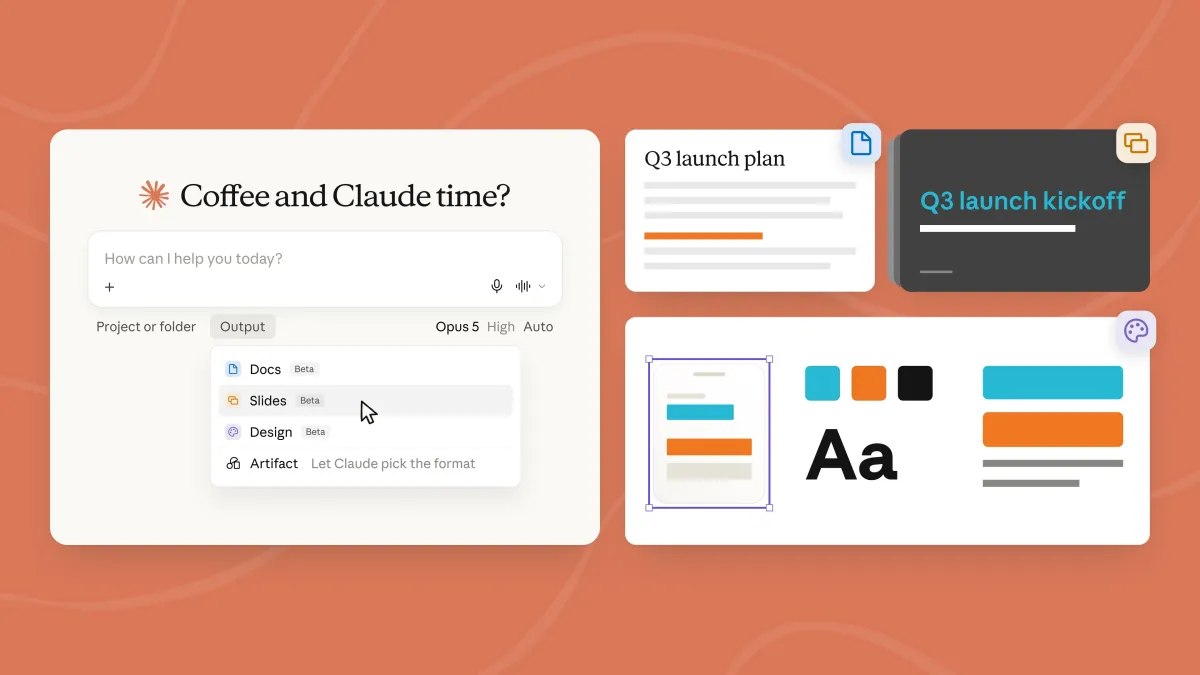
Anthropic has redesigned the Claude interface to combine chat, Cowork and Artifacts in one place, while adding tools for documents and presentations. The rollout starts with Pro and Max users and aims to make Claude easier to use as a productivity platform.
- Anthropic is merging Claude’s chat and workspace features into one unified interface.
- The company is adding new tools for slides and documents, with mobile editing and sharing support.
- The update is rolling out first to Pro and Max users, then later to free and team tiers.
- A recent memory upgrade for Cowork is meant to help Claude retain context across chats.
Anthropic has redesigned Claude so users can access chat, Cowork, Artifacts and other creation tools from one interface instead of choosing between separate tabs. The change, rolling out first to paid users, is meant to make Claude easier to navigate while automatically sending tasks to the right workspace behind the scenes.
The update matters because it turns Claude from a set of loosely connected features into a more cohesive productivity platform. Anthropic is also expanding the assistant’s ability to build presentations and documents, signaling a broader push to compete with workplace AI tools from OpenAI, Google and Microsoft.
What Anthropic changed in Claude
Anthropic is collapsing the front end for Claude chat and Cowork into a single experience. Instead of making people decide where to begin, the assistant now routes requests across chat, interactive workspaces and creation tools within one window.
The company’s goal is simple: reduce friction. If a user wants to brainstorm, refine a draft, generate an interactive artifact or launch a design task, Claude should decide where that work belongs rather than forcing the user to figure it out first.
How the unified interface works
The new setup brings Claude chat, Cowork and Artifacts together in one place. Artifacts, Claude’s interactive workspace for producing and iterating on content, remain part of the experience, but users no longer need to jump around between separate tabs to reach them.
Anthropic says Claude can now automatically direct prompts to the appropriate feature. That means a user can enter a request in a single interface and let the system decide whether it should be handled as a conversational exchange, a collaborative draft or a more structured creation task.
Claude Design, the tool Anthropic introduced in April for building websites and prototypes, is also available throughout the platform rather than being confined to a narrow workflow.
Why Anthropic is simplifying the experience
Anthropic’s redesign addresses a usability problem that has grown more common as AI products add more capabilities. Once an assistant can write text, generate code, build slides and manage documents, a cluttered interface can become a barrier rather than a feature.
According to the company, some customers were uncertain about which tab to use for which task. The new design tries to solve that problem by turning Claude into a single entry point that routes work internally, instead of a menu of separate destinations that users must memorize.
This kind of simplification also reflects a broader shift in the AI market. The leading tools are no longer competing only on model quality; they are also competing on workflow design, collaboration features and how much manual decision-making they remove from the user.
Anthropic’s position is that users should be able to start with one prompt and let Claude handle the routing to the right feature, rather than having to choose the correct workspace themselves.
What new document and presentation tools are arriving?
Anthropic is adding two major productivity functions: presentation creation and document editing. These additions turn Claude into a more direct competitor to software used for office work, project planning and team collaboration.
With the presentation tool, users can ask Claude to create, revise and present slides. The output can also be downloaded as either a PDF or a PowerPoint file, which makes the feature useful in environments where teams still rely heavily on standard presentation formats.
The new Docs feature is designed for step-by-step collaboration. Users can build sections with Claude, ask follow-up questions, comment on completed portions and work on drafts as they evolve. Anthropic is positioning this as a live co-authoring flow rather than a one-shot document generator.
How the Docs feature is different
Docs is not just a file export tool. It is built for iterative work, where users and Claude can move through a document section by section, refining ideas as they go.
That means a user can ask Claude to draft an outline, expand a section, clarify a paragraph or revise completed parts without leaving the same workspace. Anthropic is also making it possible to share generated documents and slide decks via link and continue editing them on mobile devices.
The cross-device workflow is notable because it supports a familiar modern pattern: start a task on desktop, check progress on the phone, and finish it later without losing context.
How does mobile fit into the new Claude workflow?
Mobile is now part of Claude’s editing and monitoring loop, not just a companion app for quick chats. Anthropic says users can begin creating a document on desktop, then track the progress from the mobile app while the work continues.
That matters for longer-running tasks such as slide generation or document drafting, where users may want to step away while Claude continues to produce or refine the output. It also gives the app a more continuous feel across devices, which is increasingly important for business users.
Anthropic is clearly trying to make Claude useful beyond ad hoc prompting. The company wants it to function as a practical work surface that can carry projects from idea to output across web, desktop and mobile environments.
| Claude update | What it does | Who gets it first | Why it matters |
|---|---|---|---|
| Unified interface | Merges chat, Cowork and Artifacts into one front end | Pro and Max users | Reduces confusion and removes tab-hopping |
| Presentation creation | Builds, edits and presents slides; exports to PDF or PowerPoint | Pro and Max users | Brings Claude deeper into workplace productivity |
| Docs feature | Collaborative document creation with sections, comments and edits | Pro and Max users | Makes Claude more useful for long-form drafting |
| Mobile continuity | View progress and edit shared work across devices | Pro and Max users | Supports work that starts on desktop and finishes on mobile |
Why Cowork’s memory upgrade matters
The interface redesign follows an upgrade to Cowork’s memory layer, which helps Claude preserve user context across conversations. That is a significant piece of the puzzle because a cleaner interface is only useful if the assistant also remembers what a user has already done.
Memory is increasingly central to AI products that want to behave like work companions rather than disposable chatbots. When a system can retain relevant context, it becomes more capable of handling long projects, repeated revisions and multi-session tasks.
In practice, the memory improvement and unified interface appear to be working together. One makes Claude easier to navigate; the other makes it better at continuing a task after the user comes back later.
How does this affect Claude’s position in the AI market?
Anthropic’s move is part interface redesign, part strategic positioning. The company is trying to make Claude feel less like a set of experimental AI components and more like a polished productivity environment.
That places it more directly in competition with rival assistants that are also moving toward integrated workspaces. OpenAI has pushed ChatGPT deeper into productivity and agent-style use cases, while Google and Microsoft have tied their models tightly to their office ecosystems.
Anthropic does not appear to be competing by overwhelming users with options. Instead, it is betting that fewer choices, better routing and stronger memory can make Claude feel simpler and more dependable than rival tools.
That is a meaningful product strategy, especially for people who want AI to assist with work but do not want to manage multiple interfaces to do it.
Who is the new Claude experience for?
The initial rollout is aimed at Claude’s Pro and Max subscribers on the web, desktop and mobile apps. Anthropic says the features will reach those tiers over the coming weeks before expanding to free and team plans later.
That staged rollout is typical for a platform change of this size. It lets Anthropic monitor how the new routing system behaves under real-world use, especially when users begin mixing chat, documents, slides and design tasks in the same session.
For premium users, the update should make Claude feel more like a full work environment. For teams, once the features arrive, it could lower the learning curve for people who only want to ask Claude to do work without having to learn the product’s internal layout.
Rollout details
- First wave: Claude Pro and Max subscribers
- Platforms: Web, desktop and mobile
- Timeline: Rolling out over the coming weeks
- Later expansion: Free users and team plans
What this signals about Anthropic’s product direction
Anthropic is making a clear bet that the next phase of AI adoption will depend on workflow integration, not just better conversations. The company is taking a product that many users may have approached as a chatbot and turning it into something more like a general-purpose workbench.
That approach could help Claude win users who are frustrated by fragmented interfaces. It also fits the broader direction of the market, where AI vendors are racing to embed creation tools, memory and project continuity into one experience.
In that sense, the redesign is more than a cosmetic update. It is a signal that Anthropic wants Claude to be the place where users start work, keep work moving and finish work without switching environments.
The company’s decision to unify the interface, add document and presentation tools, and strengthen memory suggests it sees the future of assistant software as continuous and collaborative. The assistant should not only answer questions, but also help produce the things people need to ship.
How Claude compares with other AI assistants
Claude’s updated interface moves it closer to the broader category of AI productivity suites, but its design philosophy appears different from some rivals. Rather than pushing users to pick between a growing list of modes, Anthropic is trying to hide that complexity behind automatic routing.
This matters because the most common complaint about advanced AI tools is not always accuracy; often it is usability. Users may like the output, but they can get lost deciding where the task belongs or how to continue it after the first response.
By unifying Claude’s surfaces, Anthropic is trying to make the app feel more intuitive. If it works as intended, users should be able to go from a prompt to a document, deck or prototype with fewer interruptions and less mental overhead.
That could become a useful differentiator, especially for people whose day-to-day work includes drafting, presenting and revising content across several formats.
Timeline: how Claude’s workspace features have evolved
Claude’s latest redesign did not arrive in isolation. It builds on a sequence of product changes aimed at making the assistant more useful for sustained work rather than isolated conversations.
| Date | Update | Why it mattered |
|---|---|---|
| April 2026 | Claude Design introduced | Added a dedicated tool for website and prototype design |
| Before September 2026 | Cowork memory upgraded | Improved Claude’s ability to retain context across chats |
| September 16, 2026 | Unified Claude interface announced | Combined chat, Cowork and Artifacts into one front end |
| Coming weeks | Pro and Max rollout begins | Paid users get first access on web, desktop and mobile |
| Later | Free and team tiers expand access | Broader adoption across casual and organizational users |
Why this matters for everyday users
For everyday users, the value of the update is not in any single feature. It is in how the features now fit together. A person can start with a simple prompt, let Claude decide whether the request belongs in chat or a workspace, and then continue shaping the result into a document, slide deck or prototype.
That reduces the number of decisions the user has to make before the work even starts. It also lowers the risk that people will underuse Claude’s more advanced features simply because they are hard to find or hard to distinguish from one another.
In that sense, Anthropic is solving a product problem that has become familiar across the AI industry: feature sprawl. As assistants gain more capabilities, the challenge is no longer only adding power; it is making that power accessible without making the product feel complicated.
What happens next?
The next few weeks will show whether the unified Claude interface actually makes the product easier to use in practice. Paid users will be the first to test whether automatic routing feels seamless or whether it introduces new edge cases.
Anthropic will also be watching how well the document and presentation features perform across devices, especially if users move between desktop and mobile while working on the same file. If the experience is smooth, it could strengthen Claude’s position as a serious productivity assistant.
For now, the company’s message is clear: Claude is no longer just a place to chat with an AI model. Anthropic wants it to be a single, connected environment where conversation, collaboration and content creation all happen in the same place.
Frequently asked questions
What is changing in Claude’s interface?
Anthropic is combining Claude chat, Cowork and Artifacts into a single interface so users can start one prompt and let the assistant route the task to the right workspace. The change is designed to reduce confusion and make the app easier to navigate.
Who gets the new Claude features first?
Pro and Max subscribers get the new Claude interface and productivity tools first. Anthropic says the rollout will happen across web, desktop and mobile over the coming weeks, with free users and team plans receiving access later.
Can Claude now make presentations and documents?
Yes. Anthropic is adding tools that let Claude create, edit and present slides, and it can export presentations as PDF or PowerPoint files. It is also introducing Docs, a collaborative feature for drafting and revising written content.
Why did Anthropic redesign Claude?
Anthropic redesigned Claude because users were reportedly unsure which tab to use for different tasks. The new interface removes that choice by automatically routing prompts to the right feature, which should make the product feel simpler and more cohesive.