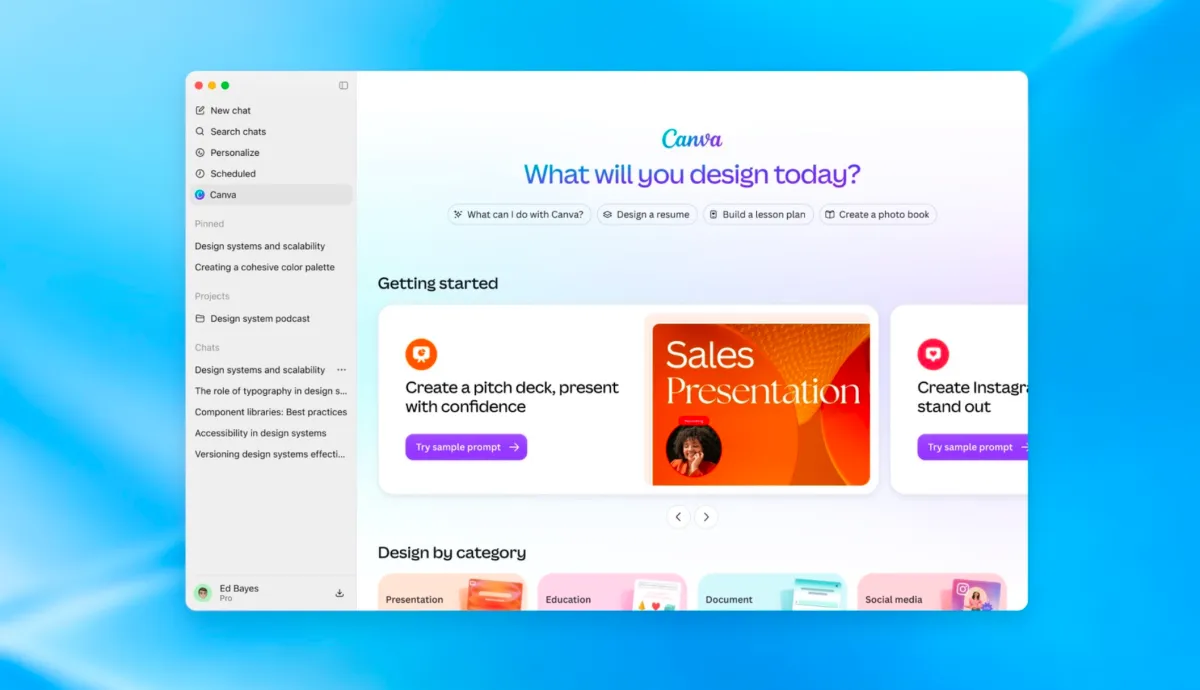
In short
OpenAI announced a major upgrade to ChatGPT plugins, allowing developers to build more app-like interfaces inside the chatbot and add event-based automations. The update also brings better plugin discovery, shared ChatGPT Sites support and more granular permissions.
- OpenAI is turning ChatGPT into a broader platform for apps, not just a chatbot.
- Developers can create richer plugin experiences with sidebar placement and interactive panels.
- ChatGPT Sites can now host plugins for shared team use with connected permissions.
- Support for MCP Events adds a path toward event-driven automations inside ChatGPT.
OpenAI is turning ChatGPT into a more complete work surface, not just a chat window. At its Dev Day event on Tuesday, the company unveiled a broader plugin update that lets developers build app-like experiences inside ChatGPT, complete with dedicated sidebar placement, interactive panels, file viewers and support for automations triggered by events in connected apps.
The changes matter because they push ChatGPT deeper into the territory long occupied by workplace software, productivity suites and enterprise collaboration tools. Rather than simply answering questions, ChatGPT is being positioned as a place where users can open tools, manage content and act on data without leaving the conversation.
What OpenAI announced at Dev Day
OpenAI’s latest update expands the role of plugins inside ChatGPT and makes those integrations feel much closer to full applications. The company said developers will be able to create richer experiences that live inside the ChatGPT interface instead of appearing only as simple connections to outside services.
That means users may soon see more tools embedded directly in the product, organized in the sidebar and designed to support in-chat workflows. OpenAI is also making it easier for developers to submit and manage those plugins, while improving how users discover them.
How do the new ChatGPT plugins work?
The new plugins work by giving third-party apps a more visible and interactive home inside ChatGPT. OpenAI says developers can build custom panels that let people use a connected service while still chatting with the model, rather than switching back and forth between applications.
The company also said plugins can include file viewers tailored to the formats supported by a developer’s product. In practical terms, that could let a user inspect documents, data files or other content inside the ChatGPT environment with less friction.
Why this matters for developers and users
This update is important because it changes ChatGPT from a tool that mainly responds to prompts into a platform where software can be embedded and used more directly. For developers, that creates a larger surface area for distribution and engagement. For users, it promises fewer context switches and a more seamless workflow.
OpenAI has already supported plugins that connect to everyday business services such as Slack, SharePoint, Airtable and Google Drive. The difference now is that those integrations can be presented more like native product experiences instead of simple add-ons.
OpenAI’s message was that ChatGPT should do more than assist with text generation; it should also become a practical place to open, use and share other software tools.
What is changing for plugin discovery?
OpenAI said it is simplifying the process of building and listing plugins, beginning with a new Plugin Creator tool and a redesigned submission flow for the plugin directory. The company says the updated process provides clearer feedback for developers as they prepare their apps for distribution.
On the user side, OpenAI said it has improved ranking and recommendation systems inside the directory and also in conversations where relevant plugins may be surfaced. That should make it easier for people to find tools without needing to know exactly what to ask for first.
| Feature | What it does | Why it matters |
|---|---|---|
| Sidebar plugin placement | Gives apps a dedicated home inside ChatGPT | Makes integrations easier to access and use |
| Interactive panels | Lets users work with tools while chatting | Reduces switching between apps |
| File viewers | Supports app-specific file formats in ChatGPT | Improves document and data handling |
| Plugin Creator tool | Helps developers build and submit plugins | Speeds up publishing and testing |
| Event-based automations | Starts workflows when things happen in connected apps | Moves ChatGPT toward task automation |
What are ChatGPT Sites and why are they important?
ChatGPT Sites are lightweight websites that users can create with ChatGPT, and OpenAI said those sites can now host plugins as well. That means a user could potentially share a ChatGPT-built experience with colleagues and let them interact with the same app-like functionality inside a shared environment.
OpenAI says those colleagues would be able to use the experience with their own connected data and permissions. That is a significant detail for teams, because it suggests the product is moving beyond one-off personal productivity and into shared organizational workflows.
In effect, ChatGPT Sites could become a way to package a workflow, a tool or a small internal app and distribute it to a group without building a conventional software stack from scratch.
How does the new automation support work?
OpenAI is also adding support for the proposed MCP Events specification, which is designed to let plugins trigger automations based on events happening in connected apps. That shift matters because it introduces a more proactive layer to ChatGPT’s plugin system.
Instead of relying only on a user to ask for a task, the system can respond when something changes elsewhere. In practice, that could enable workflows such as notifications, handoffs or follow-up actions triggered by activity in a connected service.
OpenAI said it is also making automations easier to add and manage, which suggests the company is preparing for more sophisticated workflow orchestration inside ChatGPT.
What is MCP Events?
MCP Events is a proposed specification for event-driven integrations, and OpenAI’s support for it signals interest in a more standardized way of connecting software behaviors. The feature is meant to make it easier for apps to initiate actions when something happens in another system.
For ChatGPT users, that could eventually mean a more responsive assistant that does not only react to prompts but also participates in ongoing business processes.
How OpenAI is positioning ChatGPT against productivity software
OpenAI’s latest move shows that the company is not only competing with chatbots or search assistants. It is also pushing into the broader productivity and collaboration market, where software vendors fight to become the default environment for daily work.
That is why the company’s new Pages, Slides and Space features matter alongside the plugin changes. Together, they indicate a strategy to make ChatGPT a fuller operating layer for knowledge work — one that can create content, host tools and support automation in a single place.
By giving plugins a more prominent place and better workflow support, OpenAI is making a clear play for user attention inside the app. The stronger the built-in ecosystem becomes, the harder it may be for workers to stay in competing apps for routine tasks.
What this means for the plugin ecosystem
For developers, the update creates a more attractive distribution channel, but also likely raises expectations. A plugin that merely passes data in and out may no longer be enough if competitors can offer richer interfaces and deeper automations inside ChatGPT.
For businesses building internal tools, the changes could lower the barrier to creating lightweight team apps. A small workflow built around a shared ChatGPT Site and a few integrations may be enough for some use cases that previously required custom software.
Still, the shift also raises questions about governance, permissions and the boundaries between AI assistance and operational software. OpenAI’s mention of individually approved access needs suggests the company is aware that trust and control will be central to adoption.
Why users should pay attention now
Users should pay attention because the direction is clear: ChatGPT is becoming more than a conversational interface. OpenAI is steadily building the app layer, the sharing layer and the automation layer around its core model experience.
That evolution may make ChatGPT more useful for everyday work, but it also deepens dependence on OpenAI’s ecosystem. The more tasks that begin and end inside ChatGPT, the more the platform becomes a central workspace rather than a temporary assistant.
As a result, this update is not just about plugins. It is about OpenAI’s ambition to make ChatGPT a hub for software, workflows and collaborative tasks — and to make that hub difficult for rivals to ignore.
Key developments at a glance
- Developers can build richer, app-like plugin experiences inside ChatGPT.
- Plugins get a dedicated home in the ChatGPT sidebar.
- Interactive panels and file viewers bring more work into the chat interface.
- OpenAI is simplifying plugin creation and directory submission.
- ChatGPT Sites can host plugins for shared use with team permissions.
- Support for MCP Events adds event-based automation potential.
Timeline of OpenAI’s ChatGPT platform push
OpenAI’s plugin update is part of a longer shift from chatbot to platform. The company has been layering in more productivity-oriented features over time, and this release marks one of the clearest attempts yet to make ChatGPT feel like a place where work happens rather than just a place where answers appear.
| Stage | What OpenAI added | Strategic direction |
|---|---|---|
| Earlier plugin support | Connections to services such as Slack, SharePoint, Airtable and Google Drive | Basic integrations |
| Recent productivity tools | Pages, Slides and Space features | Content creation and workflow support |
| Dev Day update | App-like plugins, sidebar placement, panels and automations | Platform and ecosystem expansion |
The bigger picture for OpenAI
The new plugin framework reinforces a familiar pattern in OpenAI’s product strategy: build a large user base with a highly visible AI interface, then turn that interface into a platform others build on. That has implications far beyond convenience features.
If the ecosystem grows, ChatGPT could become the front end for a growing number of business processes, with developers treating it as a distribution channel and users treating it as a workspace. That would make OpenAI less dependent on one-off chat sessions and more tied to recurring usage inside integrated tools.
For now, the announcement signals ambition more than immediate disruption. But the direction is unmistakable. OpenAI wants ChatGPT to be the place where software lives, not just the place where software is described.
Frequently asked questions
What did OpenAI announce about ChatGPT plugins?
OpenAI announced that developers can now build more app-like plugin experiences inside ChatGPT, including dedicated sidebar placement, interactive panels and file viewers. The company also said it is improving plugin discovery, creation and automation support.
How are the new ChatGPT plugins different from older plugins?
The new ChatGPT plugins are designed to feel more like embedded apps than simple integrations. They can live in the sidebar, support richer interfaces and allow users to work with tools directly inside a chat session instead of switching to separate software.
What are ChatGPT Sites in OpenAI's update?
ChatGPT Sites are lightweight websites built with ChatGPT that can now host plugins. OpenAI says they can be shared with colleagues, who can use them with their own connected data and permissions, making them useful for team workflows.
What is MCP Events and why does it matter?
MCP Events is a proposed specification for event-driven integrations, and OpenAI’s support for it could let plugins trigger automations when things happen in connected apps. That matters because it moves ChatGPT toward proactive workflow automation rather than only responding to user prompts.