Updated September 24, 2026 8:24 pm
In short
Google Photos’ AI virtual closet is now available to all eligible users in the U.S., Brazil and India on iOS and Android, alongside new Gemini Spark, Markup and Android-only Moods updates.
- Google Photos is now rolling out its AI virtual closet to iPhone and Android users in three countries.
- The feature builds a digital wardrobe from photos and lets users filter clothing by category.
- Google says wardrobe data is not shared with retailers or other third parties.
- The rollout comes with other updates, including Gemini Spark, improved Markup tools and new Android filters.
Update — September 24, 2026 8:24 pm
Google Photos’ virtual closet is now fully open to everyone in the U.S., Brazil and India using either iPhone or Android, after first reaching Android users in June.
The updated source also notes that Google’s Gemini Spark photo feature needs a Google AI Pro or Ultra subscription in the U.S., while the closet, Markup upgrades and Android-only “Moods” filters are part of the broader Photos rollout.
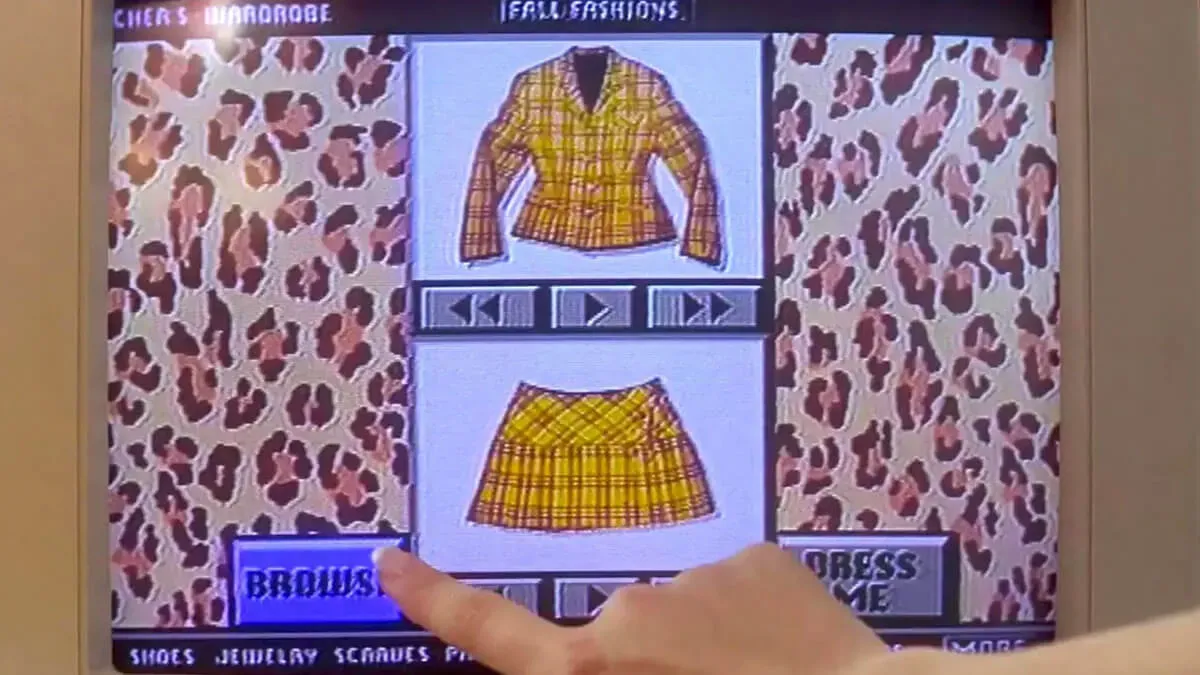
The new writeup frames the virtual closet as a Clueless-style digital wardrobe, but the underlying feature and availability remain the same.
Google Photos has started widely rolling out a new AI-powered virtual closet that builds a wardrobe from your outfit photos, giving users in the U.S., Brazil and India a way to organize, compare and remix what they wear. The feature is now available on both iPhone and Android after a staggered launch that began with Android users in June, and it adds a consumer-friendly example of how Google is pushing AI deeper into everyday photo tools.
The update matters because it turns Google Photos from a storage app into something closer to a personal style assistant. Instead of scrolling endlessly through camera rolls for outfit ideas, users can now gather clothing items into a digital wardrobe, sort them by type and combine them into new looks — all from images they already have in their library.
What Google’s new virtual closet actually does
The virtual closet feature uses AI to recognize clothing in your photos and create a copy of your wardrobe inside Google Photos. Once the system identifies pieces from images you’ve taken or saved, it groups them into a browsable collection that can be filtered by clothing category.
Google says the tool is meant to help users manage what they wear and spot possible outfit combinations more easily. In practical terms, it resembles a visual inventory of your wardrobe, except the inventory is assembled automatically from the images you already own.
The feature is designed around convenience rather than shopping. Google has also said that information about how people dress or what they wear is not shared with third-party companies such as retailers, a point likely intended to reassure users who are wary of style data becoming another source of advertising targeting.
How does the AI wardrobe work?
It works by scanning your photos for clothing items and turning those items into a digital catalog. From there, users can sort pieces into categories such as tops, bottoms and jewelry, then mix and match them to build outfit combinations.
That means the feature is less about generating new clothing recommendations from scratch and more about organizing the outfits you already own or have already worn. The result is a sort of wardrobe mirror inside Google Photos.
- It identifies clothing items from photos in your library.
- It builds a virtual wardrobe automatically.
- It lets users filter by clothing category.
- It supports outfit pairing and re-combination.
Where and when is the feature available?
The virtual closet is now available to all eligible Google Photos users in the United States, Brazil and India on both Android and iOS devices. Google first announced the feature earlier this year and initially planned to begin rolling it out during the summer.
Android users were the first to receive access, starting in June. The latest expansion means the feature has now reached the broader user base Google promised, including iPhone users in the same supported markets.
| Detail | What Google announced |
|---|---|
| Feature | AI-powered virtual closet in Google Photos |
| Platforms | iOS and Android |
| Available markets | United States, Brazil, India |
| Initial Android access | June 2026 |
| Broader rollout | September 2026 |
Why does this update matter for Google Photos?
This update shows Google continuing to evolve Photos from a basic cloud album into a broader AI-powered memory and editing suite. The app increasingly does more than store images: it can help users search, improve, stylize and now organize clothing from those images into a fashion-specific digital tool.
That direction reflects a larger trend across consumer software, where photo libraries are becoming structured data sources that AI can interpret and transform. In Google’s case, the company is layering these features into an app with massive reach, making even niche tools potentially useful at scale.
The virtual closet also gives Google a relatively low-risk way to showcase useful AI. Rather than relying on highly abstract generative features, it offers a concrete, daily-life use case that is easy to understand and visually intuitive.
Google says the feature is intended to assist users, and that wardrobe data is not being shared with third parties such as retailers.
How does the feature fit into Google Photos’ wider AI push?
It fits into a broader package of updates that are arriving alongside the closet rollout. Google is also adding a Gemini Spark option that lets users select, brighten and share photos through a single prompt, as well as an updated markup tool and more Remix templates powered by AI.
Collectively, these additions point to an app that is becoming more interactive and more opinionated about what users might want to do with their pictures. Instead of treating photos as passive files, Google is giving them new life through editing, styling and repurposing tools.
What else changed in Google Photos?
Several smaller but useful updates are part of the release, including a stronger markup experience for image editing and a new set of Android-only filters called Moods. These Moods filters include looks such as 35mm film and a 2000s digicam style, leaning into the kind of nostalgic effects that have become popular on social apps.
Google’s upgraded Markup tools also add practical functions. Users can blur sensitive details like license plates, adjust stroke thickness more precisely for sketches and choose from more fonts when adding text. In other words, the update is not only about AI novelty; it also improves everyday utility.
- Gemini Spark: one-prompt photo selection, brightness adjustment and sharing for subscribers in the U.S.
- Markup upgrade: better redaction, finer drawing control and more text font choices.
- Moods filters: new Android photo styles including 35mm film and 2000s digicam.
- More Remix templates: additional AI-based photo transformation options.
How does Google’s approach compare with everyday fashion tech?
Google is not the first company to suggest that software can help people manage style, but its scale gives this feature a different reach. Wardrobe apps and closet organizers have existed for years, yet they often depend on manual uploads and tagging. Google Photos can instead use a user’s existing photo history, making the experience much less labor-intensive.
That distinction matters. The promise of the virtual closet is not that users must build a wardrobe from scratch, but that Google can infer useful structure from what is already there. For many people, the most valuable feature may simply be organization: a searchable visual record of outfits they have worn, liked or want to revisit.
At the same time, the feature hints at a future where AI helps people manage not just images, but the objects and decisions those images represent. Clothing is a natural starting point because it is visual, personal and easy to categorize.
Why the Clueless comparison keeps coming up
The comparison to Clueless comes from the movie’s famous virtual wardrobe scene, in which Cher’s character uses a computer to plan outfits and sort clothing. The reference works because the new Google Photos feature feels like a modern, real-world version of that fictional idea.
In the film, the digital closet is a symbol of privilege and excess, reflecting Cher’s access to a large wardrobe and expensive lifestyle. Google’s version is more democratic: anyone with a supported device and a photo library can use it, without needing a Beverly Hills wardrobe or a personal stylist.
That cultural shorthand also helps explain why the feature is likely to resonate. It is easy to understand, easy to visualize and naturally ties AI to a familiar pop-culture concept rather than a technical abstraction.
What this rollout says about Google’s AI strategy
Google appears to be emphasizing AI tools that feel practical, local and personal. Rather than trying to make every feature sound revolutionary, the company is embedding machine learning into tasks people already do: edit a picture, blur a plate, change a filter, organize clothes, share an image faster.
That approach could help Google make AI feel less like a separate product and more like an upgrade to existing habits. It also gives the company another way to compete with rivals that are pushing AI assistants and generative tools across mobile platforms.
Google Photos is especially well positioned for this strategy because it already holds a rich archive of user-generated visual data. That makes it a natural candidate for features that depend on recognition, sorting and transformation.
How might users actually use the virtual closet?
Users may use it to plan outfits, identify repeated clothing patterns or organize fashion ideas for future purchases. It could also help travelers, stylists, content creators and anyone who wants to keep better track of what they wear in photos.
For some, the biggest value may be simply reducing friction. Instead of mentally reconstructing old outfits from memory, users can review a digital version of what they’ve already worn and pair pieces more efficiently.
- Open Google Photos on iPhone or Android.
- Let the app identify clothing items in your existing photos.
- Browse the resulting wardrobe by category.
- Combine pieces into new outfit ideas.
Privacy and trust remain central to the rollout
Because the feature relies on personal photos and clothing data, privacy is an obvious question. Google has tried to address that concern by saying wardrobe information is not being shared with third parties such as retailers.
That statement is important in an era when consumers are increasingly alert to how AI systems analyze their personal data. Even a seemingly harmless feature can raise questions about what is being inferred, stored or monetized behind the scenes.
By framing the tool as an assistant rather than a shopping funnel, Google is signaling that the feature is meant to be useful without becoming an ad product. Whether users see that as enough will depend on how transparent the company is about how the feature works over time.
Why the broader rollout matters now
The move from an Android-only launch to a cross-platform rollout is significant because it broadens the feature’s audience immediately. Google Photos is one of the company’s most widely used consumer products, and making the virtual closet available on both major mobile platforms increases the likelihood that the feature will be tested, shared and normalised quickly.
It also gives Google a new talking point in the consumer AI race. While much of the industry conversation has focused on large language models, this update underscores the value of smaller, targeted AI applications that can be absorbed into everyday products without requiring users to learn a new interface.
For Google, the message is clear: AI in photos is no longer just about enhancement or search. It is increasingly about understanding the visual details of life — including what people wear — and making those details easier to organize and use.
| Update | Purpose | Who can use it |
|---|---|---|
| Virtual closet | Organize clothing from photos and mix outfits | Users in the U.S., Brazil and India |
| Gemini Spark | Select, brighten and share photos with one prompt | Google AI Pro or Ultra subscribers in the U.S. |
| Markup tools | Redact, sketch and add text with more control | Google Photos users |
| Moods filters | Create nostalgic image styles | Android users |
Bottom line
Google Photos’ new AI virtual closet is now available across iPhone and Android in the U.S., Brazil and India, turning outfit photos into an organized digital wardrobe. The rollout highlights Google’s push to make AI more practical, personal and embedded in the tools people already use every day.
What started as a feature announced earlier this year has become a broader sign of where Google Photos is headed: toward a smarter, more active role in helping users manage, edit and reinterpret their visual lives.
Frequently asked questions
What is Google Photos’ virtual closet?
Google Photos’ virtual closet is an AI feature that identifies clothing in your photos and turns those items into a digital wardrobe. Users can sort pieces by category and combine them to plan new outfits from images already in their library.
Which countries have access to the virtual closet?
The virtual closet is available in the United States, Brazil and India. Google has expanded the feature to both iOS and Android users in those markets after first launching it on Android earlier in the year.
Does Google share the wardrobe data with retailers?
No, Google says the feature is designed to help users and that information about how they dress or what they wear is not shared with third parties such as retailers.
What other Google Photos updates are included?
Google Photos is also adding Gemini Spark for one-prompt photo actions, upgraded Markup tools for redaction and drawing, more Remix templates and new Android-only Moods filters such as 35mm film and 2000s digicam styles.