Updated September 2, 2026 4:55 pm
In short
Google Pics is rolling out to more Workspace users and is now built into Docs and Slides, with Drive integration due in the coming weeks.
- Google Pics is a new AI design app for Workspace users.
- It lets people generate, edit and upscale images with more precise controls.
- The app is launching inside Docs and Slides, with Drive support planned.
- Google is targeting business users who want Canva-style design without leaving Workspace.
Update — September 2, 2026 4:55 pm
Google Pics is now explicitly available as a Workspace integration in Docs and Slides, where users can click an image and edit it with the app’s full set of precision AI tools.
Google also says Drive support is still on the way and should arrive in the coming weeks, expanding the app beyond the standalone Workspace experience.
The rollout list remains the same: Business Standard, Business Plus, Enterprise Standard and Enterprise Plus customers, along with Google AI Pro, Ultra and AI Pro for Education subscribers.
Update — September 1, 2026 7:54 pm
Google Pics is also being built more directly into Workspace than our original article indicated. Google says the tool can be used inside Docs and Slides, where people can select an image and edit it with the app’s full set of precision AI controls.
The company also says Drive support is coming in the next few weeks. Google has now said the rollout is reaching Business Standard, Business Plus, Enterprise Standard and Enterprise Plus customers, plus Google AI Pro, Ultra and AI Pro for Education subscribers.
Google has introduced Google Pics, a new AI-powered image generation and editing app for Workspace users that it says will make it easier to create polished marketing visuals, presentations and product graphics. The rollout matters because it brings a Canva-like design workflow directly into Google’s productivity suite, while adding more precise AI editing controls than many chatbot-based image tools.
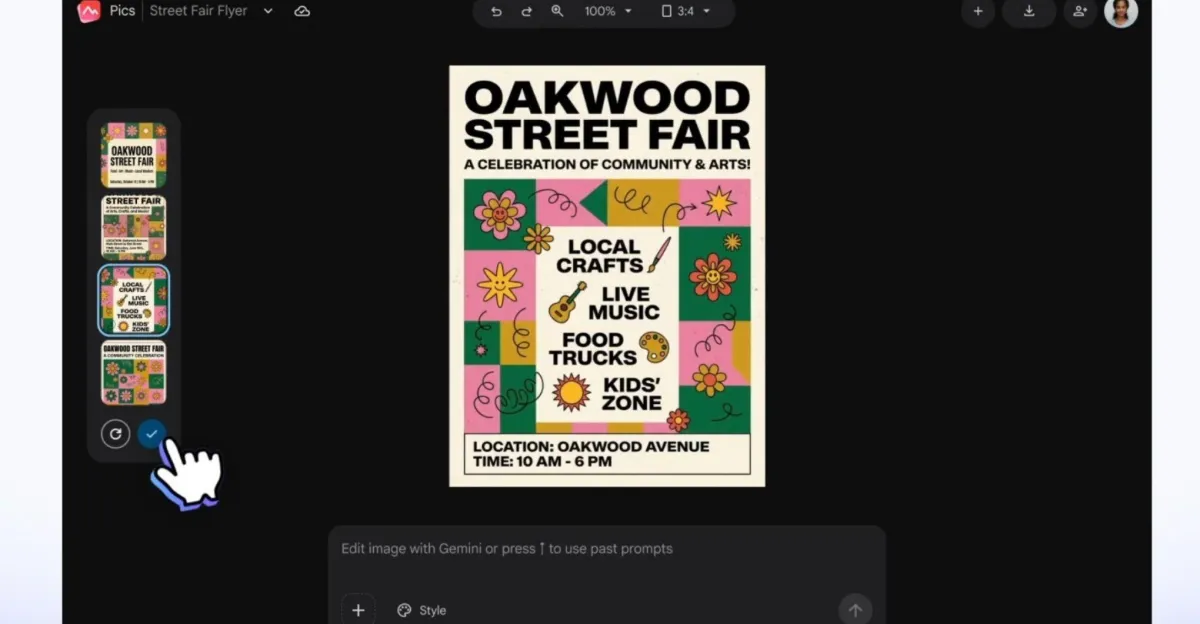
Built on Gemini and Google’s Nano Banana image model, Pics is designed to help businesses generate images from scratch, edit individual objects with text prompts, change or translate text inside visuals, upscale files to higher resolutions and quickly reformat designs for different channels. Google is positioning the app as a way to reduce the friction and inconsistency that have often made AI image tools frustrating for professional use.
What Google Pics is and why Google built it
Google Pics is a creative design tool aimed at Workspace customers who need fast, business-ready visuals without bouncing between multiple apps. In practical terms, it sits somewhere between a lightweight graphic design platform and an AI image editor, with a strong emphasis on prompt-driven changes and document-friendly workflows.
The company says the product was created to address a common problem: while consumers have embraced AI image generation, businesses have often found the output too unreliable for real work. Teams trying to produce campaign graphics, customer-facing slides or branded product imagery frequently end up spending too much time iterating on prompts, correcting awkward details and moving files between tools.
That challenge has opened the door for platforms such as Canva and Adobe Express, both of which already offer streamlined design for non-specialists. Google’s answer is to fold similar capabilities into Workspace, where many employees already draft documents, build presentations and store assets.
Google says the goal is to make professional-looking images less cumbersome for business users by reducing trial-and-error prompting and consolidating design tasks inside Workspace.
How Google Pics works
Google Pics is built around generative AI, but it is not limited to one-shot image prompts. Users can create visuals from scratch, then make targeted changes to specific objects or text within those visuals instead of regenerating the entire image from the ground up. That distinction is important for professional workflows, where precision often matters more than novelty.
The app also supports text-aware editing, including reformatting, changing and translating text that appears in images. For teams creating posters, flyers or social posts, this can remove a common bottleneck: the need to manually rebuild a graphic just to update a headline, label or call to action.
Google says Pics can upscale imagery to 2K or 4K, which gives users a way to move from rough concept art to higher-quality assets suitable for web, print or large-format use. The tool can also crop designs into formats optimized for social media, digital publishing and other common outputs.
Why the precision tools matter
Google’s pitch is that more granular editing should cut down on the odd, unusable results that sometimes plague AI-generated marketing materials. In many cases, business users do not need a fully synthetic image from scratch; they need a product shot adjusted for a campaign, a slide illustration cleaned up or a flyer localized for another market.
By allowing users to click on a specific element and describe the change they want, Pics shifts AI from a novelty generator toward a practical production tool. That may be the feature set that most clearly separates it from prompt-only chatbots, which can still struggle with consistency, typography and precise revisions.
Where Google Pics fits in the Canva and Adobe Express market
Google is entering a crowded but growing category. Canva has become one of the most recognizable names in easy-to-use design software, while Adobe Express gives Adobe a lighter-weight creation option for users who do not need the full complexity of Photoshop or Illustrator. Both products have also been adding AI features as customers demand faster content production.
Google’s advantage is distribution. Workspace already sits inside many businesses’ daily workflows, which means a built-in design tool can reduce the need to export a document, open a separate editor and import the result back into a slide deck or report. For organizations trying to standardize software use, that convenience can be persuasive.
Google is also clearly betting that many employees want the ability to make attractive visuals without needing formal design training. That message is reflected in the company’s own framing of the app as a tool that can help people produce strong images without feeling like they need to be graphic designers.
How it may change everyday Workspace work
For office teams, the most obvious use cases are presentations, internal communications, marketing one-pagers and social assets. A salesperson could quickly build a slide illustration, a product manager could create a mockup for a roadmap update and a marketing team could draft banner art without leaving Docs or Slides.
Because Pics can be used as a standalone Workspace app as well as inside Docs and Slides, it gives users flexibility depending on how much design work they need to do. Google says support for Drive is also on the way, which could make image editing easier from a central file repository once that integration arrives.
- Generate images from scratch for campaigns, concepts or mockups
- Edit specific objects or text within an existing image
- Translate, reformat or replace embedded text
- Upscale files to 2K or 4K
- Crop content for social, web, print and digital formats
- Share designs for collaboration with teammates or friends
What Google is launching now
Google Pics is now beginning to reach Workspace customers after first being shown to testers following Google I/O in May. The rollout is not universal; it is going to specific business and consumer tiers, which suggests Google is using a staged release rather than a broad public launch.
The app is available to Workspace users on Business Standard, Business Plus, Enterprise Standard and Enterprise Plus plans. It is also coming to people subscribed to Google AI Pro and Ultra personal plans, as well as the Google AI Pro for Education plan.
That distribution strategy makes sense for a tool meant to support productivity and content creation inside Google’s paid ecosystem. It also gives Google a chance to gather feedback from users who are more likely to use the product in serious work settings, where image quality and workflow reliability matter more than experimentation.
What makes Google Pics different from a chatbot image generator?
Google Pics tries to solve a problem that many text chatbots have not handled well: visual editing that feels controlled rather than random. Traditional AI image generation can be impressive, but it often produces variations that are close to what a user wants rather than exactly what they need.
That gap matters in business contexts. A marketing team may need a logo moved, a label translated, a headline updated or a background refined, not a brand-new image concept. Pics is designed around those practical adjustments, making it closer to a professional content tool than a novelty generator.
The emphasis on object-level editing and text changes also suggests Google is trying to make AI images feel more editable and less fragile. In professional settings, the biggest barrier to adoption is often not whether AI can make something interesting; it is whether the result can be controlled enough to use in front of customers or executives.
| Feature | What Google Pics offers | Why it matters |
|---|---|---|
| Image generation | Create images from text prompts | Speeds up concepting and content creation |
| Object-level editing | Edit specific items in an image with prompts | Reduces need to regenerate entire visuals |
| Text editing | Change, reformat or translate text inside images | Useful for marketing, localization and updates |
| Upscaling | Export at 2K or 4K | Improves usability for print and large displays |
| Formatting | Crop for web, social, print and digital | Supports multi-channel publishing |
| Collaboration | Share designs with teammates and friends | Fits team-based workplace workflows |
How the rollout compares with Google’s earlier AI image efforts
Google Pics did not appear overnight. The company first introduced it to testers after Google I/O in May, then spent the following months preparing a broader Workspace deployment. That timeline suggests Google has been refining the product for business use rather than positioning it as a standalone consumer experiment.
The reliance on Gemini and Nano Banana also fits a broader pattern at Google: packaging core AI models into task-specific tools that users can understand quickly. Instead of asking customers to learn a complex prompt interface, Google is offering an application centered on a familiar job, such as creating a slide image or marketing graphic.
Timeline of Google Pics
| Date | Milestone | Significance |
|---|---|---|
| May 2026 | Tester rollout after Google I/O | Initial preview for early users |
| September 1, 2026 | Broader Workspace rollout begins | Expansion to business and consumer plans |
| Coming weeks | Drive integration planned | Deeper support for file-based workflows |
Who stands to benefit most?
The clearest beneficiaries are Workspace users who need frequent visual content but do not have in-house design teams. That includes small businesses, sales teams, educators, internal communications staff and marketing departments that want to move faster without sacrificing presentation quality.
Education users may also find value in the tool’s ability to generate and reformat visuals for lessons, student materials and presentations. The inclusion of Google AI Pro for Education indicates that Google sees a role for Pics beyond corporate marketing alone.
For larger enterprises, the appeal may lie in standardization. If teams already use Docs, Slides and Drive, a built-in image editor could reduce subscription sprawl and simplify how employees create approved visuals under one ecosystem.
What the launch means for Google’s AI strategy
Google’s launch shows that the company is continuing to push AI deeper into everyday productivity software rather than leaving it confined to experimental chats or standalone apps. The strategy is not only about demonstrating model capability; it is about making AI useful enough to become part of routine work.
That matters because image generation has become one of the most visible battlegrounds in the broader AI market. A great-looking text answer can impress users, but a usable visual tool can directly affect how teams market products, communicate ideas and produce collateral.
By bringing more advanced image creation into Workspace, Google is also trying to keep users inside its ecosystem. If employees can design a poster, edit a slide graphic and collaborate on revisions without leaving Google’s software, the company has a better chance of becoming a default platform for creative work as well as productivity.
What happens next?
The immediate next step is the wider availability of Pics across the eligible plans Google listed. The longer-term question is whether the app becomes a serious everyday design tool or simply another AI feature that users try once and then forget.
That outcome will depend on quality, speed and reliability. If Pics consistently delivers cleaner edits, better typography handling and fewer awkward AI artifacts than generic generators, it could become a meaningful alternative to separate design software for a large segment of Workspace customers.
If not, it may still serve as a useful convenience layer for occasional visuals. Either way, Google’s move underscores a clear trend: AI image tools are moving out of the experimental stage and into the software where businesses already do their work.
Bottom line: Google Pics is Google’s attempt to make AI image creation feel less like prompting a chatbot and more like using a practical design tool inside Workspace. Its success will depend on whether it can actually help businesses produce professional visuals faster and with fewer frustrations.
Key facts at a glance
- Product: Google Pics
- Purpose: AI image generation and editing for Workspace users
- Core technology: Gemini and Nano Banana
- Main use cases: Marketing images, presentations, product storytelling and social content
- Availability: Rolling out now to select Workspace and Google AI plans
Frequently asked questions
What is Google Pics?
Google Pics is a new AI-powered image generation and editing app from Google for Workspace users. It lets people create visuals from prompts, edit specific parts of an image, change text inside graphics and export designs in formats suitable for business use.
How is Google Pics different from other AI image tools?
Google Pics is different because it focuses on precision editing inside a productivity workflow rather than only generating new images. Users can target specific objects or text, upscale results and work directly in Docs and Slides instead of switching to another app.
Who can use Google Pics right now?
Google Pics is rolling out to Workspace users on Business Standard, Business Plus, Enterprise Standard and Enterprise Plus plans. It is also available to Google AI Pro and Ultra personal subscribers, plus users on the Google AI Pro for Education plan.
Why is Google launching this tool now?
Google is launching Pics now to meet growing demand for business-ready AI visuals. The company wants to help teams create marketing images, presentations and product graphics more reliably, with fewer awkward results and less dependence on third-party design platforms.
Will Google Pics work in Drive?
Yes, Google says Drive support is planned for the coming weeks. For now, the app is launching as a standalone Workspace app and as an integration inside Docs and Slides, where users can edit selected images directly.