In short
OpenAI has launched Micro, its first hardware product: a $230 programmable keypad built for ChatGPT and Codex users. The device looks polished and can be useful for power users, but its narrow appeal and learning curve may limit broader adoption.
- OpenAI’s first hardware product is Micro, a programmable keypad for ChatGPT and Codex.
- The $230 device is aimed mainly at developers and heavy AI users.
- Micro offers customizable keys, Bluetooth/USB connectivity, and voice dictation.
- Early reactions are mixed, with critics questioning the value versus cheaper alternatives.
- The launch hints at OpenAI’s broader ambition to build AI-centric hardware.
OpenAI has entered hardware with Micro, a compact keypad designed to work with ChatGPT and Codex, and it appears aimed squarely at developers who already live inside AI tools. The device is polished, customizable, and genuinely useful in the right hands, but its $230 price and steep learning curve make it a niche first product rather than a must-have accessory.
The release matters because it signals that OpenAI is testing a new category beyond software: physical products built around agentic AI workflows. It also arrives as the company navigates a legal fight with Apple and faces questions about how far its hardware ambitions will go.
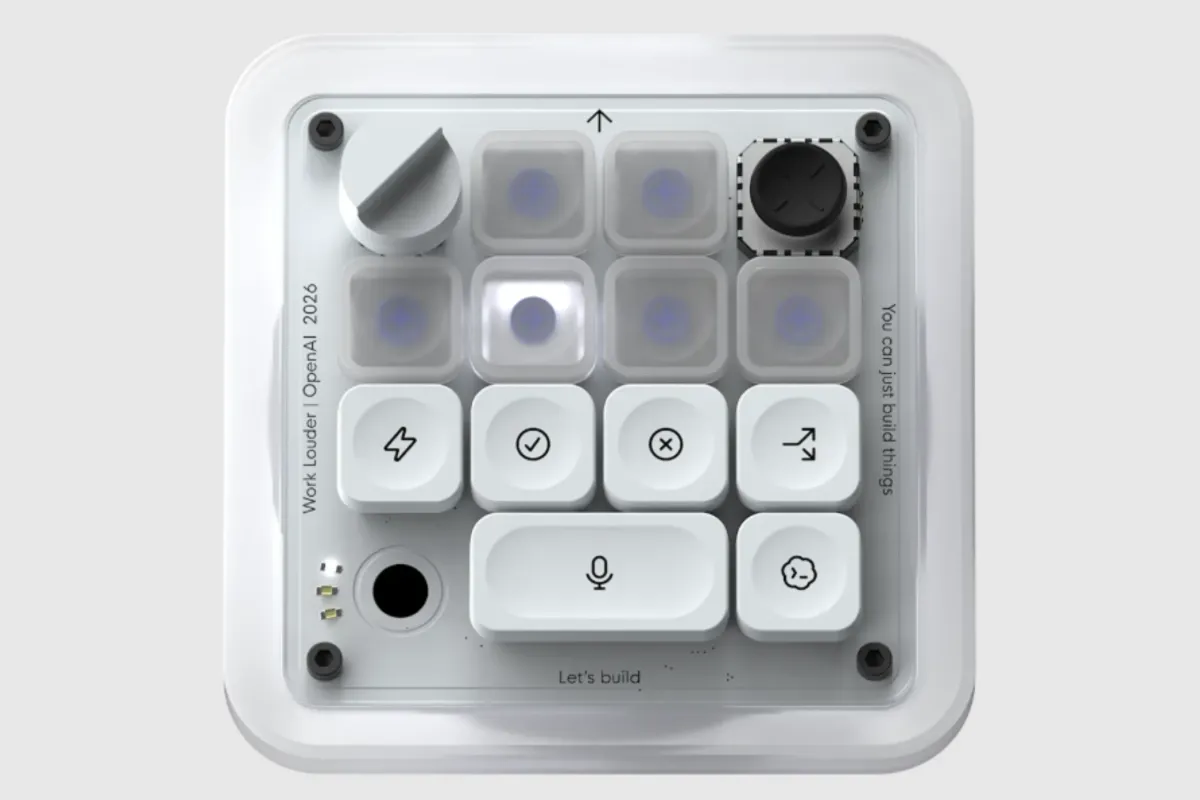
Micro, created with keyboard maker Work Louder, is a small desktop keypad with a high-end feel. In practice, it functions as a programmable command center for ChatGPT sessions, voice dictation, and Codex tasks. For coders and heavy AI users, that could make repetitive interactions easier. For everyone else, it may look like a very expensive macro pad in an Apple-like box.
What is OpenAI’s Micro keypad?
Micro is OpenAI’s first consumer-facing hardware device, and it is essentially a customizable keypad meant to speed up work inside ChatGPT. It is not a standalone computer, nor is it a smart assistant with a screen; instead, it is a dedicated physical controller that sits beside your laptop or desktop and sends commands into OpenAI’s software.
The product was developed with Work Louder, a company known for specialty keyboards and creator-friendly input devices. That partnership helps explain the device’s aesthetic: compact, tactile, and deliberately premium-looking.
OpenAI appears to be using Micro as a proof of concept for a broader hardware strategy. The company has reportedly explored other devices as well, including a separate smart-home style product, but Micro is the only hardware now available to customers.
How does Micro work?
Micro works by pairing with a computer over Bluetooth or USB and then sending preconfigured commands into ChatGPT or Codex. Once it is set up, users can assign specific actions to the keypad’s top row and lower command keys, giving them one-touch access to common tasks.
The most notable feature is a voice dictation button. Hold it down, speak your prompt, and then press send to submit it to the app. That makes the device feel less like a keyboard accessory and more like a compact AI control panel.
Customization happens inside ChatGPT itself through a dedicated Micro tab. Users can change key assignments, adjust brightness, and connect buttons to specific projects or workflows.
Why is OpenAI making hardware now?
OpenAI is making hardware because software-only AI products are increasingly competing for attention in crowded digital interfaces, and physical devices can create a stronger, more habitual relationship with users. A keypad that lives on a desk puts ChatGPT closer to the center of daily work.
The launch also reflects a broader industry trend. AI companies are trying to move from passive chat interfaces toward agentic systems that can take action on a user’s behalf. Hardware can make that shift feel more tangible, especially for professionals who want instant access to workflows without opening menus or typing the same prompts repeatedly.
There is also a symbolic angle. A well-designed device signals that OpenAI wants to be seen not just as a software lab, but as a consumer platform with its own ecosystem.
OpenAI’s hardware debut looks less like a mass-market launch than a carefully designed test: can a physical shortcut for AI make everyday work easier, or will it remain a novelty for enthusiasts?
What does the keypad actually offer users?
The keypad offers speed, structure, and a more tactile way to interact with AI tools. In the best-case scenario, it lets users jump between different ChatGPT sessions, trigger commands faster, and keep projects organized without constantly switching windows.
Its six frosted “agent” keys are the centerpiece. Those can be mapped to different tasks or sessions, while six additional command keys manage actions inside ChatGPT and Codex. The layout is built for repeat use, not casual experimentation.
Micro also includes visual feedback through color-coded buttons:
- White indicates an idle agent
- Blue indicates an agent is thinking
- Green indicates task completion
- Red signals an error
That system is useful, but it adds another layer of information users have to remember. The device is therefore best understood as a workflow tool that rewards familiarity.
Who is Micro for?
Micro is for people who use ChatGPT often enough to benefit from shortcuts and who are comfortable setting up custom workflows. Its most obvious audience is coders, especially those using OpenAI’s Codex tools, because the keypad is built around frequent prompt-and-response cycles.
It is less compelling for occasional ChatGPT users who do not need a dedicated piece of hardware to access the same functions. For them, a mouse and keyboard may remain simpler, cheaper, and more intuitive.
OpenAI’s own positioning seems to acknowledge that reality. Micro is not trying to be universal consumer hardware; it is trying to be beloved by a smaller group of high-frequency users.
How much does Micro cost, and is it worth it?
Micro costs $230, which immediately puts it in a premium niche. At that price, buyers are not just purchasing a keypad; they are buying into a specific way of working, one that assumes regular use of ChatGPT and a willingness to learn a new interface.
Whether it is worth it depends on the user’s habits. For a developer or AI power user who spends all day juggling prompts, agents, and coding sessions, the device could pay off in convenience. For anyone else, the value proposition is harder to defend.
Independent reactions so far suggest that skepticism is widespread. Some early online criticism has dismissed the device as more of a novelty than a serious tool, while others have questioned the cost compared with cheaper programmable keypads already on the market.
| Feature | Micro details | Why it matters |
|---|---|---|
| Price | $230 | Places the device in premium accessory territory |
| Connectivity | Bluetooth or USB | Lets users pair it flexibly with a computer |
| Keys | 6 agent keys, 6 command keys | Supports custom AI workflows and shortcuts |
| Core feature | Voice dictation button | Speeds up prompt entry for ChatGPT users |
| Software support | ChatGPT and Codex | Targets OpenAI’s most engaged users |
What was it like to use?
Once configured, the device can be enjoyable and surprisingly efficient. The appeal comes from turning a software experience into something more physical and immediate. Assigning different sessions to different keys makes it easier to move between tasks, and the dictation button adds a natural voice-first workflow.
That said, the setup is part of the experience, and not necessarily in a good way for beginners. Users need time to learn which keys do what, remember the color indicators, and understand how the keypad maps to specific ChatGPT projects.
The product therefore rewards patience. It is not the sort of accessory that feels instantly obvious the moment you plug it in. It becomes more useful the longer you use it.
What is the learning curve?
The learning curve is real because Micro asks users to memorize both function and status. The keys are not self-explanatory, and the color system is only useful once you learn the code behind it.
That makes the keypad feel more like a specialized instrument than a universal controller. People who are already comfortable with keyboard shortcuts and software customization will adapt faster than those who prefer straightforward consumer gadgets.
In short, the device is designed for fluency rather than discovery. If you are not going to use it often, it may never become second nature.
How has the market reacted so far?
The response from early observers has been mixed, with stronger enthusiasm from gadget fans and more skepticism from working programmers. That split makes sense: the device is stylish and thoughtfully made, but it is also expensive and narrow in purpose.
Some developer communities have questioned whether a dedicated ChatGPT keypad is more useful than a regular programmable macro device. Others have argued that serious coders are unlikely to abandon familiar tools for a novelty accessory, no matter how polished it looks.
The mixed reception is important because it suggests OpenAI is testing demand rather than proving it. If Micro finds a loyal audience, it could justify a broader family of devices. If not, it may become a footnote in the company’s hardware history.
Early criticism centers on a simple question: if a laptop already handles the same tasks, what exactly justifies a separate $230 desk accessory?
What does the Apple comparison mean?
The Apple comparison comes from the device’s packaging and design language, which feel unusually minimalist and polished. That resemblance may be intentional, or it may simply reflect the industry’s shared taste for clean premium hardware.
It also lands at a sensitive moment. OpenAI and Apple are entangled in a legal dispute in which Apple has accused the AI company of trade-secret theft. Against that backdrop, any product that looks or feels Apple-like is bound to attract extra scrutiny.
Still, resemblance does not equal imitation. Micro’s most important features are functional, not aesthetic: it is built to speed up AI work, not to replace a mainstream consumer device.
How does Micro fit into OpenAI’s bigger hardware strategy?
Micro fits into a larger effort to move OpenAI from being purely a software provider to becoming a hardware company with its own user experience. That shift is strategic because hardware can anchor habits, create product loyalty, and expand how people interact with AI.
If the company eventually introduces more ambitious devices, Micro could serve as the low-risk first step. It is small, relatively simple, and oriented around existing OpenAI software rather than a brand-new platform.
That makes it a useful bridge product. It gives OpenAI a way to learn how customers behave when AI becomes physical, without immediately committing to a smartphone, home device, or wearable.
What happens next?
What happens next depends on whether OpenAI can convert novelty into repeat use. If Micro becomes a staple for developers, creators, and AI enthusiasts, it may validate the company’s broader hardware push. If buyers see it as a stylish curiosity, the market may remain unconvinced.
For now, the keypad is best viewed as an experiment with strong design and limited reach. It is clever, distinctly OpenAI, and likely to appeal to a very specific kind of user. But it is not yet the kind of product that signals a mass-market breakthrough.
The larger lesson is that AI hardware is hard. Users must not only like the product; they must need it enough to change habits. Micro shows how difficult that can be, even for one of the most prominent AI companies in the world.
Key facts about OpenAI’s Micro keypad
Here is a quick summary of the device and why it stands out:
- OpenAI’s first hardware product
- Built with Work Louder
- Designed for ChatGPT and Codex users
- Includes programmable keys and voice dictation
- Priced at $230
- Appeals most to frequent AI users and developers
For now, Micro is less a mainstream gadget than a preview of where OpenAI wants to go next. It is a tiny object with an outsized strategic meaning: if OpenAI can make AI feel physical, it may be able to make its software harder to leave.
Frequently asked questions
What is OpenAI’s Micro keypad?
OpenAI’s Micro keypad is a small programmable hardware accessory built to work with ChatGPT and Codex. It gives users customizable buttons, voice dictation, and quick access to AI tasks from a physical desktop device rather than only through software.
How much does the OpenAI Micro keypad cost?
The OpenAI Micro keypad costs $230. That puts it in premium accessory territory and makes it most attractive to frequent ChatGPT users who expect to save enough time and effort to justify the price.
Who is the AI keypad designed for?
The AI keypad is designed primarily for developers and other power users who rely heavily on ChatGPT or Codex. Casual users are less likely to benefit, because the device requires setup, customization, and a willingness to learn its button system.
Why is OpenAI selling hardware now?
OpenAI is selling hardware now to bring AI workflows into a more tangible, always-available form. A physical keypad can keep ChatGPT close at hand, reinforce daily use, and help the company explore a broader hardware strategy.
Is Micro worth buying?
Micro may be worth buying for ChatGPT power users who want quick, tactile access to prompts and agent workflows. For everyone else, a regular keyboard or cheaper programmable macro pad may offer similar convenience at a lower cost.