In short
Google is upgrading Vids with custom AI avatars and Gemini Omni, allowing users to make personalized videos from selfies, voice recordings, prompts, and images. The update positions Vids as a stronger workplace video platform and a more direct competitor to AI video startups.
- Google Vids now supports custom AI avatars built from a selfie and voice recording.
- Gemini Omni can generate and edit AI video using prompts, reference images, and step-by-step changes.
- Google is positioning Vids as a workplace video platform inside Workspace.
- The company is adding safeguards, including account binding, SynthID watermarking, and age/region limits.
- The update increases competition with AI video startups such as HeyGen, Synthesia, Captions, and D-ID.
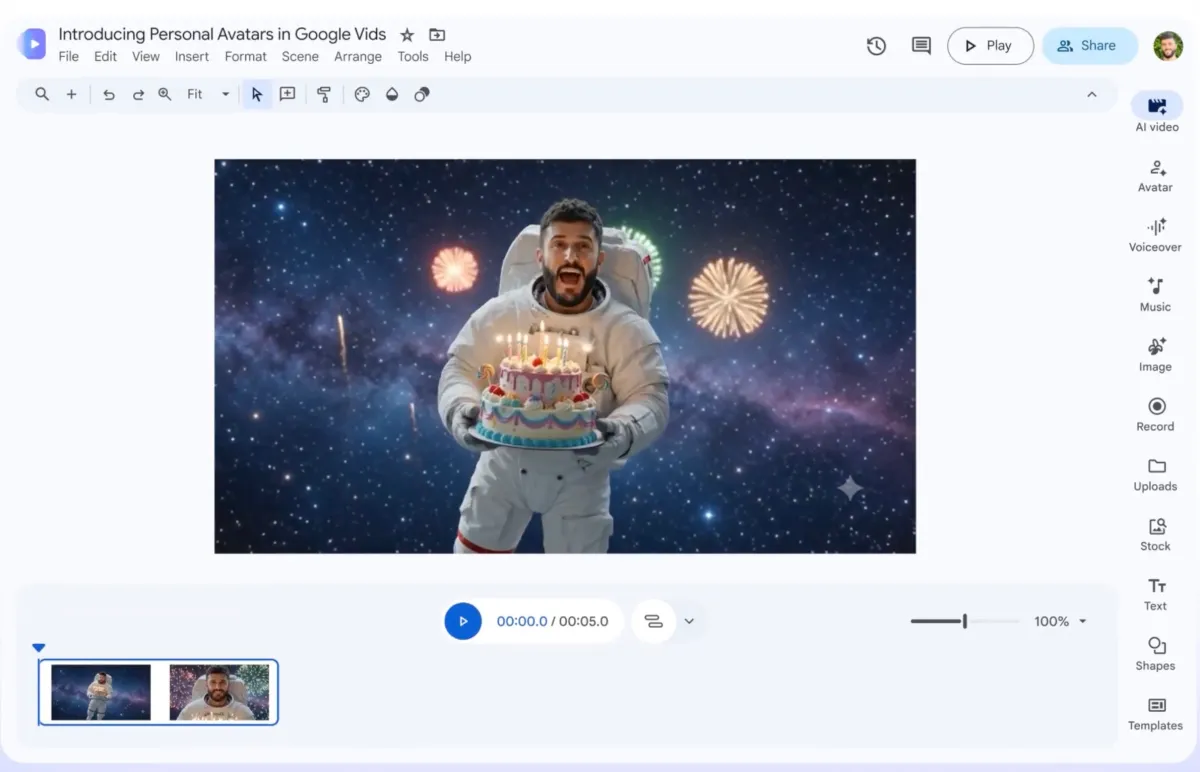
Google is expanding Google Vids with a new custom avatar feature and deeper Gemini support, allowing users to create AI-generated videos that look and sound like them from a selfie and voice sample, with new editing tools aimed at making workplace video production faster and easier. The update matters because it pushes Vids beyond simple presentation help and turns it into a more serious competitor in the fast-growing AI video market.
Announced on Thursday, the changes add a personal digital avatar option, bring Google’s multimodal Gemini Omni model into the product, and introduce more flexible editing capabilities. Together, the features make Vids more useful for business communication, training, and internal updates while also moving it closer to the creative tools offered by a growing field of AI video startups.
The timing is notable. OpenAI’s short-lived Sora video product may no longer be operating, but the broader appetite for AI-generated video remains strong. Google appears to see an opening to serve both enterprise users who want quick, polished content and individual creators who want a more personalized way to appear on camera without filming every take themselves.
What Google Vids is changing
Google Vids is no longer just a lightweight AI assistant for slide-like workplace videos. The latest update turns it into a broader creation tool with three major additions: personal AI avatars, Gemini Omni-powered generation, and step-by-step editing.
The company’s pitch is straightforward: make it easier to produce professional-looking videos without requiring a full studio setup, a camera crew, or advanced editing skills. That could be especially useful for recurring corporate content such as onboarding clips, product walkthroughs, executive updates, and training modules.
How do the new AI avatars work?
Google says users will be able to generate a custom digital avatar based on a selfie and a voice recording they upload. The avatar is designed to resemble the account holder and speak in a voice modeled on the recording, creating a personalized presenter that can front a video without the person having to appear on camera in real time.
The company is positioning the feature as a controlled, account-bound tool rather than an open-ended generator. According to Google, the avatar remains tied to the user’s Google account and is invisibly marked with SynthID, the company’s watermarking technology for AI-generated content.
That detail is important for trust and authenticity. In an environment where synthetic media can be difficult to distinguish from authentic footage, invisible watermarking is one way to preserve traceability while still allowing users to experiment with AI-generated likenesses.
Google says the avatar feature is designed to stay linked to the user’s account and include an invisible SynthID watermark, signaling that the company wants personalization without losing track of provenance.
Access is not universal. Google said personal avatars will be available only to users in certain regions and only to adults aged 18 and over. That limitation reflects the sensitivities around likeness creation, identity control, and potential misuse.
Why Gemini Omni matters for video creation
Gemini Omni is the other major piece of the update, and it may end up being the more consequential one for everyday users. Google says the model can create videos from a combination of a written prompt and reference images that the user uploads, then blend those inputs into a generated clip.
That means users can guide the output with both text and visual references, which is often more effective than relying on text alone. Instead of starting with a blank page, teams can point the model toward a particular style, subject, or visual direction and ask it to build a video around that brief.
Omni can also help with post-production on existing footage. Google says users will be able to swap backgrounds, improve lighting, and add effects to videos shot on a phone. That broadens Vids from a generation tool into a practical editing assistant, especially for people who capture content on mobile devices and want a fast cleanup workflow.
What does step-by-step editing change?
Step-by-step editing allows users to make incremental changes instead of having to regenerate a video from scratch every time they want a tweak. That sounds simple, but it is a major usability improvement in AI media tools, where one small prompt change can otherwise force a full restart.
For business users, that can save time and reduce frustration. A training video might need only a revised title slide, an updated line of narration, or a different background image. With step-by-step edits, those changes become more practical and less disruptive to the entire workflow.
In effect, Google is trying to make the product behave less like a one-shot generator and more like a real editing suite that can support a back-and-forth creative process.
How Google Vids is evolving into a workplace video platform
The update also reveals where Google wants Vids to sit inside its larger software ecosystem. By folding it into Google Workspace, the company is clearly aiming at business communication rather than consumer entertainment alone.
That focus makes sense. Many companies already use Workspace tools for documents, presentations, and collaboration, and Vids now offers a way to add video to that stack with fewer technical barriers. A manager could draft a script, generate an avatar-led explanation, refine the visuals, and distribute the result inside the same ecosystem used for email and documents.
Still, the new features could pull Vids beyond basic workplace use. Personalized avatars and flexible editing are also the kind of capabilities that appeal to creators, small teams, and startups looking for faster ways to produce promotional content, customer explainers, and social media clips.
That puts Google in a more competitive position against specialist platforms that have built reputations in the AI video space.
Who is Google competing with?
Google’s move places Vids in closer competition with a cluster of AI video companies that have focused on avatar generation, synthetic presenters, and AI-assisted video production. Among the names now more directly in the crosshairs are HeyGen, Synthesia, Captions, and D-ID.
Those companies have spent years refining tools that let people create talking-head videos, multilingual content, and branded explainer clips. Google has the advantage of scale, distribution, and Workspace integration, but the specialized players often have more mature workflows tailored specifically to video creators.
The competition is not just about making a person appear on screen. It is about the full production chain: how easily a user can script, generate, revise, localize, and publish a video without bouncing between multiple tools.
| Feature | What it does | Why it matters |
|---|---|---|
| Custom AI avatar | Creates a digital presenter from a selfie and voice recording | Lets users star in videos without filming themselves live |
| Gemini Omni generation | Builds video from text prompts plus reference images | Gives users more control over visual style and output |
| Editing enhancements | Changes backgrounds, lighting, and effects on existing footage | Turns Vids into a more useful production assistant |
| Step-by-step edits | Allows incremental revisions instead of full regeneration | Makes AI video workflows faster and less wasteful |
| SynthID watermarking | Invisible marking of AI-generated avatars | Supports transparency and provenance |
Why the timing matters for AI video
The new features arrive at a moment when AI video is moving from novelty to workflow tool. Early products drew attention by showing that a person could be turned into a synthetic presenter, but the market is now shifting toward reliability, editing control, and enterprise use.
That shift is important because the first wave of AI video excitement often collided with practical concerns: awkward motion, inconsistent output, brand safety, and confusion about what was real. Products that survive the next stage are likely to be the ones that make the process easier to govern and harder to misuse.
Google’s emphasis on account binding, age gating, and watermarking suggests the company understands that the challenge is not only technical capability but also trust. The more convincing synthetic media becomes, the more pressure there is to show where it came from and who created it.
What does SynthID add?
SynthID is Google’s invisible watermarking system for AI-generated content, and in this context it serves as a metadata-like safeguard that helps identify synthetic media without visibly branding it. Google is using it to signal that avatar-generated videos are created by AI and can be traced back to the platform.
That is not a complete answer to misinformation risks, but it is one of the more concrete protections available to companies trying to support synthetic media while reducing the chance that it is passed off as authentic footage.
How this compares with past AI video efforts
The most obvious comparison is with tools that let users appear in generated videos, especially products that centered on a user’s likeness or a realistic avatar. Those services often marketed themselves as shortcuts for creators who needed talking-head clips, multilingual training videos, or a way to produce content without a camera crew.
Google’s distinction is distribution. Rather than launching as a standalone video startup, it is embedding the feature inside Workspace, where it can be adopted by companies already paying for Google’s productivity tools. That could make adoption easier if the feature proves reliable.
At the same time, Google is not simply copying a startup playbook. The addition of Gemini Omni and step-by-step editing suggests a broader ambition: create an end-to-end AI video environment rather than just a synthetic spokesperson generator.
Key differences at a glance
- Workspace integration: Vids is being positioned as a business tool first.
- Prompt plus image generation: Gemini Omni gives users more creative control.
- Avatar safeguards: Account binding and watermarking are central to Google’s approach.
- Editing workflow: Users can refine output without restarting from zero.
What businesses are likely to do with it
For companies, the practical use cases are easy to see. A communications team could create a leadership update with a branded avatar. An HR department could produce onboarding or compliance videos. Sales teams could build product explainers. Trainers could repurpose scripts into repeatable video modules.
The key benefit is speed. AI video tools do not necessarily replace human-produced video, but they can reduce the cost of creating first drafts and internal content that does not need a full-scale production workflow.
That makes the product especially attractive for companies that need frequent updates or localized versions of the same message across teams and regions.
- Draft a script in Workspace.
- Generate a custom avatar or use visual references.
- Refine the video with Gemini Omni edits.
- Publish for internal or external use.
What the limitations tell us
Google’s restrictions on age and geography are not just policy details. They show that the company is moving cautiously around a category that has obvious abuse potential.
Limiting access to adults in selected regions reduces exposure while Google tests the product and navigates local rules, user expectations, and content governance. It also hints that the rollout may be gradual rather than immediate and global.
These guardrails matter because AI avatars sit at the intersection of identity, likeness rights, and synthetic speech. A powerful tool in the wrong hands can produce convincing impersonations, which is why platform safeguards are becoming as important as model quality.
Google’s regional and age limits suggest the company is treating personal likeness generation as a sensitive capability rather than a general-purpose feature.
What comes next for Google Vids?
The update suggests Google wants Vids to become a more central part of its AI productivity strategy. If the tools work well, they could deepen Workspace’s value and help Google compete in a market where AI features are increasingly expected rather than optional.
But the bigger question is whether Vids can become a true habit-forming video tool. Users will judge it not only on whether the avatars look realistic, but also on whether the full workflow feels polished enough to replace existing methods.
If Google can combine ease of use, enterprise controls, and a credible editing experience, Vids may become one of the company’s more practical AI products. If not, it risks being another interesting demo that gets lost among more focused video apps.
Timeline of the Google Vids rollout
Here is a simple look at the product’s evolution based on Google’s latest announcement.
| Stage | Development | Impact |
|---|---|---|
| Original Vids | AI-assisted workplace presentation creation | Helped users make simple business videos |
| Thursday update | Added custom avatars and Gemini Omni integration | Expanded Vids into a more capable AI video platform |
| Current rollout rules | Access limited by region and age | Introduced tighter controls around personal likeness use |
For now, Google’s message is clear: it wants Vids to be more than a presentation helper. It wants it to be a practical video creation tool for the workplace, with enough AI firepower to challenge the growing field of synthetic media platforms.
Whether users embrace that vision will depend on how well the new avatars, Omni-powered edits, and watermarking protections hold up once the feature reaches a wider audience.
Bottom line
Google’s Vids update is a meaningful step in the company’s broader push into generative media. By adding personal avatars, Gemini Omni video generation, and more flexible editing, Google is making a clear bet that AI video is moving from experimental novelty to mainstream productivity software.
That puts the company in direct competition with specialist AI video startups, while also raising the bar for trust, safety, and transparency in synthetic media. In a market where realism is improving quickly, those protections may matter almost as much as the creative capabilities themselves.
Frequently asked questions
What is new in Google Vids?
Google Vids now lets users create a custom AI avatar from a selfie and voice recording, and it also adds Gemini Omni for prompt-and-image-based video generation, editing, and refinements. The update makes Vids more of a full video creation tool rather than only a presentation helper.
How do Google Vids AI avatars work?
Google Vids AI avatars are created from a selfie and a voice recording that the user uploads. Google says the avatar is tied to the user’s account and marked with an invisible SynthID watermark, which is intended to help identify AI-generated content and reduce misuse.
Who can use the personal avatar feature?
Google says the personal avatar feature is only available to users in certain regions and only to people who are 18 or older. Those restrictions suggest Google is taking a cautious approach to likeness generation and is limiting access while it rolls out the feature.
How does Gemini Omni improve Google Vids?
Gemini Omni lets users generate video from a text prompt plus reference images, then refine the result through step-by-step edits. It can also help change backgrounds, improve lighting, and add effects to footage, making Vids more useful as an editing assistant.
Why is Google Vids competing with AI video startups?
Google Vids is competing with AI video startups because its new features overlap with tools from companies like HeyGen, Synthesia, Captions, and D-ID. By adding avatars, generation, and editing inside Workspace, Google is targeting the same fast-growing market for synthetic video production.