In short
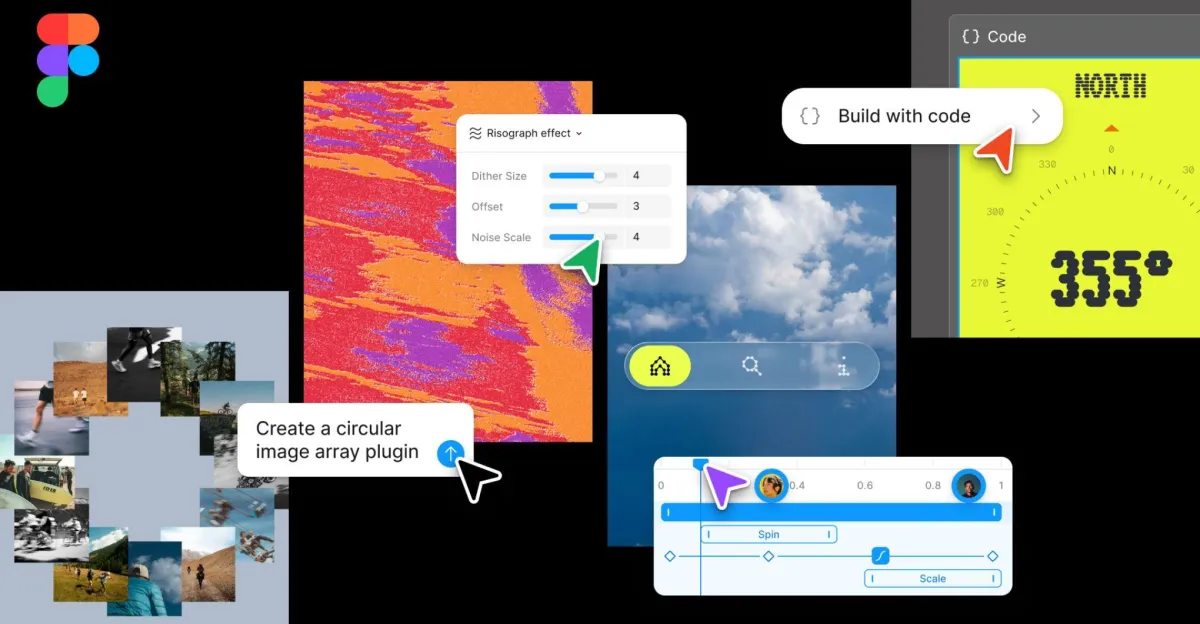
Figma has unveiled a major set of AI-powered design updates, including motion graphics, shader effects and code layers inside the canvas. The company says the changes are meant to unify design, code and automation in one workspace.
- Code layers bring source code directly into the Figma Design canvas.
- New motion and shader tools let users generate advanced visual effects with prompts.
- Figma Weave workflows and agent skills aim to automate more repetitive team tasks.
- Generative plugins let nontechnical users create reusable custom tools.
- The update pushes Figma closer to a full-stack design and development platform.
Figma is broadening its ambitions beyond interface design, rolling out a new wave of AI-powered tools aimed at helping teams move from concept to shipped product with fewer handoffs and less repetitive work. The company used its annual Config conference to introduce features that blend design, code and generative AI more tightly than before, including code layers directly in the Figma Design canvas, AI-assisted motion graphics, shader creation tools and expanded workflow automation.
The updates reflect a larger shift across the design software industry: tools are no longer trying only to help people draw screens, but to help them build interactive, production-ready experiences. Figma’s latest product direction makes that trend more explicit by framing the canvas as a shared workspace for designers, developers, AI agents and reusable tools.
At the center of the announcement is a redesigned canvas that Figma says is optimized for full-stack development. The new setup is intended to let teams work with design assets, code, animations and AI-generated outputs in one environment instead of bouncing between separate apps. For Figma, that means competing not just with other design platforms, but also with increasingly capable AI-assisted development tools.
What Figma announced at Config
Figma’s latest product package is built around two broad themes: new creative building blocks and new collaborative intelligence features. The first group focuses on ways to create richer visual assets directly in Figma. The second gives teams more automation, context and extensibility through its AI systems.
The company says the goal is to let people “push their ideas further” while reducing tedious manual tasks. In practical terms, that means giving users more control over what happens on the canvas, whether they are writing code, shaping motion, or generating visual effects through prompts.
New creative materials for the canvas
The most eye-catching additions are the ones aimed at visual creation. Figma is introducing code layers, motion tools, shader effects and a set of workflows built around its Weave AI tooling.
Code layers are designed to bring code directly into the design process. Instead of switching from a prototype to a separate editor, users can inspect and adjust code inside the Figma Design canvas. Figma says this will make it easier to clone repositories, generate new directions with its AI agent, extract flows into editable design layers and then push changes back into code.
The company is also adding motion tools that let teams create animations, transitions and 3D transforms collaboratively from inside Figma. Users can prompt the AI chatbot to generate motion ideas, apply preset styles or fine-tune the result on a timeline. Figma says these motion features are connected to design systems and code, which should make the output more usable for real product shipping rather than just mockups.
Another major addition is shaders. Figma says users will be able to prompt the platform to build shader effects and custom fills powered by WebGPU. The feature opens up visual treatments that were previously difficult or impossible in the product, including effects such as dithering, pixelation and more advanced blur styles.
Figma is also bringing in what it calls Figma Weave workflows. These combine more than 20 integrated Weave tools into the canvas, with the idea of turning complicated AI-driven creative processes into simpler, more accessible actions. The company describes this as an early step toward deeper integration between Figma and Figma Weave later this year.
More intelligence for teams and agents
The second part of the announcement focuses on making Figma’s agent more useful in team environments. That includes “agent skills,” which are intended to convert repetitive tasks into reusable capabilities that groups can share across projects.
Figma is also expanding the amount of context the agent can use. Users will be able to bring in data from third-party connectors, web search and file attachments, making the assistant better suited to real-world work rather than isolated design prompts.
In addition, the company is launching generative plugins. These are meant to let users extend Figma’s capabilities by turning prompts into reusable tools. Figma says the process will not require developer setup or technical expertise, which could lower the barrier for non-engineers who want custom functionality.
Why the update matters
Figma has long been associated with collaborative interface design, but the company is increasingly positioning itself as a broader product creation platform. That matters because design teams today are often expected to do much more than mock up screens. They are asked to prototype motion, test interactions, communicate with engineering and increasingly use AI to speed up production.
By adding code layers and motion creation to the same workspace, Figma is moving closer to the point where designers can influence implementation more directly. The company’s message is clear: the gap between design intent and functional product should be narrower, and AI can help close it.
For developers, the appeal is different but related. Tools that preserve code relationships, sync changes back to repositories and connect design systems to production workflows can reduce the friction that often appears when a mockup becomes a build task. For product teams, the promise is fewer fragmented steps and less duplicated effort.
At the same time, Figma is also making a bet that AI can be embedded into specialized professional software without turning the experience into a generic chatbot interface. Rather than asking users to leave the canvas and talk to a separate assistant, Figma is trying to make the assistant part of the design surface itself.
How the new tools fit together
Figma’s announcement is easier to understand when broken into the specific problems each feature is trying to solve. The common thread is workflow compression: bringing more of the creation cycle into one place.
| Feature | What it does | Primary benefit |
|---|---|---|
| Code layers | Lets users interact with and modify code inside the design canvas | Reduces switching between design and development tools |
| Motion | Creates animations, transitions and 3D transforms with AI and timeline controls | Makes product motion easier to prototype and ship |
| Shaders | Generates shader-based visual effects and fills through prompts | Unlocks advanced visual styles in Figma |
| Figma Weave workflows | Bundles more than 20 Weave tools into the canvas | Simplifies complex AI-assisted visual work |
| Agent skills | Turns repeatable tasks into shared team capabilities | Improves consistency across projects |
| Generative plugins | Converts prompts into reusable custom plugins | Enables more tailored workflows without technical setup |
That combination suggests Figma is no longer treating AI as a feature that sits on top of design work. Instead, it is trying to make AI a native part of production, much like layers, components and prototyping have become native parts of modern design software.
Code layers: the biggest step toward design-development fusion
The code layers feature may be the most consequential of the new tools, even if it is not the most visually dramatic. Designers have always worked with abstractions while engineers work with implementation. Figma’s code layers attempt to close that divide by allowing code to live inside the design space.
In principle, that could help teams handle common workflow bottlenecks: reviewing a prototype, making small code adjustments, mapping visual ideas into production-ready structures and then syncing those changes back to the repository. Figma’s description suggests a more fluid relationship between visual design and source code than the software has offered before.
That kind of integration is especially relevant as AI coding tools become more common. Developers and designers increasingly work alongside assistants that can generate snippets, suggest variations or translate prompts into functional interfaces. Figma appears to be leaning into that shift rather than resisting it.
Figma says the new canvas is meant to bring teams, AI agents, tools and materials together in a single environment, making it easier to move from idea to implementation.
There is still a big difference between being able to inspect code in a design environment and actually building production systems. But the direction is important. Figma is trying to blur the border just enough to make cross-functional collaboration less painful.
Motion tools bring animation into everyday design work
Motion design has traditionally required separate tools, specialist skills or at least a fair amount of manual effort. Figma’s new motion feature aims to lower that barrier by combining generative prompts with familiar timeline controls.
That means a designer can describe the kind of animation or transition they want, let the AI generate a starting point and then adjust the result manually if needed. Figma says the feature supports collaborative animation design, along with 3D transforms, and that it stays connected to the broader design system.
This matters because motion increasingly defines the quality of digital products. From subtle screen transitions to more expressive onboarding flows, animation is no longer optional polish. It affects how products feel, how users orient themselves and how brands communicate personality.
By bringing motion into the main canvas, Figma is making a practical argument: animation should be treated as part of the design workflow, not a late-stage specialist task.
What this could mean for product teams
- Faster iteration on interactive prototypes
- Less reliance on separate motion tools for common effects
- Better alignment between visual design and implementation
- More room for non-specialists to contribute to motion concepts
Shaders open the door to more advanced visual styling
Shaders are a more technical feature, but they could be important for teams that want richer visual effects without jumping into specialized graphics software. Figma says the new shader capability is powered by WebGPU, a modern web graphics framework that supports more advanced rendering.
According to the company, users will be able to prompt the creation of shader effects and fills directly on the canvas. That includes visual treatments such as dithering, pixelation and nuanced blur effects, all of which can help designers achieve a distinct aesthetic.
The presence of shaders also signals that Figma sees value in expanding beyond flat design primitives. As digital products evolve, teams often want textures, depth and expressive effects that go beyond standard UI libraries. Figma’s approach makes those options more accessible inside the same collaborative environment where layouts are already built.
There is a strategic angle here too. The more Figma can host complex visual creation in its own ecosystem, the less reason users have to leave the platform for adjacent tools.
Figma Weave becomes part of the creative workflow
Another important part of the announcement is the deeper role of Figma Weave. The company says it is turning more than 20 Weave tools into integrated workflows on the canvas, with the longer-term goal of a fuller integration later this year.
That suggests Figma wants to normalize AI-assisted visual production rather than present it as a separate mode of work. Instead of forcing users to manage multiple tools and prompt chains manually, the platform is packaging those processes into more direct controls.
For teams already experimenting with generative visuals, that could mean less friction and more repeatability. For others, it may simply make advanced AI workflows less intimidating.
Agent skills and generative plugins point to a more customizable future
Figma is also expanding what its agent can do on behalf of teams. With agent skills, repeated tasks can be converted into shared actions that many people can use consistently. In theory, that could help organizations standardize best practices or automate small but frequent chores.
The richer context layer is equally significant. By allowing third-party connectors, web search and file attachments, Figma is trying to make its agent more aware of real project conditions. That is a key requirement if AI tools are to do more than offer generic suggestions.
Generative plugins may prove especially appealing for teams with niche needs. Figma says users will be able to create reusable custom plugins from prompts without technical setup. That lowers the threshold for tailoring the platform to a specific workflow, which is often one of the hardest things for creative software to do well.
Figma describes these plugins as a way to let prompts become practical tools that can be adjusted, shared and reused by teams without requiring engineering expertise.
Why Figma is leaning harder into AI now
Figma’s latest announcements come at a moment when nearly every major software company is racing to embed AI into core products. In design, that trend is especially noticeable because creative workflows involve many repetitive, high-friction tasks that AI can potentially speed up.
Layout changes, asset variations, motion drafts, shader exploration and plugin creation all represent opportunities for automation. At the same time, designers and developers still want control, consistency and compatibility with real production systems. Figma’s challenge is to offer AI assistance without undermining trust in the quality of the output.
The company’s framing reflects that balance. It is not presenting AI as a replacement for creative judgment, but as a way to help teams move faster and work with more precision. That distinction matters, especially in professional software where reliability is often more important than novelty.
The strategy also reinforces Figma’s position as a collaboration platform. If design, development and AI can all happen in one place, the software becomes more central to how products are built. That kind of centrality is valuable in a competitive market.
Industry context: design tools are becoming build tools
Figma is not the only company moving in this direction. Across the software landscape, product development tools are becoming more integrated, more AI-driven and more connected to code. The line between prototyping and implementation is thinning.
That trend creates both opportunity and pressure. On one hand, teams gain speed and flexibility. On the other hand, they may become more dependent on a platform that controls more of the workflow. For Figma, the opportunity is obvious: if it can make the whole chain smoother, it can become indispensable.
But there is also a user expectation challenge. Designers want tools that preserve craft, while developers want tools that do not abstract away too much of the underlying structure. Figma’s new features attempt to satisfy both sides by keeping the canvas collaborative and code-aware.
The emphasis on WebGPU for shaders, code synchronization for layers and design-system alignment for motion suggests the company is trying to maintain technical credibility while still making the interface approachable.
A closer look at the announcement by feature
1. Code layers
Brings source code into the visual design workspace, supports repo cloning, editable flows and sync-back functionality.
2. Motion
Lets users generate and refine animations, transitions and 3D transforms through prompts and timeline editing.
3. Shaders
Adds AI-assisted visual effects for advanced rendering and custom fills inside the canvas.
4. Figma Weave workflows
Packages more than 20 Weave tools into usable, integrated creative workflows.
5. Agent skills
Turns repetitive tasks into reusable capabilities shared across teams.
6. Generative plugins
Lets users create custom plugins from prompts without requiring coding knowledge.
What to watch next
The biggest question is how these features will work in practice. AI tools often sound powerful in launch demos but vary widely in usefulness once they face messy, real-world projects. The value of Figma’s new capabilities will depend on speed, reliability, editability and how well they fit into existing team workflows.
It will also matter how deeply Figma Weave integrates with the rest of the product later this year, and whether the company can make code layers and motion tools feel natural for both designers and engineers. If it succeeds, Figma could become more than a leading design app. It could become a central environment for building digital products from idea to implementation.
For now, the company is signaling that the future of design software is not just about prettier mockups. It is about smarter, more connected systems that can turn prompts, code and collaboration into something production-ready.
The bottom line
Figma’s Config announcements show a company doubling down on AI as a core part of creative production. Code layers, motion graphics, shader tools, Weave workflows, agent skills and generative plugins all point in the same direction: a more integrated canvas where teams can design, automate and build without leaving the platform.
That may not eliminate the friction of product development, but it could meaningfully reduce the number of steps between an idea and a shippable result. For Figma, that is both a product strategy and a competitive statement.