In short
Adobe previewed four experimental Max 2026 AI tools that could eventually reach Creative Cloud or Firefly. The demos focus on conversational character creation, image-to-3D scene expansion, prompt-driven sound design and copyable photo edits.
- Adobe showed four experimental AI “sneaks” at Max 2026.
- The tools target video characters, 3D image expansion, sound design and repeatable photo edits.
- Adobe says the projects are not guaranteed to ship.
- The company could fold some of the ideas into Creative Cloud or Firefly later.
Adobe used its Max 2026 showcase to preview a new slate of experimental AI tools that could change how people build video, edit images and work with sound. The company’s latest “sneaks” include systems that let users direct AI characters in conversation, turn flat images into navigable 3D scenes, generate and sync sound effects from a clip and prompt, and copy one editing workflow across other subjects in the same photo.
The demonstrations matter because Adobe is not just adding AI to familiar tools; it is testing a more conversational model of creative production. If any of the experiments make it into Creative Cloud or Firefly, they could give users more direct control over complex tasks that normally require multiple manual steps.
What Adobe showed at Max 2026
The company’s annual Max conference has long served as a preview stage for features that may or may not become official products. This year’s batch, reported by The Verge, centered on Adobe’s push to make creative work more interactive and easier to steer in plain language.
Adobe said the tools are “sneaks,” meaning they are experimental and not guaranteed to ship. Even so, the concepts point to where the company wants to take its generative AI strategy: closer to actual production workflows, rather than isolated demo features.
Project Screen Test: characters you can shape by conversation
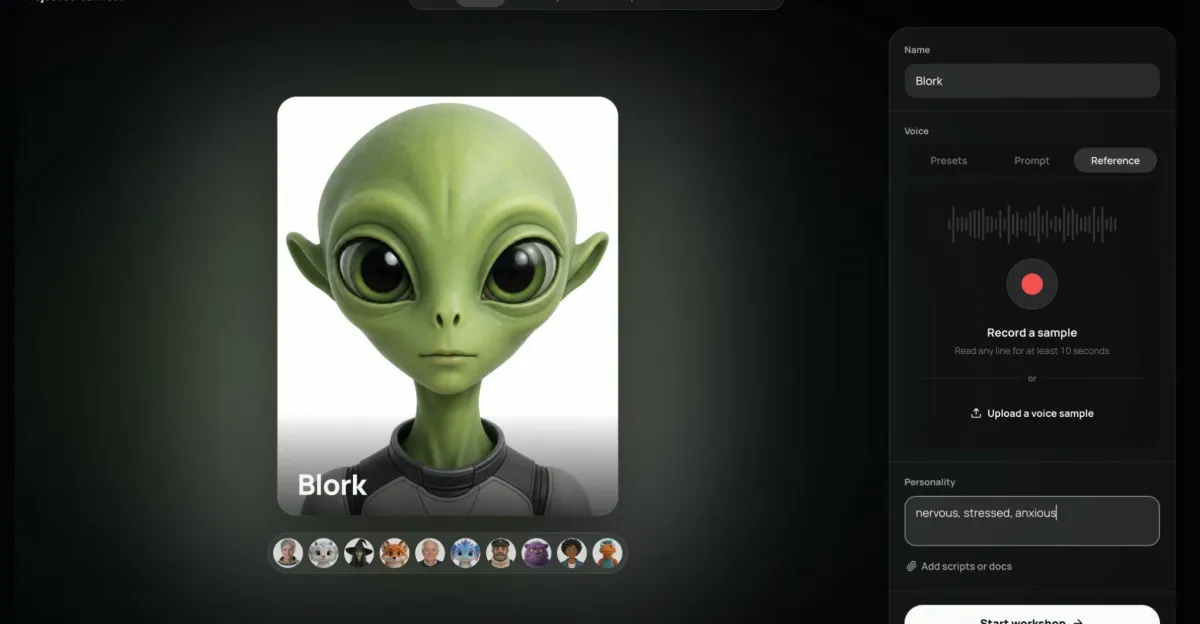
Project Screen Test is Adobe’s experimental approach to AI character creation for video content. The system begins with traits the user can prompt, along with voice setup that can use preset audio, described audio or uploaded audio.
From there, the character can be interviewed to refine its backstory, temperament, goals, flaws, fears and movement quirks. The result is meant to be a more guided creative process, where the user shapes an on-screen personality through dialogue instead of static settings alone.
Screen Test can also generate animated screen tests from a described scene or environment, giving creators a way to see a character in motion before committing to a fuller production.
Project Sight Span: turning images into navigable spaces
Project Sight Span is Adobe’s attempt to move beyond flat images. The tool turns a still image into a navigable 3D scene, extrapolating missing space beyond the original frame while keeping the style and recognizable details intact.
According to The Verge, Sight Span is designed to work across photos, paintings and illustrations. That makes it more than a camera-specific effect: it is a general visual expansion tool that could help creators explore composition, staging and spatial context in a new way.
In practical terms, the promise is simple. A single image could become a space a user can walk through, inspect and extend without starting from scratch.
Project Sound Bender: prompt-driven sound design
Project Sound Bender focuses on audio. Adobe’s experiment generates and syncs sound effects from a video clip plus a text prompt, which could reduce the amount of manual searching and timing required in basic sound design.
The system also includes a square sound canvas for real-time mix adjustment, suggesting Adobe wants users to shape the audio as it is being built rather than treating sound as a separate post-production step.
That kind of workflow could be especially useful for creators who know the emotional or narrative tone they want, but do not want to assemble it through many separate audio tools.
Project Rinse Repeat: copying edits across a photo
Project Rinse Repeat addresses one of the most repetitive parts of image editing: applying the same kind of cleanup or adjustment to different people or objects in a single frame. Adobe’s demo copies one edit workflow onto other subjects in the same photo, even when those subjects are mismatched in shape or size.
The tool can propagate retouching, shadows and other Photoshop edits across those subjects, which could make it easier to maintain consistency inside a complex image. For editors, the value is speed as much as precision: one successful fix could be reused without rebuilding it object by object.
Why it matters
Adobe’s experiments show a clear direction: more of the creative process is being turned into an interactive conversation with software. That matters because many of the hardest parts of production are not glamorous. They are the small, repeated, technical decisions that slow people down and consume time.
If Adobe can make advanced editing feel more intuitive, it could lower barriers for less experienced users while giving professionals tighter control over details. That is the balance the company appears to be chasing, and it is why the previewed tools are more significant than isolated demos.
Gautham Mysore, a senior principle Adobe research scientist, framed the goal as one of both simplicity and precision, saying:
“Making these interactions more intuitive is also about giving experienced creatives more precise control”
That framing is important. Adobe is not only trying to automate creative work; it is trying to make the software respond more naturally to intent. For a company whose products sit at the center of professional design, that shift could shape how artists, editors and filmmakers expect software to behave.
There is also a broader market angle. Adobe’s generative AI push already runs through Firefly, the company’s AI platform, and across Creative Cloud. These experiments could eventually feed into those products, giving Adobe a path to fold new capabilities into the tools people already use.
How did Adobe get here?
Adobe Max is the company’s annual venue for new creative software and technology previews. It is also a familiar place for “sneaks,” Adobe’s label for experimental features shown before the company decides whether to ship them.
That matters because the company has a long history of using Max as both a product showcase and a research stage. Some ideas remain ideas; others evolve into features inside flagship products. The point of the event is not simply to impress the room, but to test the direction of Adobe’s product strategy in public.
Adobe’s current AI push sits on top of that tradition. Firefly is the company’s generative AI platform, while Photoshop remains the flagship image editor. The new experiments look designed to connect those worlds: more generation, more guidance, and less friction between concept and final output.
The Verge’s reporting suggests Adobe is especially interested in making advanced tools feel more accessible without taking control away from experienced users. That tension is visible in each demo. The features are built to save time, but also to preserve the ability to steer and refine.
Background: what “sneaks” mean for Adobe
Adobe’s use of the term is important because it signals uncertainty. A sneak is not a product launch. It is a public test of an idea, and Adobe has not promised that any of the Max 2026 concepts will ship.
Still, the company often uses those previews to judge whether a concept belongs in Creative Cloud, Firefly, both, or neither. That leaves open the possibility that the current batch could influence future releases even if the exact prototypes never arrive as shown.
| Project | What it does | Potential creative use |
|---|---|---|
| Screen Test | Creates and refines AI characters through conversation and voice setup | Video character development and animated screen tests |
| Sight Span | Turns images into navigable 3D scenes while preserving style and detail | Scene exploration from photos, paintings or illustrations |
| Sound Bender | Generates and syncs sound effects from a clip and prompt | Faster sound design and audio mixing |
| Rinse Repeat | Copies edits across people or objects in the same photo | Consistent retouching and shadow adjustments |
What makes these tools different from standard AI demos?
The common thread is workflow. Adobe is not just showing image generation or text-to-video output. It is asking a more practical question: how can AI reduce the effort involved in real creative tasks without stripping away control?
Screen Test does that through dialogue, letting users tune a character like a live collaborator. Sight Span does it by converting a still image into a spatial environment. Sound Bender gives prompts a direct path into audio. Rinse Repeat automates a tedious edit across multiple subjects while trying to preserve visual consistency.
These are not broad consumer AI toys. They are targeted attempts to solve specific production problems. That is a meaningful distinction, particularly for Adobe, whose customers often need reliable, repeatable results rather than novelty.
How could this affect Creative Cloud users?
It could shorten the distance between an idea and a workable draft. Users who currently move between separate tools to edit an image, build a scene or craft audio may eventually get more of that work inside Adobe’s ecosystem if the experiments are productized.
For professionals, the question is not whether AI can produce something. It is whether the output can be controlled, revised and trusted enough to use in a real project. That is why Adobe’s emphasis on precision matters as much as the automation itself.
By the numbers
Adobe did not attach pricing or release dates to the Max 2026 experiments, but the reporting does provide a useful snapshot of what is being tested and how.
| Item | Detail |
|---|---|
| 4 | experimental projects highlighted in the reporting |
| 3 | major workflows covered: character creation, image expansion and sound design |
| 2 | core Adobe products mentioned as possible destinations: Creative Cloud and Firefly |
| 1 | annual conference stage where the previews were shown: Adobe Max |
What happens next?
The main open question is whether any of these projects will become official Adobe products. The company has not said which, if any, will move beyond the sneak stage.
Also unclear is where the tools would land if Adobe develops them further. They could show up in Creative Cloud apps, in Firefly, or in both. That decision will matter for how users access them and how deeply they are woven into Adobe’s existing software stack.
Timing remains unknown as well. Adobe has not given a release date, and the Max preview does not itself indicate when the experiments might be ready for wider use.
Finally, there is the practical test that always follows an AI demo: real-world quality. The systems will have to prove they can offer dependable control, not just a striking first impression.
What to watch after Max 2026
- Whether Adobe confirms any of the sneaks as products in development
- Whether Screen Test, Sight Span, Sound Bender or Rinse Repeat appear in Creative Cloud or Firefly
- How much manual control users keep over character, image and sound adjustments
- Whether Adobe provides a timeline for broader testing or release
The bigger picture
Adobe’s latest Max previews show a company trying to fold generative AI into the mechanics of creative work, not bolt it on top. The emphasis is on interaction, control and accessibility, which suggests Adobe sees the next phase of AI software as less about spectacle and more about reducing friction in everyday production.
That is why the experiments stand out. They are not broad promises about the future of creativity. They are specific, hands-on bets about where time is lost inside the workflow, and how software might help recover it.
Whether Adobe ships these exact tools is still unknown. But the direction is already clear: the company wants its AI to feel less like a separate feature and more like part of the creative conversation itself.
Quick summary
Adobe used Max 2026 to preview four experimental AI tools that could reshape video, image and sound workflows. The company says they are still “sneaks,” but the demos show how Adobe wants to make creative editing more intuitive, more accessible and more precise.
Frequently asked questions
What did Adobe announce at Max 2026?
Adobe previewed four experimental AI tools at Max 2026: Project Screen Test, Project Sight Span, Project Sound Bender and Project Rinse Repeat. The company described them as “sneaks,” meaning they are not guaranteed to become shipping products.
What is Project Screen Test?
Project Screen Test is an AI character-creation tool for video content. It starts with promptable traits and voice setup, then lets users interview the character to refine backstory, temperament, goals, flaws, fears and movement quirks.
How does Project Sight Span work?
Project Sight Span turns a flat image into a navigable 3D scene. Adobe says it extrapolates missing space beyond the original frame while preserving style and recognizable details, and it can work on photos, paintings and illustrations.
Will Adobe release these AI tools?
Adobe has not said whether any of the experiments will ship. The company only described them as sneaks, and The Verge reported they could eventually feed into Creative Cloud or Firefly if Adobe moves forward with them.
Why do Adobe’s AI experiments matter?
They matter because they target real creative workflows, not just flashy demos. Adobe is trying to make advanced editing more intuitive while still giving experienced users more precise control over the final result.