Updated September 2, 2026 10:29 pm
In short
Google’s Android update adds motion-sickness relief, Gemini-based accessibility help, item tracking and richer Messages customization, with Motion Assist limited to Android 17 and Guided Vision arriving on Android 9+ devices in Gemini-supported countries.
- Google is adding five Android features centered on accessibility, personalization and everyday usefulness.
- Motion Assist aims to reduce motion sickness in moving vehicles and is similar to an Apple feature introduced in 2024.
- Guided Vision uses Gemini and the phone camera to help blind and low-vision users read, identify and navigate.
- Google Messages is gaining Keep integration and more chat customization options.
- The update shows Google using Gemini as a practical assistant inside core Android apps.
Update — September 2, 2026 10:29 pm
Google has now pinned down availability for two of the new Android features. Motion Assist is limited to Android 17 devices, while Guided Vision will reach phones running Android 9 and later in countries where Gemini is supported.
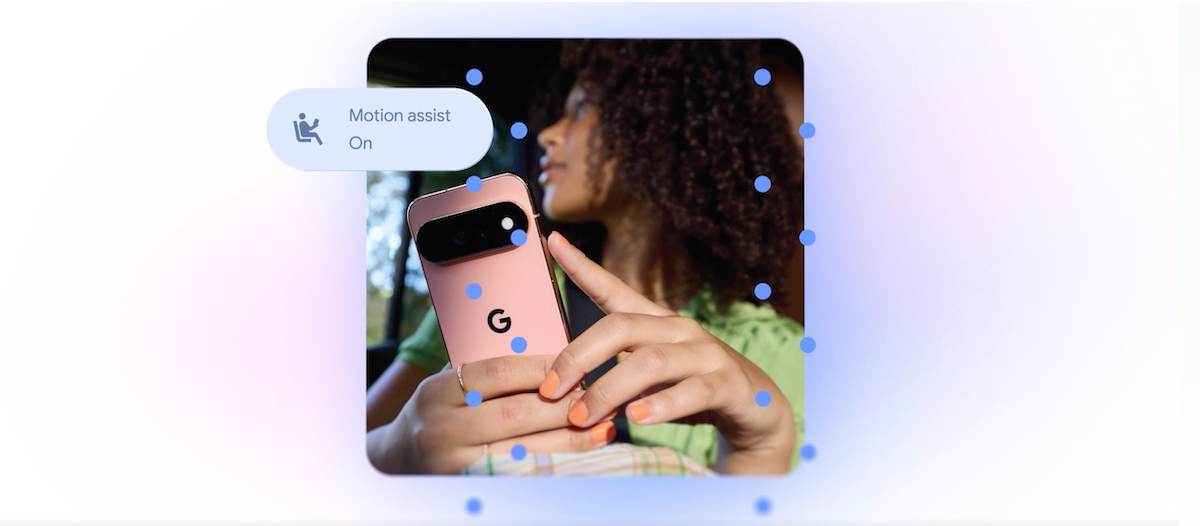
The company also said users can have Motion Assist switch on automatically, add it to Quick Settings, and tweak the bubble’s look by changing its shape, color and transparency.
Update — September 2, 2026 12:24 am
Google says Motion Assist is set to work automatically if users want, and it can also be pinned to Quick Settings. The company also says the feature will let people adjust the bubble’s shape, color and transparency.
TechCrunch’s updated source also pins availability more specifically: Motion Assist is for Android 17 users, while Guided Vision is coming to phones on Android 9 and newer in countries where Gemini is available.
Google is rolling out five Android updates that aim to make phones easier to use, more personal and less uncomfortable in moving cars. The new features include a motion-sickness aid, a camera-based accessibility tool for blind and low-vision users, item tracking through Gemini, and fresh customization options for Google Messages.
The update matters because it shows Google is pushing Android more aggressively into everyday assistance, while also narrowing gaps with features Apple has already brought to iPhone users. At the same time, Google is leaning on Gemini to turn the phone into a more context-aware helper rather than just a communication device.
What Google is changing in Android
Google says the package includes five separate improvements aimed at accessibility, organization and messaging. Some are straightforward quality-of-life additions, while others use the company’s Gemini AI system to interpret what the user needs in the moment.
The rollout arrives as smartphone makers continue adding software tools that address practical frustrations, such as reading labels in poor light, keeping track of valuables or making chat apps feel less rigid and more personal. Google’s changes are also part of a broader race to make AI feel useful in ordinary tasks rather than limited to chatbots and search.
| Feature | What it does | Who it helps | Availability |
|---|---|---|---|
| Motion Assist | Adds a moving bubble overlay to reduce motion sickness in vehicles | People who feel queasy while using phones in cars, trains or other moving transport | Android 17 users |
| Guided Vision | Uses camera and Gemini to describe surroundings and read text | Blind and low-vision users | Android 9 and newer in Gemini-supported countries |
| Remembered items | Lets users store the location of important objects in Find Hub | Anyone who misplaces passports, keys or other essentials | Rolling out through Find Hub |
| Google Keep in Messages | Brings note sharing and editing into chats | Groups coordinating lists and plans | Google Messages |
| Chat personalization | Adds custom backgrounds, photos and colors for conversations | Users who want more visual control over Messages | Google Messages |
How does Motion Assist work?
Motion Assist is Google’s new answer to a familiar problem: some people become nauseated when they look at a phone screen while riding in a moving vehicle. The feature places a bubble-like graphic on the display that shifts in response to the vehicle’s movement, reducing the mismatch between what the eyes are seeing and what the body is feeling.
That mismatch is one of the main reasons motion sickness can be triggered during travel. By giving the brain a subtle visual cue that movement is happening, the feature is designed to make screen use more tolerable during a commute, ride-share trip or train journey.
How does it compare with Apple’s version?
Apple introduced a similar idea in 2024 under the name Vehicle Motion Cues. Apple’s system uses animated dots around the edges of the screen that respond to vehicle movement, while Google’s version uses a bubble overlay instead.
Both products are trying to solve the same problem, but the design choices differ. Apple’s approach is more minimal and edge-based, while Google’s appears more centralized and customizable. Google says users will be able to enable Motion Assist automatically, place it in Quick Settings and adjust its shape, color and transparency.
Google’s pitch is that the feature can make phone use less uncomfortable for riders who feel sick in moving vehicles, with visual cues that help align what they see with what they physically experience.
Why Guided Vision could matter most
Guided Vision is the most ambitious of the new updates because it combines smartphone camera access with Gemini’s language and recognition capabilities. The tool is intended to support people who are blind or have low vision by describing scenes, reading text and helping users understand what is in front of them.
In practice, that could mean reading fine print on a food package, identifying items in a household setting or helping someone navigate a dim restaurant menu. If the camera is not aimed correctly, the phone can also speak back with instructions such as moving the device, panning across the scene or centering an object.
That combination of computer vision, speech and camera guidance points to a larger trend in consumer AI: the move from text-only chat into real-world assistance. Instead of waiting for a user to type a prompt, the system can observe the environment and offer direction in context.
Who can use Guided Vision?
Google says Guided Vision will be available on devices running Android 9 and later, but only in countries where Gemini is available. That means the feature’s reach will depend not just on phone hardware, but also on Google’s regional AI rollout.
This is important because accessibility tools are only useful when they are widely available and easy to activate. Google’s decision to extend support to older Android versions should help more users benefit without forcing an immediate device upgrade.
What is Find Hub getting?
Google is adding a “remembered items” section to Find Hub, giving users a way to store the location of important objects by telling Gemini where they left them. A user could, for example, record that a passport is in a bedroom drawer and later search for that detail in the app.
Users will also be able to attach a photo, making the note easier to verify when they return to it. That turns Find Hub into more than a device-finding tool; it becomes a lightweight memory system for objects that are easy to forget but hard to replace.
While simple on the surface, this kind of feature fits a wider shift in mobile software toward personal record-keeping. The more software can remember on a user’s behalf, the more it can reduce friction in daily routines. The challenge, as always, will be trust, privacy and whether users feel comfortable storing such information in Google’s ecosystem.
How is Google Messages becoming more useful?
Google Messages is getting two different upgrades: closer integration with Google Keep and more flexible customization for conversations. Together, they make the app feel less like a bare messaging utility and more like a place where people can coordinate, organize and personalize their exchanges.
The Keep integration will allow people to share and edit notes, grocery lists, vacation plans and similar items without leaving the conversation. That could be especially useful for families or groups planning errands and trips, since everyone can work from the same shared note while chatting.
Google is also adding visual customization so users can set individual chat backgrounds, photos and colors. The app will automatically adapt text bubbles to match the theme, which helps maintain readability while giving each thread a distinct look.
Why does this feel familiar?
Because it is. Apple added a comparable custom background option to Messages last year, showing that conversation apps are moving toward richer visual control. Google’s version extends that trend to Android users and adds its own ecosystem tie-in through Keep.
These updates may not be revolutionary, but they reflect an important reality about messaging apps: personalization has become part of the product experience, not a cosmetic extra. For many users, chat apps are the most-used software on their phones, so small design choices can have outsized impact.
Why Google is leaning on Gemini
Gemini is increasingly becoming the connective layer across Google’s consumer products. In this update, it is not being positioned as a standalone chatbot, but as an assistant that can interpret scenes, remember items and help users interact with their phone more naturally.
That strategy is significant for two reasons. First, it makes Gemini more visible in everyday life, which could help Google justify its investment in the technology. Second, it ties AI to practical tasks rather than speculative promises, which is where consumers are more likely to see immediate value.
The update also illustrates a competitive dynamic between Google and Apple. Apple has already moved first on several of these user-facing features, especially motion sickness mitigation and messaging customization. Google’s response suggests Android is prioritizing both parity and differentiation: matching rival tools where needed, while using Gemini to build something more expansive.
What this says about the Android roadmap
The new features point to a broader Android direction focused on utility, accessibility and everyday assistance. Rather than treating AI as a separate product category, Google is embedding it into camera use, item tracking, chat and system-level comfort features.
That approach has two advantages. It gives users practical reasons to engage with Gemini, and it helps Android feel more adaptive to individual needs. For users with disabilities, frequent travelers, busy households or people who simply misplace things, the updates could make the phone more valuable without requiring new habits.
It also shows how platform competition now extends beyond hardware specifications. Companies are increasingly judged on whether their software can reduce friction in daily life. Features like Motion Assist and Guided Vision may be small in isolation, but together they add up to a clearer message: Android is trying to be more considerate, more capable and more personal.
Availability and rollout at a glance
Google did not frame the announcement as a single major Android version launch, but as a set of features rolling out across the ecosystem. The practical impact will vary by device, country and software version.
- Motion Assist: available for Android 17 users.
- Guided Vision: coming to Android 9 and later in Gemini-supported countries.
- Remembered items: added to Find Hub for storing item locations and photos.
- Google Keep in Messages: enables shared note editing in chats.
- Chat personalization: adds custom backgrounds, photos and colors in Google Messages.
For now, the key question is adoption. Accessibility tools often have the biggest impact when they are easy to discover and simple to turn on, while messaging customization tends to spread quickly if it feels fun and low-risk. If Google gets both right, this update could be one of those quiet Android releases that changes how people use their phones every day.
That is especially true for Guided Vision, which may become the headline feature if users embrace it. Motion Assist may attract attention because it solves a relatable travel problem, but the camera-and-Gemini combination could have the widest long-term utility if it proves accurate, reliable and easy to use.
In the end, Google’s message is clear: Android should not only connect people and apps, but also reduce friction, remember details and help users navigate the physical world. The latest update is a modest but telling step in that direction.
Background: Google and Apple continue to mirror each other
One reason this rollout stands out is that several of the features have clear echoes in Apple’s software. That does not make Google late in every case, but it does highlight how quickly good ideas now travel between mobile platforms.
For users, the rivalry can be beneficial. If one company introduces a feature that makes phone use easier, the other often responds with its own implementation, usually with different design choices and ecosystem integration. The result is a faster spread of useful tools across the market.
In this case, Google is pairing a catch-up strategy with a more AI-forward one. Motion sickness relief and chat personalization may meet a competitive benchmark, but Guided Vision and remembered items hint at a broader ambition: using Gemini to make Android a more helpful companion in the background of daily life.
Frequently asked questions
What is Google’s new Android update about?
Google’s new Android update is about making phones more helpful, accessible and personalized. It adds motion-sickness relief, Gemini-powered camera assistance for blind and low-vision users, item memory in Find Hub, and new sharing and customization tools in Google Messages.
How does Motion Assist work on Android?
Motion Assist works by placing a bubble-like visual overlay on the screen that moves with the motion of the vehicle. Google says the cue is designed to reduce the disconnect between what users see and what they feel while riding in a moving car or train.
What is Guided Vision in Android?
Guided Vision is a Gemini-powered accessibility tool that uses the phone’s camera to help blind and low-vision users. It can read small print, identify objects and give voice instructions if the camera is pointed in the wrong direction.
Which Android versions support the new features?
The features have different requirements. Google says Motion Assist is available on Android 17, while Guided Vision will work on Android 9 and newer in countries where Gemini is available.
Is Google copying Apple with these updates?
Google is matching Apple in a few areas, especially motion-sickness support and Messages customization. But Google is also adding its own twist by tying several features to Gemini, which gives Android a stronger AI-driven angle.