In short
Google is adding a short-form video feature to NotebookLM that turns uploaded sources into 60-second AI clips with narration and visuals. The rollout starts with English-language support for Google AI Pro and Ultra subscribers, with free access coming later.
- NotebookLM can now generate 60-second vertical AI videos from uploaded sources.
- The feature is available first to Google AI Pro and Ultra subscribers in English only.
- Google is expanding NotebookLM beyond summaries into podcasts, explainers and video.
- The clips are designed for quick consumption, but users should still verify the source material.
Google is turning NotebookLM into something closer to a creator tool than a traditional research assistant. The company has begun rolling out a new feature that can turn a set of uploaded sources into a vertical, 60-second AI video designed to feel at home on social platforms such as TikTok and Instagram Reels.
The update gives subscribers to Google AI Pro and Google AI Ultra a faster way to digest notes, documents, and source material. Instead of producing only text summaries or audio overviews, NotebookLM can now generate a short-form video package that combines narration with AI-generated visuals. The result is a compact, mobile-friendly explainer that tries to condense a notebook’s core ideas into a single minute.
At launch, the feature is limited to English and is not yet available to free users, though Google says broader access is planned. The move underscores how aggressively the company is expanding NotebookLM beyond its original identity as a research and study companion and into a multi-format content engine.
What Google is adding to NotebookLM
NotebookLM has long let users upload documents, links, transcripts, and other source material, then ask the system to summarize, reorganize, or explain that information. The new video option takes that idea one step further by packaging the content into a short vertical clip that resembles the fast-paced format popularized by short-form video platforms.
According to Google’s description, the clips are generated from the sources in a notebook and are meant to provide a quick overview rather than a deep dive. They include AI narration and machine-generated imagery, giving the system enough flexibility to create something visually engaging even when the underlying source material is technical, historical, or otherwise dense.
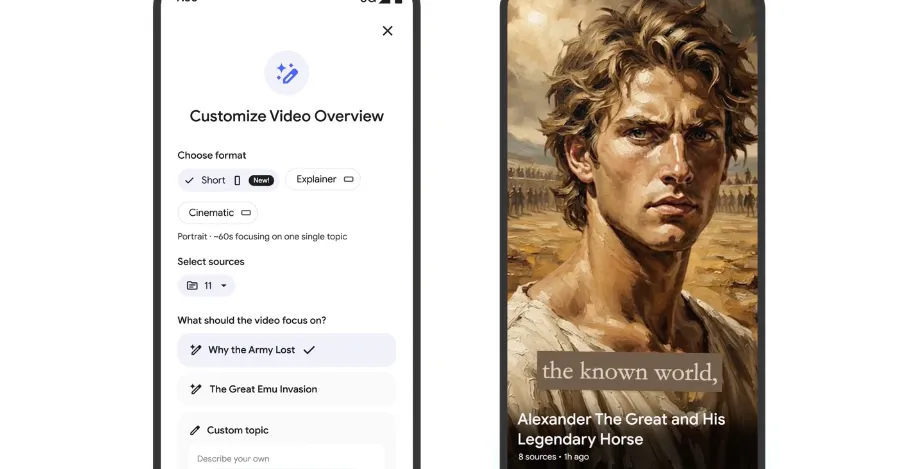
Google’s example for the feature focused on Australia’s failed efforts to control emu populations, a topic that lends itself to a playful visual treatment. In that sample, the video used stylized art and a narrated summary to transform a niche historical subject into a more immediately accessible format.
A new format for research, not just entertainment
The most important shift here is not simply that NotebookLM can create video. It is that Google is reframing research output around attention-friendly presentation styles. The company has already experimented with turning source material into AI podcasts, cinematic videos, and visual explainers. The new short-form clip feature extends that strategy into a format optimized for rapid consumption on phones.
That matters because the line between productivity tools and content tools is becoming increasingly blurred. A notebook that once served as a private workspace for research can now produce polished, shareable media with minimal user effort. For students, analysts, journalists, marketers, and casual users alike, the appeal is obvious: less time spent distilling notes into something presentable.
How the 60-second AI videos work
Google says the process is simple. On the web or in the NotebookLM app, users choose a notebook, open the Studio panel on the right side of the screen, select the video option, and then choose the short format. From there, they can either let NotebookLM decide the topic or enter a specific prompt before generating the clip.
The company is positioning the feature as part of the same workflow that powers its other creative outputs inside NotebookLM. Rather than replacing the user’s research, it repackages the sources into a format that is easier to scan, share, and potentially present to others.
NotebookLM’s growing content toolbox
The new video feature joins an expanding list of output types that already includes:
- AI-generated podcasts based on uploaded materials
- Cinematic-style videos for longer summaries
- Visual explainers that turn source material into a more structured overview
Each format serves a slightly different purpose. Podcasts are useful for hands-free review, cinematic videos are better suited to longer-form explanation, and the new 60-second clips seem designed for immediate comprehension and social sharing. In effect, Google is giving users multiple editorial layers for the same source set.
Why Google is leaning into short-form video
The timing of the update fits a broader shift in how people consume information. Short-form video has become one of the dominant media formats on the internet, shaping expectations not only in entertainment but increasingly in news, education, and corporate communications. Users are accustomed to receiving complex ideas in a fast, vertical, caption-driven format.
By bringing that style into NotebookLM, Google is betting that research tools should adapt to those habits instead of asking users to translate notes into engaging presentations manually. That could be especially useful for people who need to communicate findings quickly, whether in classrooms, meetings, internal reports, or social posts.
It also reflects a familiar product strategy from Google: build a useful foundational tool, then layer AI-generated outputs on top of it to increase engagement and utility. NotebookLM began as a way to help users work with source material. It is increasingly becoming a system for transforming raw information into multiple forms of media.
From note-taking to narrative packaging
The broader significance of the update is that it changes the role NotebookLM plays in the workflow. A traditional note-taking app helps users organize information. NotebookLM now helps users narrate it. That distinction may sound small, but it matters in a world where the ability to summarize and present content is often as valuable as the content itself.
In practical terms, the feature could reduce friction for anyone who needs to explain a topic quickly. A researcher can turn notes into a visual brief. A teacher can create a short class primer. A student can make a study recap. A team lead can convert a document stack into a concise update.
What the rollout means for subscribers
For now, access to the new video clips is restricted to Google AI Pro and Google AI Ultra subscribers. That places the feature inside Google’s premium AI ecosystem, where the company has been testing advanced capabilities before deciding whether to broaden them to a larger audience.
Google has said that support for free users is coming later, though it has not specified a date. That leaves the current rollout as both a feature launch and a subscription incentive, giving paying users early access to a tool that may eventually become part of the free product lineup.
Limiting the feature to English at first is also notable. It suggests that Google is still tuning the system for broad public use and wants to avoid expanding too quickly across languages before the output quality is ready. That is a common pattern for generative AI products, which often debut with constrained language support before scaling up.
| NotebookLM video feature | Details |
|---|---|
| Format | 60-second vertical AI video |
| Availability | Google AI Pro and Google AI Ultra subscribers |
| Language support | English only at launch |
| Input | Uploaded sources in a NotebookLM notebook |
| Output style | AI narration plus generated visuals |
| Free tier access | Planned for a later release |
How the feature fits into Google’s AI strategy
NotebookLM has become one of Google’s clearest demonstrations of how the company wants consumers to interact with generative AI. Rather than focusing only on open-ended chat, Google has increasingly emphasized grounded AI tools that work from user-provided source material. That approach reduces some of the uncertainty associated with large language models because the system is anchored to documents the user already trusts or controls.
The new clip feature strengthens that positioning. By generating a video from sources already in the notebook, Google can present NotebookLM as both a summarization tool and a communication tool. It is not just about asking questions of your sources; it is about reshaping those sources into a new format.
That aligns with a wider trend across the industry, where AI products are moving from text-only interfaces toward multimodal output. Companies are competing on how effectively their systems can synthesize information into audio, images, slides, and now short video.
Why multimodal output matters
For users, multimodal output can make information more accessible. Some people absorb content better through listening, while others prefer visuals or written summaries. A short video can combine those strengths in a package that is easy to share and simple to understand without requiring a long attention span.
For Google, the payoff is strategic as well as practical. Features that generate multiple forms of output from the same source set make the product more versatile and potentially more sticky. The more ways a user can interact with a notebook, the more likely they are to keep their materials inside Google’s ecosystem.
What the examples suggest about the product direction
The emu example shared by Google is telling because it shows the company is not treating the feature as a mere slideshow generator. The clip uses a distinct visual style and a compact narrative arc, which suggests Google wants the output to feel more like a finished story than a static summary.
That raises an important question: is NotebookLM becoming a true AI editor? If so, the app may eventually serve users who want to build presentations, explainers, class materials, briefing videos, or social content directly from source documents. In that scenario, NotebookLM would sit somewhere between a research assistant and a lightweight production studio.
The company’s pitch is that the new videos help users catch up on their research faster by turning source material into a brief, watchable summary rather than a block of text.
That promise will likely appeal to users who value speed over depth. But it also introduces the usual questions that come with AI-generated media: how accurately does the system represent the source material, how much editorial judgment is applied, and how much of the nuance is lost in the compression process?
Potential benefits for different user groups
The feature’s usefulness depends on who is using it. Different audiences will likely find different value in a 60-second research video.
- Students: quick revision clips from lecture notes and readings
- Educators: short lesson previews and topic introductions
- Business teams: concise summaries for meetings and status updates
- Researchers: fast synthesis of source packs and briefing materials
- Creators: social-ready explainers derived from documented research
In each case, the feature saves time by doing the first pass of editing and presentation. That does not eliminate the need for human review, but it lowers the barrier to producing something polished enough to share.
The risks of turning research into snackable video
There is, however, a tension at the heart of the update. Short-form video is effective precisely because it simplifies. But simplification can flatten complexity, especially when the source material is nuanced, technical, or controversial.
When an AI system condenses a notebook into 60 seconds, it must decide what to emphasize, what to omit, and how to frame the message. Those decisions may be invisible to the user even when the content appears accurate at a glance. That is a familiar concern across generative AI, but it becomes more pronounced when the result looks like a polished piece of media.
Users will likely need to treat these clips as drafts or summaries rather than authoritative final products. The feature may be excellent at saving time, but it still depends on the quality of the underlying sources and the user’s willingness to verify the output.
Accuracy, framing, and trust
NotebookLM’s grounding in user-uploaded sources can help improve trust compared with systems that answer from broad model memory alone. Still, a generated video can create the impression of certainty even when the summary is incomplete. The visual polish may make the output feel more finished than it really is.
That is why the best use case may be as a starting point. The clip can introduce the topic, surface the main points, and provide a quick recap, but it should not replace careful reading of the source material when precision matters.
How this compares with other NotebookLM formats
NotebookLM already supports a range of formats that serve different levels of depth. The new short video sits at the quick-consumption end of that spectrum. A simple comparison helps show where it fits.
| Format | Best for | Approximate depth |
|---|---|---|
| AI podcast | Listening through a longer summary | Medium |
| Cinematic video | More immersive source overviews | Medium to high |
| Visual explainer | Structured walkthroughs and study aid | High |
| 60-second vertical clip | Fast recap and social-style sharing | Low to medium |
This spread of output types shows that Google is not trying to replace reading with one perfect AI format. Instead, it is trying to let users choose the level of effort and detail that best suits the task. The new short video is the fastest, lightest option in that toolkit.
What happens next
The immediate question is whether users will embrace the feature as a practical summary tool or treat it more as a novelty. The answer will likely depend on the quality of the generated clips and whether Google can keep them accurate, useful, and visually coherent across a wide range of topics.
If the rollout is successful, Google may have a strong case for expanding the feature beyond English and opening it to more users. It could also become an important template for how the company develops future AI products: source-based, multimodal, and designed for rapid comprehension rather than open-ended generation alone.
For now, the update makes one thing clear. Google does not want NotebookLM to be just a place to store information. It wants the app to help users reshape that information into formats people actually want to watch.
That ambition puts NotebookLM at the intersection of research, publishing, and social media culture. And in a digital environment where speed and presentation often determine whether an idea gets noticed, a one-minute AI video may prove to be more than just a gimmick.