In short
Figma announced Specs, a Markdown-based editor for defining design systems and guiding AI agents, plus new beta and integration updates. The rollout is part of a broader push to make AI-generated design more predictable and enterprise-friendly.
- Figma Specs turns design rules into a Markdown-based source of truth.
- The company is expanding its canvas agent and moving code layers into public beta.
- Payload is being integrated with Figma Make to connect content and dynamic websites.
- Figma said its India user base is its largest outside the U.S. and works with 40% of BSE top 100 companies.
- More than 20 tools now connect through Figma’s MCP, including Open Code, Dia, Grok Bot and Sarvam.
Figma unveiled a new Markdown-based editor called Figma Specs on Wednesday, alongside a broader set of tools designed to help AI agents follow a company’s design rules more reliably. The update matters because it gives teams a clearer way to define brand systems for both human designers and third-party agents as AI increasingly participates in product creation.
The announcement came during Figma’s first Config event in India, where the company also expanded access to its canvas agent, moved code layers into public beta, and deepened integration with Payload, the headless content management system it acquired last year. Together, the changes show Figma trying to become not just a design workspace, but a control layer for how software teams generate, test, and ship digital products with AI.
What Figma announced in India
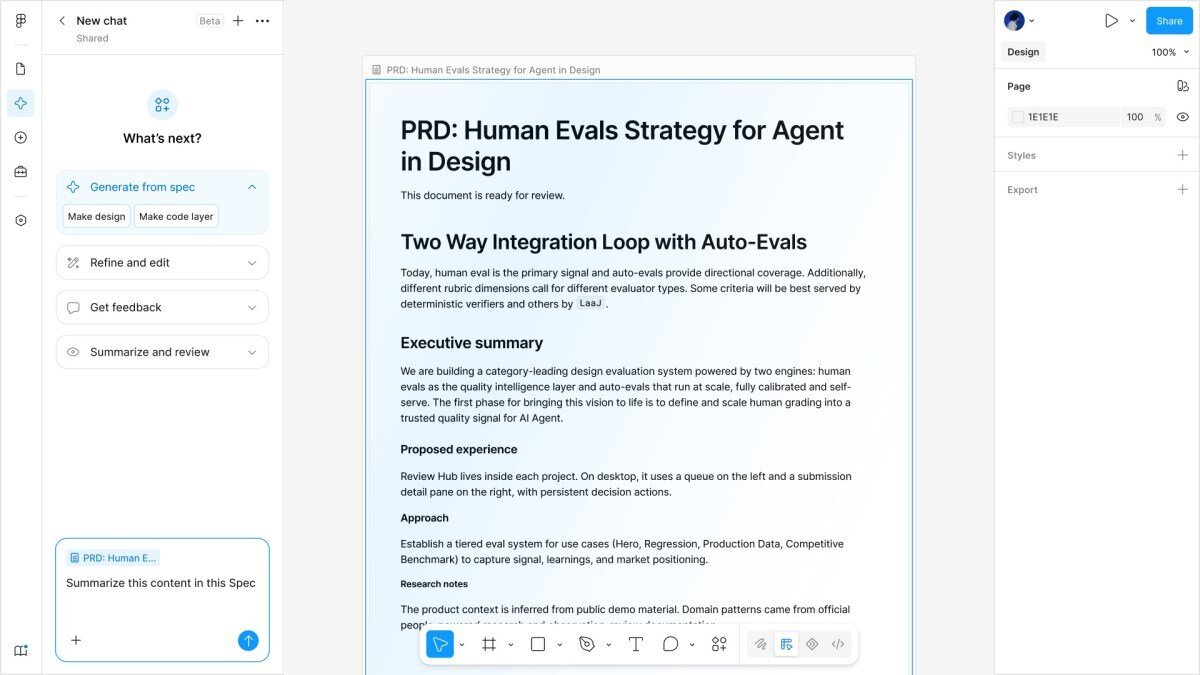
Figma used its first Config event in India to introduce several products aimed at making design and AI development more structured. The headline feature, Figma Specs, is a Markdown-based editor that gives teams a lightweight way to document design language, guidelines, and system rules in one place.
According to the company, Specs can sit as a standalone file or live alongside the canvas. It is not just a text document: users can connect it to other Figma assets, including canvas elements, FigJam diagrams, code layers, and design components. That makes it easier to anchor the design language in actual working files rather than scattering instructions across separate tools.
The release also extends Figma’s broader effort to make its AI features more controllable. The company said it is giving more users access to its canvas agent, but is simultaneously adding ways to guide its output because generative systems can be unpredictable by nature. That tension — faster creation versus tighter governance — is central to how Figma is positioning its platform.
How does Figma Specs help teams and agents?
Figma Specs gives teams a central reference point for design decisions, and that same source of truth can be used by AI agents while generating layouts or prototypes. The goal is to make brand rules easier to read, easier to update, and harder for automated systems to ignore.
In practical terms, the editor lets teams describe their design language in Markdown, which many developers and product teams already know how to use. That lowers the barrier for cross-functional collaboration between designers, engineers, and product managers. By supporting links to libraries and canvas content, the system can keep instructions tied to actual assets instead of static documentation that quickly goes stale.
Figma also said teams can attach broader context around the design system, including design libraries, code libraries, and guidelines. That added context is especially important for AI-generated work, where a model may otherwise invent layouts or patterns that technically work but do not fit a company’s brand or product standards.
Chief design officer Loredana Crisan said Figma sees itself as the place where software teams decide what they will build and ship, and argued that AI has changed what is possible during the creation process. She noted that much of today’s code is written to explore ideas and shape products, not just to produce finished releases.
Her point reflects a broader industry shift: design tools are no longer just for mockups. They are increasingly the environment where teams explore product direction, validate concepts, and hand off machine-generated components for further iteration.
Why Figma is putting more control around AI output
Figma is building these guardrails because AI systems do not behave deterministically. In other words, the same prompt or design context can produce different results from one session to the next. That unpredictability is useful for ideation, but it is a problem when companies need consistency across brands, teams, and markets.
The company’s strategy is to keep the creative upside of AI while adding enough structure that teams can trust the output. Specs, richer libraries, and centralized rules all point to the same objective: helping agents make decisions that are not merely plausible, but aligned with a company’s design system.
That matters for enterprise customers, which often have strict brand standards, accessibility requirements, and internal approvals. A design system that can be read by both humans and agents could reduce repetitive cleanup work and make it easier to scale AI-assisted product development.
What problem does this solve for product teams?
It solves the problem of fragmented design context. Teams often keep guidelines in scattered documents, code repositories, component libraries, and slide decks, which makes it difficult for people and tools to know which rule is current. Figma’s pitch is that Specs can consolidate that context into something usable inside the design workflow.
That could save time in several ways:
- Designers can reference the same rules directly in the workspace.
- Engineers can connect code libraries to the source of design intent.
- Agents can follow the same standards when generating prototypes or variations.
- Teams can reduce back-and-forth over whether an asset matches the system.
Code layers move into public beta
Another notable update is the wider release of Figma’s code layers feature, which adds coding directly into designs on the canvas. Figma first showed the feature in private beta in June, and the company is now making it publicly available so more users can test it.
Code layers are intended to make prototypes more interactive and more realistic. Instead of treating design and code as separate stages, teams can add functional elements directly into the same environment where they are building visual concepts. Users can also ask the agent to convert a design into code or modify part of the code to refine a prototype.
That is important because many modern product teams do not simply move from wireframe to development in a straight line. They iterate constantly, often using design tools to simulate behavior before engineers commit to production work. Figma’s public beta suggests the company wants to be part of that loop for much longer than before.
| Feature | What it does | Current status | Main benefit |
|---|---|---|---|
| Figma Specs | Markdown editor for design language and rules | Newly announced | Creates a source of truth for humans and agents |
| Canvas agent | AI assistant that works inside design files | Expanded to more users | Helps generate and edit designs with guidance |
| Code layers | Adds code directly to on-canvas prototypes | Public beta | Makes designs more interactive and testable |
| Payload integration | Connects content management to Figma Make | Being rolled out | Links dynamic websites to editable content |
How Payload fits into Figma’s product plan
Figma is also weaving Payload into Figma Make, its product for generating dynamic websites. That integration lets teams manage content more directly while building AI-generated web experiences, closing the gap between the visual prototype and the live site.
The company acquired Payload, an open-source headless CMS, last year. Since then, it says the product has seen downloads rise sixfold over the past 12 months, a sign that interest in more flexible content infrastructure is growing alongside AI-assisted design.
For Figma, Payload adds a content management layer to a platform that already sits at the center of many product workflows. In theory, that gives teams a more coherent path from layout and interaction design to page content and site updates, especially when those updates need to be coordinated across multiple contributors.
Who else can Figma’s MCP support?
Figma said its model context protocol, or MCP, now supports more than 20 additional tools. The list includes Open Code, Dia, Grok Bot, and the Indian startup Sarvam, among others.
This matters because MCP is a bridge between AI systems and external tools. By supporting more clients and agents, Figma can become a more useful hub for workflows that involve multiple models, coding assistants, or specialized applications. It also shows the company is not just building its own AI features; it is opening the door for third-party tools to interact with Figma’s systems.
That broader interoperability could make the platform more attractive to teams experimenting with different AI assistants while still wanting one design system to govern the output. It also positions Figma to benefit from the rapid expansion of the AI tooling ecosystem without forcing customers into a single assistant or model.
Why India is central to Figma’s growth story
India has become one of Figma’s most important international markets, and the company is treating it that way. Figma opened its first office in the country late last year, staffing it with sales, partnerships, go-to-market, and product support teams.
The company said India is its largest user base outside the United States. It also said Figma works with 40% of the top 100 Indian companies listed on the Bombay Stock Exchange, a figure that suggests strong adoption among large enterprises rather than only startups and design agencies.
Holding a Config event in India sends a signal that the market is not just a sales territory, but a product and community hub. It also reflects the growing influence of Indian product teams, which are increasingly building for global audiences and adopting AI workflows at scale.
Why does this matter for enterprise users?
It matters because enterprises are exactly the kind of customers that value standardized design systems, shared content infrastructure, and AI tools with guardrails. If Figma can persuade large companies to centralize more of their product creation process inside its platform, it can deepen its role in day-to-day workflow rather than being used only for early-stage design.
That could increase stickiness, expand the addressable market for its AI products, and create more reasons for developers, designers, and content teams to stay inside Figma as projects move from concept to release.
The bigger picture: Figma’s AI strategy is about workflow control
Figma’s announcements fit a wider trend in software tools: companies are no longer asking only how AI can generate more content, but how it can do so in a way that respects brand, code quality, and team standards. The challenge is not merely creation, but coordination.
In that context, Figma is building a set of overlapping layers: a structured language for design rules, a canvas agent for generation, code layers for interactivity, and content management for live websites. Each piece addresses a different part of the product lifecycle, but the common thread is control.
That control is especially valuable as software teams experiment with agents that can draft layouts, generate code, and revise prototypes in response to prompts. Without a shared source of truth, those systems can drift away from brand requirements or product intent. Figma’s answer is to make its own platform that source of truth.
The company is not alone in seeing this opportunity. Many software and AI firms are chasing the same problem: how to make generative tools useful in real business environments where standards matter. What distinguishes Figma is that it already sits inside the creative process for millions of designers and developers, which gives it a natural place to add structure around AI.
Key facts at a glance
| Item | Details |
|---|---|
| Event | Figma’s first Config event in India |
| Lead announcement | Figma Specs, a Markdown-based design editor |
| AI focus | Helping agents follow brand and design rules |
| Prototype feature | Code layers now in public beta |
| CMS integration | Payload connected to Figma Make |
| Tool support | More than 20 tools added through MCP |
| India footprint | First office opened late last year |
| Market position | Largest user base outside the U.S. |
Timeline of recent Figma moves
Figma’s latest update did not happen in isolation. It is part of a sequence of product and business decisions that show how quickly the company is adapting to AI-native workflows.
- Last year: Figma acquired Payload, the open-source headless CMS.
- Late last year: Figma opened its first office in India.
- June 2026: Code layers were introduced in private beta.
- Over the past week: Figma expanded availability of its canvas agent.
- This week: Figma announced Specs, pushed code layers to public beta, and unveiled more MCP integrations at its India Config event.
What happens next?
The next phase for Figma will be whether teams actually adopt these tools as part of their everyday design and development process. Figma Specs is likely to be judged on how well it becomes a living document rather than another static artifact. Code layers will be judged on whether they make prototyping faster without adding complexity. Payload’s integration will be measured by how smoothly it connects content and design.
If those pieces work together, Figma could become an even more central operating system for product creation. If they do not, the tools may still be useful individually, but the larger vision of agent-aware design systems may be harder to realize.
For now, the message from Figma is clear: the company wants to define how AI agents build inside its platform, not leave that responsibility to the models alone.
Frequently asked questions
What is Figma Specs?
Figma Specs is a new Markdown-based editor that lets teams define their design language, link to libraries and canvas elements, and give both people and AI agents a central reference for brand and product rules.
Why did Figma launch these AI controls now?
Figma launched them now because AI-generated design work is growing quickly, but the output can be inconsistent. The company wants to make agent-driven creation more predictable by adding clearer design rules and richer context.
What is code layers in Figma?
Code layers is a feature that brings coding directly onto the canvas so prototypes can be more interactive. Users can also ask Figma’s agent to convert designs into code or adjust code during iteration.
How is Payload connected to Figma Make?
Payload is being integrated into Figma Make so teams can manage content more directly while building dynamic websites. That links the design process with the content system behind the site.
Why is India important to Figma?
India is important because it is Figma’s largest market outside the United States. The company also said it works with 40% of the top 100 Indian companies listed on the Bombay Stock Exchange, making the market strategically important.