Updated September 24, 2026 8:53 pm
In short
Meta is pushing its cute Muse AI mascot across glasses and a standalone wearable to make users more willing to share personal, health and relationship information, while the updated source adds named mascot variants, more concrete demos and a renewed warning about ad-targeting potential.
- Meta is positioning Muse as a friendly AI companion for smart glasses and a standalone wearable.
- The mascot’s cute design may reduce user skepticism and encourage more personal sharing.
- Early demos showed practical promise but also accuracy and reliability issues.
- The story raises bigger questions about privacy, data collection and Meta’s long-term monetization strategy.
Update — September 24, 2026 8:53 pm
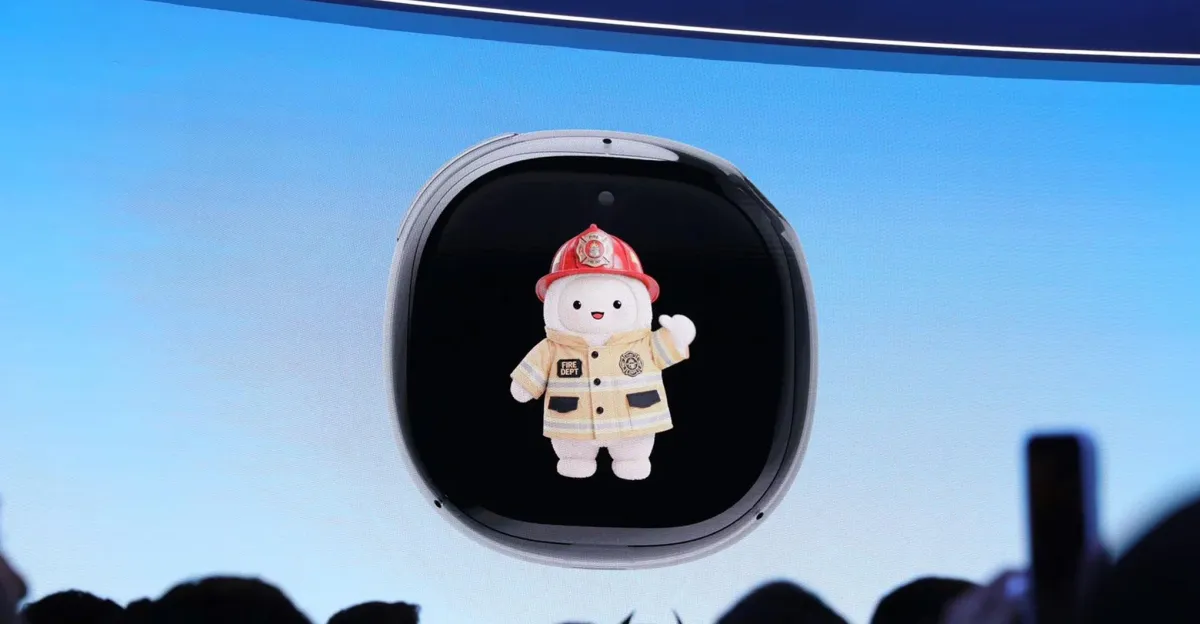
The updated source adds that Meta’s mascot is now being used with specific names and variants, including “Jolly,” “Cooper,” and “Blorbo,” depending on the demo or user experience. It also says the company is placing the mascot prominently across its campus and demo stations to reinforce the branding.
The new piece further notes that the Muse assistant is being tested in more detail through named demo scenarios, including health goals, food choices and relationship advice. One tester also reported that the assistant could clear spam from email, which highlights how quickly a friendly AI can become part of more personal routines.
There’s also a sharper new point about data use: the updated source explicitly raises the possibility that glasses-based use could help Meta infer what people eat and feed that information into ad targeting.
Meta is rolling out a new AI assistant called Muse across its smart glasses and a standalone wearable, and its biggest weapon may be its mascot. The company’s plush, pastel character is designed to make people feel comfortable handing over personal information — including health, productivity and relationship details — to an AI system that could become central to Meta’s future business.
That is the uncomfortable takeaway from Meta Connect, where the company repeatedly framed Muse as a friendly companion while showcasing how deeply it can be woven into daily life. The pitch is simple: if the AI feels approachable enough, users may be more willing to trust it with more of themselves.
Meta’s latest AI push is not just about software. It is about packaging data collection, decision-making and wearability in a form that looks almost disarmingly innocent.
Why Meta’s new AI mascot matters
Meta’s Muse rollout matters because the company is trying to normalize an always-on AI agent that can live in your glasses, on your wrist or in another portable device. The more natural and emotionally appealing the assistant feels, the easier it may be for Meta to make it part of a user’s routine — and the more information it can collect in the process.
The strategy is especially significant in health and wellness, where users are often willing to share sensitive details if they believe they will get better advice. Meta appears to understand that emotional design can reduce resistance to surveillance-like functionality, even if the product is presented as helpful rather than invasive.
What is Muse, and what is Meta trying to build?
Muse is Meta’s AI agent concept, built to work across the company’s smart glasses and a new standalone wearable called Charm. In practice, Muse is meant to act as a context-aware helper that can see, hear and respond to a person’s environment in real time.
The company’s demonstrations showed Muse helping with tasks such as choosing food, planning exercise and offering advice that depends on personal goals. That means the system is not only reacting to general questions, but also learning from the specifics of a user’s day-to-day life.
Meta’s broader ambition is easy to see: if a user wears the device often enough, Muse can become the interface through which the company understands habits, needs, moods and routines.
How does the wearable approach change the AI experience?
It changes the experience by making AI ambient rather than occasional. Instead of opening an app and asking a chatbot a question, users can let a device observe their surroundings and surface suggestions in the moment.
That can be genuinely useful for people who need hands-free assistance, especially users with visual impairments or people who want rapid, situational guidance. But it also creates a much richer stream of personal data than a standard text chatbot ever could.
How Meta uses cuteness as product design
Meta has wrapped its AI offering in one of the oldest tricks in consumer design: make the machine adorable so people lower their guard. The Muse mascot, presented in different forms during the company’s event, is intentionally soft-edged, cheerful and toy-like.
The effect is not subtle. A cute companion is easier to anthropomorphize, easier to trust and easier to forgive when it gets something wrong. That matters because AI assistants often fail in exactly the moments when users are most likely to reveal personal information.
Meta seems to believe that charm can substitute for friction. If the assistant looks like a harmless friend rather than a corporate tool, users may be less likely to ask who benefits from the interaction.
Meta’s design approach is to make the assistant feel so friendly that users stop thinking about how much they are giving away in return.
Why does cute design work so well?
Cute design works because humans are wired to respond to features associated with babies and small animals. Round shapes, soft colors and expressive faces trigger protective instincts and social warmth. In technology, that can translate into greater patience, more engagement and less skepticism.
For Meta, that is not just aesthetic theory. It is a user-retention strategy. The more people like the assistant, the more often they may use it, and the more data they may contribute through everyday requests.
What the demos showed at Meta Connect
Meta’s event put Muse front and center, with demonstrations that tried to show how the agent could help in real life. Some demos focused on a fictional fitness user, while others used food and shopping scenarios to show how the system might respond to visual prompts and personal context.
One test involved asking the assistant to assess snacks for protein value, using a scene viewed through smart glasses. Another demo involved attempting to add an item to a shopping cart, which exposed how fragile these systems can be when they encounter imperfect catalogs or unclear object recognition.
The demonstrations were revealing precisely because they showed both the promise and the limits of the product. The assistant could offer plausible guidance, but it also made mistakes that underscored how much it still depends on unreliable interpretation.
| Meta Muse element | What it does | Why it matters |
|---|---|---|
| Muse AI agent | Provides contextual suggestions and task help | Positions Meta as a daily AI companion provider |
| Smart glasses integration | Uses what the wearer sees and hears | Expands data collection into real-world behavior |
| Charm wearable | Standalone device for carrying Muse everywhere | Creates another always-available data surface |
| Mascot design | Friendly, plush and toy-like character | Reduces user skepticism and boosts emotional attachment |
How accurate is the assistant in practice?
The assistant’s accuracy appears uneven, at least in the early demos. It could be slow to answer straightforward food questions, misread nutritional information and stumble when asked to identify or place products. Those weaknesses are not unusual for current AI systems, particularly when they are asked to interpret images and act on them in real time.
That unreliability matters because it highlights a tension at the heart of Meta’s pitch. The more useful Muse becomes, the more it needs access to intimate context. But the more context it has, the more consequential its mistakes become.
In other words, a wrong answer from a casual chatbot is annoying. A wrong answer from a device embedded in someone’s health or relationship decision-making can be more serious.
What does this mean for health advice?
It means users may be tempted to treat the assistant like a coach or a guide even when it is still an imperfect inference engine. For health-related goals — exercise, weight management, eating habits and routine building — people are often most likely to keep asking follow-up questions, which increases the amount of sensitive information the system can absorb.
That creates a feedback loop. The assistant becomes more personalized as the user shares more, and the user shares more because the assistant seems more personalized.
Why privacy concerns are central to the story
Meta’s business model is the reason this rollout invites scrutiny. The company has spent years turning behavioral data into advertising advantage, and AI assistants may simply be the next frontier. If Muse can infer what a user eats, how they train, who they talk to and what goals they are pursuing, that information becomes commercially valuable even if it is not sold directly.
The core concern is not only that Meta will know more. It is that the company will know more in a form that is more emotionally intimate, more continuous and potentially more predictive than anything in a conventional feed or app.
That makes the assistant’s friendly design feel strategic rather than innocent. A cute face lowers resistance. Lower resistance can mean more disclosure. More disclosure can mean better targeting.
Critics see a familiar pattern: a convenience feature that doubles as a highly efficient pipeline for personal data.
Who is Muse for?
Muse seems aimed at multiple audiences at once. It is meant for everyday users who want help organizing their lives, for early adopters who like wearable tech and for people who might appreciate hands-free assistance in practical situations. Meta is also clearly hoping it can appeal to people who will form an emotional bond with the assistant itself.
That is an important distinction. Many AI products are useful because they save time. Muse is being sold not just as a tool, but as a presence — something you carry, see and maybe talk to throughout the day.
The more a product feels like a companion, the more likely users are to lower their defenses. That is good for engagement and potentially bad for boundaries.
How the mascot changes the trust equation
The mascot changes the trust equation by making the product feel less like a monitoring device and more like a character. That can soften the public’s response to a product that, under the hood, may be gathering a great deal of contextual information.
Meta’s bet is that the warmth of the interface will outweigh unease about the infrastructure behind it. The company is not alone in using design to build trust, but in this case the emotional appeal is unusually central to the product story.
The danger is that people may evaluate the mascot rather than the system. They may remember the cute face and forget to ask what the assistant is learning, where that data goes and how it might later be used.
The bigger AI trend Meta is tapping into
Meta is part of a wider push in the technology industry to make AI feel less like software and more like a relationship. Across the market, companies are experimenting with agents, copilots and companions that can take action, anticipate needs and speak in more natural, human-like ways.
What sets Meta apart is the company’s scale and its long history of monetizing personal behavior. If it succeeds, Muse could become part of a broader ecosystem where devices see more, infer more and nudge users more often.
That raises a familiar question in a new form: when a product is useful enough and cute enough, how much scrutiny will users still apply?
What are the practical benefits?
The practical benefits include hands-free help, contextual suggestions, easier task completion and potentially improved accessibility. For some users, especially those with disabilities or busy routines, a wearable AI assistant could be genuinely valuable.
That is why the product should not be dismissed outright. The real issue is not whether the tool can help. It is whether users fully understand the trade-off between convenience and intimacy.
A product that is hard to hate and harder to ignore
Muse is built to be difficult to resist. That is not an accident. Meta appears to understand that people are more likely to experiment with a tool that feels playful, harmless and emotionally warm than one that feels technical or corporate.
But that friendliness may be the point of maximum leverage. A user who would never volunteer personal health details to a platform may do so if the request comes from a smiling assistant that seems to care.
That is what makes the product so unsettling. Not because it is obviously malicious, but because it is so skillful at making something potentially intrusive look charming.
What users should keep in mind
Anyone considering an AI wearable like Muse should think carefully about what kind of data the device can see, store and infer. That includes not only prompts and answers, but also environmental cues, habits, shopping preferences, health goals and social patterns.
Before sharing sensitive details, users should ask a few basic questions:
- What information does the device capture automatically?
- How is that information stored and used?
- Can the assistant’s personalization be limited?
- What happens when the system makes a mistake?
- Who benefits most from the data it collects?
Those questions matter even more when the product is designed to feel lovable.
What happens next?
Meta is still early in this new phase of wearable AI, but the direction is clear. The company wants Muse to be more than a novelty and more than a simple assistant. It wants it to become a daily habit, a personal coach and, eventually, an extension of the user’s routine.
If that happens, the mascot will have done its job. It will have helped turn a potentially unnerving technology into something people invite into their lives.
That may be the most important part of the story: Meta is not just building an AI tool. It is building a social relationship around one. And when the product is this cute, that relationship may form faster than many users realize.
Bottom line: Meta’s Muse rollout is a reminder that product design can be a form of persuasion. The cuter the assistant looks, the easier it may be for the company to earn the trust it needs to collect more personal data — and the harder it may be for users to notice what they are giving up.
Frequently asked questions
What is Meta’s Muse AI?
Meta’s Muse AI is an assistant concept designed to work across smart glasses and a new wearable device. It is meant to provide contextual help, suggestions and task support based on what the user sees, hears and asks it to do.
Why is Meta using a cute mascot for Muse AI?
Meta is using a cute mascot to make the assistant feel friendly, approachable and low-risk. That emotional design can help users trust the product faster, which may lead them to share more personal information and use it more often.
What are the privacy concerns with Muse AI?
The main privacy concern is that Muse can learn from highly personal context, including health habits, food choices, routines and relationships. Because Meta has a history of monetizing user behavior, critics worry the data could become valuable for targeting and profiling.
Is Muse AI accurate enough to trust?
Muse appears promising but imperfect. The demos showed it could offer helpful guidance, yet it also made mistakes with food identification and shopping tasks. That means users should treat it as a tool in development, not a fully reliable advisor.
Who might benefit from Meta’s wearable AI?
People who want hands-free help, contextual suggestions or accessibility support may benefit most. The assistant could be especially useful for users with visual impairments or anyone who wants quick, real-world guidance without opening an app.