Updated September 2, 2026 9:53 pm
In short
Amazon’s Alexa for Shopping can now help verify suspicious company emails, texts and calls, using its AI to compare them with Amazon’s communication history and only confirming messages it is fully certain are real.
- Alexa for Shopping can now check whether a message really came from Amazon.
- The assistant compares suspicious messages with Amazon’s communication records.
- Amazon says it only confirms a message when it is completely certain.
- If verification fails, customers are directed to the Amazon app or support.
- The update follows Amazon’s earlier email-based verification option and new product-tracking tools.
Update — September 2, 2026 9:53 pm
Amazon’s Alexa for Shopping now has another way to help customers check suspicious messages: in addition to reviewing emails, texts and calls, it can compare them with a record of Amazon’s past communications and only confirm a message when it is fully certain.
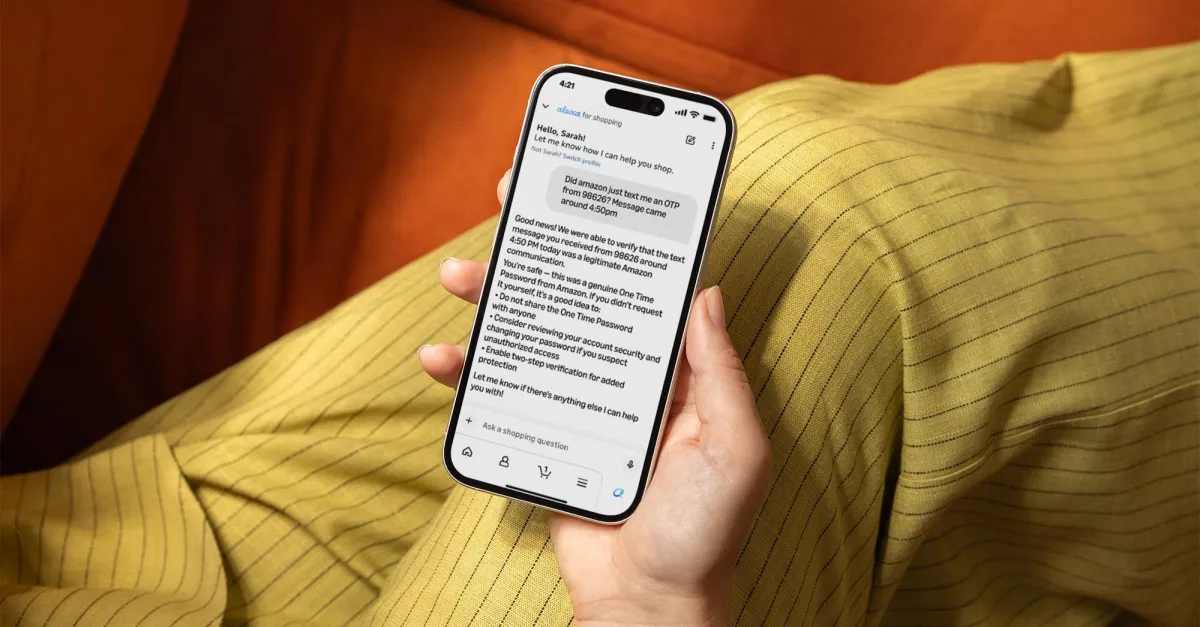
The company also showed an example in which the assistant verified a text containing an OTP sent from short code 98626. If Alexa cannot vouch for a message, it will point users back to the Amazon app and the company’s support team.
Amazon has also launched a separate verification option earlier this year that lets people forward questionable messages to verify@amazon.com, and it recently added an “Update Me When” feature for tracking new product launches.
Amazon has added a scam-fighting feature to Alexa for Shopping that can help customers check whether an email, text message or phone call really came from the company. The update matters because impersonation scams remain a common way for fraudsters to steal logins, one-time passwords and payment details, and Amazon is now using its assistant to give shoppers a faster way to verify suspicious messages.
The feature lets users ask Alexa for Shopping to examine a message and compare it with Amazon’s records, including the way the company says it has contacted customers in the past. Amazon says the assistant only confirms authenticity when it is fully certain, and if it cannot verify a message, it directs customers to their account, order history or official support channels instead of encouraging them to trust the suspicious message.
What Amazon’s new verification tool does
Amazon’s latest Alexa for Shopping update is designed to answer a simple but important question: did this message really come from Amazon? The assistant can review an email, SMS message or phone call and attempt to determine whether it is legitimate based on message content, formatting, sender details and a broader record of Amazon communications.
According to Amazon, the assistant compares a suspicious message “against a record of every message Amazon has sent,” which gives it a wider reference point than a typical manual inspection. That makes the feature more than just a keyword checker. It is meant to spot the kinds of clues that often appear in impersonation attempts, such as mismatched formatting, strange sender information or wording that does not fit Amazon’s standard patterns.
The company is also being careful about how the feature presents its judgment. Amazon says Alexa for Shopping will only say a message is real if it is “completely certain.” That caution matters because false reassurance could be worse than no verification at all when a scam is trying to pressure a customer into acting fast.
How the assistant responds to a suspicious message
When Alexa for Shopping can verify a message, it confirms the message as genuine and identifies the type of communication it believes Amazon sent. In one example shared by Amazon, a customer asks whether an OTP text from a particular short code was legitimate, and the assistant replies that the message was indeed an authentic one-time password from Amazon.
If the assistant cannot confirm that a message is from Amazon, it does not simply stop there. Amazon says the tool will point customers toward the app so they can check their orders directly and contact the company through official support if needed. That response is meant to prevent users from relying on a questionable message, especially if it is part of a larger phishing attempt.
Amazon says Alexa for Shopping can compare a suspicious message with a record of the company’s prior communications and will only vouch for it when the assistant is completely certain it is genuine.
Why impersonation scams are such a big target
Impersonation scams work because they borrow trust. Criminals often pretend to be a well-known company, then use urgency and familiarity to convince victims to hand over sensitive information, click malicious links or share verification codes. Amazon is a natural target because millions of customers receive order updates, password resets, delivery alerts and account notices that scammers can try to imitate.
The timing of the feature also reflects a broader shift in consumer security. Messaging scams have become increasingly polished, and many users now see fake texts and emails that closely resemble legitimate company communications. For customers, the challenge is not just spotting obvious spelling mistakes; it is figuring out whether a message that looks convincing is actually fraudulent.
Amazon’s approach is notable because it places a consumer-facing AI assistant in the middle of that verification process. Instead of leaving users to decide on their own, the company is offering an automated check that uses Amazon’s own communication history as a reference. In practical terms, that could reduce the chance that a customer clicks a dangerous link while trying to confirm a delivery or account alert.
Why this feature matters for shoppers
The main value of the update is speed. Many scam victims are targeted when they are distracted, rushed or worried about a purchase, and that is exactly when a quick verification tool can help. Rather than searching through support pages or comparing messages manually, a user can ask Alexa for Shopping to evaluate the message and get a direct answer.
The feature also fits the way many people already use Amazon’s shopping tools. Alexa for Shopping is being positioned not just as a voice assistant for ordering products, but as a more active helper for purchase-related questions, tracking and account safety. That makes security part of the shopping experience instead of a separate task buried in account settings.
How does Alexa for Shopping verify a message?
Alexa for Shopping verifies a message by comparing it with Amazon’s records and analyzing multiple elements at once. Amazon says the assistant looks at the message itself, its structure and who sent it, then checks that information against a record of messages the company has previously sent.
That combination suggests a system built to detect patterns rather than one-off clues. A scam email may use the right logo or mention the right order type, but still fail when measured against Amazon’s actual communication style. Likewise, a legitimate message may contain an unexpected code or urgent wording, but still match the company’s own sending behavior closely enough for the assistant to approve it.
| Feature | What it checks | What happens next |
|---|---|---|
| Email verification | Sender, format, wording and Amazon communication history | Confirms authenticity only if completely certain |
| Text message verification | SMS content, short code or sender details, and message pattern | Identifies the message as real or sends the user to official channels |
| Phone call verification | Call origin and whether it matches Amazon’s known contacts | Helps users decide whether to trust or ignore the call |
| Confidence threshold | Overall match against Amazon’s records | Only approves when the assistant is completely certain |
What happens if Alexa cannot confirm the message?
If Alexa for Shopping cannot verify the message, the safest outcome is that it refuses to bless it as authentic. Amazon says the assistant will steer customers toward checking their orders in the Amazon app and contacting support directly rather than trusting the message at face value.
That design is important because fraud often depends on a false sense of certainty. A scam message that cannot be verified is not necessarily proof of fraud, but it is enough reason to move to an official channel. Amazon’s system is built to encourage that safer behavior instead of keeping the conversation inside the suspicious message thread.
Amazon has also added another route for customers who want to check messages manually. Earlier this year, the company introduced a way to forward questionable emails to verify@amazon.com for review. The new Alexa feature gives users a faster, more conversational option, while the email path remains available for people who prefer a traditional check.
How this fits into Amazon’s broader Alexa for Shopping push
The verification tool is only one part of a broader set of recent changes to Alexa for Shopping. Amazon has also introduced an “Update Me When” option that helps shoppers track new product releases. Taken together, the features show that the company is trying to make its shopping assistant useful not only for transactions, but also for discovery and trust.
That direction is significant because shopping assistants often struggle to earn a place in everyday use unless they solve practical problems. Product tracking helps users stay informed about items they care about, while message verification helps them avoid fraud. Both features support the same goal: making Amazon’s shopping ecosystem feel more helpful and more secure.
It is also another example of how AI tools are being folded into routine consumer tasks. Rather than asking users to interact with a separate security app, Amazon is embedding verification into a voice assistant already tied to shopping activity. For many customers, that could make safety checks feel less like a technical chore and more like a normal part of using the service.
Why Amazon’s approach stands out in the scam-fighting landscape
Amazon’s move stands out because it brings together brand-specific data, consumer AI and fraud prevention in a single workflow. Many companies warn customers about scams or publish safety tips. Fewer offer a direct assistant that can inspect a message and try to validate whether it matches official communications.
That said, the feature is not a magic shield. A system that depends on confidence thresholds must be conservative, and a refusal to confirm a message can be frustrating if the communication turns out to be legitimate. Still, in security, a cautious answer is often preferable to a wrong one.
There is also a larger trust issue at play. As AI becomes more capable of generating convincing messages, consumers may need new ways to separate authentic communications from automated fraud. Amazon’s update suggests that companies may increasingly use their own AI systems to defend their customers against AI-assisted scams.
What shoppers should still do manually
Even with Alexa for Shopping, basic security habits remain essential. Customers should still avoid clicking on links in suspicious messages, should not share verification codes with anyone and should log into their accounts through the official app or website rather than through an emailed shortcut.
- Check the order directly in the Amazon app.
- Look for inconsistencies in sender details and formatting.
- Never disclose one-time passwords to a caller or text sender.
- Use official support channels if anything looks unusual.
The new assistant feature can speed up those checks, but it should be treated as one layer of defense, not the only one. Scammers routinely adapt, and no automated system is likely to catch every attempt.
Timeline: Amazon’s recent Alexa for Shopping updates
Amazon’s latest anti-scam feature arrives after a series of shopping-focused updates to its assistant. The company has been steadily broadening Alexa for Shopping beyond basic commerce tasks, with security and product discovery now part of the package.
| When | Update | Purpose |
|---|---|---|
| Earlier this year | Forward suspicious messages to verify@amazon.com | Let customers manually check whether a message is real |
| Recent update | “Update Me When” feature | Help shoppers track new product releases |
| Current update | Alexa for Shopping message verification | Help identify fake emails, texts and calls claiming to be from Amazon |
What this means for Amazon customers
For Amazon customers, the new feature is best viewed as a practical convenience with real security value. It offers a quick way to sanity-check a message before responding, especially when that message contains a code, delivery alert or account prompt that could be part of a phishing attempt.
For the company, it is a signal that customer trust is becoming a product feature in its own right. By allowing Alexa to verify communications, Amazon is extending its role beyond shopping and into the safeguarding of the shopping experience itself.
The update will not eliminate impersonation scams, but it could make them less effective. If more customers verify suspicious messages before reacting, scam attempts lose one of their most important advantages: urgency without scrutiny.
Bottom line
Amazon is using Alexa for Shopping to help customers identify fake messages that pretend to come from the company, a move aimed squarely at impersonation scams. The assistant can compare a message with Amazon’s records and only confirm it when it is fully certain, giving shoppers a faster way to check suspicious emails, texts and calls.
As AI-driven fraud becomes more convincing, Amazon is leaning on AI of its own to help customers stay safe. That makes the update less of a novelty and more of a sign of where everyday digital security may be headed.
Frequently asked questions
How does Alexa for Shopping verify Amazon messages?
Alexa for Shopping verifies Amazon messages by comparing the email, text or call with Amazon’s records and checking details such as sender information, formatting and wording. Amazon says it only confirms authenticity when it is completely certain the message is genuine.
What should I do if Alexa cannot confirm a message is real?
If Alexa cannot confirm a message is real, you should treat it cautiously and use official Amazon channels instead. Amazon says customers should check their orders in the app and contact support directly rather than trusting the suspicious message.
Can Alexa for Shopping check texts and phone calls, not just emails?
Yes, Alexa for Shopping can review emails, text messages and phone calls that appear to come from Amazon. The feature is intended to help customers identify impersonation attempts across the main ways scammers contact people.
Is this Amazon’s first anti-scam verification tool?
No, this is not Amazon’s first verification option. Earlier this year, the company introduced a way for customers to forward suspicious messages to verify@amazon.com so Amazon could check whether they were legitimate.
Why is Amazon adding scam protection to Alexa for Shopping now?
Amazon is adding scam protection now because impersonation scams are becoming more common and more convincing. The feature gives shoppers a faster way to confirm suspicious messages and reduces the chance that they will share sensitive information with fraudsters.