In short
Google has begun rolling out Create My Widget to Pixel phones, letting users generate Android widgets with Gemini. Early testing suggests the beta is quick and playful, but still limited by preset templates and weak on truly custom or real-time functions.
- Google’s Create My Widget beta is rolling out to Pixel phones.
- The feature uses Gemini to generate Android widgets from prompts.
- Early testing found the tool fast but mostly template-based.
- Some widgets are playful, but functional use cases can be limited.
- The rollout could broaden Gemini’s role on Android home screens.
Google has started rolling out its Create My Widget beta to Pixel phones, giving users a new way to generate Android widgets with Gemini. The feature, first shown at I/O in the spring, is meant to make home-screen widgets easier to create — but early hands-on testing suggests it is still limited, template-driven and better suited to playful experiments than truly custom tools.
What Google is shipping
Create My Widget is part of Android’s broader Gemini Intelligence suite, and it began appearing on Pixel phones earlier this month, according to The Verge. In practice, it lets users ask Gemini to assemble a widget based on a prompt, then places that result on the home screen.
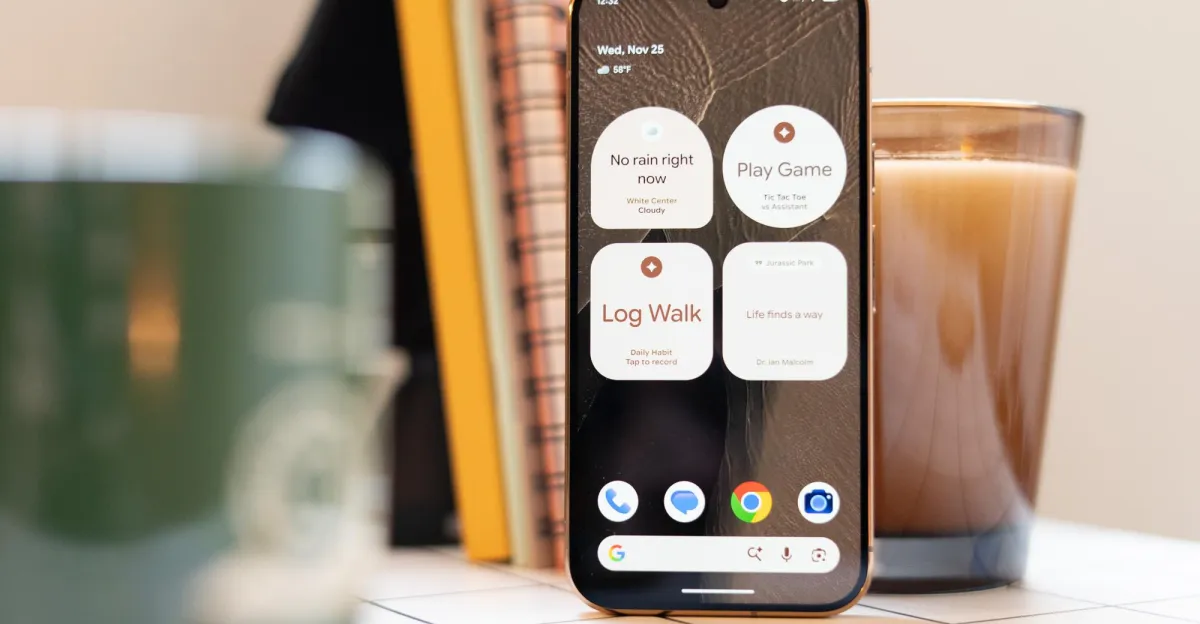
The idea is simple enough: instead of building a widget by hand or relying on a rigid catalog, users describe what they want and let the AI do the setup. That could mean a countdown, a sports score display, recipe suggestions or habit tracking. It can also mean something far less practical, like a novelty tile that spits out an hourly Jurassic Park quote.
How fast is it?
According to The Verge’s hands-on report, widget creation can be quick. In one test, the process took about 20 seconds. That speed matters because it shows Google is aiming for convenience first: a lightweight prompt, a quick generation step and an immediate result on the home screen.
| By the numbers | What The Verge reported | Why it matters |
|---|---|---|
| 20 seconds | Time it took to make one widget in testing | Shows the feature is designed for speed and casual use |
| Earlier this month | When the beta started rolling out to Pixel phones | Confirms the rollout is just beginning |
| Spring | When Google first announced the feature at I/O | Shows the feature moved from demo to beta in a matter of months |
Why it matters
Google is trying to make Android home screens feel more useful and more approachable, while also giving Gemini a more visible role in daily phone use. Widgets have long been one of Android’s strengths, but they can be fiddly to customize and inconsistent across apps. A Gemini-powered shortcut to build one lowers the barrier for people who would never spend time designing a widget manually.
That has implications beyond novelty. If Google can make AI-generated widgets actually useful, it could create a new entry point for Gemini inside Android, especially for users who want glanceable information without opening full apps. It also raises a practical question: is this AI making widgets better, or merely making them easier to generate?
For now, the answer appears to be somewhere in between. The Verge’s report suggests Google is using Gemini to add accessibility and playfulness to Android, but not yet delivering the kind of flexible, fully custom mini-app experience some users may expect.
How does Create My Widget work?
The Verge’s tester used the feature on a Pixel 11 Pro, and the results point to a system that is still constrained by preset templates rather than open-ended widget building. In other words, users can influence the content and purpose of the widget, but they do not appear to be designing an entirely new interface from scratch.
That distinction is important. A true custom widget platform would let users shape layout, behavior and live data sources with much more freedom. Create My Widget, by contrast, seems to turn natural-language requests into a limited set of home-screen formats that Gemini can populate quickly.
What kinds of widgets does it support?
The Verge identified practical examples including countdowns, sports scores, recipe suggestions and habit tracking. Those are the types of widgets that fit Android’s existing home-screen model: simple, glanceable and mostly informational.
But the report also shows where the system runs into limits. A widget built for bus arrivals did not deliver actual real-time transit information. Instead, it returned schedule-based Gemini text, which is a weaker substitute for live data. A walk-tracking widget also failed to become a visual streak tracker and instead turned into a calendar-log shortcut with a checklist.
What the beta can do — and what it can’t
In its current form, Create My Widget looks more like a shortcut generator than a full widget studio. It can create useful frames for information and reminders, but it does not seem to handle every task with the precision users might expect from a native app feature.
That limitation may be the defining story of the rollout. Google is clearly experimenting with how far Gemini can go in shaping Android’s user interface, but the beta’s template-based structure keeps the feature safely within bounds. That makes it easier to use, but also less powerful.
Examples from testing
- A novelty widget could cycle through an hourly Jurassic Park quote.
- A bus widget returned schedule-based Gemini text rather than live transit arrivals.
- A walk-tracking idea became a calendar log and checklist.
- Some widgets open Gemini when tapped, which then generates an answer or action.
“That is one big pile of shit,”
That quote appears in The Verge’s reported hands-on write-up, highlighting the tongue-in-cheek tone of the review as it evaluated how polished — or unfinished — the feature felt in practice.
Background: how Google got here
Android widgets are nothing new. They have long served as home-screen tiles that surface quick information or actions without forcing users to open a full app. Over time, they became one of the more distinctive parts of Android’s interface, giving users more control over what they see at a glance.
Google’s I/O conference is also a familiar stage for Android feature launches. The company first announced Create My Widget there in the spring, positioning it as part of a broader push to weave Gemini into consumer products. Gemini itself is Google’s AI assistant and model family, and the company has been using it across its ecosystem as it tries to make AI feel more native to everyday use.
The current rollout fits that strategy. Rather than introducing a brand-new product category, Google is taking a familiar Android feature and adding AI to the front end. That is a lower-risk way to ship Gemini to users, because the widget system already has an established place on the home screen and in Android habits.
What the rollout means for Pixel users
For Pixel owners, the beta offers a preview of how Google wants AI to shape routine interactions. A widget that can be created in seconds from a plain-language prompt lowers the friction for people who want personalization without setup work.
It also fits a broader product pattern: Google is increasingly using Gemini not just as a chatbot-style assistant, but as a layer that can generate content, responses and interface elements across Android. In this case, the interface element is the widget itself.
Still, the hands-on report suggests that the current version is likely to satisfy users who want playful customization more than those who need precision tools. If you want a humorous quote tile or a simple reminder box, the feature may be enough. If you want a reliable live data widget, the beta may disappoint.
Why it matters for the market
AI features are increasingly judged not by demos, but by whether they change everyday behavior. Google’s widget experiment is a good example of that shift. The company is not just adding another Gemini button; it is testing whether AI can help people organize their phone screens in ways that feel useful enough to stick.
That matters because the phone home screen is prime real estate. Whoever controls that space controls a user’s first interaction with the device. If Google can make AI-assisted widgets popular, it could deepen Gemini’s role in Android and strengthen the company’s grip on the everyday user experience.
There is also a broader competitive angle. A practical, easy-to-use widget builder could make Android feel more flexible than rival ecosystems, especially if Google improves beyond the current template restrictions. But if the feature remains mostly a novelty layer, it may end up as a demo-friendly add-on rather than a meaningful platform shift.
What happens next
The biggest unanswered question is whether Google will widen Create My Widget beyond Pixel phones. The Verge reports that the beta is rolling out to Pixel devices first, but it is not yet clear how fast — or whether — Google will extend it further.
There are also open questions about the feature’s capabilities. Google may eventually add more flexible customization, better support for live data and more useful behavior for real-world tasks like transit, tracking and scheduling. For now, though, the early evidence suggests the company is still testing the boundaries of how much Gemini should be allowed to do inside a widget.
That means the next version may matter more than this one. If Google can move Create My Widget from playful shortcut generation to genuinely useful automation, the feature could become a small but meaningful part of Android’s evolution. If not, it may remain an interesting beta that users try once, smile at, and then forget.
What to watch
- Whether Google opens the beta beyond Pixel phones.
- Whether preset templates become more flexible.
- Whether Gemini gains better access to live, real-time data sources.
- Whether the feature becomes more functional than novelty-focused.
“Life, uh, finds a way.”
That quote, also attributed to The Verge’s Allison Johnson in the fact sheet, neatly captures the feature’s current vibe: a clever idea that may still evolve into something more useful if Google keeps refining it.
Frequently asked questions
What is Google’s Create My Widget?
Google’s Create My Widget is a beta feature that uses Gemini to generate Android widgets from prompts. It is rolling out to Pixel phones and appears designed to make home-screen customization faster and easier, though early testing suggests it relies heavily on preset templates.
How does Create My Widget work on Pixel phones?
Create My Widget lets users describe the kind of widget they want, then Gemini assembles it into a home-screen tile. The Verge reported that the process can be quick, but the results are constrained by templates rather than fully custom widget design.
Is Create My Widget useful for real-time information?
Not consistently. The Verge found that a bus-arrival widget did not provide true real-time transit data and instead returned schedule-based Gemini text, which suggests the feature is still limited for live data use cases.
What kinds of widgets can Gemini make?
According to The Verge, the feature can create countdowns, sports scores, recipe suggestions and habit-tracking widgets. It can also make novelty widgets, such as an hourly Jurassic Park quote tile, which shows the beta is still geared toward playful experimentation.
Will Google expand Create My Widget beyond Pixel phones?
That remains unclear. The feature started rolling out to Pixel phones earlier this month, but Google has not publicly confirmed how widely it will expand or whether it will gain more flexible customization in the future.