Updated November 3, 2026 10:24 pm
In short
Apple’s latest beta adds Watch audio summaries and rewind tools, while also expanding the redesigned Health app in iOS beta and clarifying privacy protections for saved audio snippets.
- Apple’s watchOS developer beta adds Siri Recap and Live Rewind to Apple Watch.
- Live Rewind transcribes the last 15 seconds of microphone-detected audio.
- Apple says raw audio is handled in dedicated hardware and is not saved as a file.
- The Verge and Analytics Insight differ on the watchOS version number and release timing.
- Analytics Insight says Siri AI also brings broader personal context, language support, and regional limits.
Update — November 3, 2026 10:24 pm
The latest watchOS beta now also includes Apple’s redesigned Health app for testing on iOS 27.3, alongside broader language support in several markets including Chinese, French, Japanese, Korean, Portuguese, Spanish and Vietnamese.
The Health app update adds new Insights and For You sections, plus health education content such as videos and articles.
Apple’s privacy overview for Audio Intelligence also spells out the company’s position more directly: raw audio is processed in dedicated hardware, not saved as a file, and only saved text can sync across devices in end-to-end encrypted form.
Apple has started rolling out a watchOS developer beta that adds new Audio Intelligence features to Apple Watch, including tools that can summarize recent conversations and turn the last 15 seconds of microphone-detected audio into text. The update matters because it pushes the Watch closer to a truly conversational device while keeping Apple’s privacy claims at the center of the pitch.
What Apple is adding to Apple Watch
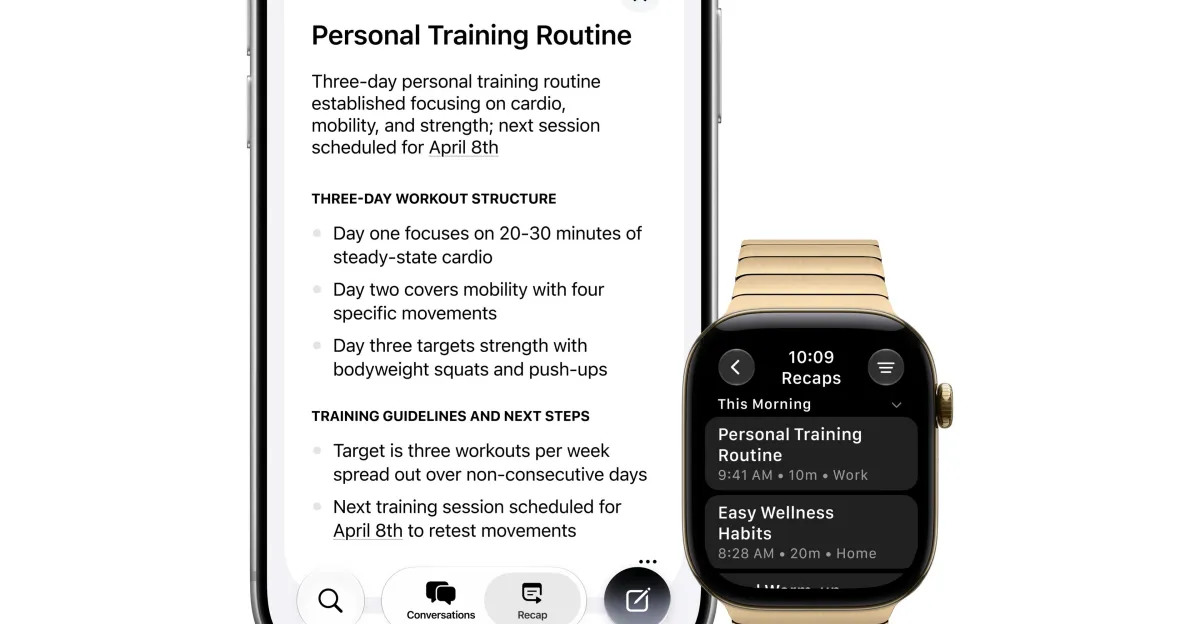
According to The Verge, the watchOS 27.3 developer beta includes two new features: Siri Recap and Live Rewind. Siri Recap creates summaries from ambient listening, while Live Rewind transcribes the most recent 15 seconds of captured audio.
In practical terms, that means a user can double-press the Digital Crown to pull up the previous 15 seconds as text. From there, the transcript can be queried through Siri or saved in the Siri app for later review.
The Verge also reported that Siri Recap can generate a title and key points after a conversation ends, turning a short exchange into something closer to a structured note. That is a notable step beyond basic voice commands, because it gives the Watch a memory function for spoken exchanges.
How Live Rewind works
Live Rewind is the most straightforward of the two features. Apple’s design, as described by The Verge, captures the last 15 seconds of microphone-detected audio and converts that short window into text. The user does not have to manually start a recording first, at least based on the beta description.
That makes the feature feel less like a recorder and more like a conversational safety net. Miss a name, a time, or a quick instruction, and the Watch can recover the last few seconds in text form.
How Siri Recap differs
Siri Recap goes one step further by summarizing ambient conversation rather than simply transcribing it. The result is meant to be a concise recap, not a raw transcript. The feature can also auto-generate a title and key points, according to The Verge.
That distinction matters. A transcript helps users quote or verify what was said. A summary helps them remember what mattered. Apple is effectively trying to cover both use cases inside the Watch interface.
“If you use iCloud with two-factor authentication and have a device passcode, any Siri Recap summary or Live Rewind text snippet you choose to save syncs across your devices end-to-end encrypted in the Siri app.”
Why it matters
This is more than a small watchOS tweak. Apple is signaling that the Watch can be an always-ready AI companion for short real-world interactions, especially those that happen when a phone is not convenient or when a user wants a quick record of a spoken exchange.
The feature set also puts privacy at the center of the story. Apple says raw audio is handled in dedicated hardware, is not saved as a file, and is not accessible to the operating system, apps, or Apple. That is the company’s main answer to the obvious question raised by always-on listening tools: who can hear, store, or retrieve the audio?
The broader implication is that Apple is trying to make on-device intelligence feel useful without turning the Watch into a surveillance device. That balance will matter not just to consumers, but to regulators and privacy advocates watching how mainstream hardware companies normalize ambient AI.
How Apple says privacy is handled
Apple’s privacy framing is unusually central here, because the new features depend on microphone access and post-conversation processing. The company says raw audio is handled in dedicated hardware and that neither the operating system nor Apple itself can access it as a file.
Apple also says saved outputs are protected when users choose to keep them. According to the company statement quoted by The Verge, Siri Recap summaries and Live Rewind snippets sync across devices end-to-end encrypted through the Siri app if the user has iCloud with two-factor authentication and a device passcode.
That design is meant to separate the momentary processing of speech from the longer-term storage of user-selected results. In other words, Apple is promising that the raw words never become a lingering audio file, while the user can still preserve a text result if desired.
Background: Apple has been building toward this
Apple Watch already supports Siri voice interaction, and Apple has long used developer betas to preview watchOS features before any public release. The company has also repeatedly emphasized on-device processing and encryption as key selling points for Siri and Apple Intelligence-related capabilities.
The new audio tools fit that pattern. They do not introduce a brand-new interface so much as widen what Siri can do on a wrist-worn device. Instead of only answering questions or setting timers, the Watch is being positioned to catch, compress, and retrieve spoken information from the immediate past.
That matters because the Watch is often used in fast, low-friction moments: in meetings, on the move, at home, or while multitasking. A brief rewind feature is a natural extension of that use pattern, and a summary tool is the logical next step if Apple wants Siri to feel more helpful than reactive.
What exactly is new in the beta?
Several items stand out in the watchOS developer beta described by The Verge, along with a related iOS beta update.
| Feature | What it does | Source detail |
|---|---|---|
| Siri Recap | Summarizes ambient conversation and can produce a title and key points | The Verge |
| Live Rewind | Turns the last 15 seconds of mic-detected audio into text | The Verge |
| Digital Crown action | Double-pressing opens the previous 15 seconds as text | The Verge |
| Saved snippets | Can be queried by Siri or stored in the Siri app | The Verge |
| iOS developer beta | Includes redesigned Health app testing | The Verge |
| Health app changes | Adds Insights, For You, and educational content sections | The Verge |
Where reports differ
There is one important wrinkle in the coverage: the version number and release timing are not aligned across outlets. The Verge says watchOS 27.3 developer beta is rolling out now with Audio Intelligence features. Analytics Insight, by contrast, says Siri AI changes arrived in watchOS 27.2 and cites an Oct. 26, 2026 release date.
That mismatch could reflect different builds, a reporting error, or separate feature rollouts. Based on the fact sheet alone, it is not possible to resolve the discrepancy with certainty. What is clear is that both outlets point to the same broad direction: Apple is adding more AI-driven Siri functionality to the Watch.
Analytics Insight also describes a wider Siri context than The Verge’s Watch-focused report. It says Siri can recall prior conversations and use broader personal context from Messages photo attachments, Calendar attendees, voicemails, Safari history, and Reading List. Those are broader Siri capabilities than the Audio Intelligence features highlighted by The Verge, and they suggest Apple’s AI work is not limited to one device or one use case.
What does Analytics Insight say about Siri AI?
Analytics Insight reports that Siri AI can draw on a user’s broader personal context, including Messages photo attachments, Calendar attendees, voicemails, Safari history, and Reading List. It also says users can use an Excluded Apps setting to limit Siri, Search, and suggestions access.
That coverage paints Siri as a more personalized assistant than the traditional command-and-response version. It also indicates Apple is thinking about controls as much as capability, giving users a way to reduce what the system can see or use.
Analytics Insight further says Siri AI language support includes French, Japanese, Korean, Portuguese, and Spanish, and that the feature is unavailable in the EU and mainland China. It also says the update improves Siri response speed on Apple Watch.
Why the language and region details matter
Language support is not a footnote for a system like this; it determines where Apple can realistically deploy the feature and who can use it well. The list cited by Analytics Insight suggests Apple is thinking beyond English-only testing, but the regional limits it reports also show that availability remains uneven.
The EU and mainland China restrictions are especially significant. If accurate, they would mean Apple’s newest Siri AI layer is not simply a software update but a regionally constrained rollout shaped by policy, compliance, or product-readiness issues.
For users, that means the Watch’s new conversational features may exist in one market and not another. For Apple, it means the company has to manage expectations carefully as it expands the product globally.
By the numbers
The update is packed into a few concrete figures that define how the feature works and when it appears.
| Number | What it refers to | Source |
|---|---|---|
| 15 seconds | The audio window Live Rewind converts into text | The Verge |
| 27.3 | watchOS developer beta version with Audio Intelligence features | The Verge |
| 27.2 | watchOS version Analytics Insight says brings Siri AI changes | Analytics Insight |
| October 26, 2026 | Release date cited by Analytics Insight | Analytics Insight |
| 2-factor authentication | Required, with a device passcode, for encrypted syncing of saved snippets | The Verge |
Background: what developer beta means
Developer betas are pre-release builds intended for testing, not broad consumer deployment. That distinction matters because features can change before they reach the public, or disappear entirely if Apple decides they are not ready.
So while the new Audio Intelligence features are real enough to be described in developer software, they should not be treated as final consumer behavior. Apple has a history of using beta releases to refine how features work, how they look, and how they fit into the wider operating system.
That means users reading about Siri Recap or Live Rewind should see them as a preview of Apple’s direction, not a final promise. The gap between beta and release is where Apple typically tunes privacy, language support, and interface details.
How is this different from a normal voice assistant?
This is different because Siri is no longer being positioned only as a tool for commands. Apple is moving it toward a memory layer for spoken interactions, with summaries, transcripts, and user-controlled saving.
A traditional assistant responds to a request. Apple’s new Watch features suggest a system that can also reconstruct what just happened, then make that information searchable or saveable. That may sound subtle, but it changes the assistant from reactive to partly archival.
There is also a hardware story here. Because the Watch is always on the wrist and often close to the user, it is one of the few Apple devices that can plausibly capture short conversations without a separate recording workflow. That makes it a natural home for quick rewind and recap tools.
What happens next
The immediate next step is beta testing. Apple will likely keep refining these features before deciding whether they should ship in a final public watchOS release unchanged, as some version of the beta, or not at all.
Several questions remain open:
- Whether the features will ship exactly as described in the developer beta
- Whether the version-number mismatch between sources reflects separate builds, a typo, or a staggered rollout
- How broadly Apple will expand language support and regional availability
- Whether always-on listening features draw regulatory or privacy scrutiny
Another issue to watch is whether Apple surfaces clearer controls for when the Watch can listen, summarize, or save content. The tighter the integration becomes, the more important those controls will be to users deciding how much they want the device to remember.
For now, the message from Apple’s beta software is clear: the Apple Watch is becoming a more conversational AI device, but the company still wants the privacy story to be part of the product itself, not an afterthought.
At a glance
Here is the story in one line: Apple is testing new Apple Watch audio features that can summarize or transcribe recent speech, while emphasizing that the raw audio stays on-device and only user-saved results sync in encrypted form.
Frequently asked questions
What are Apple’s new Apple Watch audio features?
Apple’s new Apple Watch audio features are Siri Recap and Live Rewind. According to The Verge, Siri Recap summarizes ambient conversation, while Live Rewind turns the last 15 seconds of microphone-detected audio into text that users can review or save.
How does Live Rewind work on Apple Watch?
Live Rewind works by converting the previous 15 seconds of microphone-detected audio into a text transcript. The Verge says users can double-press the Digital Crown to open that recent audio as text, then ask Siri about it or save it in the Siri app.
Is Apple storing the raw audio from these features?
Apple says no. The company states that the raw audio is handled in dedicated hardware, is not saved as a file, and is not accessible to the operating system, apps, or Apple itself.
Why do the reports about watchOS version numbers differ?
The reports differ because The Verge says the features are in watchOS 27.3, while Analytics Insight says Siri AI changes arrived in watchOS 27.2. Based on the fact sheet alone, that mismatch could reflect separate builds, a typo, or different rollout timing.
Will Apple Watch audio summaries be available everywhere?
Not necessarily. Analytics Insight says Siri AI support includes French, Japanese, Korean, Portuguese, and Spanish, but also says the feature is unavailable in the EU and mainland China, suggesting regional availability remains limited.